
TCL 98X11K
TCL 98-Inch Class X11K Series QD-Mini LED 4K UHD Google Smart TV User Manual
Model: 98X11K
Introduction
Welcome to the user manual for your new TCL 98-Inch Class X11K Series QD-Mini LED 4K UHD Google Smart TV. This manual provides essential information for setting up, operating, maintaining, and troubleshooting your television. Please read it thoroughly before using your TV to ensure proper and safe operation.

Front view of the TCL 98-Inch Class X11K Series QD-Mini LED TV, showcasing its sleek design and vibrant display.
The TCL X11K Series represents the pinnacle of picture quality, featuring TCL’s advanced Halo Control System and up to LD14000 Precise Dimming Series for stunning visuals. Experience exceptional clarity and vibrant colors with HDR 6500 nits peak brightness, a 144Hz Refresh Rate, CrystGlow HVA Panel, and the powerful AIPQ Processor PRO.

Promotional banner highlighting the TCL X11K Series QD-Mini LED TV as the pinnacle of picture quality, featuring Bang & Olufsen audio.
What's in the Box
Before you begin, please ensure all components listed below are present in your package:
- TCL TV with Google TV
- TV Stands (2)
- Power Cable
- TV Remote + Batteries
- Quick Start Guide
- User Manual (this document)
- Warranty Card
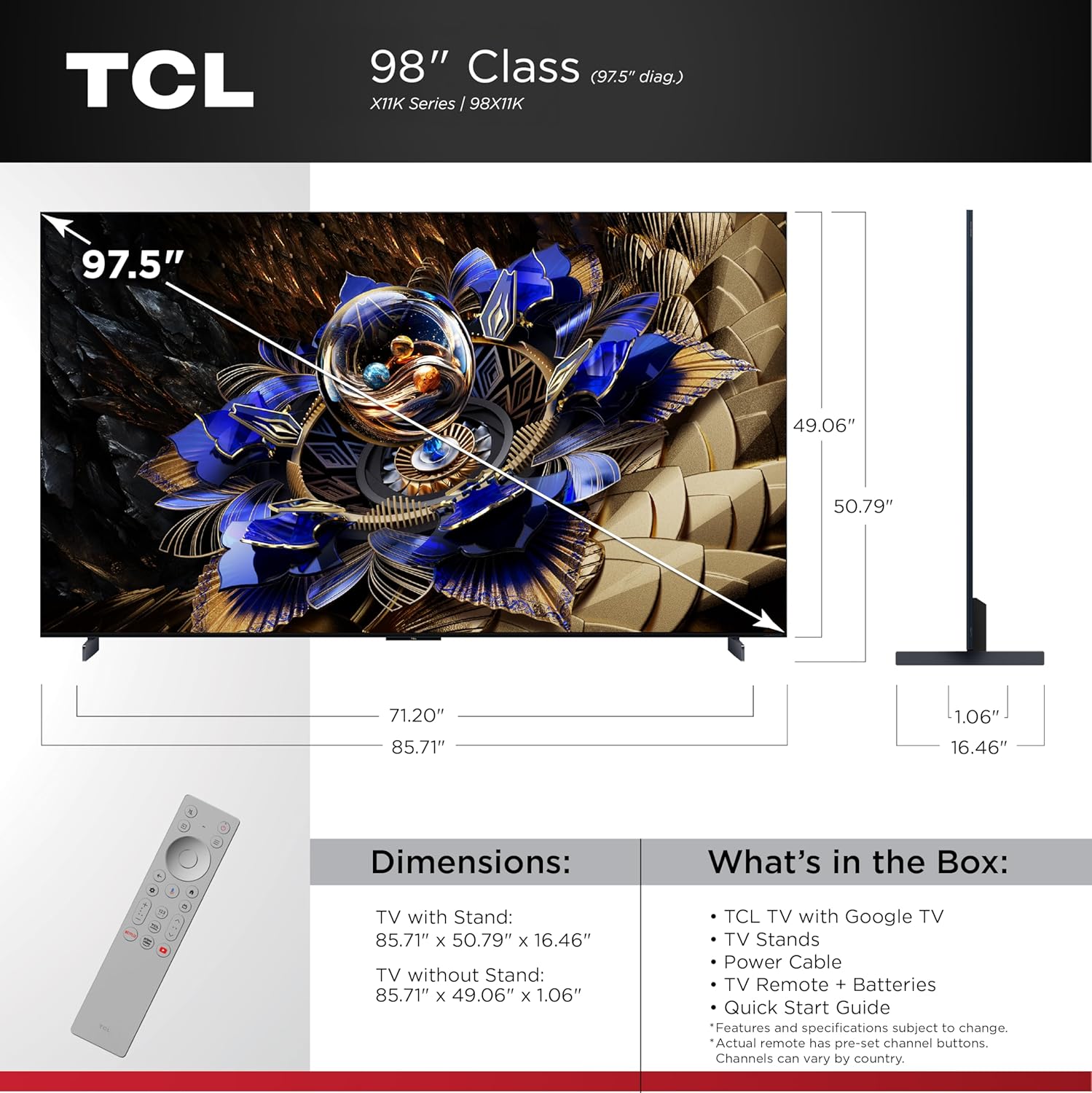
Diagram showing the dimensions of the TCL 98X11K TV with and without the stand, alongside a list of included items in the box, such as the TV, stands, power cable, remote, and user manual.
Setup
1. Attaching the TV Stands
Carefully place the TV face down on a soft, flat surface to prevent screen damage. Align each stand with the corresponding screw holes on the bottom of the TV. Secure the stands using the provided screws. Ensure the stands are firmly attached before proceeding.
2. Connecting Power and Devices
After attaching the stands, place the TV in your desired location. Connect the power cable to the TV's power input and then to a wall outlet. Connect your external devices (e.g., cable box, gaming console, Blu-ray player) to the appropriate HDMI or other input ports on the TV. For optimal performance, use HDMI 2.1 cables for devices supporting 4K 144Hz.
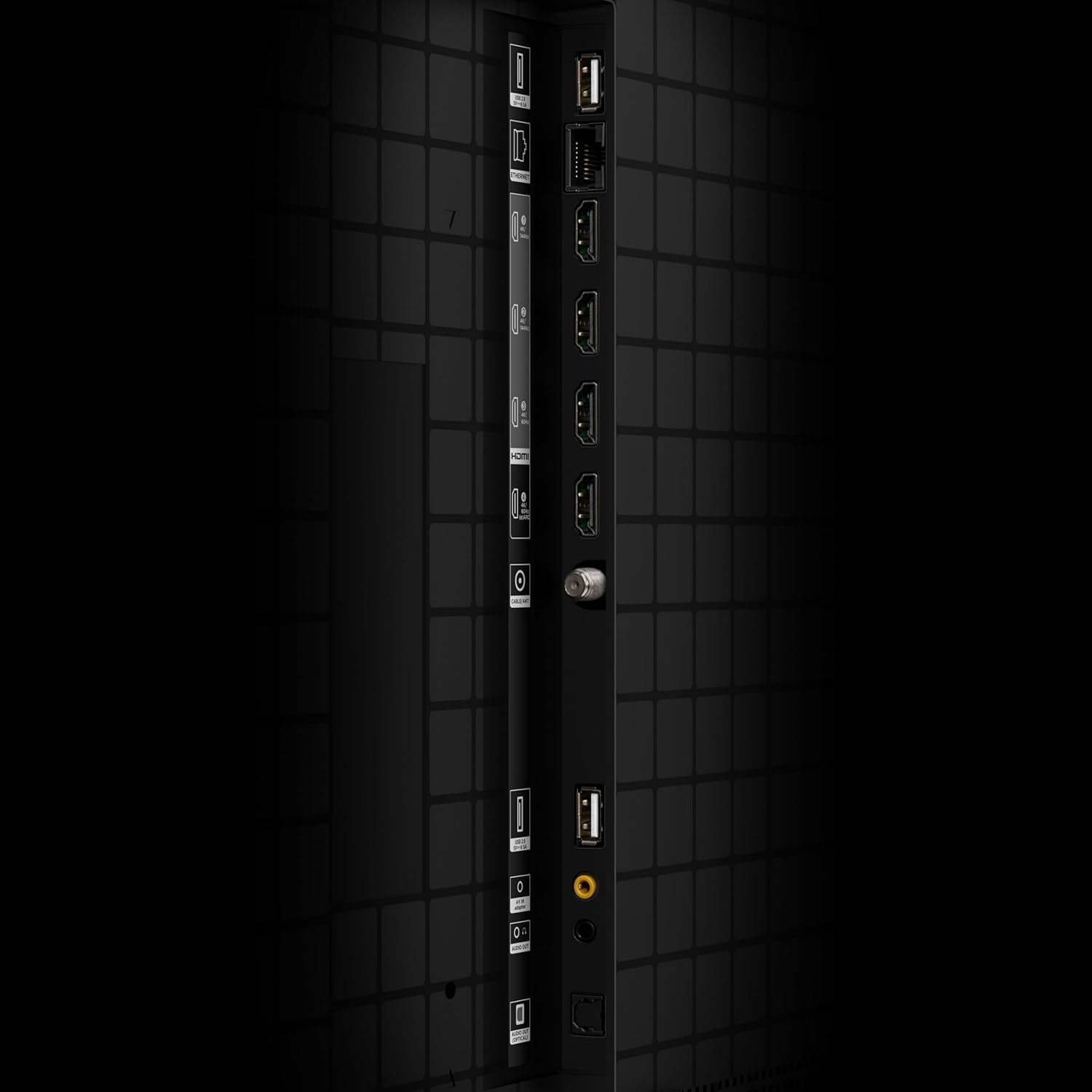
Close-up view of the rear input/output ports on the TCL 98X11K TV, including multiple HDMI and USB ports, and an antenna input.
3. Initial Setup and Network Connection
Turn on the TV using the power button on the remote control. Follow the on-screen instructions to complete the initial setup, which includes selecting your language, connecting to your Wi-Fi network, and signing in to your Google account. A stable internet connection is required to access Google TV features and updates.
Operating
Google TV Smart OS and Voice Control
Your TCL X11K TV runs on Google TV, providing a personalized experience with access to a vast library of movies, shows, and apps. Use the included backlit voice remote or the hands-free voice control feature to navigate, search for content, and control your TV with ease.

Screenshot of the Google TV smart interface displayed on the TCL TV, showing various streaming app icons and content recommendations.

Image illustrating the Google TV Smart OS with hands-free voice control and a backlit voice remote, emphasizing ease of content discovery.
Picture Quality Features
The X11K Series boasts advanced picture technologies for an unparalleled viewing experience:
- QD-Mini LED: Combines QLED and OLED technologies for precise, pixel-level lighting.
- TCL Halo Control System: An advanced suite of technologies including Super High Energy LED Microchip, Condensed Micro Lens, and Dynamic Light Algorithm for stunning, “halo-free” images.
- LD14000 Precise Dimming Series: Up to 14,000 precisely controlled local dimming zones for pure black levels.
- HDR 6500 Nits Peak Brightness: Delivers incredible brightness and contrast for dazzling HDR impact.
- CrystGlow HVA Panel: An anti-reflective coating and ultra-wide viewing angle ensure crisp, visible details in any room.
- Enhanced QLED: Utilizes upgraded quantum crystal material for vibrant colors and an ultra-long service life.
- 144Hz Native Refresh Rate: Provides crystal clear motion for fast-moving action, sports, and video games without blur.
- TCL AIPQ PRO Processor: Harnesses AI to dynamically control picture clarity, contrast, color, motion, upscaling, and backlighting.
- Filmmaker Mode: Preserves the creative intent of filmmakers by adjusting post-processing features, color, contrast, and brightness.
- 4K UltraHD Resolution: Experience incredible detail with 4 times the resolution of 1080p Full HDTVs.

An overview graphic showcasing key features of the TCL X11K Premium QD-Mini LED TV, including precise dimming, HDR, CrystGlow HVA Panel, AIPQ Processor, and ultra-slim design.
Audio Features
Enjoy immersive sound with your TCL X11K TV:
- Audio by Bang & Olufsen: Elevates your sound experiences with premium audio quality.
- Dolby Atmos Audio: Advanced spatial audio processing for movies, TV shows, and video games.
- DTS Virtual:X: Advanced audio post-processing for immersive 3D sound from your TV speakers.

Image highlighting the 'Audio by Bang & Olufsen' feature, showing a TV playing music in a living room setting with sound waves emanating from the screen.
Gaming Features
For gamers, the X11K offers:
- Auto Game Mode (ALLM) with AMD FreeSync Premium Pro: Automatically enables game mode for the lowest possible input lag and latency, ensuring unmatched gaming performance.

Image demonstrating the Auto Game Mode (ALLM) with AMD FreeSync Premium Pro, showing a dynamic gaming scene on the TV screen.
Maintenance
Cleaning the Screen
To clean the screen, gently wipe it with a soft, lint-free cloth. For stubborn marks, lightly dampen the cloth with water or a specialized screen cleaner. Never spray cleaner directly onto the screen. Avoid using abrasive cleaners, waxes, or solvents.
General Care
Keep the TV in a well-ventilated area. Do not block ventilation openings. Avoid exposing the TV to direct sunlight, high temperatures, or high humidity. Unplug the TV from the power outlet during lightning storms or when left unattended for long periods.
Troubleshooting
If you encounter issues with your TV, refer to the following common solutions:
| Problem | Possible Solution |
|---|---|
| No Power | Ensure the power cable is securely connected to both the TV and a working power outlet. Try a different outlet. |
| No Picture/Sound | Check input source (HDMI, Antenna). Ensure external devices are powered on and connected correctly. Restart the TV. |
| Remote Not Working | Replace batteries. Ensure no obstructions between remote and TV. Re-pair the remote if necessary (refer to Quick Start Guide). |
| Poor Picture Quality | Check cable connections. Adjust picture settings (brightness, contrast, sharpness). Ensure content resolution matches TV capability. |
| No Internet Connection | Check Wi-Fi router. Reconnect to the network in TV settings. Restart both TV and router. |
For more detailed troubleshooting, please refer to the comprehensive online support resources available on the TCL website or contact customer support.
Specifications
Key technical specifications for your TCL 98X11K TV:
| Feature | Detail |
|---|---|
| Brand | TCL |
| Model Number | 98X11K |
| Screen Size | 98 Inches |
| Display Technology | QLED, Mini LED, 4K UHD |
| Resolution | 4K (3840 x 2160) |
| Refresh Rate | 144 Hz |
| Product Dimensions (with stand) | 85.7"W x 49.1"H x 16.46"D |
| Product Dimensions (without stand) | 85.7"W x 49.06"H x 1.06"D |
| Item Weight | 155 Pounds |
| Connectivity Technology | Wi-Fi, RF, USB, HDMI |
| Audio Output Wattage | 120 Watts |
| Special Features | Built-In Speaker, Game Mode, Multiple Voice Assistance, Bezel-Less Design, AMD FreeSync |
| Country of Origin | Mexico |
Warranty and Support
Warranty Information
Your TCL 98-Inch Class X11K Series TV comes with a limited manufacturer's warranty. Please refer to the included Warranty Card for specific terms, conditions, and duration of coverage. Keep your proof of purchase for warranty claims.
Customer Support
For technical assistance, product registration, or service inquiries, please visit the official TCL support website or contact their customer service hotline. Contact information can typically be found on the TCL website or in the Quick Start Guide.
You can also visit the TCL Store on Amazon for additional product information and resources.
Ask a question about this manual
Ask about setup, troubleshooting, compatibility, parts, safety, or missing instructions. Manuals+ will review the question and use this page’s manual context to help answer it.