
1. Introduction
Thank you for choosing the Elac SUB1015 Powered Subwoofer. This high-performance subwoofer is engineered to deliver powerful and deep bass, enhancing your home audio experience. Featuring a 10-inch polypropylene cone, the SUB1015 handles low frequencies with clarity and precision. This manual provides essential information for proper setup, operation, and maintenance to ensure optimal performance and longevity of your subwoofer.
2. Package Contents
Please verify that all items are present in the package:
- Elac SUB1015 Powered Subwoofer
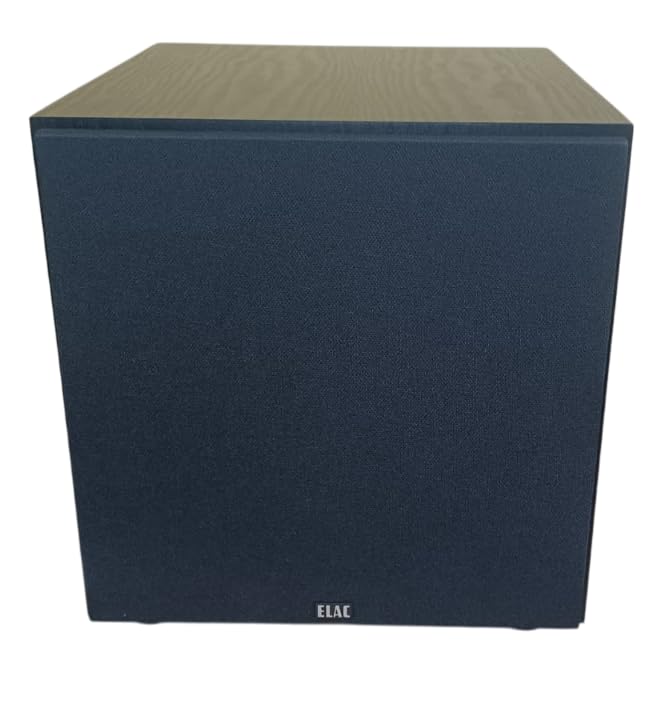
- Grille
- AC Power Cord
3. Setup and Connections
Proper setup is crucial for achieving the best sound quality from your subwoofer. Follow these steps for installation:
3.1 Placement
The placement of your subwoofer significantly impacts its performance. Experiment with different locations in your room to find the optimal spot. Generally, placing the subwoofer in a corner can enhance bass output, but may also lead to boomy sound. Placing it along a wall or near your main speakers can provide a more balanced sound. Ensure there is adequate ventilation around the unit.
3.2 Connecting the Subwoofer
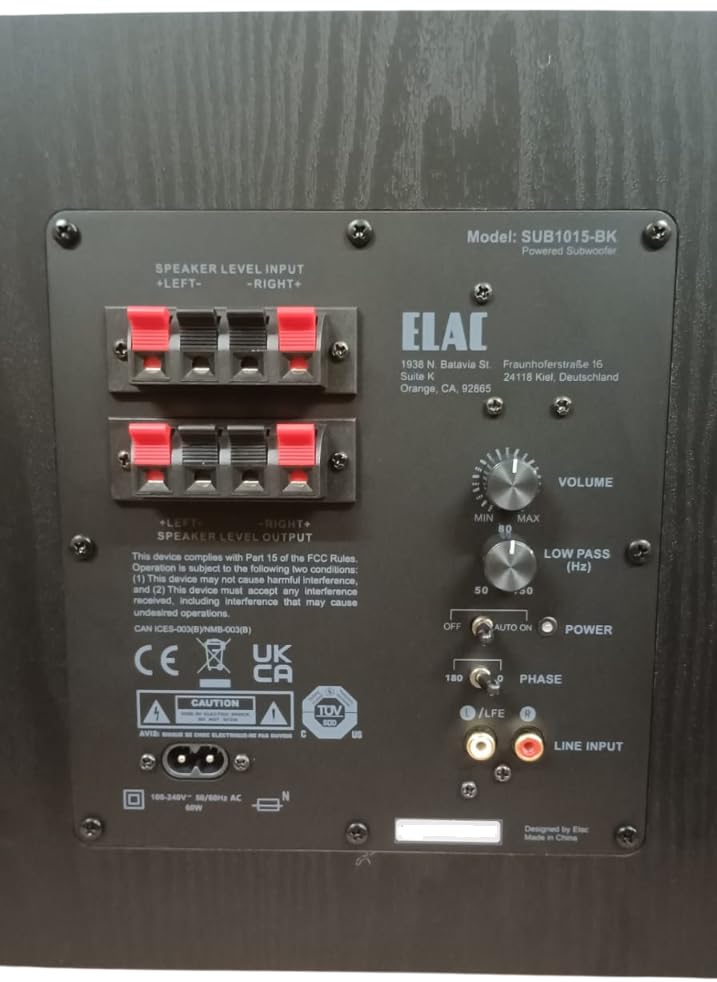
The SUB1015 offers both RCA line-level and speaker-level inputs for compatibility with various audio systems.
RCA Line-Level Input (Recommended)
If your AV receiver or pre-amplifier has a dedicated subwoofer output (often labeled LFE, Sub Out, or Pre-Out Sub), use an RCA cable to connect this output to the LINE INPUT (LFE) on the subwoofer's rear panel. This method typically provides the best performance and control.
Speaker-Level Input
If your receiver or amplifier does not have a dedicated subwoofer output, you can connect the subwoofer using the speaker-level inputs. Connect the speaker outputs from your amplifier to the SPEAKER LEVEL INPUT terminals on the subwoofer. Ensure correct polarity (positive to positive, negative to negative). You can then connect your main speakers to the SPEAKER LEVEL OUTPUT terminals on the subwoofer, or directly to your amplifier if your main speakers are full-range.
3.3 Power Connection
Once all audio connections are made, connect the supplied AC power cord to the subwoofer's power inlet and then to a suitable wall outlet. The subwoofer is designed for 230 Volts input.
4. Operating Instructions
After connecting your subwoofer, use the controls on the rear panel to fine-tune its performance.
4.1 Controls Overview
- VOLUME: Adjusts the overall output level of the subwoofer. Start with a low setting and gradually increase until the bass blends seamlessly with your main speakers.
- LOW PASS (Hz): Controls the upper frequency limit of the subwoofer. This setting determines where the subwoofer takes over from your main speakers. A common starting point is 80 Hz, but adjust based on your main speakers' low-frequency capabilities.
- POWER: This switch has three positions:
- OFF: Turns the subwoofer off.
- ON: Keeps the subwoofer continuously on.
- AUTO: The subwoofer will automatically turn on when an audio signal is detected and enter standby mode after a period of inactivity. This mode consumes less than 0.5W in standby.
- PHASE: Adjusts the phase of the subwoofer's output relative to your main speakers. Set to 0° or 180°. Experiment with both settings to find which provides the most coherent and impactful bass in your listening position.
5. Troubleshooting
If you encounter issues with your Elac SUB1015 subwoofer, refer to the following common problems and solutions:
- No Sound:
- Ensure the power cord is securely connected and the subwoofer is plugged into a live outlet.
- Check the POWER switch position. If set to AUTO, ensure an audio signal is present.
- Verify all audio cables (RCA or speaker-level) are correctly and securely connected.
- Increase the VOLUME control on the subwoofer.
- Check your receiver/amplifier settings to ensure the subwoofer output is enabled and volume is not muted.
- Weak or Distorted Bass:
- Adjust the VOLUME control on the subwoofer.
- Adjust the LOW PASS (Hz) control. If set too low, you might not hear enough bass.
- Experiment with the PHASE switch (0° or 180°) to see if it improves bass integration.
- Check subwoofer placement. Moving it to a different location, especially closer to a wall or corner, might improve bass response.
- Ensure speaker wires are connected with correct polarity (+ to +, - to -).
- Humming or Buzzing Noise:
- Try plugging the subwoofer into a different electrical outlet.
- Ensure all audio cables are properly shielded and not running parallel to power cables.
- If using RCA connections, try a different RCA cable.
- Disconnect all audio inputs from the subwoofer. If the hum disappears, the issue is likely with the source equipment or cabling.
6. Specifications
Detailed technical specifications for the Elac SUB1015 Powered Subwoofer:
| Feature | Specification |
|---|---|
| Brand | Elac |
| Model Number | SUB1015-BK |
| Speaker Type | Powered Subwoofer |
| Woofer Driver Diameter | 10 Inches (Polypropylene Cone) |
| Amplifier Type | Class D |
| Power Handling (RMS/Peak) | 60W RMS / 120W Peak |
| Frequency Response | 36 Hz to 150 Hz |
| Connectivity Technology | RCA, Wired |
| Audio Output Mode | Mono |
| Input Voltage | 230 Volts |
| Low Standby Power Consumption | Less than 0.5W |
| Cabinet Finish | Black Ash |
| Item Dimensions (D x W x H) | 36.8D x 31W x 32.5H Centimeters |
| Item Weight | 9.8 Kilograms |
| Country of Origin | USA |
7. Maintenance
To maintain the appearance and performance of your subwoofer:
- Cleaning: Use a soft, dry cloth to wipe the cabinet. Avoid using abrasive cleaners, waxes, or solvents.
- Placement: Keep the subwoofer away from direct sunlight, heat sources, and excessive moisture.
- Ventilation: Ensure the rear panel and any vents are not obstructed to allow for proper heat dissipation.
8. Product Overview Video
Watch this video for a visual overview of the Elac SUB1015 Powered Subwoofer and its key features.
9. Warranty and Support
The Elac SUB1015 Powered Subwoofer comes with a 1 Year manufacturer warranty.
Manufacturer Information:
ELAC Americas Inc.
1938 N. Batavia St. Suite K
Orange, CA 92865
Importer Contact Information (India):
Kripa Electronics (india) Pvt.Ltd
Gala No 4 5 6, Building No. C, Shreeram Complex,
Village Dapoda, Bhiwandi Thane-421032


