
COSTWAY WO79049PWFR
COSTWAY Extendable Dining Table User Manual
Model: WO79049PWFR
1. Important Safety Information
Please read and understand all instructions before assembly and use. Keep this manual for future reference.
- Do not exceed the maximum load capacity of 110 kg (242 lbs). Overloading can cause damage or injury.
- Ensure the table is stable and properly assembled before use to prevent tipping.
- Keep small parts away from children during assembly to avoid choking hazards.
- Use on a flat, stable surface.
- Avoid placing hot items directly on the table surface without protection.
2. Product Overview
The COSTWAY Extendable Dining Table is designed for versatility and space-saving, accommodating 4 to 6 people. Its robust construction ensures durability and stability.

Figure 2.1: The COSTWAY Extendable Dining Table shown in both its compact (top right) and fully extended (foreground) configurations, highlighting its adaptable design.

Figure 2.2: Detailed product dimensions, illustrating the table's length from 120cm to 158cm, width of 70cm, and height of 76cm. The maximum load capacity is 110 kg.
Key Features:
- Extendable Design: Easily adjusts from 120 cm to 158 cm to accommodate 4 to 6 people.
- Easy Extension: Integrated metallic slides allow for smooth and effortless extension.
- Robust and Stable Frame: Features L-shaped legs and high-quality wooden boards for excellent support and a 110 kg load capacity.
- Versatile Use: Suitable for various scenarios including family dinners, formal dining, or business meetings.
- Easy Maintenance: Smooth surface allows for simple cleaning with a damp cloth.
3. Setup and Assembly
The table comes with complete instructions for assembly. Follow the steps carefully to ensure proper setup.
Assembly Steps:
- Unpack all components and verify against the parts list provided in the separate assembly manual.
- Attach the L-shaped legs to the main table frame using the provided hardware. Ensure all screws are tightened securely.
- Carefully place the table upright.
- Familiarize yourself with the extension mechanism.
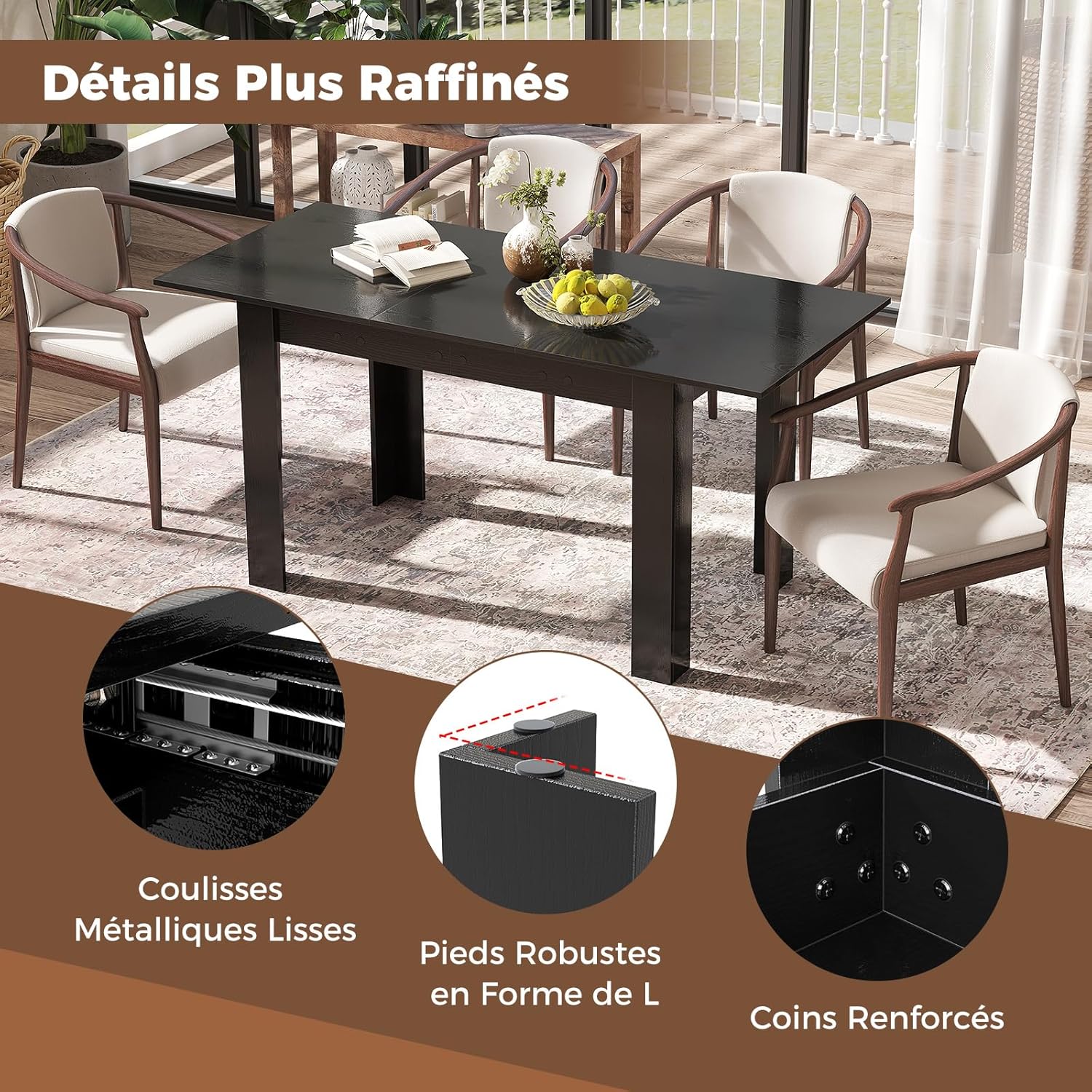
Figure 3.1: Detailed view of the table's construction, showing the smooth metal slides for extension, robust L-shaped legs for stability, and reinforced corners for added durability. These elements contribute to the table's sturdy design.
4. Operating the Extendable Feature
The COSTWAY dining table features an intuitive extension mechanism for easy adjustment of its length.
To Extend the Table:
- Gently pull the two halves of the table top apart. The integrated metallic slides will guide the movement.
- Locate the extension leaf stored within the table (if applicable, or insert the separate extension leaf).
- Place the extension leaf securely into the gap created.
- Push the two halves of the table top back together until they meet the extension leaf and lock into place.
To Retract the Table:
- Reverse the extension process: gently pull the table halves apart to release the extension leaf.
- Remove the extension leaf and store it appropriately.
- Push the two main table halves back together until they are flush and secure.
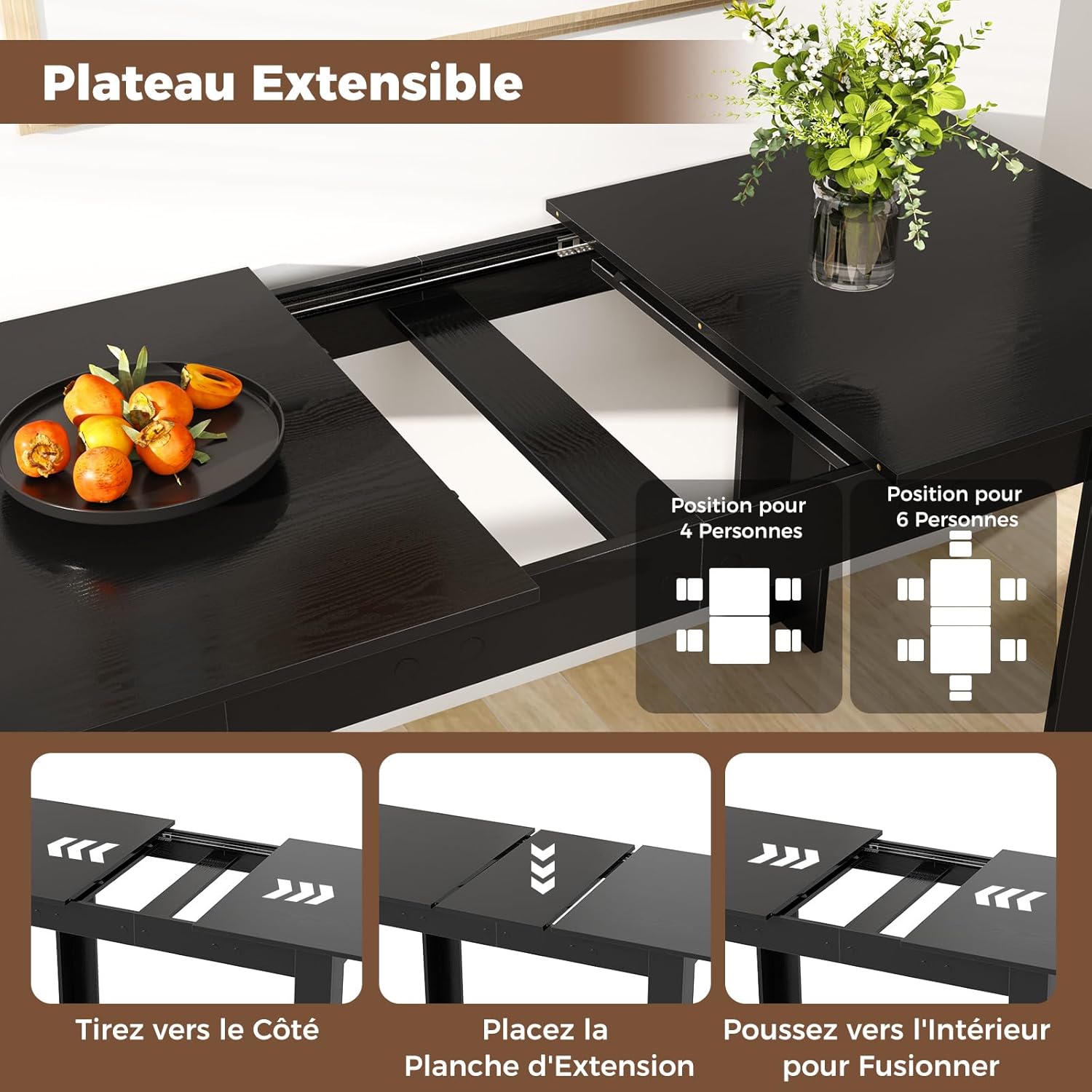
Figure 4.1: Visual guide demonstrating the three steps to extend the table: 1. Pull the sides apart, 2. Place the extension board, 3. Push the sides together to merge, showing configurations for 4 and 6 persons.
5. Maintenance and Care
Proper care will ensure the longevity and appearance of your COSTWAY dining table.
- Cleaning: Wipe the table surface regularly with a soft, damp cloth. For stubborn stains, use a mild soap solution and dry immediately with a clean cloth. Avoid abrasive cleaners or harsh chemicals.
- Spills: Clean up spills immediately to prevent liquid absorption and potential damage to the wood finish.
- Heat Protection: Always use placemats or coasters under hot dishes, cups, and bowls to protect the surface from heat marks.
- Sunlight Exposure: Avoid prolonged direct sunlight exposure, which can cause fading or discoloration over time.
- Humidity: Maintain a consistent humidity level in the room to prevent wood from warping or cracking.
- Moving: When moving the table, lift it rather than dragging it to prevent damage to the legs and floor.

Figure 5.1: The table surface is shown being easily cleaned with a cloth, emphasizing its smooth, low-maintenance finish. The image also highlights the table's spacious area, suitable for food, dishes, plants, and decorations.
6. Troubleshooting
If you encounter any issues with your COSTWAY Extendable Dining Table, refer to the following common problems and solutions.
| Problem | Possible Cause | Solution |
|---|---|---|
| Table wobbles or is unstable. | Loose screws or uneven floor. | Check and tighten all assembly screws. Ensure the table is on a flat, level surface. Use shims if necessary. |
| Extension mechanism is stiff. | Dust or debris in slides, or lack of lubrication. | Clean the metallic slides thoroughly. Apply a small amount of silicone-based lubricant to the slides if needed. |
| Surface scratches or marks. | Sharp objects or abrasive cleaning. | Use placemats and coasters. Avoid dragging objects across the surface. For minor scratches, consult a furniture repair specialist. |
If the problem persists or if you encounter issues not listed here, please contact COSTWAY customer support.
7. Specifications
| Attribute | Detail |
|---|---|
| Brand | COSTWAY |
| Model Number | WO79049PWFR |
| Color | Black |
| Dimensions (Compact) | 120 cm (L) x 70 cm (W) x 76 cm (H) |
| Dimensions (Extended) | 158 cm (L) x 70 cm (W) x 76 cm (H) |
| Product Weight | 24 kg (52.9 lbs) |
| Maximum Weight Recommendation | 110 kg (242 lbs) |
| Seating Capacity | 4 to 6 persons |
| Base Type | Leg |
| Included Components | 1 x Extendable Table, 1 x User Manual (Assembly instructions are typically separate or detailed within this manual) |
| Indoor/Outdoor Use | Indoor |
8. Warranty and Support
For warranty information or technical support, please refer to the purchase documentation or contact COSTWAY customer service directly.
Specific warranty terms and contact details are not provided within this general user manual.
Ask a question about this manual
Ask about setup, troubleshooting, compatibility, parts, safety, or missing instructions. Manuals+ will review the question and use this page’s manual context to help answer it.