1. Introduction
This manual provides comprehensive instructions for the GGGUOJINN BC700 Professional Dynamic Microphone. It covers setup, operation, maintenance, and technical specifications to ensure optimal performance for recording, podcasting, game commentary, and studio applications. The BC700 is designed with a flat, wide-range frequency response and a cardioid polar pattern to effectively capture sound while minimizing unwanted background noise.
2. Product Features
- Professional Dynamic Microphone: Engineered for high-quality audio capture with a flat, wide-range frequency response.
- Cardioid Polar Pattern: Effectively reduces side and rear noise, focusing on the sound source directly in front of the microphone.
- Durable Construction: High-quality aluminum alloy ensures ruggedness and longevity, suitable for regular use.
- Integrated Pop Filter: Designed to minimize explosive breath sounds without the need for additional external protection.
- Adjustable Stand: Includes a special stand designed to reduce mechanical noise transmission and allow for flexible angle adjustment.
- XLR Output: Standard XLR connection for professional audio interfaces and mixers.
3. Package Contents
Please check the package for the following items:
- GGGUOJINN BC700 Dynamic Microphone
- Adjustable Microphone Stand/Mount
- Foam Windscreen (pre-installed or separate)
- User Manual (this document)
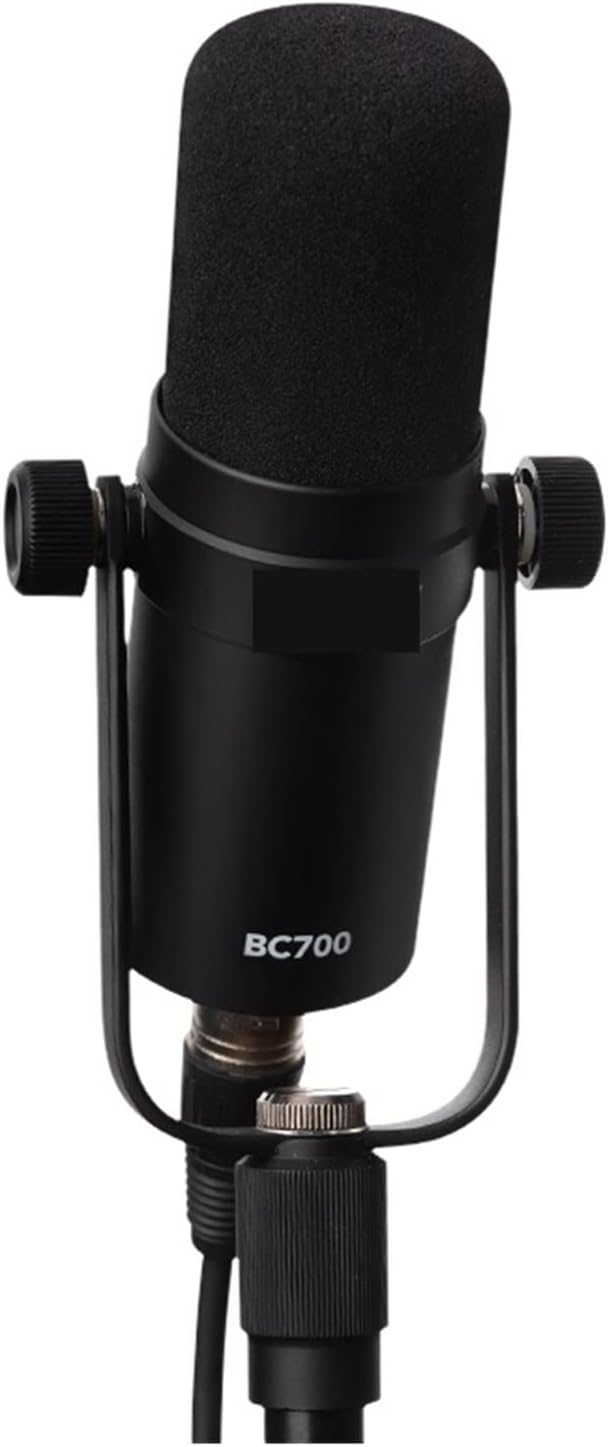
Image 1: Front view of the BC700 microphone, showcasing its design with the included stand and foam windscreen.

Image 2: The BC700 microphone lying down, with its foam windscreen detached, illustrating the separate components.
4. Setup Guide
- Attach the Microphone to the Stand: Securely fasten the BC700 microphone to the provided adjustable stand. Ensure it is tightened to prevent accidental movement.
- Connect the XLR Cable: Insert a standard XLR cable (not included) into the XLR output port at the base of the microphone. Connect the other end of the XLR cable to your audio interface, mixer, or preamplifier.
- Position the Microphone: Adjust the angle and height of the microphone using the stand. For optimal sound capture, position the microphone directly in front of the sound source, typically 6-12 inches away. The cardioid polar pattern means the microphone is most sensitive to sounds coming from the front.
- Install Foam Windscreen (if separate): If your foam windscreen is not pre-installed, gently slide it over the microphone head. This helps to reduce plosive sounds and breath noise.

Image 3: Angled view of the BC700, highlighting the XLR output connection at the base of the microphone.

Image 4: Side view of the BC700 microphone, illustrating its connection to the stand and the XLR port.
5. Operation
5.1 Proper Microphone Placement
- Directionality: The BC700 is a cardioid microphone, meaning it picks up sound primarily from the front. Ensure the front of the microphone (where the "BC700" label is typically visible) is facing the sound source.
- Distance: For vocals and speech, a distance of 6-12 inches (15-30 cm) is generally recommended. Experiment with distance to find the optimal balance between clarity and room ambiance.
- Angle: Adjust the microphone angle to capture the desired sound. For example, when recording an instrument, aim the microphone at the part of the instrument that produces the most desirable tone.
5.2 Gain Settings
Adjust the gain (input level) on your audio interface or mixer. Start with a low gain setting and gradually increase it until you achieve a strong signal without clipping (distortion). Monitor your audio levels to prevent overdriving the input.

Image 5: Front view of the BC700 microphone, illustrating its orientation on the stand for optimal sound capture.
6. Maintenance
- Cleaning: Use a soft, dry cloth to wipe the microphone body. Do not use liquid cleaners or solvents, as they may damage the finish or internal components.
- Foam Windscreen: The foam windscreen can be gently removed and cleaned with mild soap and water if necessary. Ensure it is completely dry before reattaching.
- Storage: When not in use, store the microphone in a dry, dust-free environment, preferably in its original packaging or a protective case, to prevent damage from dust, moisture, or impacts.
- Avoid Extreme Conditions: Do not expose the microphone to extreme temperatures, high humidity, or direct sunlight for extended periods.

Image 6: The BC700 microphone with its foam windscreen removed, revealing the protective grille underneath. This view is useful for understanding cleaning procedures.
7. Troubleshooting
| Problem | Possible Cause | Solution |
|---|---|---|
| No Sound Output |
|
|
| Poor Sound Quality / Distortion |
|
|
| Microphone Not Stable on Stand |
|
|
8. Specifications
| Microphone Type | Dynamic Microphone |
| Polar Pattern | Cardioid |
| Frequency Response | 50Hz - 16kHz |
| Sensitivity | -57dB ±3dB |
| Output Impedance | 320 Ohms |
| Output Connection | XLR |
| Dimensions (Microphone) | 144mm x 44mm (Length x Diameter) |
| Construction Material | High-quality Aluminum Alloy |
9. Warranty & Support
Information regarding product warranty and customer support was not provided in the available product details. Please refer to the retailer or manufacturer's official website for specific warranty terms and contact information for support inquiries.
10. Product Videos
No official product videos from the seller were provided in the available product information to embed in this manual.