
1. Introduction
This manual provides essential information for the safe and efficient operation of your ebmpapst 6454/2 TDHPU Axial Fan. Please read this manual thoroughly before installation and use, and retain it for future reference. This fan is designed for industrial applications requiring reliable airflow and cooling.
2. Safety Instructions
Observe the following safety precautions to prevent injury and damage to the product:
- Ensure the power supply matches the fan's voltage requirements (24V DC).
- Disconnect power before installation, maintenance, or cleaning.
- Do not operate the fan if any part is damaged.
- Keep fingers and foreign objects away from rotating blades.
- Install the fan in a well-ventilated area, free from obstructions.
- This fan is designed for specific applications; do not use it for purposes other than intended.
3. Package Contents
Verify that all items are present in the package:
- 1 x ebmpapst 6454/2 TDHPU Axial Cooling Fan
4. Product Overview
The ebmpapst 6454/2 TDHPU is a high-performance DC brushless axial fan featuring a durable metal housing and a 4-wire configuration for precise control. It is engineered for efficient air cooling in various industrial and electronic systems.

Figure 1: Top view of the ebmpapst 6454/2 TDHPU Axial Fan, displaying the product label with model number, voltage, current, and power specifications.
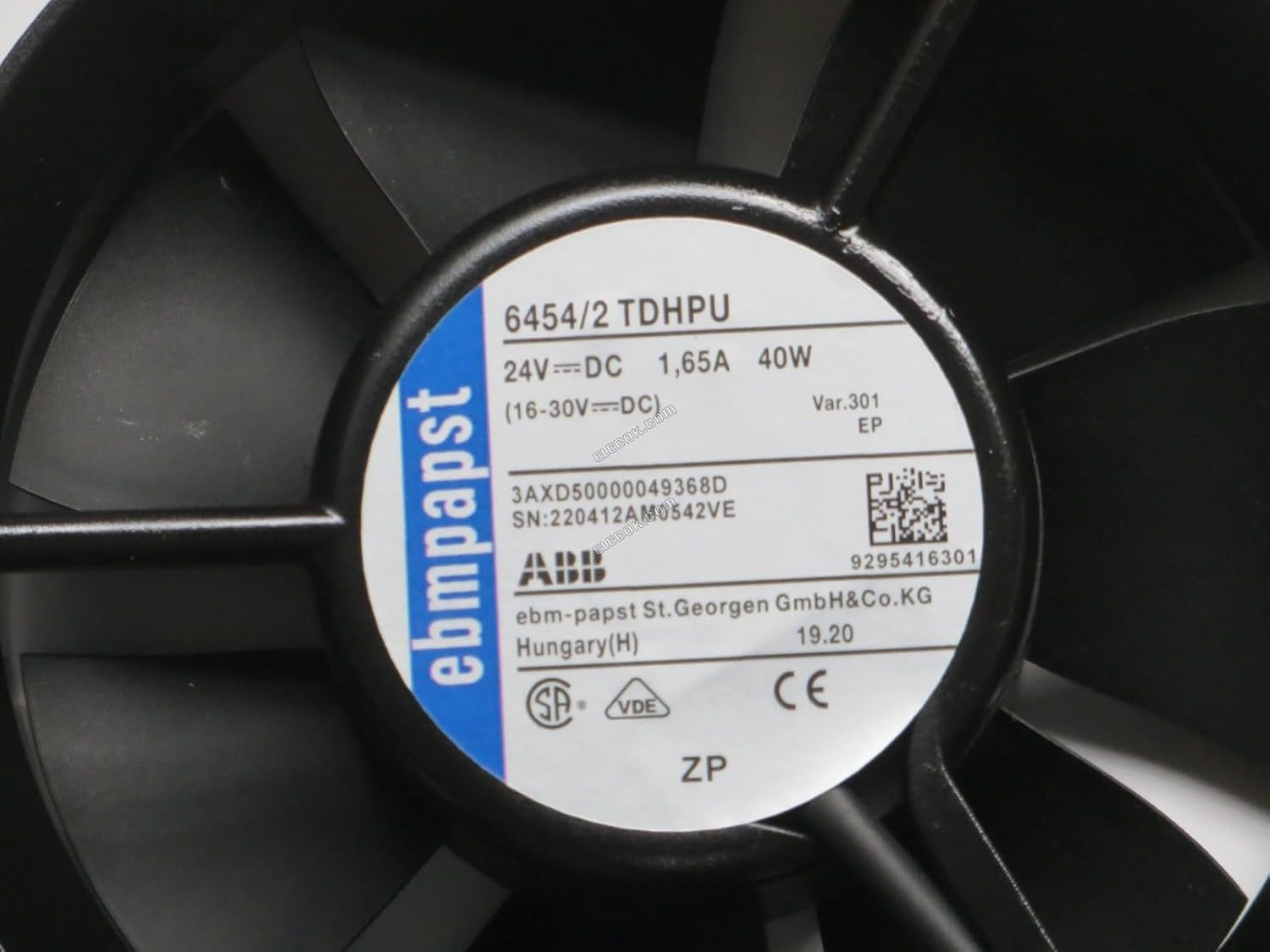
Figure 2: Close-up view of the fan's label, detailing specifications such as 24V DC, 1.65A, 40W, and serial number information.

Figure 3: Front view of the axial fan blades, showing the robust construction and design optimized for airflow.
5. Specifications
| Feature | Specification |
|---|---|
| Model Number | 6454/2 TDHPU |
| Voltage | 24V DC |
| Current | 1.65A |
| Power | 40W |
| Rotational Speed | 4500 RPM |
| Air Flow Capacity | 283.6 Cubic Feet Per Minute |
| Dimensions (L x W x H) | 172mm x 150mm x 51mm (approx. 15L x 5.1W x 17.2H Centimeters) |
| Noise Level | 48 dB |
| Material | Metal Housing |
| Wiring | 4-Wire (for speed and performance control) |
| Cooling Method | Air |
| Weight | 450 g |
6. Setup and Installation
Follow these steps for proper installation:
- Preparation: Ensure the mounting surface is clean, flat, and capable of supporting the fan's weight. Verify that the power supply is off.
- Mounting: Secure the fan to the desired location using appropriate screws or fasteners through the mounting holes on the fan's frame. Ensure the fan is firmly attached to prevent vibration.
- Wiring: Connect the 4-wire connector to the corresponding power and control interface.
- Typically, two wires are for power (positive and negative), and the remaining two are for speed control (PWM) and tachometer feedback. Refer to your system's wiring diagram for specific connections.
- Ensure correct polarity for DC power connections.
- Airflow Direction: Position the fan to ensure optimal airflow for cooling. Axial fans typically draw air from one side and expel it from the other.
- Final Check: Double-check all connections and mounting security before applying power.
7. Operating Instructions
Once installed and wired correctly:
- Power On: Apply 24V DC power to the fan. The fan should begin to rotate.
- Speed Control (4-Wire): If your system supports PWM (Pulse Width Modulation) control, you can adjust the fan speed via the control signal. The tachometer wire provides feedback on the fan's rotational speed.
- Monitoring: Observe the fan's operation for any unusual noises or vibrations. Ensure consistent airflow.
8. Maintenance
Regular maintenance ensures optimal performance and longevity:
- Cleaning: Periodically clean dust and debris from the fan blades and housing. Use a soft brush or compressed air. Always disconnect power before cleaning.
- Inspection: Check for any signs of wear, damage, or loose connections. Ensure mounting screws remain tight.
- Lubrication: This fan features a DC brushless motor and typically does not require lubrication. Do not attempt to lubricate internal components.
9. Troubleshooting
Refer to the table below for common issues and their solutions:
| Problem | Possible Cause | Solution |
|---|---|---|
| Fan does not start | No power, incorrect wiring, faulty power supply. | Check power connections, verify voltage, ensure correct wiring polarity. Test power supply. |
| Fan runs slowly or inconsistently | Insufficient voltage, obstruction, faulty speed control signal. | Verify 24V DC supply. Clear any obstructions. Check PWM signal if applicable. |
| Excessive noise or vibration | Loose mounting, damaged blades, foreign object, worn bearings. | Tighten mounting screws. Inspect blades for damage. Remove foreign objects. If bearings are worn, fan replacement may be necessary. |
| No airflow | Fan not spinning, blocked intake/exhaust. | Refer to "Fan does not start" solutions. Clear any blockages around the fan. |
10. Warranty and Support
For warranty information or technical support, please contact your retailer or the manufacturer, A.K ENTERPRISES. Keep your purchase receipt as proof of purchase.
Manufacturer: A.K ENTERPRISES
Packer: Lighting Hub


