
1. Introduction
Thank you for choosing the Butterfly Vector+ Power Hob. This manual provides essential information for the safe and efficient operation of your new induction cooktop. Please read these instructions thoroughly before first use and keep them for future reference. This appliance is designed for domestic use only.
2. Safety Instructions
Always observe basic safety precautions when using electrical appliances to reduce the risk of fire, electric shock, and injury.
- Electrical Safety: Ensure the power supply matches the voltage specified on the appliance. Do not immerse the appliance, cord, or plug in water or other liquids.
- Placement: Place the cooktop on a stable, heat-resistant, and level surface, away from flammable materials. Ensure adequate ventilation around the unit.
- Cookware: Use only induction-compatible cookware. The cooktop features Pan Sensor Technology to detect suitable cookware.
- Overheating Protection: The appliance is equipped with an Automatic Voltage Regulator and Overheating Protection to prevent damage from power fluctuations and excessive heat. If the unit overheats, it will automatically shut off.
- Children and Supervision: This appliance is not intended for use by persons with reduced physical, sensory, or mental capabilities, or lack of experience and knowledge, unless they have been given supervision or instruction concerning use of the appliance by a person responsible for their safety. Children should be supervised to ensure they do not play with the appliance.
- Cleaning: Always unplug the cooktop before cleaning. Allow it to cool completely.
- Damage: Do not operate the appliance if it has a damaged cord or plug, or if it malfunctions or has been damaged in any manner. Contact customer service for repair.
3. Product Overview
The Butterfly Vector+ Power Hob is a 1700W induction cooktop designed for efficient and safe cooking. Key components and features include:
- A-Grade Crystal Glass Surface: Durable and easy to clean, ensuring minimal heat loss.
- Pan Sensor Technology: Automatically detects induction-compatible cookware for optimal heating.
- Automatic Voltage Regulator: Provides overload protection and prevents overheating due to voltage fluctuations.
- 7 Preset Indian Cooking Menus: Specialized settings for common Indian dishes.
- Variable Temperature Settings: Allows precise control over cooking temperature.
- Durable Shockproof ABS Body: Robust construction for longevity and easy maintenance.
- Soft Touch Control Panel: User-friendly interface for smooth function and setting adjustments.
- 4-Digit Digital Display: Provides clear feedback on settings and status.
- Automatic Shut-Off: Enhances safety by turning off the unit under certain conditions (e.g., no pan, overheating).
- Power-On Indicator: Visual confirmation when the unit is active.
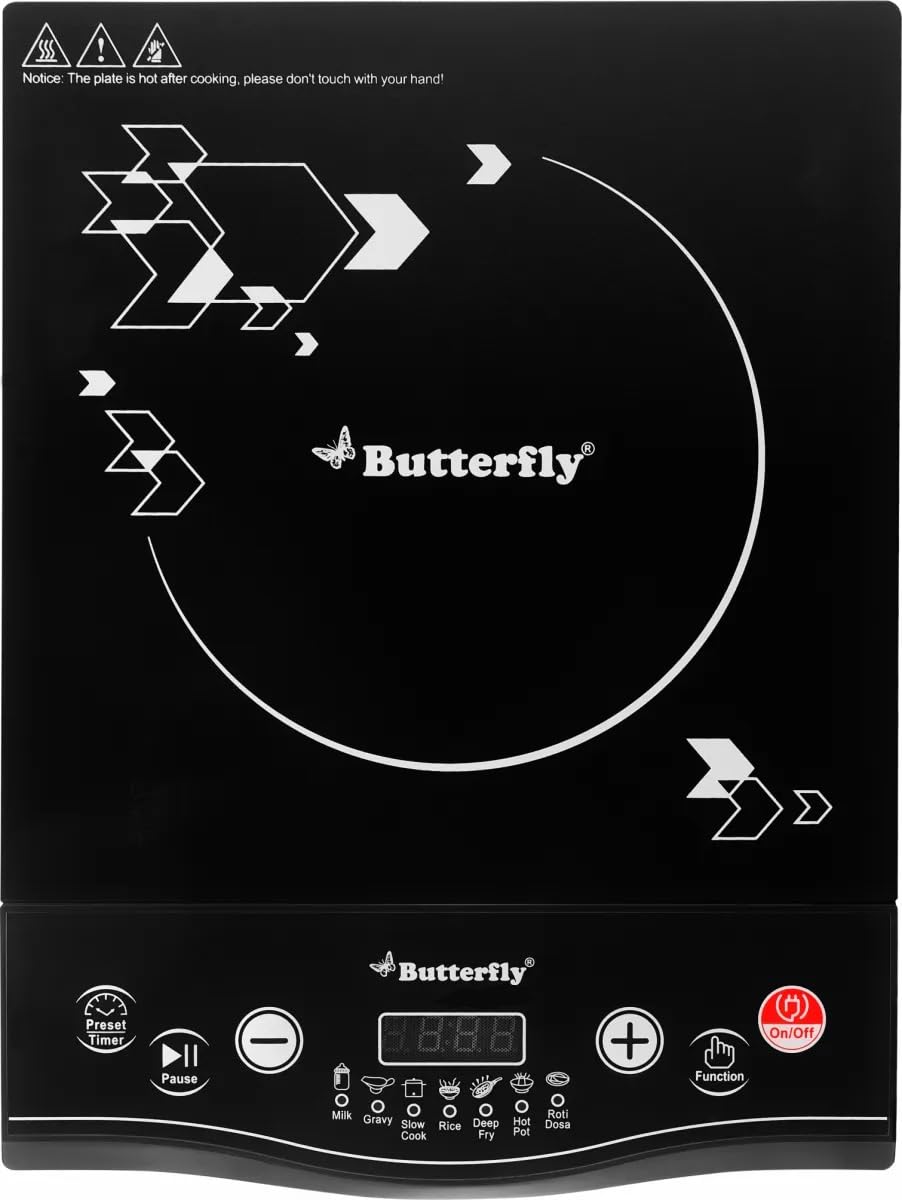
Figure 1: Front view of the Butterfly Vector+ Power Hob, showing the crystal glass surface and control panel.
4. Setup
- Unpacking: Carefully remove the cooktop from its packaging. Retain packaging materials for future transport or storage.
- Placement: Place the cooktop on a flat, stable, and dry surface. Ensure there is at least 10-15 cm of clear space around the unit for proper ventilation. Do not place it near heat sources or on metallic surfaces that could interfere with induction.
- Power Connection: Plug the power cord into a grounded 220 Volt AC electrical outlet. The cooktop is equipped with an Automatic Voltage Regulator for protection against power fluctuations.
- Initial Cleaning: Before first use, wipe the glass surface with a soft, damp cloth.
5. Operating Instructions
Follow these steps to operate your Butterfly Vector+ Power Hob:
- Power On: Place induction-compatible cookware (e.g., cast iron, magnetic stainless steel) containing food or liquid onto the center of the glass cooking zone. Plug in the appliance. The Power-On Indicator will light up.
- Start Cooking: Press the "ON/OFF" button on the Soft Touch Control Panel. The digital display will illuminate.
- Select Function:
- Preset Menus: Press the "Menu" button repeatedly to cycle through the 7 Preset Indian Cooking Menus (e.g., Curry, Dosa, Fry, Milk, Roti, Soup, Water). The corresponding indicator will light up, and the cooktop will start heating at the preset power/temperature.
- Manual Temperature/Power Control: If not using a preset menu, you can adjust the power or temperature manually using the '+' and '-' buttons. The Variable Temperature Settings allow for precise heat control.
- Adjust Settings: Use the '+' and '-' buttons to increase or decrease the power level or temperature as desired during manual operation.
- Timer Function (if available): Refer to the control panel for a timer button. Press it and use '+' and '-' to set the desired cooking time. The cooktop will automatically shut off once the timer expires.
- Pan Detection: If no suitable pan is detected or the pan is removed, the cooktop will display an error code (e.g., "E0") and automatically shut off after a short period, thanks to the Pan Sensor Technology.
- Power Off: After cooking, press the "ON/OFF" button to turn off the cooktop. Unplug the appliance from the wall socket.
6. Maintenance and Cleaning
Proper maintenance ensures the longevity and performance of your cooktop.
- Before Cleaning: Always unplug the cooktop and allow it to cool completely before cleaning.
- Glass Surface: Wipe the A-Grade Crystal Glass Surface with a soft, damp cloth and mild detergent. For stubborn stains, use a non-abrasive ceramic hob cleaner. Do not use abrasive pads, harsh chemicals, or sharp objects.
- Body: The Durable Shockproof ABS Body can be wiped clean with a damp cloth. Do not use water jets or immerse the unit in water.
- Ventilation Openings: Keep the ventilation openings on the bottom and sides of the unit clear of dust and debris to prevent overheating.
- Storage: When not in use for extended periods, store the cooktop in a dry place, away from direct sunlight and moisture.
7. Troubleshooting
If you encounter issues with your Butterfly Vector+ Power Hob, refer to the following common problems and solutions:
| Problem | Possible Cause | Solution |
|---|---|---|
| Cooktop does not turn on. | No power supply; appliance not plugged in; power outlet faulty. | Check if the power cord is securely plugged in. Test the outlet with another appliance. Check circuit breaker. |
| Cooktop turns on but does not heat. | Cookware is not induction-compatible; no cookware on the hob; cookware is too small or too large. | Ensure you are using induction-compatible cookware. Place the cookware centrally on the cooking zone. Ensure the cookware base diameter is within the recommended range. |
| Display shows an error code (e.g., "E0"). | "E0" typically indicates no pan detected or incompatible pan. Other codes may indicate internal issues. | For "E0", ensure an induction-compatible pan is placed correctly. If other error codes appear, unplug the unit, wait a few minutes, and plug it back in. If the error persists, contact customer service. |
| Unit automatically shuts off during operation. | Overheating protection activated; pan removed; timer expired. | Allow the unit to cool down. Ensure ventilation openings are not blocked. Replace the pan if it was removed. Check if a timer was set. |
If the problem persists after attempting these solutions, please contact Butterfly customer service.
8. Specifications
| Feature | Detail |
|---|---|
| Model Number | TRIPOH0087 |
| Brand | Butterfly |
| Wattage | 1700 Watts |
| Voltage | 220 Volts |
| Heating Element | Induction |
| Number of Heating Elements | 1 |
| Material | Glass (A-Grade Crystal Glass) and ABS Body |
| Color | Black |
| Item Dimensions (D x W x H) | 27.5D x 8.5W x 39H Centimeters |
| Item Weight | 1500 Grams |
| Special Features | Automatic Shut-Off, Digital Display, Lightweight, Power-On Indicator, Temperature Control, Pan Sensor Technology, Automatic Voltage Regulator, 7 Preset Indian Cooking Menus |
| Included Components | 1 Butterfly Induction Cooktop |
9. Warranty and Support
Warranty: The Butterfly Vector+ Power Hob comes with a 1 Year Warranty from the date of purchase. Please retain your purchase receipt as proof of warranty. The warranty covers manufacturing defects under normal domestic use. It does not cover damage caused by misuse, accident, unauthorized modification, or failure to follow instructions.
Customer Support: For any service, repair, or warranty claims, please contact Butterfly customer service using the details below:
- Manufacturer: Butterfly Gandhimathi Appliances Limited
- Address: No. 143, Pudupakkam Village, Vandalur - Kelambakkam Road, Kancheepuram District, 603 103, Tamil Nadu, India
- Phone: 9362 01 9362
- Email: service@butterflyindia.com
- Website: www.butterflyindia.com