
Introduction
Thank you for choosing the AVIOT TE-V1R Wireless Earbuds. These earbuds are designed to provide a superior audio experience with advanced features such as Hybrid Dual Driver 2.0 technology, LDAC support for high-resolution audio, Adaptive Hybrid Noise Canceling, and extended battery life. This manual will guide you through the setup, operation, and maintenance of your new earbuds.
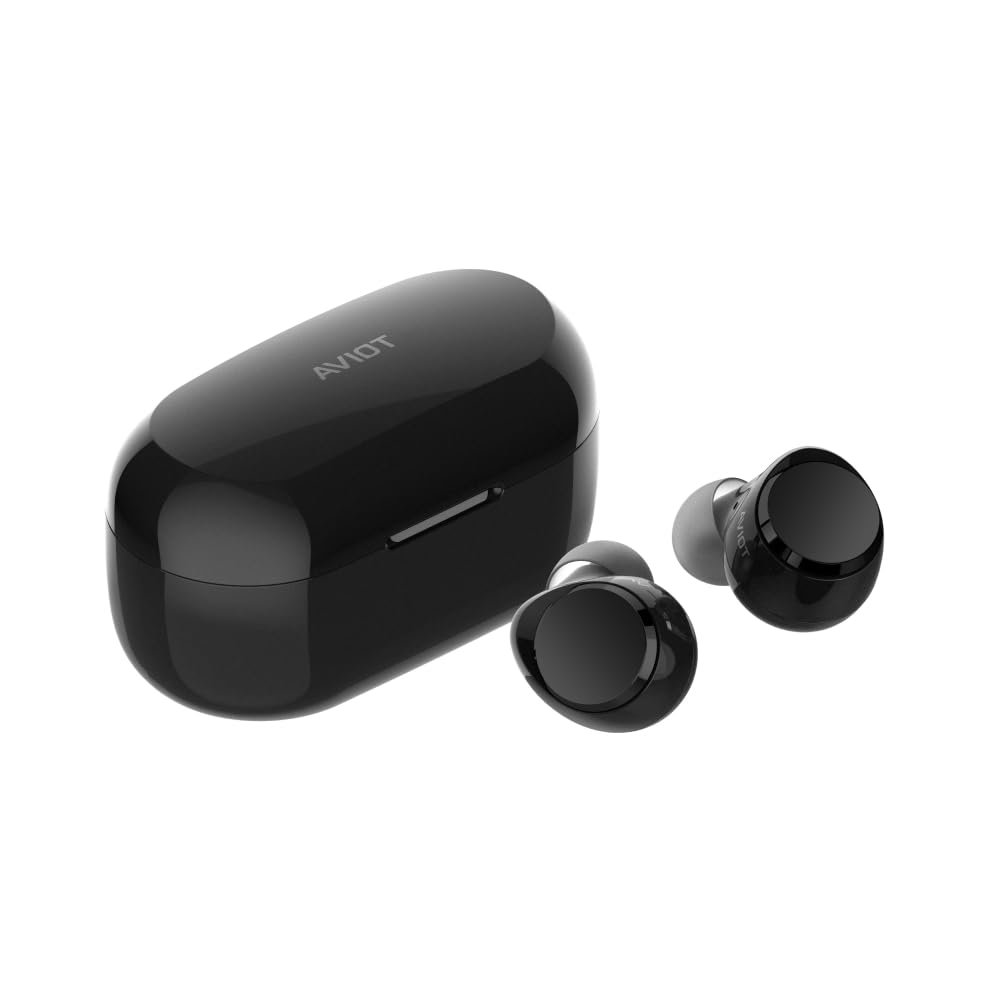
Image: AVIOT TE-V1R Wireless Earbuds and their charging case.
What's in the Box
Your AVIOT TE-V1R package includes the following items:
- AVIOT TE-V1R Wireless Earbuds
- Wireless Charging Case
- USB Charging Cable
- Ear Cushions (various sizes)
- User Manual (this document)

Image: The AVIOT TE-V1R earbuds and charging case, illustrating the product components.
Setup
Charging the Earbuds and Case
Before first use, fully charge the earbuds and charging case. The charging case can be charged via the included USB cable or wirelessly using a compatible wireless charger.
- Earbuds Charging: Place the earbuds into the charging case. Ensure they are properly seated. The indicator lights on the case will show charging status.
- Case Charging: Connect the USB charging cable to the case and a power source, or place the case on a wireless charging pad.
- Fast Charging: A short 10-minute charge can provide up to 120 minutes of playback.

Image: Graphic illustrating the battery life of the earbuds (up to 19 hours) and with the charging case (up to 62 hours).
Power On/Off
- Power On: Open the charging case, and the earbuds will automatically power on. Alternatively, press and hold the touch sensor on each earbud for 3 seconds.
- Power Off: Place the earbuds back into the charging case and close the lid. They will automatically power off. Alternatively, press and hold the touch sensor on each earbud for 7 seconds.

Image: Close-up of an earbud, highlighting the ability to turn earbuds on and off without the charging case to conserve battery.
Bluetooth Pairing
- Ensure the earbuds are charged and powered on.
- Open the charging case. The earbuds will enter pairing mode (indicator lights may flash).
- On your device (smartphone, tablet, laptop), go to Bluetooth settings.
- Select "AVIOT TE-V1R" from the list of available devices.
- Once connected, you will hear a confirmation tone.
Multipoint Connectivity
The TE-V1R supports multipoint connectivity, allowing you to connect to two devices simultaneously. This enables seamless switching between audio sources, such as taking a call on your phone while listening to music on your laptop.
- Pair the earbuds with your first device as described above.
- Disconnect the earbuds from the first device's Bluetooth settings (do not unpair).
- Pair the earbuds with your second device.
- Reconnect the earbuds to the first device from its Bluetooth settings.
- The earbuds are now connected to both devices.
Operating Instructions
Touch Controls
The AVIOT TE-V1R earbuds feature intuitive touch controls. Some functions can be customized using the dedicated AVIOT SOUND ME app.

Image: A visual guide to the touch controls on the left (L) and right (R) earbuds for various functions.
| Function | Left Earbud (L) | Right Earbud (R) |
|---|---|---|
| Power On | Press and hold for 3 secs | Press and hold for 3 secs |
| Power Off | Press and hold for 7 secs | Press and hold for 7 secs |
| Play/Pause | One tap | One tap |
| Next Track | - | Double tap |
| Previous Track | Double tap | - |
| Increase Volume | Triple tap | - |
| Decrease Volume | - | Triple tap |
| Answer Call | One tap when receiving a call | One tap when receiving a call |
| End Call | One tap during a call | One tap during a call |
| ANC On/Off | Press and hold for 1.5 seconds | Press and hold for 1.5 seconds |
| Ambient Sound On/Off | Press and hold for 1.5 seconds | Press and hold for 1.5 seconds |
Sound Quality and LDAC Support
The TE-V1R features a Hybrid Dual Driver 2.0 system, combining a newly developed 10mm dynamic driver and a balanced armature driver. This configuration delivers well-balanced, high-quality sound across deep bass and high frequencies.

Image: Exploded view diagram of the Hybrid Dual Driver 2.0 system within the earbud.
For high-resolution wireless audio, the earbuds support LDAC, which transmits approximately three times more data than conventional Bluetooth methods (SBC, AAC), faithfully reproducing high-quality audio.

Image: Graphic highlighting Hi-Res Audio Wireless and LDAC support for superior sound quality.
Adaptive Hybrid Noise Canceling
The Adaptive Hybrid Noise Canceling feature automatically adjusts the level of noise reduction based on your surrounding environment. This creates a quiet listening environment, allowing you to immerse yourself in your audio.

Image: A person wearing the earbuds, demonstrating the noise-canceling feature in an urban environment.
Low Latency Mode
Activate the Low Latency Mode to minimize audio-video synchronization issues, providing a smoother experience for watching videos and gaming.
Maintenance
Water Resistance (IPX4)
The AVIOT TE-V1R earbuds are IPX4-rated for water resistance, meaning they are protected against splashing water from any direction. This ensures safe use during workouts or in light rain. Note: The charging case is not water-resistant. Do not submerge the earbuds or expose them to high-pressure water.
Cleaning and Storage
- Regularly clean the earbuds and charging contacts with a soft, dry cloth.
- Remove ear cushions and clean them with mild soap and water if necessary, ensuring they are completely dry before reattaching.
- Store the earbuds in their charging case when not in use to protect them and conserve battery.
Comfortable Fit
The earbuds feature an ergonomic design for a comfortable and secure fit that minimizes interference with the unique contours of each person's ears. This design helps reduce fatigue during extended use and keeps them securely in place.

Image: Three different individuals wearing the AVIOT TE-V1R earbuds, showcasing their comfortable and secure fit during various activities.
Troubleshooting
- No Sound/Pairing Issues: Ensure earbuds are charged, powered on, and within Bluetooth range. Try resetting the earbuds and re-pairing with your device.
- One Earbud Not Working: Place both earbuds back in the case, close the lid, wait a few seconds, then open and try again. Ensure both earbuds are charged.
- Voice Prompts in Japanese: Some users have reported difficulty changing the voice prompt language from Japanese to English via the companion app. Please refer to the AVIOT SOUND ME app for available language settings and updates. If the issue persists, contact AVIOT customer support.
- Battery Not Charging: Check the charging cable and power source. Ensure the charging case is properly placed on the wireless charging pad. Clean the charging contacts on both the earbuds and the case.
- Poor Noise Canceling: Ensure the ear cushions provide a snug fit. Try different sized ear cushions for optimal seal.
Specifications
| Feature | Detail |
|---|---|
| Model Name | TE-V1R |
| Brand | AVIOT |
| Connectivity Technology | Wireless (Bluetooth 5.3) |
| Audio Driver Type | Hybrid Dual Driver 2.0 (10mm Dynamic + Balanced Armature) |
| Noise Control | Adaptive Hybrid Noise Cancellation |
| Special Features | LDAC Support, Wireless Charging, IPX4 Water Resistance, Low Latency Mode, Multipoint Connectivity |
| Battery Life (Earbuds) | Up to 19 Hours |
| Battery Life (with Case) | Up to 62 Hours |
| Fast Charging | 10 min charge for 120 min playback |
| Water Resistance Level | IPX4 |
| Control Method | Touch |
| Compatible Devices | Smartphones, Laptops, Tablets, Smart Speakers |
| Item Weight | 7.2 ounces (205 Grams) |
| Material | Plastic |
Warranty and Support
For warranty information, product registration, or technical support, please refer to the official AVIOT website or contact AVIOT customer service directly. Keep your purchase receipt for any warranty claims.


