TWS T2 Wireless Earbuds
User Manual

Image: The TWS T2 Wireless Earbuds, shown in their transparent charging case. The case features an LED digital display indicating a 90% charge level. One earbud is partially visible, highlighting the compact design.
Introduction
These high-quality Bluetooth 5.3 stereo sound earphones are designed for an exceptional listening experience. Equipped with the latest Bluetooth technology, they deliver a seamless and stable connection with superior audio clarity. Whether for music, calls, or gaming, these earphones provide crisp sound, deep bass, and comfort for extended use.
Key features include:
- Bluetooth 5.3 Technology: Ensures fast, stable, and energy-efficient wireless connectivity.
- LED Power Digital Display: Track battery life easily on the charging case.
- Stereo Sound Quality: Enjoy clear, immersive sound with balanced bass and crisp treble.
- Comfortable Fit: Ergonomically designed for all-day comfort and a secure fit.
- Compact Charging Case: Keeps earbuds protected and charged for portability.
Setup
- Charging the Earbuds and Case:
Before first use, fully charge the earbuds and the charging case. Connect the provided USB-C cable to the charging port on the case and to a USB power source. The LED display on the case will show the charging progress. A full charge typically takes 1-2 hours.

Image: A close-up of the transparent charging case with an LED digital display. The display accurately shows the battery level of both the charging compartment and individual headphones, indicating 95% for the case and 35% for the earbuds.
- Pairing with a Device:
Open the charging case. The earbuds will automatically enter pairing mode (indicated by flashing lights on the earbuds). On your device (smartphone, tablet, etc.), go to Bluetooth settings and search for available devices. Select "TWS T2" from the list. Once connected, the earbud lights will stop flashing.
- Automatic Reconnection:
After initial pairing, the earbuds will automatically connect to the last paired device when removed from the charging case, provided Bluetooth is enabled on the device and it is within range.
Operating Instructions
The TWS T2 Earbuds feature touch controls for various functions:
- Play/Pause: Single tap on either earbud.
- Next Track: Double tap the right earbud.
- Previous Track: Double tap the left earbud.
- Answer/End Call: Single tap on either earbud during an incoming call.
- Reject Call: Press and hold either earbud for 2 seconds during an incoming call.
- Activate Voice Assistant: Triple tap on either earbud.
- Volume Control: Volume is controlled via the connected device.
The earbuds are designed for low latency, enhancing experiences such as gaming:
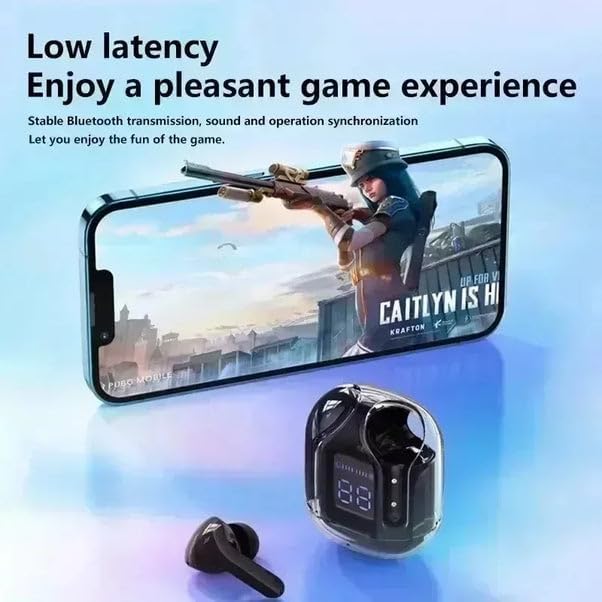
Image: The TWS T2 Wireless Earbuds and their charging case are positioned next to a smartphone displaying a mobile game. This illustrates the low latency feature, which ensures stable Bluetooth transmission and synchronized sound and operation for an improved gaming experience.
Maintenance
Proper maintenance ensures the longevity and performance of your TWS T2 Wireless Earbuds:
- Cleaning: Use a soft, dry, lint-free cloth to clean the earbuds and charging case. Do not use abrasive cleaners, alcohol, or chemical solvents. Gently remove any earwax buildup from the earbud tips using a small, soft brush.
- Storage: When not in use, store the earbuds in their charging case to protect them from dust and damage. Keep them in a cool, dry place away from direct sunlight and extreme temperatures.
- Battery Care: To preserve battery life, avoid fully discharging the earbuds and case frequently. Recharge them regularly, even if not used for extended periods.
- Protection: The earbuds feature a high-hardness shell with a scratch-resistant coating. While durable, avoid dropping them or exposing them to sharp objects.

Image: A single white TWS T2 earbud is shown within its transparent charging case, with the LED display indicating a 90% charge. The image emphasizes the high hardness shell, which is covered with a high-quality scratch-resistant coating designed to resist scratches from various sharp products.
Troubleshooting
| Problem | Possible Solution |
|---|---|
| Earbuds not pairing |
|
| No sound from one earbud |
|
| Earbuds not charging |
|
| Poor sound quality |
|
Specifications
| Feature | Detail |
|---|---|
| Model Name | TWS T2 Wireless Earbuds, Pink |
| Wireless Communication Technology | Bluetooth 5.3 |
| Form Factor | In Ear |
| Connectivity Technology | Wireless |
| Color | Pink |
| Manufacturer | MixBuds |
| First Available | February 2, 2025 |
Warranty and Support
This product is covered by a standard manufacturer's warranty. For specific warranty details, please refer to the product packaging or contact the retailer where the product was purchased.
For technical support or inquiries, please contact the manufacturer or your point of purchase. Keep your purchase receipt as proof of purchase for any warranty claims.


