
Introduction
This manual provides detailed instructions for the installation, programming, operation, and maintenance of your IQMatePro Universal Garage Door Remote Control. This remote is designed for compatibility with various garage door openers, offering a convenient solution for controlling up to three garage doors.
Compatibility
The IQMatePro Universal Garage Door Remote Control is compatible with a wide range of garage door openers from brands such as LiftMaster, Sears, Craftsman, and Chamberlain. Please verify your garage door opener's part number against the list below and the compatibility chart to ensure proper function.
Compatible Part Numbers:
- 41A4207, 41A4207-1, 41A4207-##
- 41A4252, 41A4252-1, 41A4252-4, 41A4252-5, 41A4252-6, 41A4252-6A, 41A4252-6B, 41A4252-6C, 41A4252-6D, 41A4252-6E, 41A4252-6F, 41A4252-6G, 41A4252-7, 41A4252-7A, 41A4252-7B, 41A4252-7C, 41A4252-7D, 41A4252-7E, 41A4252-7F, 41A4252-7G, 41A4252-12, 41A4252###
- 41A4315, 41A4315-5, 41A4315-6, 41A4315-6B, 41A4315-6C, 41A4315-6D, 41A4315-7A, 41A4315-7B, 41A4315-7D, 41A4315-7E, 41A4315###
- 41A5021-3G
- 41D4374-9C
- 41D4674-1C, 41D4674-1D, 41D4674-1E, 41D4674-1F, 41D4674-1G, 41D4674-3C
- K1027, HBW0777, HBW1127
To locate your garage door opener's part number, look for a sticker on the overhead unit. On some units, you may need to lift the light cover to find this information.
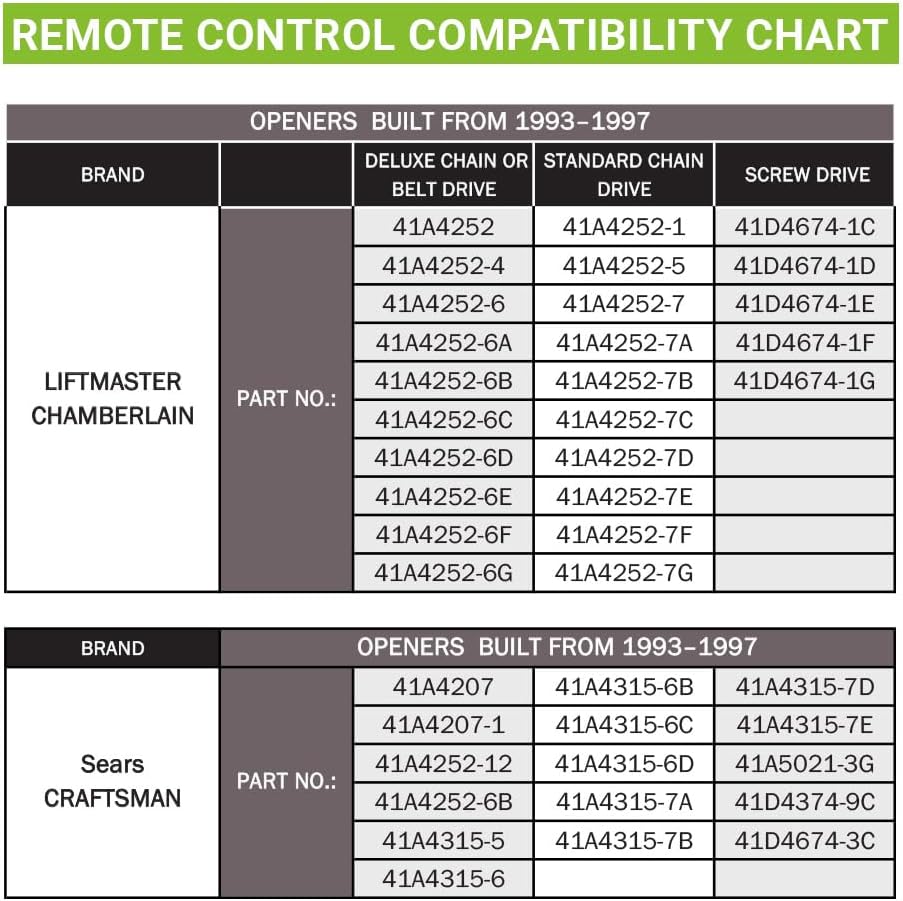
Image: Compatibility Chart. This chart details compatible part numbers for LiftMaster, Chamberlain, Sears, and Craftsman garage door openers manufactured between 1993 and 1997, categorized by drive type.
Package Contents
Your IQMatePro Universal Garage Door Remote Control package includes the following items:
- 2 x Mini Remote Controls
- 2 x Keychains
- Batteries (pre-installed in each remote control)
- 1 x User Manual (this document)

Image: Package Contents. This image displays the two mini remote controls, two keychains, and the included battery, along with a small programming instruction card.
Setup and Programming Instructions
Follow these steps for wireless programming of your IQMatePro remote control. This process allows you to link the remote to your garage door opener in seconds.
- Locate the Learn Button: Find the Smart/Learn button on the back of your garage door opener's motor unit. This unit is typically mounted on the ceiling of your garage. You may need a ladder to reach it. The color of the learn button (e.g., green, red, purple, yellow, orange) is important for compatibility, though this remote is designed for broad compatibility.
- Activate Learn Mode: Press and release the Learn button on the motor unit. The indicator light on the opener will illuminate for approximately 30 seconds, indicating it is in programming mode.
- Program the Remote: Within 30 seconds of pressing the Learn button on the opener, press and hold the desired button on your IQMatePro remote control. Release the button when the garage door opener's light flashes or you hear a click. This indicates successful programming.
- Test Operation: Press the programmed button on your remote control again. The garage door should open or close.
Note: If you have more than one garage door, you can program the other two buttons on the remote control by repeating steps 1-3 for each additional opener.
Image: Programming Instructions Detail. This image highlights the programming instructions card, illustrating the steps to program the remote control with a garage door opener.
Operating Instructions
Your IQMatePro remote control features three buttons, allowing you to operate up to three different garage door openers or gate operators independently.
- Single Door Operation: After programming, simply press the assigned button on the remote control to open or close your garage door.
- Multiple Door Operation: If you have programmed multiple garage doors, each button corresponds to a specific door. Press the respective button to control the desired door.
- Security: The remote utilizes advanced anti-burglary technology with strong encryption and a powerful modern chip, ensuring a new code is generated with every click for enhanced security.

Image: 3-Button Operation. This image illustrates how the remote's three buttons can operate up to three individual garage doors, highlighting its multi-device control capability.

Image: Anti-Burglary Technology. This image visually represents the advanced security features of the remote, including Security+, strong encryption, and a powerful modern chip for reliable operation.
Maintenance
The IQMatePro remote control is designed for low maintenance. The primary maintenance task is battery replacement.
Battery Replacement
The remote control uses a standard button cell battery (type not specified, but typically CR2032 or similar). When the remote's range decreases or it stops responding, it is likely time to replace the battery.
- Open the Remote Casing: Carefully use a small flat-head screwdriver or a coin to pry open the remote control casing. There is usually a small notch on the side for this purpose.
- Remove Old Battery: Note the orientation of the old battery (positive (+) side up or down) and gently remove it.
- Insert New Battery: Insert a new battery of the same type, ensuring the correct orientation.
- Close Casing: Snap the remote control casing back together securely.
- Test: Test the remote control to ensure it functions correctly.
Troubleshooting
If you encounter issues with your IQMatePro remote control, refer to the following troubleshooting steps:
- Remote Not Responding:
- Ensure the battery is correctly installed and not depleted. Replace the battery if necessary.
- Verify that the remote is within range of the garage door opener.
- Re-attempt the programming steps outlined in the "Setup and Programming Instructions" section.
- Remote Only Works Intermittently:
- This often indicates a low battery. Replace the battery.
- Check for any sources of interference (e.g., other wireless devices, large metal objects) near the garage door opener or remote.
- Remote Does Not Program:
- Confirm that your garage door opener's part number is listed in the compatibility section.
- Ensure you are pressing and releasing the Learn button on the opener correctly and within the specified timeframe (usually 30 seconds).
- Try holding the remote button closer to the opener during programming.
- If your opener has multiple learn buttons (e.g., for different frequencies), ensure you are using the correct one.
- Garage Door Opens/Closes Unexpectedly:
- This is rare with rolling code technology but can occur due to interference. Check for nearby devices.
- Reprogram the remote to generate a new code.
If these steps do not resolve the issue, please contact technical support for further assistance.
Specifications
Below are the technical specifications for the IQMatePro Universal Garage Door Remote Control:
- Model Number: 390MHz
- Product Dimensions: 1.57 x 0.39 x 1.18 inches (4cm x 1cm x 3cm)
- Item Weight: 1.76 ounces (approximately 50 grams)
- Power Source: 1 x Unknown battery (typically button cell, pre-installed)
- Max Number of Supported Devices: 3
- Special Feature: Pre-Programmed (ready for pairing)
- Color: Black
- Manufacturer: IQMatePro

Image: Product Dimensions. This image provides a visual representation of the remote control's compact size and precise measurements.
Warranty and Support
IQMatePro is committed to providing reliable products and excellent customer service.
Technical Support
Should you require assistance with your IQMatePro Universal Garage Door Remote Control, technical support is available 24/7. Please refer to the contact information provided with your purchase or visit the IQMatePro official website for support details.