
1. Introduction
Thank you for choosing the ADC-V729AC 4MP Floodlight Camera. This device is designed to enhance your outdoor security by providing high-resolution video surveillance, powerful illumination, and two-way audio communication. This manual provides detailed instructions for the proper installation, operation, and maintenance of your floodlight camera.
2. Safety Information
- Electrical Safety: Installation should be performed by a qualified electrician or in accordance with local electrical codes. Ensure power is disconnected before installation or maintenance.
- Mounting: Mount the camera securely to a stable surface capable of supporting its weight. Ensure the mounting location provides a clear field of view and is within Wi-Fi range.
- Operating Temperature: This device is designed for outdoor use within specified temperature ranges. Refer to the specifications section for details.
- Water Exposure: While designed for outdoor use, avoid direct high-pressure water jets or submersion.
- Cleaning: Use a soft, damp cloth for cleaning. Do not use harsh chemicals or abrasive cleaners.
3. Package Contents
Please verify that all items are present in your package:
- ADC-V729AC 4MP Floodlight Camera

Image: Front view of the ADC-V729AC Floodlight Camera, showing the camera module and two adjustable floodlights.
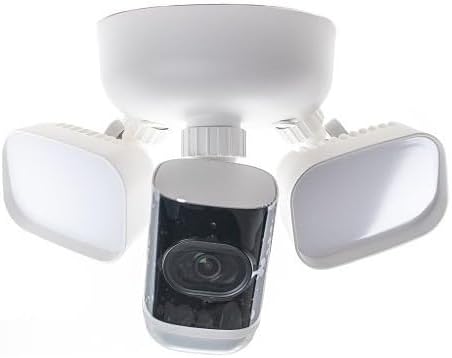
Image: Bottom view of the ADC-V729AC Floodlight Camera, illustrating the camera module and the underside of the floodlights.
4. Setup
Follow these steps to install and set up your ADC-V729AC Floodlight Camera:
- Choose a Location: Select an outdoor location with a clear view of the area you wish to monitor. Ensure it is within range of your Wi-Fi network and has access to a suitable power source.
- Power Disconnection: IMPORTANT: Before beginning installation, turn off power to the existing light fixture or junction box at the circuit breaker.
- Mounting: Securely attach the camera's mounting bracket to the wall or eave using appropriate screws and anchors. Ensure the bracket is level and stable.
- Wiring: Connect the camera's electrical wires (typically live, neutral, and ground) to the corresponding wires from your junction box. Follow local electrical codes and diagrams provided with the camera.
- Attach Camera: Once wiring is complete and secure, attach the camera body to the mounting bracket.
- Power On: Restore power at the circuit breaker. The camera will power on and begin its startup sequence.
- App Configuration: Download the companion mobile application (compatible with Android devices) to your smartphone. Follow the in-app instructions to connect the camera to your Wi-Fi network and complete the setup process. This typically involves scanning a QR code on the camera or entering a serial number.
- Adjust Floodlights: Once connected, adjust the angle of the floodlights to illuminate the desired area.
5. Operating
The ADC-V729AC Floodlight Camera offers several key functionalities:
- Live View: Access real-time video footage from your camera via the mobile application.
- Motion Detection: The camera is equipped with motion detection capabilities. You can configure motion zones and sensitivity settings within the app to receive alerts when activity is detected.
- Two-Way Audio: Use the built-in microphone and speaker to communicate with visitors or deter intruders from your smartphone.
- Floodlight Control: Control the 3000-lumen floodlights manually through the app, or set them to activate automatically upon motion detection or at scheduled times.
- Onboard Recording: The camera supports onboard recording, allowing video footage to be stored directly on the device. Consult the app for managing recorded clips and storage options.
- Night Vision: The camera automatically switches to night vision mode in low-light conditions, providing clear surveillance even in darkness.
6. Maintenance
Regular maintenance ensures optimal performance and longevity of your camera:
- Lens Cleaning: Periodically clean the camera lens with a soft, lint-free cloth to ensure clear image quality. Avoid abrasive materials.
- Housing Cleaning: Wipe down the camera housing with a damp cloth to remove dirt and debris.
- Firmware Updates: Check the mobile application regularly for available firmware updates. Keeping the firmware updated ensures you have the latest features and security enhancements.
- Connection Check: Periodically verify the camera's Wi-Fi connection strength through the app to ensure stable operation.
7. Troubleshooting
If you encounter issues with your ADC-V729AC Floodlight Camera, refer to the following common problems and solutions:
| Problem | Possible Cause | Solution |
|---|---|---|
| Camera not powering on | No power, loose wiring, circuit breaker tripped. | Check circuit breaker. Verify all electrical connections are secure. Consult a qualified electrician if unsure. |
| Cannot connect to Wi-Fi | Incorrect Wi-Fi password, camera too far from router, router issues, network congestion. | Ensure correct Wi-Fi password. Move camera closer to router or use a Wi-Fi extender. Restart router. Try connecting during off-peak hours. |
| Poor video quality | Dirty lens, low bandwidth, poor Wi-Fi signal. | Clean the camera lens. Check your internet speed. Improve Wi-Fi signal strength. |
| Two-way audio not working | Microphone/speaker blocked, app settings, network issues. | Ensure nothing is obstructing the microphone or speaker. Check audio settings in the app. Verify stable network connection. |
| Motion alerts not received | Motion detection off, sensitivity too low, notification settings. | Enable motion detection in the app. Adjust sensitivity settings. Check app notification permissions on your smartphone. |
8. Specifications
| Feature | Detail |
|---|---|
| Model Name | ADC-V729AC |
| Video Capture Resolution | 4MP |
| Floodlight Brightness | 3000 Lumens |
| Connectivity Protocol | Wi-Fi |
| Connectivity Technology | Wired |
| Indoor/Outdoor Usage | Outdoor |
| Power Source | Battery Powered (Note: Product data indicates 'Battery Powered' but typical floodlight cameras are wired. Please verify power source with product packaging.) |
| Controller Type | Android (via compatible smartphone app) |
| Mounting Type | Wall Mount |
| Color | White/Gray |
| Product Dimensions | 7 x 7 x 7 inches |
| Night Vision Range | 100 Inches |
| Special Feature | HD Resolution, Two-Way Audio, Onboard Recording |
9. Warranty and Support
For warranty information and technical support, please refer to the documentation included with your purchase or visit the manufacturer's official website. Keep your proof of purchase for warranty claims.