
GOLDEN ENERGY ASP4865U140-H
GOLDEN ENERGY SRNE ASP Series Hybrid Inverter User Manual
Model: ASP4865U140-H
1. Introduction
This user manual provides comprehensive instructions for the installation, operation, and maintenance of the GOLDEN ENERGY SRNE ASP Series Hybrid Inverter, model ASP4865U140-H. This advanced hybrid inverter, developed in collaboration between GOLDEN ENERGY and SRNE, is designed for efficient solar power systems, supporting both 100V and 200V single-phase three-wire configurations and allowing parallel connection of up to six units.
Key features include support for lead-acid and lithium iron phosphate batteries, dual MPPT PV inputs for high efficiency, multiple charging modes, and comprehensive protection functions. Please read this manual thoroughly before installation and operation to ensure safe and optimal performance of your inverter.
2. Safety Information
Always adhere to the following safety guidelines to prevent injury, damage to the inverter, or other property damage.
- Qualified Personnel: Installation and maintenance should only be performed by qualified personnel.
- Electrical Safety: Ensure all power sources are disconnected before performing any wiring or maintenance. High voltages are present within the inverter.
- Ventilation: Install the inverter in a well-ventilated area to prevent overheating.
- Environment: Do not expose the inverter to rain, snow, liquids, or excessive dust.
- Modifications: Do not attempt to disassemble, repair, or modify the inverter. Unauthorized modifications will void the warranty and may cause serious hazards.
- Battery Compatibility: Ensure that the connected batteries are compatible with the inverter's specifications. Improper battery usage can lead to damage and safety risks.
- Warranty Limitations: The warranty covers natural failures under proper usage conditions. Damage resulting from intentional misuse, improper maintenance, or unauthorized repairs/modifications is not covered.
3. Product Overview
The ASP4865U140-H is a high-performance hybrid inverter designed for residential and commercial solar energy systems. It integrates a solar charge controller, inverter, and battery charger into one unit, providing a reliable power solution.

This image displays the front panel of the inverter, featuring a large LCD screen for monitoring and configuration, along with navigation buttons. The clean white casing and prominent branding are visible.
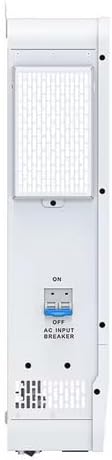
The side view of the inverter shows the integrated AC input breaker, clearly labeled "ON" and "OFF", providing an accessible safety switch for the AC power supply.
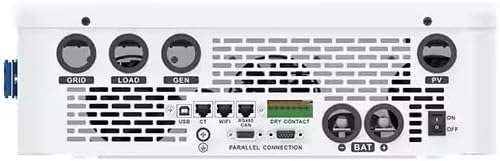
This image provides a detailed look at the bottom panel, revealing connection terminals for GRID, LOAD, GEN, PV, and BAT. Communication ports such as USB, WIFI, RS485, and CAN are also visible, along with a "DRY CONTACT" for external control.

The rear view of the inverter shows the robust mounting brackets at the top, designed for secure wall installation. Ventilation grilles are also visible, indicating the cooling system.
4. Setup
4.1 Unpacking and Inspection
Upon receiving the inverter, carefully unpack it and inspect for any shipping damage. Report any damage to your dealer immediately.
4.2 Mounting the Inverter
Choose a suitable location that is well-ventilated, dry, and protected from direct sunlight and moisture. Ensure sufficient clearance around the unit for proper airflow. Mount the inverter securely using appropriate fasteners for the wall material.
4.3 Wiring Connections
All wiring must comply with local electrical codes and regulations. Ensure all circuit breakers are in the OFF position before making any connections.
- Battery Connection: Connect the battery bank (lead-acid or lithium iron phosphate) to the designated BAT terminals. Ensure correct polarity. The inverter supports various battery types and allows setting priority for power sources (utility or solar) when batteries are unavailable.
- PV Input Connection: Connect your solar panel array to the PV input terminals. The inverter features two MPPT inputs, supporting a maximum current of 22A per circuit, suitable for high-power modules.
- AC Output Connection (LOAD): Connect your household loads to the LOAD terminals. The inverter supports single-phase three-wire output with selectable voltage levels: 100Vac, 105Vac, 110Vac, and 120Vac.
- AC Input Connection (GRID/GEN): Connect the utility grid or a generator to the GRID/GEN terminals.
- Communication Interfaces: The inverter supports CAN, USB, and RS485 communication for monitoring and control.
4.4 Parallel Connection
The ASP series inverter supports parallel connection of up to 6 units to increase overall system capacity. Refer to the specific parallel connection guide for detailed instructions and wiring diagrams. Note that while the ID setting items are consistent across the ASP series, output and recommended cable diameters may vary, so cross-reference with the English manual for precise values.
5. Operating the Inverter
5.1 Initial Power-Up
After all connections are secure, switch on the AC input breaker, then the battery breaker (if applicable), and finally the inverter's main switch. The LCD screen will illuminate, displaying system status.
5.2 LCD Display and Control
The large LCD screen provides clear information on power flow and operational status. Use the navigation buttons to browse through various parameters and settings, including voltage, current, and charging/discharging status.
5.3 Charging Modes
The inverter offers four selectable charging modes:
- Solar Only: Charges batteries exclusively from solar power.
- Utility Priority: Prioritizes utility power for charging, supplementing with solar if available.
- Solar Priority: Prioritizes solar power for charging, supplementing with utility if needed.
- Utility/PV Mixed Charging: Utilizes both utility and PV power for charging.
5.4 Time Slot Settings
Configure time slots for main charging cut-in/cut-out and switch between battery discharge and main bypass power supply modes, optimizing energy usage based on your schedule or electricity rates.
5.5 Power Saving Mode
The inverter features an energy-saving mode to reduce no-load energy loss. It seamlessly switches between utility output and inverter output modes.
6. Maintenance
Regular maintenance ensures the longevity and optimal performance of your inverter.
- Cleaning: Periodically clean the exterior of the inverter with a dry cloth. Ensure ventilation openings are free from dust and debris.
- Connection Checks: Annually inspect all electrical connections for tightness and signs of corrosion.
- Fan Operation: The inverter's fan operates as needed for cooling. While the fan may run even under low load, the energy-saving mode helps minimize consumption.
- Battery Health: For battery-based systems, regularly monitor battery voltage and health according to battery manufacturer guidelines.
7. Troubleshooting
This section provides guidance for common issues. For problems not listed here, contact customer support.
| Problem | Possible Cause | Solution |
|---|---|---|
| Inverter not powering on | No AC input, battery disconnected, or low battery voltage. | Check AC input breaker, battery connections, and battery charge level. |
| No output power | Overload, short circuit, or protection activated. | Reduce load, check for short circuits, and reset the inverter. The inverter has comprehensive protection functions including voltage, overcurrent, over-discharge, and overload protection. |
| Low charging current | Insufficient solar input, high ambient temperature, or battery full. | Check PV panel connections, ensure adequate ventilation, or verify battery status. |
| Unusual noise from inverter | Fan operation under load, or internal component issue. | Normal fan operation occurs during cooling. If noise is excessive or unusual, contact support. |
8. Specifications
The following table outlines the key technical specifications for the GOLDEN ENERGY SRNE ASP4865U140-H Hybrid Inverter. For a more detailed breakdown, please refer to the official specification sheet image below.

This image presents a comprehensive table of specifications for various ASP series models, including the ASP4865U140-H. It covers inverter output power, battery compatibility, solar input details (MPPT), grid/generator input, efficiency, and general data such as dimensions, weight, and communication interfaces.
| Feature | Specification |
|---|---|
| Model Number | ASP4865U140-H |
| Rated Output Power | 6.5 KW |
| Input Voltage | PV425V (Max PV Array Power 5,000W + 5,000W) |
| Output Voltage | 100V/200V Single-Phase Three-Wire (Selectable: 100Vac, 105Vac, 110Vac, 120Vac) |
| Battery Type Support | Lead-acid, Lithium Iron Phosphate |
| MPPT Efficiency | 99.9% |
| Parallel Capability | Up to 6 units |
| Dimensions (Product Size) | 62 x 43.5 x 13.5 cm |
| No-load Energy Loss (ASP4865U140-H) | 70W per hour |
| Communication | CAN, USB, RS485 |
9. Warranty and Support
9.1 Warranty Policy
The GOLDEN ENERGY SRNE ASP Series Hybrid Inverter comes with a six-month warranty period covering natural failures that occur during proper use in accordance with the instruction manual and manufacturer's warranty regulations.
The warranty does not cover:
- Damage caused by intentional misuse or improper maintenance.
- Failures resulting from incorrect usage.
- Damage due to unauthorized repairs or modifications to the system.
- Damage from connecting self-made batteries, as proper usage conditions cannot be verified.
Warranty claims are processed in accordance with the manufacturer's policies in the country of origin. This may involve multiple exchanges of information, including requests for voltage, current, and setting measurements from the customer, which can extend the resolution time. Please note that replacement products are not provided during the period required for communication with the manufacturer or for repairs/parts replacement.
9.2 Customer Support
For technical assistance, warranty claims, or any questions regarding your ASP4865U140-H inverter, please contact your dealer or the official GOLDEN ENERGY / SRNE support channel. Have your model number and purchase details ready when contacting support.
For further assistance, please visit the official GOLDEN ENERGY website or contact your local distributor.
Ask a question about this manual
Ask about setup, troubleshooting, compatibility, parts, safety, or missing instructions. Manuals+ will review the question and use this page’s manual context to help answer it.