
1. Introduction
Thank you for choosing the Dratal DT-407 Wireless Cordless Stick Vacuum Cleaner. This lightweight and versatile vacuum is designed for efficient cleaning of floors, sofas, carpets, and hard-to-reach areas. With its powerful suction, multiple attachments, and convenient cordless design, it simplifies your daily cleaning tasks. Please read this manual thoroughly before use to ensure proper operation and maintenance.
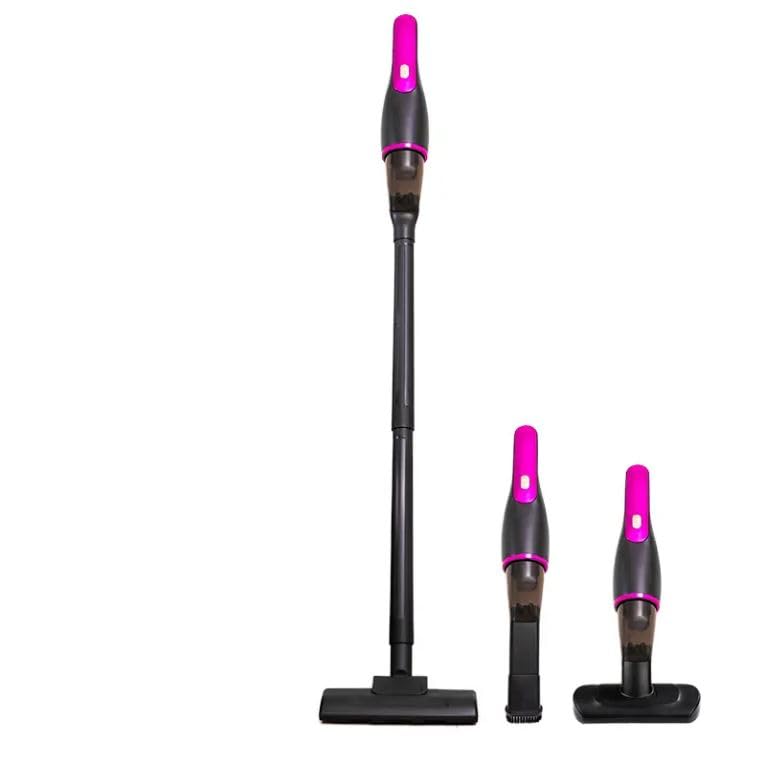
Image 1.1: Dratal DT-407 Wireless Cordless Stick Vacuum Cleaner in its assembled form.
2. Important Safety Instructions
To reduce the risk of fire, electric shock, or injury, please observe the following safety precautions:
- Read all instructions before using this appliance.
- This appliance is for household use only. Do not use outdoors or on wet surfaces.
- Do not allow to be used as a toy. Close attention is necessary when used by or near children.
- Use only as described in this manual. Use only manufacturer's recommended attachments.
- Do not use with damaged cord or plug. If appliance is not working as it should, has been dropped, damaged, left outdoors, or dropped into water, return it to a service center.
- Do not pull or carry by cord, use cord as a handle, close a door on cord, or pull cord around sharp edges or corners. Do not run appliance over cord. Keep cord away from heated surfaces.
- Do not unplug by pulling on cord. To unplug, grasp the plug, not the cord.
- Do not handle plug or appliance with wet hands.
- Do not put any object into openings. Do not use with any opening blocked; keep free of dust, lint, hair, and anything that may reduce airflow.
- Keep hair, loose clothing, fingers, and all parts of body away from openings and moving parts.
- Do not pick up anything that is burning or smoking, such as cigarettes, matches, or hot ashes.
- Do not pick up flammable or combustible liquids, such as gasoline, or use in areas where they may be present.
- Do not pick up toxic material (e.g., chlorine bleach, ammonia cleaner).
- Do not use without dust cup and/or filters in place.
- Exercise extra care when cleaning on stairs.
- This vacuum is designed for dry messes only and should not be used to clean up wet spills or liquids.
3. Package Contents
Carefully unpack your Dratal DT-407 vacuum cleaner and check for the following items:
- 1 x Fuselage (Main Unit)
- 1 x Flat Nozzle Long Tube (Crevice Tool)
- 1 x Extension Rod
- 1 x Floor Brush
- 1 x Mite Brush
- 1 x USB Type-C Cable
- 1 x User Manual (This document)
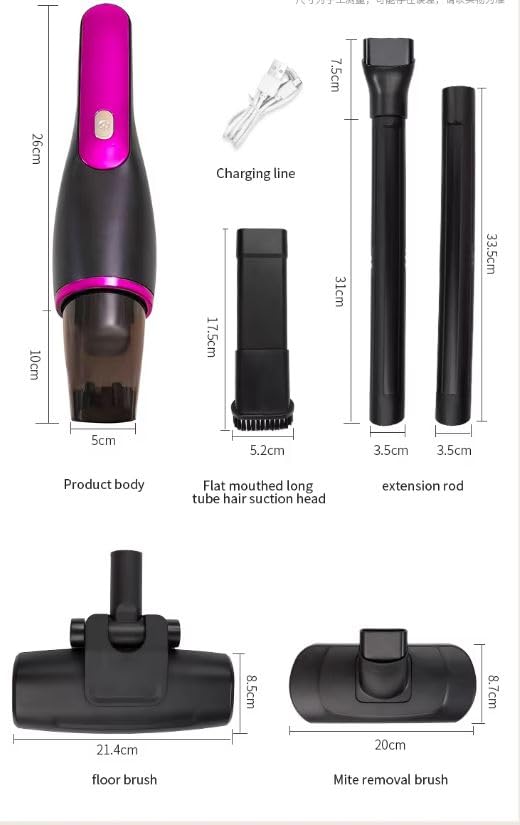
Image 3.1: All included components of the Dratal DT-407 vacuum cleaner, including the main unit, various attachments, and charging cable, with approximate dimensions.
4. Product Overview and Components
Familiarize yourself with the parts of your Dratal DT-407 vacuum cleaner:
Main Unit (Fuselage)
- Power Button: Turns the vacuum on and off.
- Dust Cup: Collects dust and debris (700ml capacity).
- Filter Element: HEPA filter for effective dust filtration.
- Charging Port: USB Type-C port for charging.
- Battery Indicator: Shows battery status.
Attachments
- Extension Rod: Connects the main unit to floor brush for upright cleaning.
- Floor Brush: For general floor cleaning (hard floors, low-pile carpets).
- Flat Nozzle Long Tube (Crevice Tool): Ideal for narrow gaps, corners, and hard-to-reach areas.
- Mite Brush: Designed for cleaning bedding, upholstery, and removing dust mites.
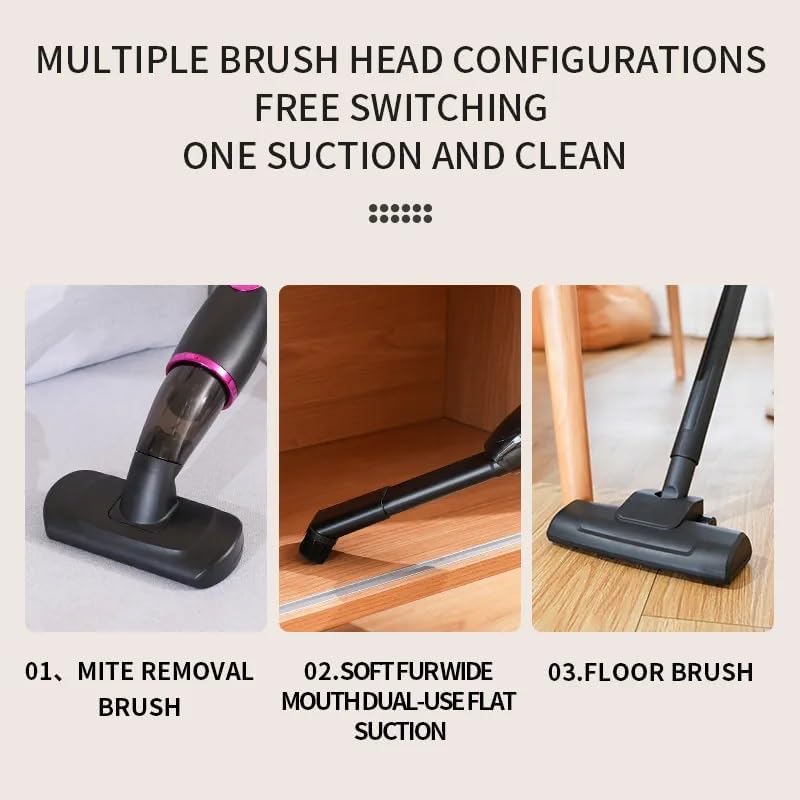
Image 4.1: The main unit with various brush heads, including the mite removal brush, soft fur wide mouth dual-use flat suction (crevice tool), and floor brush, demonstrating their different applications.
5. Assembly and Setup
5.1 Charging the Battery
- Connect the USB Type-C cable to the charging port on the main unit.
- Plug the other end of the USB cable into a compatible USB power adapter (not included) or a USB port.
- The battery indicator will show charging status. A full charge typically takes approximately 3-4 hours.
- Disconnect the charger once fully charged.
5.2 Assembling the Vacuum
The Dratal DT-407 can be assembled in various configurations:
- Handheld Mode: Attach any desired brush head (Flat Nozzle Long Tube or Mite Brush) directly to the main unit.
- Stick Vacuum Mode: Connect the Extension Rod to the main unit. Then, attach the Floor Brush to the other end of the Extension Rod.
- Ensure all connections are secure before use.
6. Operating Instructions
6.1 Power On/Off
Press the power button on the main unit to turn the vacuum cleaner on. Press it again to turn it off.
6.2 Using Attachments
- Floor Brush: Use with the extension rod for cleaning hard floors, tiles, and low-pile carpets. Glide the brush head over the surface to pick up dust and debris.
- Flat Nozzle Long Tube (Crevice Tool): Attach directly to the main unit or the extension rod. Ideal for cleaning tight spaces, corners, car interiors, and between sofa cushions.
- Mite Brush: Attach directly to the main unit. Use this brush on mattresses, pillows, and upholstered furniture to effectively remove dust mites and fine particles.
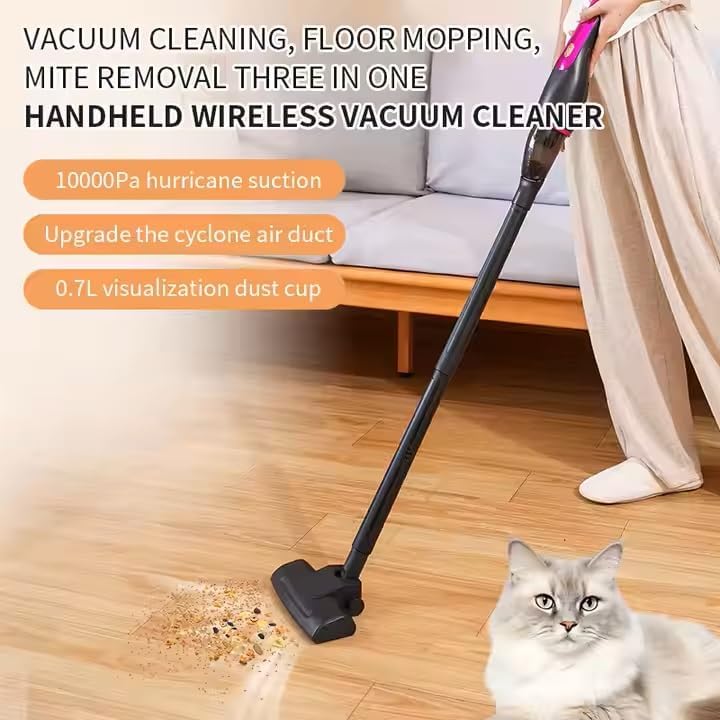
Image 6.1: The Dratal DT-407 vacuum cleaner in stick mode, effectively cleaning a wooden floor.
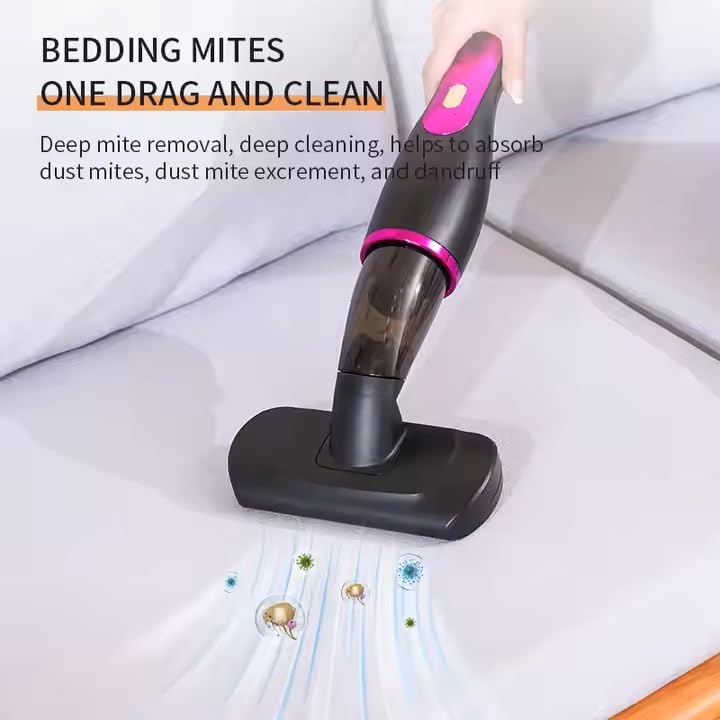
Image 6.2: The mite brush attachment in action, demonstrating its use for deep cleaning bedding and removing mites.
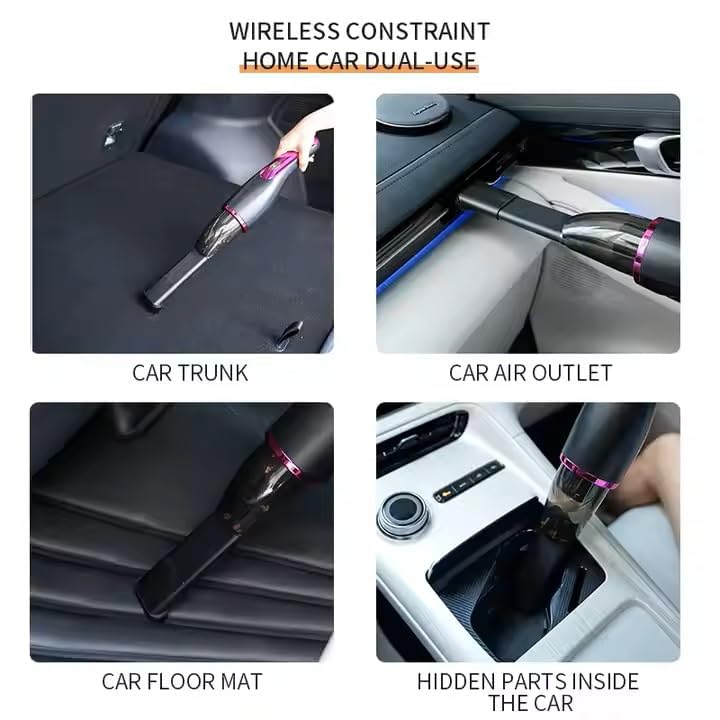
Image 6.3: The versatility of the Dratal DT-407 for car cleaning, showing its use in the car trunk, near the air outlet, on floor mats, and in hidden parts of the car interior.
6.3 Dust Cup Emptying
Empty the dust cup regularly to maintain optimal suction power. The 0.7L visualization dust cup allows you to see when it needs emptying. Simply detach the dust cup from the main unit and press the release button to open the bottom flap and dispose of the contents.
7. Maintenance
Regular maintenance ensures the longevity and performance of your vacuum cleaner.
7.1 Cleaning the Dust Cup
- Ensure the vacuum is turned off and disconnected from charging.
- Detach the dust cup from the main unit.
- Empty the collected debris into a waste bin.
- Wipe the inside of the dust cup with a dry cloth. Do not wash the dust cup with water unless specified by the manufacturer.
7.2 Cleaning the Filter
The HEPA filter should be cleaned regularly, ideally after every few uses, or when suction power decreases.
- Remove the dust cup and then carefully pull out the filter element.
- Tap the filter gently over a trash can to remove loose dust.
- If necessary, rinse the filter under cold running water. Ensure it is completely dry before reinserting it into the vacuum. Drying can take up to 24 hours.
- Reassemble the filter and dust cup.
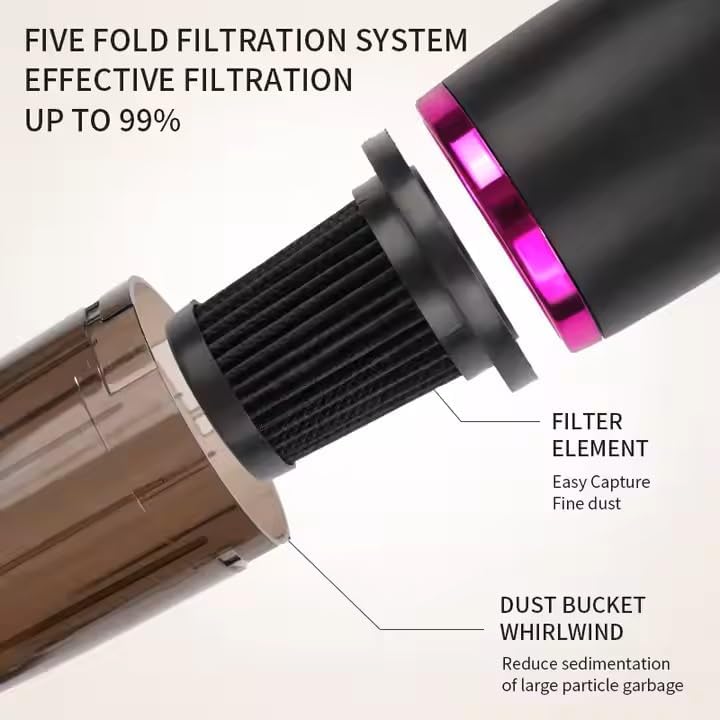
Image 7.1: Detailed view of the vacuum's filtration system, highlighting the filter element and dust bucket whirlwind, which are crucial for effective filtration and require regular cleaning.
7.3 Cleaning Brush Heads
Periodically check brush heads for tangled hair or debris. Use scissors to cut away any tangled hair and remove it. Wipe the brush heads with a damp cloth if needed.
8. Troubleshooting
If you encounter any issues with your Dratal DT-407, please refer to the following table:
| Problem | Possible Cause | Solution |
|---|---|---|
| Vacuum does not turn on | Battery is depleted Power button not pressed correctly | Charge the battery fully Press the power button firmly |
| Low suction power | Dust cup is full Filter is clogged Attachment/nozzle is blocked | Empty the dust cup Clean or replace the filter Remove any blockages from the attachment or nozzle |
| Vacuum stops during operation | Battery is low Overheating protection activated | Recharge the battery Turn off the vacuum and let it cool down for 30 minutes before resuming use |
| Charging not working | Charging cable or adapter faulty Charging port dirty | Try a different USB Type-C cable and adapter Clean the charging port gently |
9. Specifications
| Feature | Specification |
|---|---|
| Model | DT-407 |
| Rated Power | 100W |
| Suction Power | Up to 50AW |
| Dust Cup Capacity | 700ml |
| Battery Capacity | 2000mAh Lithium Battery |
| Filter Type | HEPA Filter |
| Form Factor | Stick / Handheld |
| Product Dimensions | 8L x 8W x 32H Centimeters (Main Unit) |
| Item Weight | 475 g |
| Country of Origin | China |
10. Warranty and Support
10.1 Warranty Information
Your Dratal DT-407 Wireless Cordless Stick Vacuum Cleaner comes with a standard manufacturer's warranty against defects in materials and workmanship. The specific duration and terms of the warranty may vary by region and retailer. Please retain your proof of purchase for warranty claims. For detailed warranty information, refer to the warranty card included in your package or contact your retailer.
10.2 Customer Support
If you have any questions, require technical assistance, or need to report an issue with your product, please contact Dratal customer support through the retailer where you purchased the product or visit the official Dratal website for contact information.