
Introduction
This manual provides detailed instructions for the use and maintenance of your Generic Aerbes AB-D461 Wireless Bluetooth 5.0 Headset. This headset is designed to deliver a high-quality audio experience with advanced noise cancellation and deep bass, ensuring clear sound for music and calls. It features Bluetooth 5.0 for stable connectivity and a portable design for convenience. Please read this manual thoroughly before using the product to ensure proper operation and longevity.
Package Contents
Please check the package contents upon unboxing. If any items are missing or damaged, contact your retailer.
- Wireless Bluetooth Earbuds (Left and Right)
- Portable Charging Case
- USB Charging Cable
- Multiple Sizes of Ear Tips
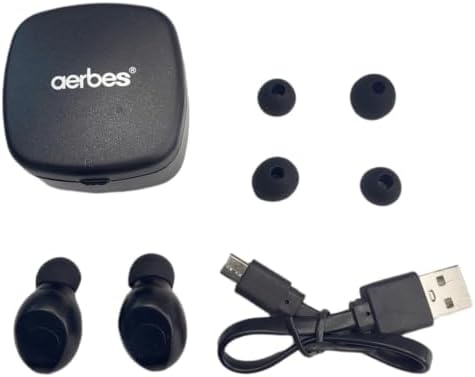
Figure 1: Contents of the Aerbes AB-D461 package, including earbuds, charging case, USB cable, and ear tips.
Setup
1. Initial Charging
Before first use, fully charge the earbuds and the charging case.
- Place both earbuds into the charging case. Ensure they are correctly seated in their respective slots.
- Connect the USB charging cable to the charging port on the case and plug the other end into a USB power source (e.g., computer, wall adapter).
- The indicator lights on the earbuds and/or case will illuminate to show charging status. Once fully charged, the lights may change color or turn off.
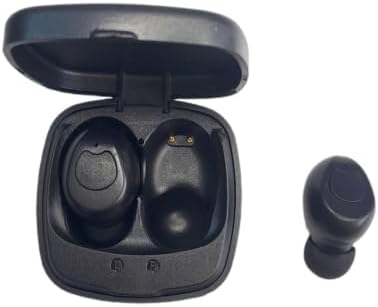
Figure 2: Earbuds placed in the charging case, showing charging contacts.
2. Pairing with a Device
The earbuds are designed for automatic connection.
- Open the charging case. The earbuds will automatically power on and enter pairing mode.
- On your device (smartphone, tablet, etc.), enable Bluetooth and search for available devices.
- Select "Aerbes AB-D461" (or similar name) from the list of found devices.
- Once connected, you will hear a confirmation tone, and the indicator lights on the earbuds may change.
- After the initial pairing, the earbuds will automatically connect to the last paired device when removed from the case.
Operating Instructions
Power On/Off
- Power On: Open the charging case, and the earbuds will power on automatically. Alternatively, press and hold the touch control area on both earbuds for approximately 3 seconds.
- Power Off: Place the earbuds back into the charging case and close the lid. They will power off automatically. Alternatively, press and hold the touch control area on both earbuds for approximately 5 seconds.
Music Playback
- Play/Pause: Tap the touch control area on either earbud once.
- Next Track: Double-tap the touch control area on the right earbud.
- Previous Track: Double-tap the touch control area on the left earbud.
- Volume Up: Triple-tap the touch control area on the right earbud.
- Volume Down: Triple-tap the touch control area on the left earbud.
Call Management
- Answer/End Call: Tap the touch control area on either earbud once.
- Reject Call: Press and hold the touch control area on either earbud for 2 seconds.
Voice Assistant
- Activate Voice Assistant: Press and hold the touch control area on either earbud for 3 seconds (when not on a call).
Maintenance
Cleaning
- Use a soft, dry, lint-free cloth to clean the earbuds and charging case.
- Do not use abrasive cleaners, solvents, or aerosol sprays.
- Regularly clean the ear tips and charging contacts to ensure optimal performance.
Storage
- When not in use, store the earbuds in their charging case to protect them and keep them charged.
- Store the device in a cool, dry place, away from extreme temperatures and direct sunlight.
Battery Care
- To prolong battery life, avoid fully discharging the battery frequently.
- Charge the device regularly, even if not in frequent use.
Troubleshooting
| Problem | Possible Cause | Solution |
|---|---|---|
| Earbuds not pairing with device. | Bluetooth is off on device; earbuds are out of range; earbuds not in pairing mode; previously paired device interfering. | Ensure Bluetooth is enabled on your device. Place earbuds closer to the device. Ensure earbuds are removed from the case to enter pairing mode. Turn off Bluetooth on other nearby devices. Try forgetting the device in your phone's Bluetooth settings and re-pairing. |
| No sound from earbuds. | Volume too low; earbuds not connected; media paused; earbud battery low. | Increase volume on both your device and the earbuds. Check Bluetooth connection. Ensure media is playing. Charge the earbuds. |
| Earbuds not charging. | Charging cable faulty; charging port dirty; earbuds not seated correctly in case; case battery empty. | Try a different USB cable and power source. Clean charging contacts on earbuds and case. Ensure earbuds are properly placed in the case. Charge the charging case. |
| Poor sound quality or intermittent connection. | Interference; device too far; low battery. | Move closer to your device. Avoid environments with strong Wi-Fi or other Bluetooth signals. Ensure earbuds are fully charged. |
Specifications
| Model Number | AB-D461 |
| Bluetooth Version | 5.0 |
| Wireless Range | Up to 10 meters (33 feet) |
| Talk Time | Approximately 4 hours |
| Standby Time | Approximately 40 hours |
| Charging Case Battery Capacity | 300mAh |
| Noise Control Type | Hybrid Noise Cancellation |
| Form Factor | In Ear |
| Material | Plastic |
| Color | White |
| Manufacturer | Generic |
| Country of Origin | South Africa |
Warranty and Support
Warranty Information
This product comes with a 6 months limited warranty from the date of purchase. This warranty covers manufacturing defects and workmanship. It does not cover damage caused by misuse, accidents, unauthorized modifications, or normal wear and tear. Please retain your proof of purchase for warranty claims.
Customer Support
For technical assistance, warranty claims, or any questions regarding your Aerbes AB-D461 Wireless Bluetooth Headset, please contact your retailer or the manufacturer's customer service department. Refer to your purchase documentation for specific contact details.