
BLACK+DECKER BD0390-WHTGRY
BLACK+DECKER Magic Mop with Bucket
Model: BD0390-WHTGRY
User Instruction Manual
Product Overview
The BLACK+DECKER Magic Mop with Bucket is designed for efficient and effortless floor cleaning. It features an innovative dual-chamber system, separating wet and dry functions to ensure your microfiber pads are always optimally prepared for cleaning.
This versatile cleaning tool is suitable for a variety of hard floor surfaces, including wood, vinyl, and tile. The durable construction, including a 56-inch extendable handle, provides comfortable use, while the compact bucket design allows for convenient storage. Each unit comes with two reusable and machine-washable microfiber pads, offering an eco-friendly and cost-effective cleaning solution. The generous 4-liter capacity in both wet and dry chambers minimizes the need for frequent refills, making it ideal for tackling larger cleaning tasks.

Figure 1: The BLACK+DECKER Magic Mop with Bucket and its retail packaging, highlighting its key features.
Components Included
Your BLACK+DECKER Magic Mop with Bucket package includes the following components:
- 1 x Dual-Chamber Mop Bucket (Wet and Dry)
- 1 x Mop Handle (multi-piece assembly)
- 2 x Washable Microfiber Pads
- 1 x Angling Mop Head

Figure 2: All components included in the BLACK+DECKER Magic Mop and Bucket Set, ready for assembly.
Setup Guide
Follow these steps to assemble your BLACK+DECKER Magic Mop:
- Assemble the Mop Handle: Connect the individual sections of the mop handle by twisting them clockwise until securely tightened. Ensure all sections are firmly joined to achieve the full 56-inch length for optimal reach.
- Attach the Mop Head: Align the assembled handle with the angling mop head. Push firmly until it clicks into place, ensuring a secure connection.
- Attach Microfiber Pad: Place one of the washable microfiber pads flat on the floor. Align the mop head over the pad and press down firmly. The Velcro strips on the mop head will securely attach to the microfiber pad.
- Prepare the Bucket: Ensure the wet+dry chamber lid is properly seated on the bucket. The lid is designed to fit snugly, providing the wash and dry slots.
- Fill the Wet Chamber: Open the designated fill port for the wet chamber (marked "WASH") and fill with clean water and your preferred floor cleaning solution (if desired). Do not exceed the maximum fill line (4L).
Operating Instructions
The BLACK+DECKER Magic Mop is designed for ease of use across various hard floor surfaces. Follow these instructions for effective cleaning:
1. Wetting the Mop Pad:
- Position the mop head vertically and insert it into the "WASH" chamber slot of the bucket.
- Push the mop handle down repeatedly into the "WASH" chamber. This action will immerse the microfiber pad in the cleaning solution and clean it. Repeat 2-3 times for thorough wetting.
- Slowly pull the mop head out of the "WASH" chamber.

Figure 3: The dual-chamber system, showing the wet chamber on the left for cleaning and wetting the pad, and the dry chamber on the right for wringing.
2. Drying/Wringing the Mop Pad:
- After wetting, or when the mop pad is dirty from cleaning, position the mop head vertically and insert it into the "DRY" chamber slot.
- Push the mop handle down repeatedly into the "DRY" chamber. The integrated scraper will remove excess water and dirt from the microfiber pad, leaving it damp and ready for use or storage. Repeat 3-5 times for optimal dryness.
- Slowly pull the mop head out of the "DRY" chamber.
3. Mopping Floors:
Once the mop pad is prepared, you can begin mopping. The mop head's angling design allows for easy maneuverability around furniture and into tight spaces.

Figure 4: The mop in action, demonstrating its ease of use and maneuverability on a hard floor surface.
4. Suitable Surfaces:
This mop is safe and effective for cleaning:
- Wood flooring
- Vinyl flooring
- Tile flooring

Figure 5: The mop is safe for use on various hard floor surfaces, including wood, vinyl, and tile.
Maintenance
Cleaning the Microfiber Pads:
The included microfiber pads are reusable and machine washable. For best results:
- Remove the microfiber pad from the mop head after each use.
- Machine wash the pads with similar colors in cold water.
- Do not use bleach or fabric softeners, as these can damage the microfiber.
- Tumble dry on low heat or air dry.
Draining the Bucket:
After each cleaning session, it is important to empty and clean the mop bucket:
- Locate the drain plugs at the bottom of each chamber (wet and dry).
- Carefully remove the drain plugs to empty the dirty water.
- Rinse both chambers with clean water.
- Replace the drain plugs securely before next use.
- Store the bucket in a dry, cool place.
Troubleshooting
If you encounter any issues with your BLACK+DECKER Magic Mop, please refer to the common problems and solutions below:
| Problem | Possible Cause | Solution |
|---|---|---|
| Mop pad not getting wet enough. | Insufficient water in the wet chamber; mop not fully immersed. | Ensure the wet chamber is filled to the appropriate level (4L). Push the mop handle down firmly and repeatedly into the "WASH" slot to ensure full immersion and saturation. |
| Mop pad remains too wet after wringing. | Not enough passes through the dry chamber; scraper not effectively wringing. | Push the mop handle down firmly and repeatedly (5-7 times) into the "DRY" slot to allow the scraper to remove more water. Ensure the mop head is positioned correctly in the slot. |
| Bucket tips over easily. | Bucket is placed on an uneven surface; excessive force applied during wringing. | Place the bucket on a flat, stable surface. Apply steady, controlled pressure when pushing the mop into the chambers. |
| Handle sections become loose. | Sections not tightened sufficiently during assembly. | Twist each handle section clockwise until it is securely tightened. Periodically check and re-tighten during use if necessary. |
Specifications
| Brand | BLACK+DECKER |
| Model Number | BD0390-WHTGRY |
| Product Dimensions | 10 x 9 x 15 inches (Bucket) |
| Item Weight | 3.54 pounds |
| Handle Length | Up to 56 inches (143 cm) |
| Wet Tank Capacity | 4 Liters (1 Gallon) |
| Dry Tank Capacity | 4 Liters (1 Gallon) |
| Included Components | 2 Microfiber Pads |
| Material | Plastic, Aluminum (Handle), Microfiber (Head) |
| Assembly Required | Yes |
| Country of Origin | China |
| UPC | 840147858337 |
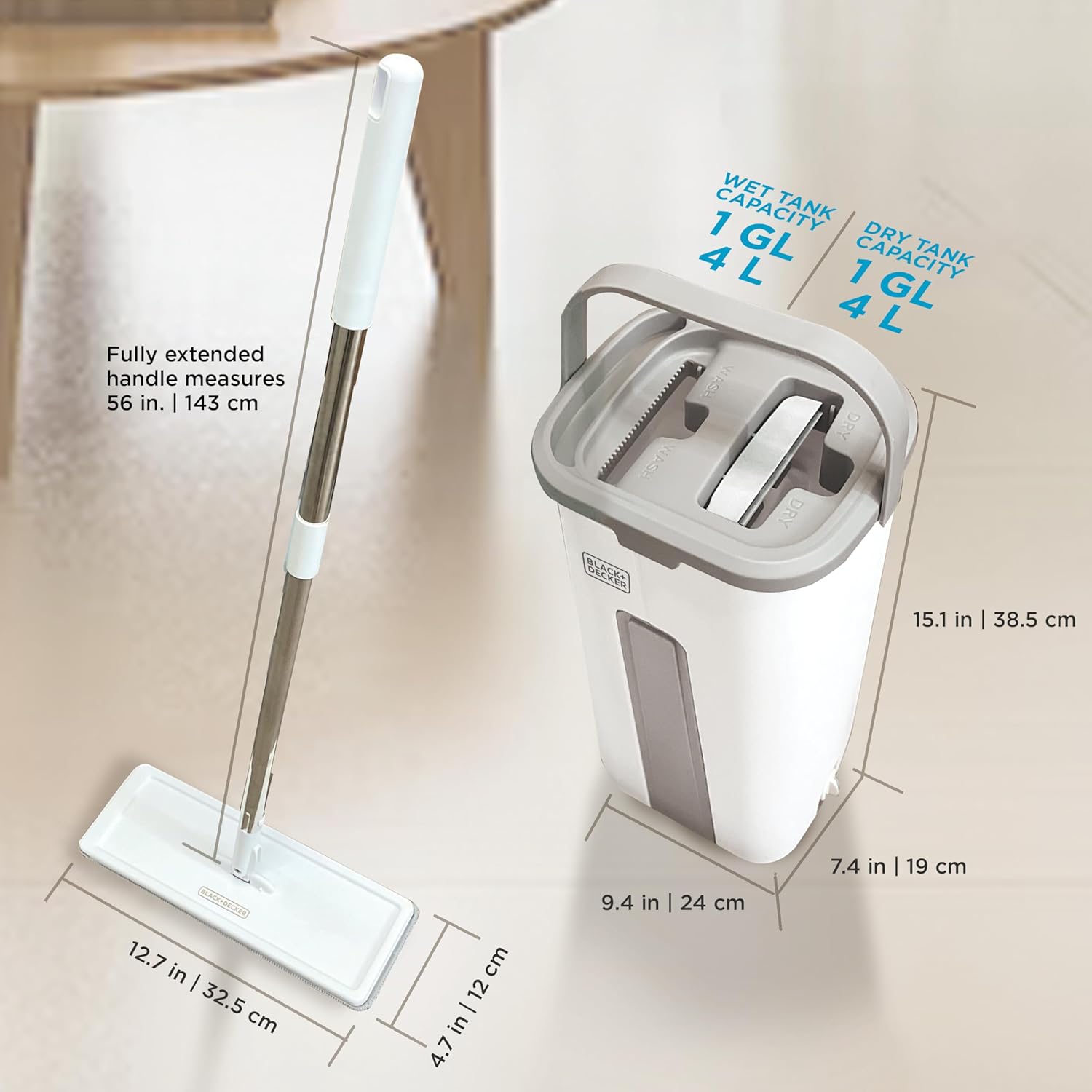
Figure 6: Detailed dimensions of the mop bucket and the fully extended mop handle.
Warranty and Support
For warranty information, technical support, or to purchase replacement parts, please contact BLACK+DECKER customer service. Refer to the product packaging or the official BLACK+DECKER website for the most up-to-date contact details and warranty terms.
Online Support: Visit the official BLACK+DECKER website for FAQs, product registration, and additional resources.
Customer Service: Contact details for phone or email support can typically be found on the product's packaging or the manufacturer's website.
Ask a question about this manual
Ask about setup, troubleshooting, compatibility, parts, safety, or missing instructions. Manuals+ will review the question and use this page’s manual context to help answer it.