
100071701
User Manual: OEM Part Remote Control for ONN Roku TV Model 100071701
This manual provides instructions for the setup, operation, and maintenance of your new OEM Part remote control, designed for seamless compatibility with ONN Roku TV 55” QLED 4K UHD (2160p) Smart TV Model 100071701.
Introduction
Thank you for choosing the OEM Part Remote Control. This remote is designed to work out of the box with your ONN Roku TV Model 100071701, requiring no programming. Simply insert batteries and begin use.
1. Setup
1.1 Battery Installation
Your remote control requires two (2) AAA (LR6) batteries. Batteries are not included.
- Locate the battery compartment on the back of the remote control.
- Slide the battery cover downwards to open.
- Insert two AAA batteries, ensuring the positive (+) and negative (-) terminals align correctly with the indicators inside the compartment.
- Slide the battery cover back into place until it clicks securely.
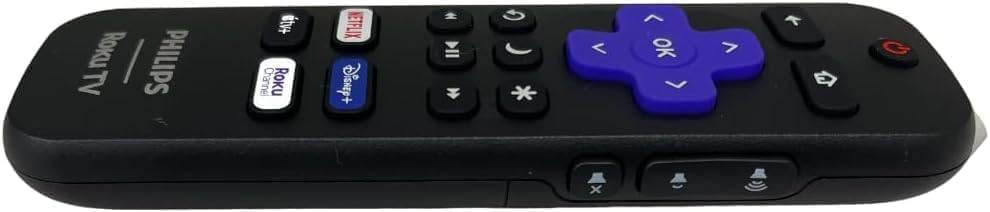
This image displays the side profile of the remote control, highlighting the area where the battery cover is located. The battery compartment is typically on the back, and this view helps in identifying the sliding mechanism for opening it.
1.2 Initial Use
Once batteries are installed, the remote is ready for immediate use. No programming or pairing is required for compatible ONN Roku TV models.
2. Operating Your Remote Control
Familiarize yourself with the buttons on your remote control for optimal use.
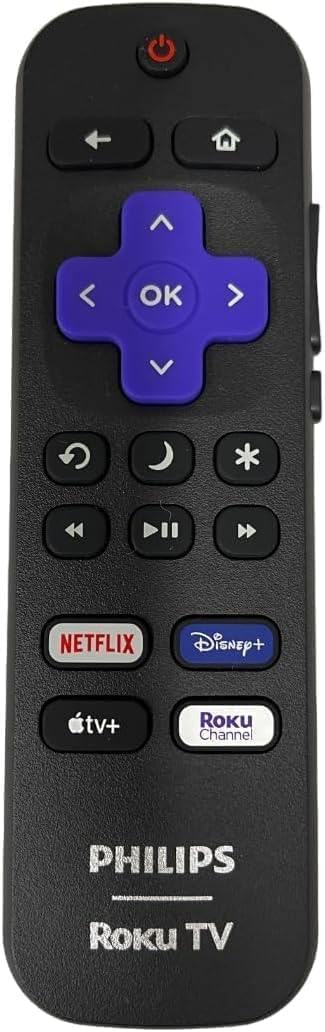
This image shows the front face of the remote control, displaying all the buttons. From top to bottom, these include the Power button, navigation cluster (Back, Home, Directional Pad, OK), playback controls (Rewind, Play/Pause, Fast Forward), Mute, Volume Up/Down, and dedicated streaming service shortcut buttons (Netflix, Disney+, Apple TV+, Roku Channel).
2.1 Button Functions
- Power: Turns the TV on or off.
- Back: Returns to the previous screen or menu.
- Home: Navigates to the Roku Home screen.
- Directional Pad (Up, Down, Left, Right): Navigates through menus and content.
- OK: Selects a highlighted item.
- Volume Up/Down: Adjusts the TV volume.
- Mute: Mutes or unmutes the TV audio.
- Rewind, Play/Pause, Fast Forward: Controls media playback.
- Shortcut Buttons (Netflix, Disney+, Apple TV+, Roku Channel): Provides direct access to these streaming applications.
- Star (*): Accesses options or settings within certain apps or menus.
- Sleep/Moon icon: May activate a sleep timer or display options.
- Replay/Loop icon: Replays the last few seconds of content.
3. Maintenance
3.1 Cleaning
To clean your remote, gently wipe it with a soft, dry cloth. Do not use liquid cleaners or abrasive materials.
3.2 Battery Replacement
Replace batteries when the remote's response becomes sluggish or stops working. Always replace both batteries at the same time with new AAA batteries. Do not mix old and new batteries, or different types of batteries.
4. Troubleshooting
| Problem | Solution |
|---|---|
| Remote not responding | Check battery orientation and charge. Replace batteries if necessary. Ensure there are no obstructions between the remote and the TV's IR receiver. Try restarting the TV. |
| Buttons are sticky or unresponsive | Clean the remote surface. Avoid spilling liquids on the remote. |
| Remote range is limited | Ensure fresh batteries are installed. Remove any objects blocking the line of sight between the remote and the TV. |
If issues persist, please refer to the 'Support' section for further assistance.
5. Specifications
- Model: 100071701
- Compatible Devices: ONN Roku TV 55” QLED 4K UHD (2160p) Smart TV Model 100071701, and other compatible Roku TVs.
- Power Source: 2 x AAA (LR6) Batteries (not included)
- Dimensions: 1.77 x 0.87 x 5.55 inches
- Weight: 1 pounds (without batteries)
- Color: Black
- Special Feature: No Programming Required
6. Support
For any questions or assistance regarding your OEM Part remote control, please feel free to contact the seller or manufacturer. Provide your product model number (100071701) for quicker service.
If your TV Model is not listed as compatible, please contact us, and we will gladly help you find the correct remote for your TV.
Related documents100071701


Ask a question about this manual
Ask about setup, troubleshooting, compatibility, parts, safety, or missing instructions. Manuals+ will review the question and use this page’s manual context to help answer it.