
1. Introduction
This user manual provides essential information for the safe and effective use of your Gmmhhs Replacement Battery Charger. This charger is designed to provide reliable and safe charging for compatible Samsung smartphone batteries, featuring multiple safety protections including over-charge, over-discharge, over-heat, over-current, and short-circuit protection.
2. Package Contents
- 1 x Gmmhhs Replacement Battery Charger
- 1 x USB Cable
3. Product Overview
Familiarize yourself with the components of your battery charger.

Image 1: The Gmmhhs Replacement Battery Charger shown with its accompanying USB cable.

Image 2: A top-down view of the charger, highlighting the battery slot and LCD display.
4. Setup and Installation
Follow these steps to set up your battery charger:
- Connect to Power: Insert the small end of the provided USB cable into the charger's USB input port. Connect the standard USB-A end of the cable to a compatible USB power source, such as a wall adapter (not included), computer USB port, or power bank.
- Adjust Battery Contacts: The charger features adjustable contacts to accommodate various battery sizes. Gently slide the movable contact to match the position of your battery's charging terminals.
- Insert Battery: Carefully insert your compatible Samsung battery into the charger's slot, ensuring the battery's contacts align with the charger's contacts. The battery should fit snugly.
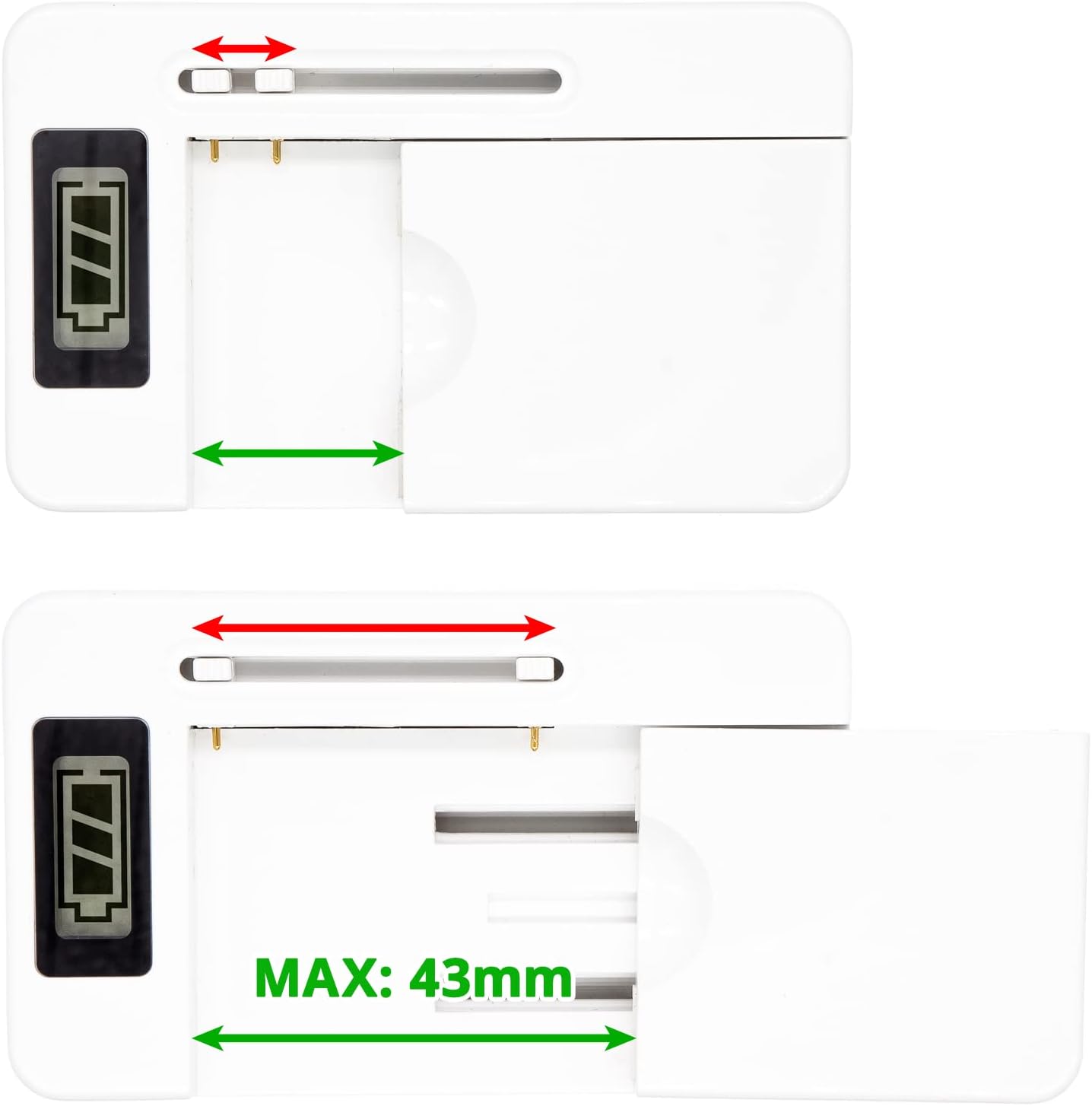
Image 3: Illustration of the adjustable battery contacts, indicating the maximum battery width of 43mm.

Image 4: A compatible battery correctly inserted into the charger, showing the LCD display.
5. Operating Instructions
Once the battery is correctly inserted and the charger is connected to power, the charging process will begin automatically. The LCD display on the charger will show the charging status, typically indicating the battery level or charging progress.
- Charging Indicator: Monitor the LCD display for charging progress.
- Full Charge: The charger will automatically stop charging once the battery reaches full capacity to prevent over-charging. The display will indicate a full charge.
- Removing Battery: Once fully charged, disconnect the charger from the power source and carefully remove the battery.
6. Maintenance and Care
- Keep the charger clean and dry. Use a soft, dry cloth to wipe any dust or debris.
- Avoid exposing the charger to extreme temperatures, direct sunlight, or high humidity.
- Do not attempt to disassemble or modify the charger. This will void the warranty and may cause damage or injury.
- Store the charger in a cool, dry place when not in use.
7. Troubleshooting
If you encounter issues with your charger, refer to the following common problems and solutions:
- Charger not turning on/charging:
- Ensure the USB cable is securely connected to both the charger and the power source.
- Verify that the power source is active and providing power.
- Check if the battery is correctly inserted and its contacts are aligned with the charger's contacts.
- Battery not charging fully:
- Ensure the battery is compatible with the charger and is not damaged.
- Allow sufficient time for charging.
- Over-heat protection activated:
- If the charger or battery becomes excessively hot, disconnect it immediately. Allow it to cool down in a well-ventilated area before attempting to charge again.
- Ensure there is adequate airflow around the charger during operation.
8. Specifications
| Feature | Detail |
|---|---|
| Model Name | DF-UC030 |
| Product Dimensions | 2.16 x 0.63 x 3.53 inches (89.63 x 54.74 x 15.88 mm) |
| Item Weight | 5.2 ounces (147.2g) |
| Recommended Uses | Replacement Battery Charging |
| Safety Protection | Over-charge, over-discharge, over-heat, over-current & short-circuit protection |
9. Warranty and Support
Your satisfaction is very important to us. This product undergoes professional testing and certification to ensure quality and safety.
If you have any questions related to this product, including pre-sales inquiries or after-sales support, please do not hesitate to contact us via email. We are committed to replying within 24 hours to address your concerns.