1. Introduction
This manual provides detailed instructions for the installation, operation, and maintenance of your Dorset DG 104 Mortise Digital Door Lock. The DG 104 offers advanced security and convenience with multiple access methods and smart features. Please read this manual thoroughly before installation and use to ensure proper functionality and safety.

Figure 1: Dorset DG 104 Mortise Digital Door Lock (Graphite Matt Finish)
2. Product Features
The Dorset DG 104 Mortise Digital Door Lock is designed for enhanced security and user convenience, incorporating several key features:
- 5-Way Access Modes: Fingerprint, PIN, RFID Card, Mechanical Key, and Mobile App Access.
- Built-in Wi-Fi: Enables remote unlocking and management via a mobile application.
- Durable Construction: Features a stainless steel deadbolt and latch for long-lasting security.
- Ergonomic Design: Compact dimensions (300x67x22 mm for front and back panels) suitable for door thicknesses of 35-90 mm.
- Low Battery Alerts: Operates on Alkaline AA batteries with notifications for low power.
- 360° Fingerprint Recognition: Stores up to 100 fingerprints for quick and secure access.
- Anti-Theft Password: Enhanced security feature to prevent password guessing.
- Auto-Locking Mode: Automatically secures the door after closing.
- Privacy Locking: Provides an additional layer of security from the inside.
- Emergency Power Supply: Micro-USB port for temporary power in case of complete battery drain.

Figure 2: Overview of 5-Way Access Modes

Figure 3: 360° Fingerprint Recognition for enhanced security
Video 1: Dorset DG 104 Product Overview and Features. This video demonstrates the various access modes and smart functionalities of the lock. (Note: The m3u8 video source is a placeholder as the exact URL was not provided in the product data.)
3. Package Contents
Upon opening the package, verify that all components are present:
- Outer body of the lock
- Inner body of the lock
- Mortise Lockset
- Mounting Screws
- RFID Cards (TAG3N)
- Alkaline AA Batteries
- Mechanical Keys
- User Manual (this document)
4. Installation Guide
Professional installation is recommended for optimal performance. Ensure your door meets the following specifications:
- Door Thickness: 35 mm to 90 mm.
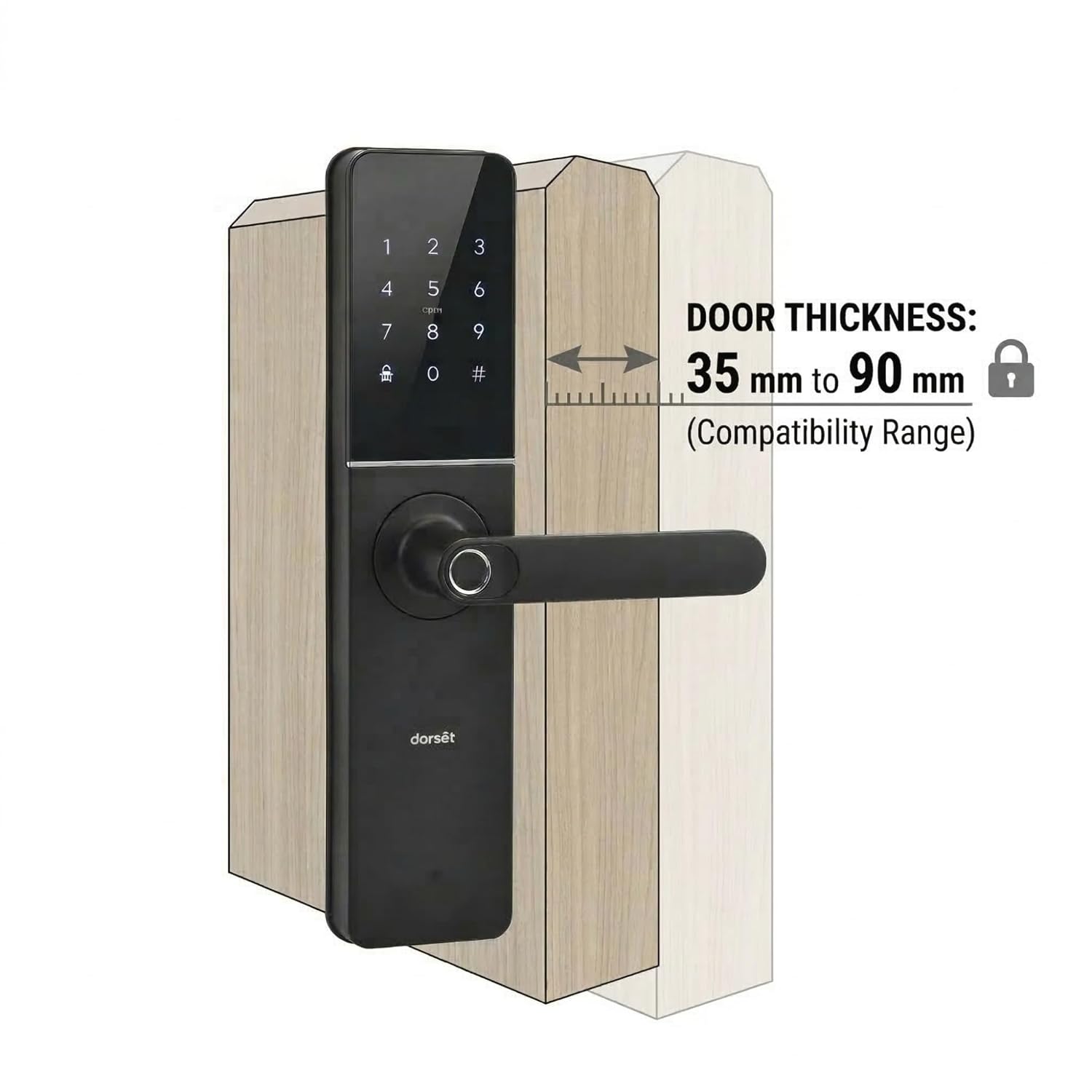
Figure 4: Door thickness compatibility for DG 104 installation
4.1. Pre-Installation Checks
- Verify all package contents against the list above.
- Ensure the door is clean and free from obstructions.
- Confirm door thickness is within the compatible range (35-90 mm).
4.2. Battery Installation
The lock requires Alkaline AA batteries.
- Locate the battery compartment on the inner body of the lock.
- Insert the specified number of AA batteries, ensuring correct polarity.
- Close the battery compartment cover securely.
4.3. Lock Assembly and Mounting
Follow the detailed diagrams and instructions provided in the separate installation template for drilling and mounting the mortise lockset, outer body, and inner body. Ensure all cables are connected correctly and not pinched.
5. Operating Instructions
5.1. Initial Setup and Master User Registration
Before using the lock, you must register a master user. Refer to the quick start guide for specific steps on registering the first fingerprint, PIN, or RFID card as the master.
5.2. Access Modes
The DG 104 offers five ways to unlock your door:
- Fingerprint Access: Place your registered finger on the fingerprint sensor. The lock will unlock upon successful verification.
- PIN Password Access: Enter your registered PIN on the touchscreen keypad, followed by the '#' key.
- RFID Card Access: Present your registered RFID card to the card reader area on the lock.
- Mechanical Key Access: In case of emergency or battery failure, use the provided mechanical key to unlock the door. Insert the key into the hidden keyhole and turn.
- Mobile App Access (Wi-Fi): Connect the lock to your home Wi-Fi network and use the Dorset Digital mobile application to remotely unlock the door, manage users, and view access logs.
5.3. Auto-Locking Function
The lock is equipped with an auto-locking feature that automatically secures the door after a set period once it is closed. This feature can typically be configured or disabled via the mobile app or lock settings.
5.4. Privacy Locking
Activate privacy locking from the inside to prevent external access, even with valid credentials. Refer to the lock's internal mechanism for specific activation steps.
6. Smart Features
The Dorset DG 104 integrates several smart features for enhanced security and convenience:
- Dual Authentication: Requires two different access methods (e.g., fingerprint + PIN) for unlocking, providing an extra layer of security.
- Anti-Theft Password: Allows users to enter random digits before or after the actual PIN to confuse onlookers, preventing password exposure.
- Low Battery Alarm: The lock will provide audible and visual alerts when the battery level is low, prompting for battery replacement.
- Emergency Power Supply: A micro-USB port is available on the outer panel for connecting a power bank to temporarily power the lock if batteries are completely drained, allowing access via registered credentials.
- Mobile Access: Remote control and monitoring through the Dorset Digital app.
- OTP Access: One-Time Password generation for temporary guest access (varies by model).
7. Maintenance
7.1. Cleaning
Clean the lock's surface and fingerprint sensor regularly with a soft, dry cloth. Avoid using abrasive cleaners, solvents, or harsh chemicals, as these can damage the finish and electronic components.
7.2. Battery Replacement
Replace all batteries promptly when the low battery alert is activated. Use only high-quality Alkaline AA batteries. Do not mix old and new batteries or different types of batteries.
7.3. Mechanical Key Storage
Store the mechanical keys in a safe location outside your property, accessible in case of electronic failure or battery depletion.
8. Troubleshooting
| Problem | Possible Cause | Solution |
|---|---|---|
| Lock does not respond. | Dead batteries. | Replace batteries or use emergency power supply. |
| Fingerprint not recognized. | Finger is dirty, wet, or sensor is smudged. Fingerprint not registered correctly. | Clean finger and sensor. Re-register fingerprint if issue persists. Try another registered finger. |
| PIN not accepted. | Incorrect PIN entered. PIN not registered. | Verify PIN. Ensure correct sequence and press '#' after entry. Re-register PIN if necessary. |
| RFID card not working. | Card not registered. Card damaged. | Register the RFID card. Try another registered card. |
| Mobile app connection issues. | No Wi-Fi connection. App not configured correctly. | Check Wi-Fi router and internet connection. Reconfigure the lock in the mobile app. |
9. Specifications
| Feature | Detail |
|---|---|
| Brand | Dorset |
| Model Number | DG104 IGM |
| Lock Type | Biometric (Mortise Digital Door Lock) |
| Access Methods | Fingerprint, PIN, RFID Card, Mechanical Key, Mobile Access (Wi-Fi) |
| Material | Stainless Steel (Deadbolt and Latch) |
| Finish Type | Matt (Graphite Matt) |
| Product Dimensions (L x W x H) | 30 x 6.7 x 2.2 Centimeters |
| Item Weight | 1.5 Kilograms |
| Door Thickness Compatibility | 35-90 mm |
| Power Source | Alkaline AA Batteries |
| Connectivity | Wi-Fi |
| Included Components | Outer body, Inner body, Mortise Lockset, Screws, TAG3N, Battery, Mechanical Keys |
10. Warranty and Support
The Dorset DG 104 Mortise Digital Door Lock comes with a 2-Year Warranty from the date of purchase. This warranty covers manufacturing defects and ensures reliable performance under normal use.
For technical assistance, troubleshooting, or warranty claims, please contact Dorset customer support:
- Manufacturer: Dorset Industries Private Limited
- Helpline: 1800 11 4448
- Website: www.dorsetindia.com
Please retain your proof of purchase for warranty validation.