
1. Introduction
This manual provides essential information for the safe and effective operation, maintenance, and troubleshooting of your VEVOR CT-520GD 3-in-1 Plasma Cutter Welder Machine. This versatile unit combines plasma cutting, TIG welding, and MMA (Stick) welding functionalities, designed for various metalworking tasks. Please read this manual thoroughly before initial use to ensure proper setup and to prevent injury or damage to the equipment.

Image: The VEVOR CT-520GD 3-in-1 Plasma Cutter Welder Machine, showcasing the main unit and all included accessories such as torches, cables, regulator, and protective gear.
2. Safety Instructions
WARNING: Welding and plasma cutting can be hazardous. Always follow safety precautions to prevent serious injury or death.
- Electrical Safety: Ensure the machine is properly grounded. Do not operate in wet conditions. Inspect power cords and cables for damage before each use. Use appropriate circuit protection.
- Personal Protective Equipment (PPE): Always wear a welding helmet with appropriate shade, flame-resistant clothing, welding gloves, and safety glasses. Protect bystanders with welding screens.
- Fume and Gas Hazards: Ensure adequate ventilation to avoid inhaling welding fumes and gases, which can be hazardous to your health. Use a fume extractor if necessary.
- Fire and Explosion: Keep flammable materials away from the work area. Welding sparks and hot metal can cause fires. Have a fire extinguisher readily available.
- Arc Rays: Arc rays can burn eyes and skin. Protect yourself and others from direct arc exposure.
- Hot Parts: Welding and cutting equipment and workpieces become extremely hot. Allow them to cool before handling.
- Compressed Gas Cylinders: Handle gas cylinders with care. Secure them properly and use appropriate regulators.
- Maintenance: Disconnect power before performing any maintenance or service. Only qualified personnel should perform repairs.
3. Product Overview
The VEVOR CT-520GD is a versatile 3-in-1 machine designed for various metal fabrication tasks. It integrates three core functions:
- Plasma Cutting: For efficient and precise cutting of various metals. Features a non-touch pilot arc for superior cut quality and extended consumable life.
- TIG Welding: Provides high-quality, precise welds, ideal for thinner materials and applications requiring aesthetic finishes.
- MMA (Stick) Welding: A robust welding method suitable for a wide range of materials and outdoor conditions.
Key Features:
- 3-in-1 Functionality: Plasma Cutter, TIG Welder, and MMA Welder.
- Non-Touch Pilot Arc: Enhances cutting performance and extends consumable lifespan.
- Dual Voltage (110V/220V): Adaptable for both household and industrial power supplies.
- IGBT Inverter Technology: Ensures stable arc, high efficiency, and reliable performance.
- Safety Protections: Built-in overheat and overload protection systems.
- Digital Display: Clear and intuitive control panel for precise adjustments.

Image: The VEVOR CT-520GD machine with visual representations of its three functions: plasma cutting, TIG welding, and MMA welding.
Included Accessories:
The package includes the following components to get you started:
- Plasma Cutting Torch
- TIG Welding Torch
- Electrode Holder (for MMA welding)
- Ground Clamp
- Air Filter Regulator
- Argon Gas Regulator (for TIG welding)
- Hammer & Brush
- Drive Rollers & Gas Hose
- Power Adapter Cord
- Protective Goggles

Image: A visual breakdown of all accessories included with the VEVOR CT-520GD, such as torches, cables, regulators, and tools.
Control Panel Overview:
The front panel features intuitive controls for mode selection and parameter adjustment.
- Mode Switch: Selects between TIG, CUT, and MMA functions.
- Digital Display: Shows current settings and error codes.
- Current Adjustment Knob: Controls the welding/cutting amperage.
- Post Flow Adjustment Knob: Adjusts the gas post-flow time for TIG welding and plasma cutting.
- Power Switch: Main ON/OFF switch.
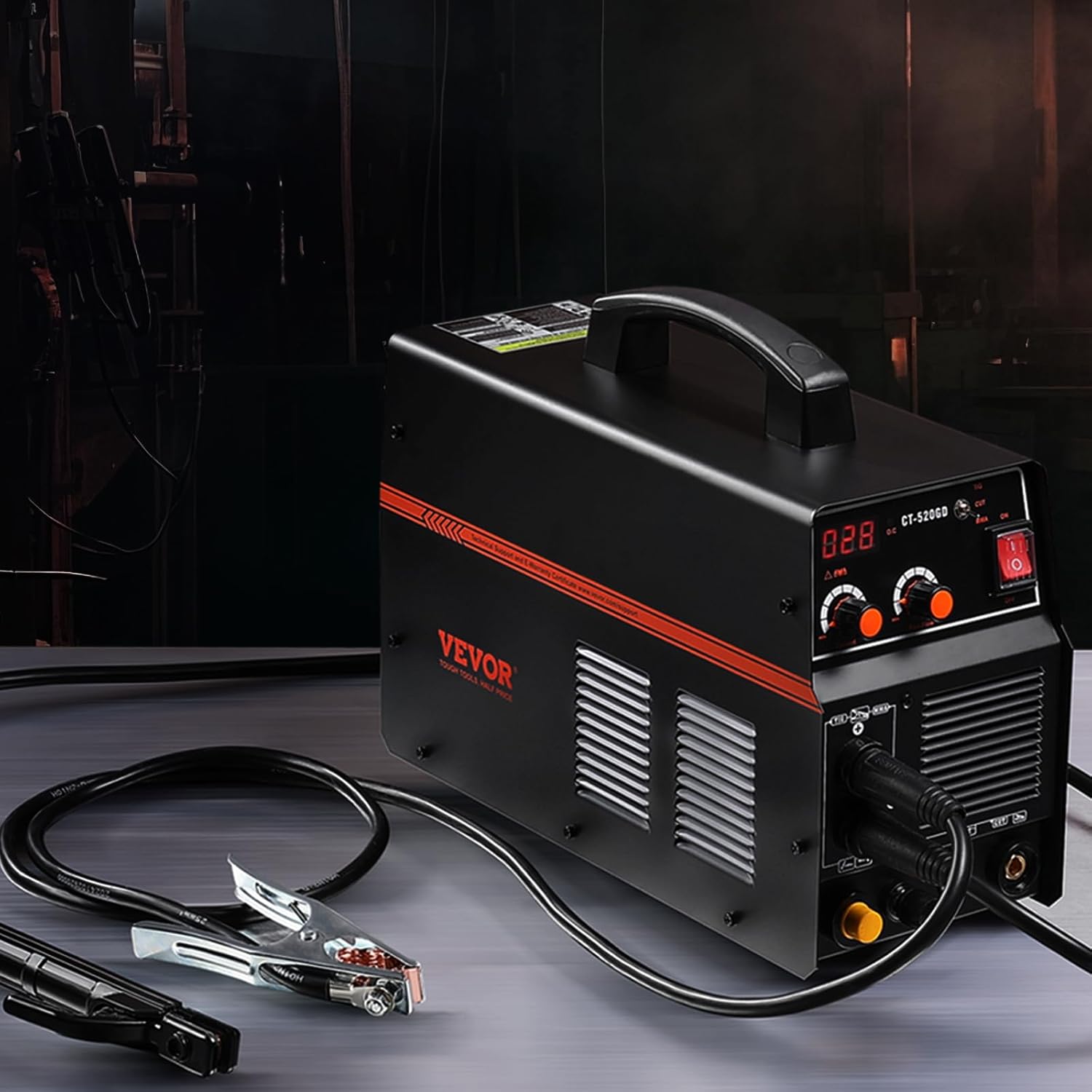
Image: A detailed view of the VEVOR CT-520GD control panel, highlighting the mode switch, digital display, current adjustment, and post-flow adjustment knobs.
4. Setup
4.1 Power Connection
The VEVOR CT-520GD supports dual voltage input (110V/220V). Ensure the power source matches the machine's requirements and that the appropriate power adapter cord is used.
- Connect the power cord to a suitable grounded outlet.
- Verify the input voltage setting on the machine, if applicable, or ensure automatic voltage detection is functioning.
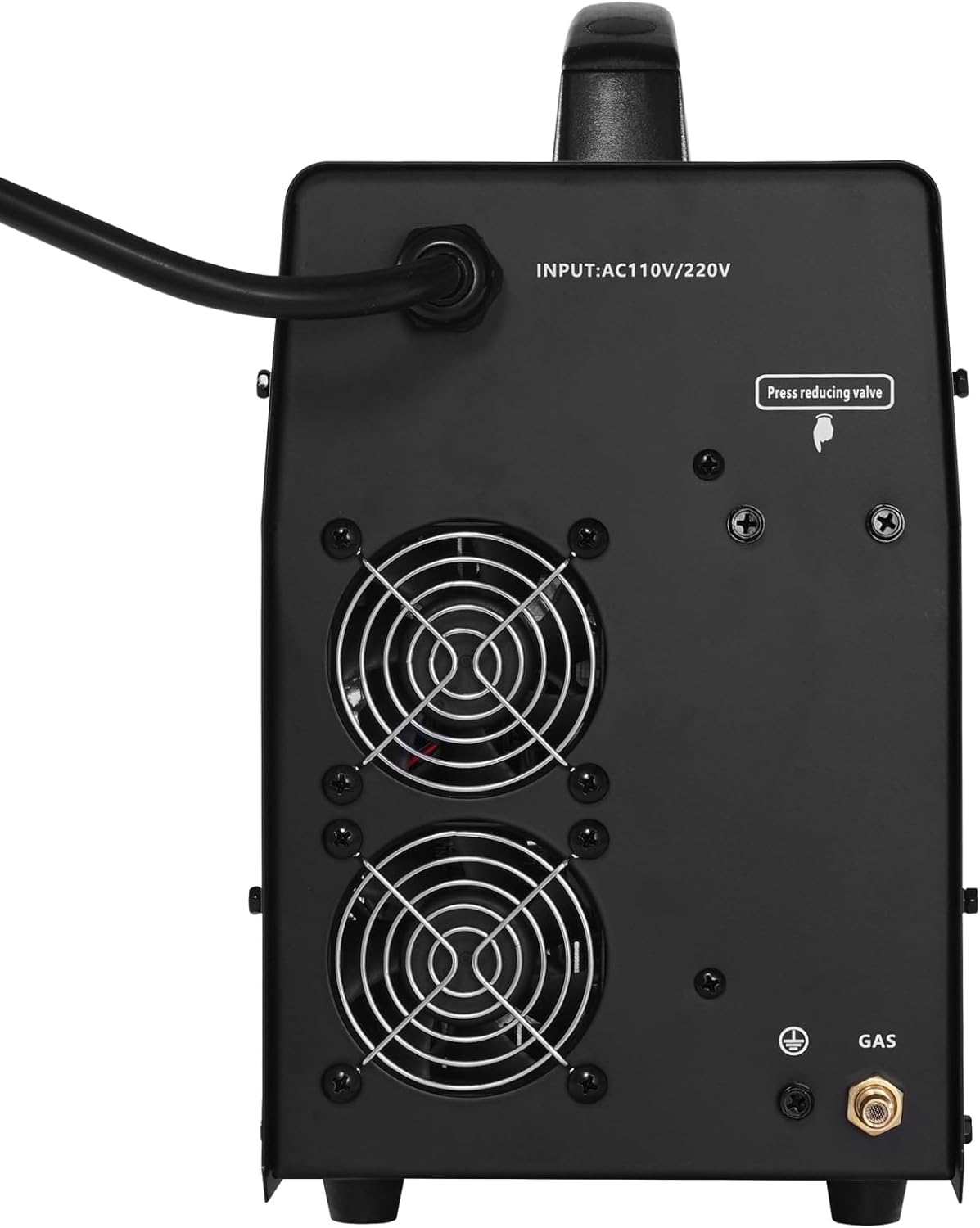
Image: The rear panel of the VEVOR CT-520GD, illustrating the power input connection and the gas inlet for air or argon.
4.2 Gas Connection (Plasma Cutting & TIG Welding)
For plasma cutting, compressed air is required. For TIG welding, an inert gas like Argon is necessary.
- Attach the air filter regulator to the machine's gas inlet.
- Connect the gas hose from the air compressor (for plasma) or argon cylinder (for TIG) to the air filter regulator.
- Ensure all connections are secure and leak-free.
- Adjust the gas pressure using the regulator to the recommended settings for your chosen process.
4.3 Torch and Ground Clamp Connection
- Connect the appropriate torch (plasma, TIG, or electrode holder) to its designated port on the front panel.
- Connect the ground clamp cable to the ground terminal.
- Securely attach the ground clamp to the workpiece or work table, ensuring good electrical contact.
5. Operation
5.1 Plasma Cutting
Plasma cutting is effective for various conductive metals, including stainless steel, carbon steel, iron, and copper.
- Select "CUT" mode using the mode switch.
- Adjust the cutting current according to the material thickness and type.
- Ensure proper air pressure is set via the regulator.
- Position the plasma torch nozzle near the workpiece. The non-touch pilot arc allows for cutting without direct contact.
- Activate the torch and move it steadily along the desired cut line.
Cutting Capacity:
- 110V Mode: Ideal clean cut up to 6mm, maximum cut up to 10mm.
- 220V Mode: Ideal clean cut up to 10mm, maximum cut up to 15mm.

Image: A user performing plasma cutting with the VEVOR CT-520GD, illustrating the machine's powerful cutting performance and specifying ideal and maximum cutting thicknesses for both 110V and 220V operations.

Image: Visual examples of various metals including stainless steel, carbon steel, iron, and copper, indicating their suitability for processing with the VEVOR CT-520GD.
5.2 TIG Welding
TIG welding provides precise control and high-quality welds. Note: This machine is not suitable for welding aluminum.
- Select "TIG" mode.
- Connect the TIG torch and ensure the argon gas cylinder is open and regulated to the correct flow rate.
- Adjust the welding current and post-flow time as needed.
- Initiate the arc and perform welding according to standard TIG procedures.
5.3 MMA (Stick) Welding
MMA welding is robust and versatile for various applications.
- Select "MMA" mode.
- Insert the appropriate electrode into the electrode holder.
- Adjust the welding current based on the electrode type and material thickness.
- Strike an arc and proceed with welding.
6. Maintenance
Regular maintenance ensures the longevity and optimal performance of your VEVOR CT-520GD.
- Daily: Inspect all cables, torches, and connections for wear or damage. Clean the torch nozzles and electrodes.
- Weekly/Monthly: Clean the machine's exterior and ventilation openings to prevent dust buildup, which can hinder cooling. Check the air filter regulator for moisture and drain if necessary.
- Consumables: Replace plasma cutting consumables (nozzles, electrodes, shield cups) and TIG welding consumables (tungsten electrodes, collets, gas lenses) as they wear out.
- Storage: Store the machine in a clean, dry environment when not in use.
7. Troubleshooting
This section addresses common issues you might encounter. For problems not listed here, contact VEVOR customer support.
| Problem | Possible Cause | Solution |
|---|---|---|
| Machine does not power on. | No power supply; faulty power cord; internal fuse blown. | Check power outlet and circuit breaker. Inspect power cord. Contact service if fuse is suspected. |
| No arc in plasma cutting. | Insufficient air pressure; worn consumables; poor ground connection; incorrect current setting. | Verify air pressure. Replace consumables. Ensure ground clamp is secure. Adjust current. |
| Poor cut quality (plasma). | Incorrect cutting speed; worn consumables; improper air pressure; torch too far from workpiece. | Adjust cutting speed. Replace consumables. Check air pressure. Maintain correct torch distance. |
| Welding arc is unstable or weak. | Poor ground connection; incorrect current setting; improper gas flow (TIG); incorrect electrode (MMA). | Check ground. Adjust current. Verify gas flow (TIG). Use correct electrode (MMA). |
| Overheat protection activated. | Excessive duty cycle; blocked ventilation; high ambient temperature. | Allow machine to cool down. Ensure clear ventilation. Reduce duty cycle. |
8. Specifications
| Feature | Detail |
|---|---|
| Model Number | CT-520GD |
| Functions | CUT / TIG / MMA |
| Cutting Type | Non-Touch Pilot Arc |
| Input Voltage | AC 110V / 220V (Dual Voltage) |
| Plasma Cutting Current | Max 50A |
| TIG Welding Current | Max 200A (at 220V) |
| MMA Welding Current | Max 200A (at 220V) |
| Operating Pressure (Cutting) | 2.5-3.5 Bar |
| Ideal Clean Cutting (110V) | Up to 6mm |
| Maximum Cutting (110V) | Up to 10mm |
| Ideal Clean Cutting (220V) | Up to 10mm |
| Maximum Cutting (220V) | Up to 15mm |
| Item Weight | 32.4 lbs / 14.7 kg |
| Product Dimensions (L x W x H) | 19.3 x 7.3 x 13 inches (490 x 185 x 330 mm) |
| Manufacturer | VEVOR |

Image: A visual representation of the VEVOR CT-520GD machine with its dimensions and a table summarizing key specifications.
9. Warranty and Support
VEVOR products are designed for durability and performance. For warranty information, technical support, or service inquiries, please visit the official VEVOR support website.
Please have your model number (CT-520GD) and purchase information ready when contacting support.