
FAN-AUR-C2BL
Austin 23" LED Chandelier Ceiling Fan Fandelier User Manual
Model: FAN-AUR-C2BL | Brand: Generic
1. Introduction
This user manual provides detailed instructions for the installation, operation, and maintenance of your Austin 23" LED Chandelier Ceiling Fan Fandelier. Please read this manual thoroughly before installation and use to ensure safe and efficient operation of the product. Keep this manual for future reference.
The Austin LED fandelier is designed to cool any room while providing powerful and adjustable lighting. It features a remote control for easy adjustment of fan speed, airflow direction, light intensity, and color temperature. Its high-quality, quiet motor is built for durability, and the integrated LED light has a lifespan of 50,000 hours. This product is JA8-2022 Compliant.
2. Safety Information
Always follow basic safety precautions when installing and operating electrical appliances to reduce the risk of fire, electric shock, and personal injury.
- Ensure the power is turned off at the circuit breaker before beginning installation or performing any maintenance.
- All electrical wiring must be performed by a qualified electrician and comply with all local and national electrical codes.
- The mounting structure must be capable of supporting the weight of the fan (approximately 15.17 pounds).
- Do not operate the fan with a damaged power cord or plug.
- Avoid placing fingers or objects into the fan blades while the fan is operating.
- This product is designed for indoor use only.
- Use only replacement parts specified by the manufacturer.
3. What's in the Box
Carefully unpack your Austin Fandelier and ensure all components are present and undamaged. If any parts are missing or damaged, contact customer support immediately.
- Fan Unit
- Integrated LED Light
- Remote Control
- Installation Hardware (screws, wire nuts, etc.)
- User Manual (this document)
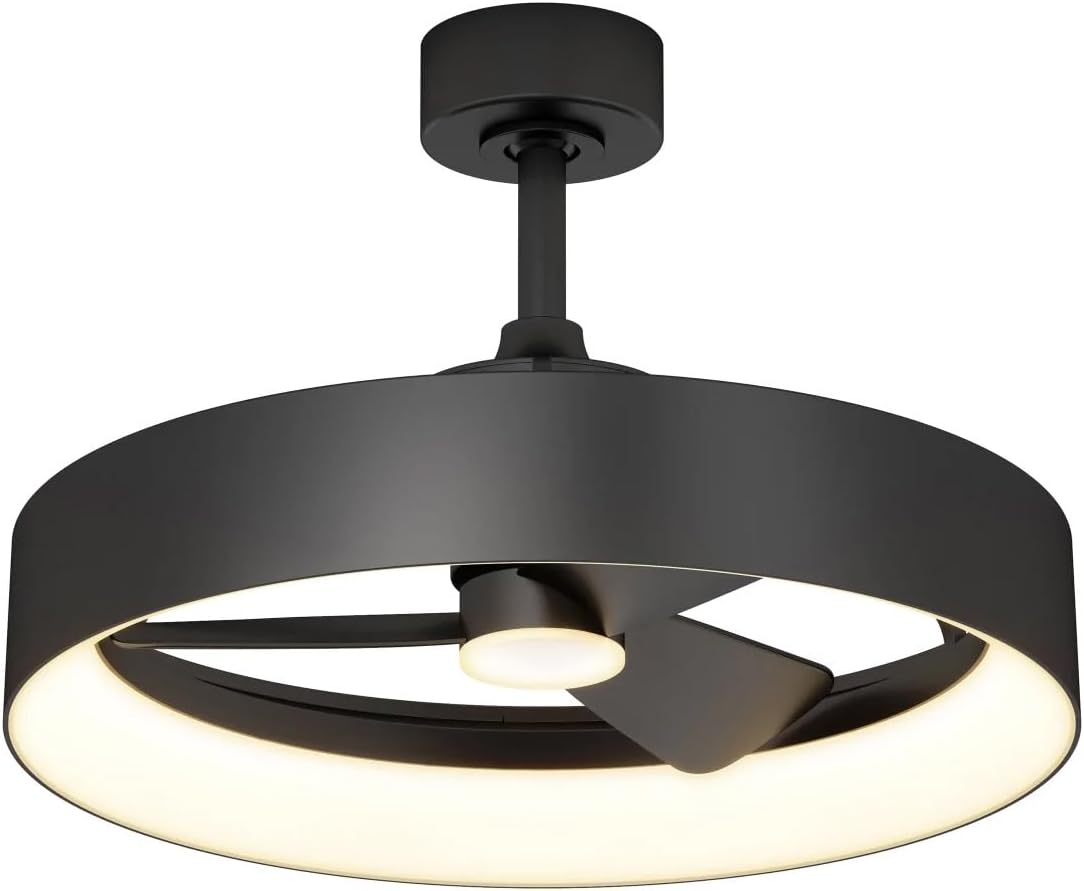
Image: The Austin 23" LED Chandelier Ceiling Fan Fandelier, showcasing its black finish, integrated LED light ring, and central fan blades. This image represents the complete product as it appears after assembly.
4. Setup and Installation
This product is designed for self-installation, however, it is highly recommended to consult a qualified electrician for all electrical wiring to ensure safety and compliance with local codes.
4.1 Pre-Installation Checklist
- Verify that all components listed in Section 3 are present.
- Ensure the power supply to the installation location is turned OFF at the circuit breaker.
- Confirm the ceiling junction box is securely mounted and capable of supporting the fan's weight.
- Gather necessary tools: screwdriver, wire strippers, electrical tape, ladder.
4.2 Installation Steps
- Mounting Bracket Installation: Secure the mounting bracket to the ceiling junction box using the provided screws. Ensure it is firmly attached.
- Wiring Connections: Connect the fan's electrical wires to the household wiring according to the wiring diagram provided in the separate wiring guide (if applicable) or standard electrical practices (Live to Live, Neutral to Neutral, Ground to Ground). Use wire nuts to secure connections.
- Fan Unit Attachment: Carefully lift the fan unit and attach it to the mounting bracket. Ensure all safety clips or screws are engaged to secure the fan in place.
- Canopy Installation: Slide the canopy up to the ceiling and secure it with the designated screws, covering the wiring connections.
- Power Restoration: Once installation is complete and all connections are secure, restore power at the circuit breaker.
5. Operating Instructions
Your Austin Fandelier is controlled by the included remote control. Ensure the remote has fresh batteries installed (not included, typically AAA).
5.1 Remote Control Functions
- Power On/Off: Press the Power button to turn the fan and light on or off.
- Fan Speed Control: Use the Fan Speed buttons (typically marked with fan icons or numbers 1-3) to cycle through slow, medium, and fast speeds.
- Airflow Direction: The Reverse button allows you to change the direction of the fan blades (downward for cooling, upward for circulating warm air).
- Light On/Off: Press the Light button to toggle the LED light on or off independently of the fan.
- Adjustable Brightness: Use the Dimmer buttons (often marked with + and -) to adjust the light intensity from 10% to 100%.
- Color Temperature Adjustment: The CCT button (or similar) allows you to cycle through different color temperatures, from warm to cool white.
- Timer Function: Set the fan to automatically turn off after 1, 3, or 8 hours using the Timer buttons.
6. Maintenance
Regular maintenance will help prolong the life and performance of your Austin Fandelier.
- Cleaning: Before cleaning, ensure the power is turned off at the circuit breaker. Use a soft, damp cloth to wipe down the fan and light fixture. Do not use abrasive cleaners or solvents, as they may damage the finish.
- Blade Cleaning: Periodically wipe the fan blades to remove dust buildup, which can affect performance and balance.
- Tightening Screws: Check all screws and connections periodically to ensure they are tight and secure.
- LED Light: The integrated LED light is designed for a long lifespan (50,000 hours) and does not require bulb replacement.
7. Troubleshooting
If you encounter issues with your Austin Fandelier, refer to the following common problems and solutions:
| Problem | Possible Cause | Solution |
|---|---|---|
| Fan does not operate. | No power to the fan; loose wire connections; remote control battery dead. | Check circuit breaker; ensure all wire connections are secure; replace remote control batteries. |
| Light does not turn on. | No power to the light; loose wire connections; light function not activated on remote. | Verify power supply; check light wire connections; press the light button on the remote. |
| Remote control not working. | Dead batteries; remote not paired (if applicable); obstruction between remote and receiver. | Replace batteries; refer to pairing instructions (if any); ensure clear line of sight. |
| Fan wobbles. | Loose mounting screws; unbalanced blades. | Tighten all mounting screws; ensure blades are clean and free of debris. |
If the problem persists after attempting these solutions, please contact customer support.
8. Specifications
| Feature | Detail |
|---|---|
| Brand | Generic |
| Model Name | LED Chandelier Ceiling Fan |
| Item Model Number | FAN-AUR-C2BL |
| Part Number | 2323099 |
| Color | Black |
| Material | Plastic, Crystal (Shade) |
| Product Dimensions | 25"L x 25"W x 15.75"H |
| Item Weight | 15.17 pounds |
| Power Source | Electric |
| Voltage | 12 Volts (DC) |
| Wattage | 12 watts |
| Light Source Type | Integrated LED |
| Light Lifespan | 50,000 hours |
| Control Method | Remote Control |
| Special Features | Adjustable brightness (10%-100%), Timer (1, 3, or 8 hours), Adjustable color temperature (warm to cool) |
| Room Type | Kitchen, Bedroom, Living Room, Study Room, Game Room |
| Manufacturer | Artika |
9. Warranty and Support
This product is manufactured by Artika. For specific warranty details and customer support, please refer to the warranty card included with your purchase or visit the manufacturer's official website. Typically, products come with a limited warranty covering defects in materials and workmanship under normal use.
When contacting support, please have your model number (FAN-AUR-C2BL) and purchase information readily available.
For assistance, you may contact Artika customer service through their official channels. Contact information is usually found on their website or on the product packaging.
Related documentsFAN-AUR-C2BL


Ask a question about this manual
Ask about setup, troubleshooting, compatibility, parts, safety, or missing instructions. Manuals+ will review the question and use this page’s manual context to help answer it.