
Introduction
Thank you for choosing the Cutting Edge Cordless T-Blade Trimmer. This device is designed for precise grooming, including outlining, fading, and detailing. Its hypoallergenic blade ensures a comfortable experience. Please read this manual thoroughly before first use to ensure proper operation and maintenance.
Important Safety Information
To reduce the risk of electric shock, injury, or fire, always follow these basic safety precautions:
- Do not immerse the trimmer in water or other liquids.
- Keep the trimmer away from water sources when charging.
- Do not use the trimmer if the blade is damaged or broken, as this may cause injury.
- Keep out of reach of children.
- Always unplug the charger from the power outlet when not in use.
- Use only the charger supplied with the trimmer.
- Do not operate the trimmer near aerosols or oxygen-administering equipment.
Package Contents
- Cutting Edge Cordless T-Blade Trimmer
- 4 Guide Combs (1mm, 2mm, 3mm, 4mm)
- Charging Cable
- Cleaning Brush
- Blade Oil
- User Manual
Product Overview
Familiarize yourself with the components of your Cutting Edge Cordless T-Blade Trimmer.
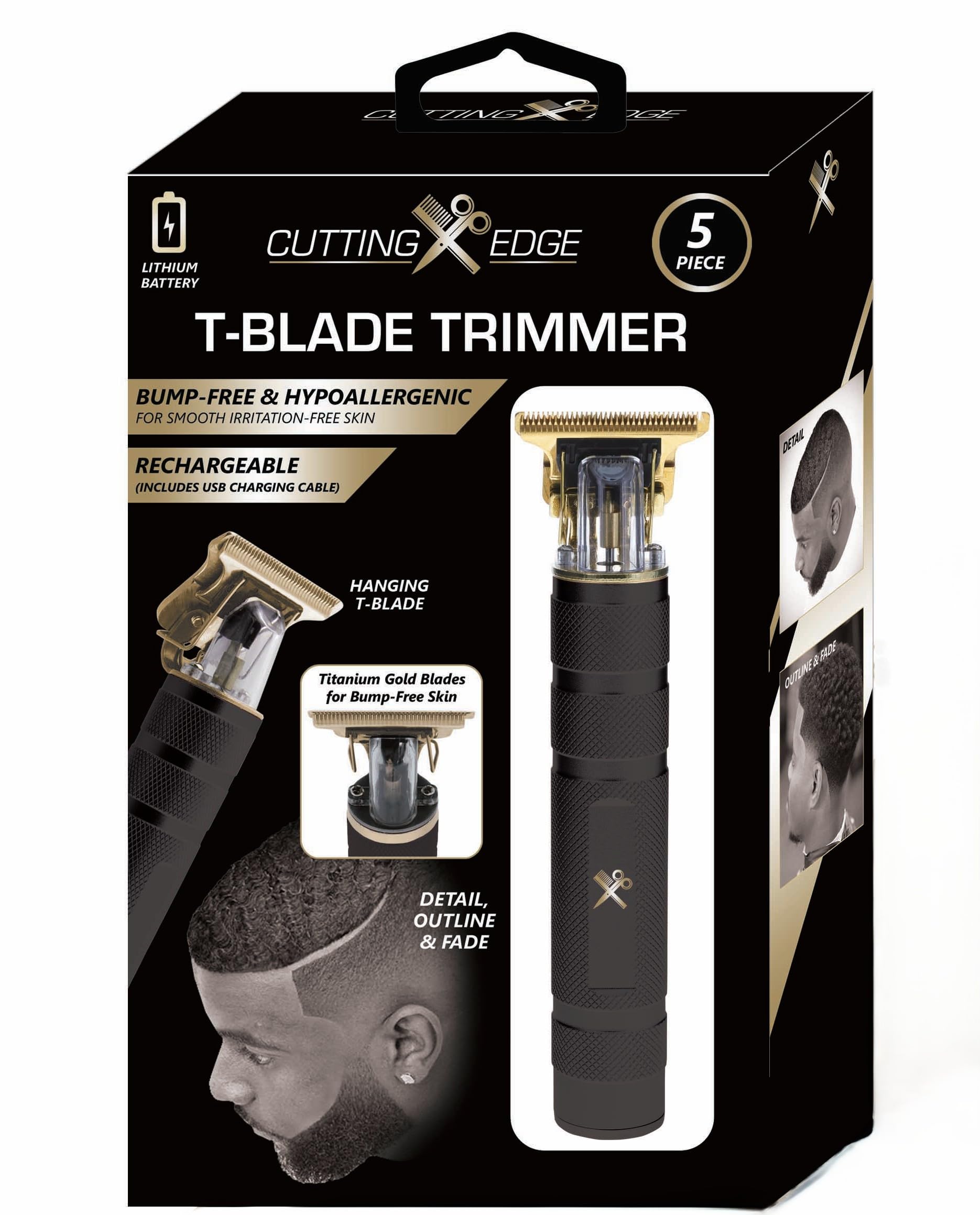
Image: Cutting Edge Cordless T-Blade Trimmer. The image displays the trimmer with its gold-colored T-blade at the top and a textured black handle. A small logo is visible on the handle.
- T-Blade: Precision cutting blade for outlining, fading, and detailing.
- Power Button: To turn the trimmer on and off.
- Charging Port: For connecting the charging cable.
- Ergonomic Handle: Textured for a secure grip.
Setup
1. Charging the Trimmer
Before first use, fully charge the trimmer for approximately 2 hours. A full charge provides up to 120 minutes of cordless runtime.
- Connect the charging cable to the trimmer's charging port.
- Plug the other end of the cable into a suitable USB power adapter (not included) or a USB port.
- The indicator light will illuminate during charging and typically change color or turn off when fully charged (refer to specific model indicator behavior if available).
- Do not overcharge the battery.
2. Attaching and Detaching Guide Combs
The trimmer comes with 4 guide combs (1mm, 2mm, 3mm, 4mm) for various cutting lengths.
- To Attach: Align the guide comb with the trimmer blade and push it firmly until it clicks into place.
- To Detach: Gently pull the guide comb away from the blade.
- Ensure the trimmer is turned off before attaching or detaching combs.
Operating Instructions
1. Basic Operation
- Turning On: Press the power button once.
- Turning Off: Press the power button again.
2. Trimming Techniques
For best results, ensure hair is clean and dry before trimming.
- Outlining: Use the trimmer without a guide comb for sharp, clean lines around the neckline, beard, and sideburns. Hold the blade flat against the skin and move it slowly in the desired direction.
- Fading: Start with a longer guide comb and gradually switch to shorter combs to create a smooth transition in hair length. Move the trimmer against the direction of hair growth.
- Detailing: For intricate designs or small areas, use the T-blade without a comb. Apply light pressure and use controlled movements.
- Always trim against the direction of hair growth for a closer cut.
- Stretch the skin taut with your free hand to ensure an even trim.
Maintenance
1. Cleaning the Blades
Regular cleaning ensures optimal performance and extends the life of your trimmer.
- Turn off the trimmer and detach any guide comb.
- Use the provided cleaning brush to remove loose hairs from the blade and trimmer head.
- For a more thorough clean, the blade can be rinsed under running water. Ensure the trimmer body does not get wet. Dry the blade completely before reattaching or storing.
2. Blade Oiling
To maintain blade sharpness and reduce friction, oil the blades after every few uses or as needed.
- Apply 1-2 drops of the supplied blade oil across the top of the blades.
- Turn the trimmer on for a few seconds to allow the oil to distribute evenly.
- Wipe off any excess oil with a soft cloth.
3. Storage
Store the trimmer in a cool, dry place, away from direct sunlight and moisture. Ensure the trimmer is turned off and any guide comb is removed or securely attached.
Troubleshooting
| Problem | Possible Cause | Solution |
|---|---|---|
| Trimmer does not turn on. | Battery is depleted. | Charge the trimmer fully. |
| Poor cutting performance. | Blades are dirty or not oiled. | Clean and oil the blades as per maintenance instructions. |
| Trimmer pulls hair. | Blades are dull or hair is too long/tangled. | Ensure blades are clean and oiled. Trim smaller sections of hair. If problem persists, blades may need replacement. |
| Trimmer gets hot. | Extended use or lack of lubrication. | Allow the trimmer to cool down. Ensure blades are properly oiled. |
Specifications
- Brand: Cutting Edge
- Model: Cordless T-Blade Trimmer (ASIN: B0DTZSLQYY)
- Power Source: Battery Powered (Rechargeable)
- Runtime: Up to 120 minutes (fully charged)
- Material: Stainless Steel (Blades)
- Color: Black
- Guide Combs: 1mm, 2mm, 3mm, 4mm
- Package Dimensions: 7 x 5 x 1 inches
- Weight: 1 Pound
Warranty and Support
For warranty information or product support, please refer to the documentation included with your purchase or contact Cutting Edge customer service. Keep your proof of purchase for warranty claims.
Note: Specific warranty terms may vary.