
1. Introduction
This manual provides essential information for the safe and efficient operation of your Smart Tech 24-inch HD Smart TV (Model 24HW01V). Please read it thoroughly before using the television and retain it for future reference.
The Smart Tech 24-inch (60 cm) TV is a compact and connected television designed for various spaces such as bedrooms, kitchens, or small living areas. Featuring the WebOS system, it offers easy access to popular streaming services like Netflix, YouTube, and Prime Video, combined with optimized picture and sound quality.

Image 1.1: Front view of the Smart Tech 24-inch HD Smart TV.
2. Safety Information
To ensure safe operation and prevent damage, observe the following precautions:
- Power Supply: Connect the TV only to an AC power source within the specified voltage range.
- Ventilation: Ensure adequate ventilation around the TV. Do not block ventilation openings.
- Water and Moisture: Do not expose the TV to rain, moisture, or excessive humidity.
- Heat Sources: Keep the TV away from heat sources such as radiators, heat registers, stoves, or other heat-producing appliances.
- Cleaning: Unplug the TV before cleaning. Use a soft, dry cloth. Do not use liquid or aerosol cleaners.
- Placement: Place the TV on a stable, level surface to prevent it from falling.
- Servicing: Do not attempt to service this product yourself. Refer all servicing to qualified service personnel.
3. Package Contents
Verify that all items are present in the packaging:
- Smart Tech 24-inch HD Smart TV
- Remote Control
- Power Cable
- TV Stand (2 pieces)
- Screws for TV Stand
- User Manual (this document)
- Quick Start Guide
4. Physical Features and Connections
4.1. Dimensions
The Smart Tech 24HW01V TV has the following approximate dimensions:
- Width: 53.48 cm
- Height (with stand): 35.39 cm
- Depth (with stand): 21.0 cm
- Screen Diagonal: 24 inches (60 cm)

Image 4.1: TV dimensions (width, height, depth, and screen diagonal).
4.2. Connectors
The TV is equipped with various ports for connecting external devices:
- CI Slot: For Common Interface modules (e.g., for pay-TV).
- USB x 2: For connecting USB storage devices to play media.
- DVB-T2: Antenna input for terrestrial digital television.
- DVB-S2: Satellite input for digital satellite television.
- HDMI x 3: High-Definition Multimedia Interface for connecting devices like Blu-ray players, game consoles, or set-top boxes. One port supports ARC (Audio Return Channel).
- Earphone: 3.5mm audio output for headphones.
- Mini AV IN: For connecting older analog devices using an adapter (adapter not always included).
- Optical: Digital audio output for connecting to soundbars or home theater systems.
- RJ45 (Ethernet): For wired network connection.

Image 4.2: Rear view of the TV showing available connectors.
5. Setup
5.1. Attaching the TV Stand
- Carefully place the TV face down on a soft, clean surface to prevent screen damage.
- Align the stand pieces with the corresponding slots on the bottom of the TV.
- Secure the stand pieces using the provided screws. Ensure they are tightened firmly.
5.2. Connecting Power and Devices
- Connect the power cable to the TV's power input and then to a wall outlet.
- Connect your antenna or satellite cable to the DVB-T2 or DVB-S2 input.
- For external devices (e.g., game console, Blu-ray player), connect an HDMI cable from the device to one of the HDMI ports on the TV.
- For a wired internet connection, connect an Ethernet cable to the RJ45 port.
5.3. Initial Setup Wizard
Upon first power-on, the TV will guide you through an initial setup process:
- Language Selection: Choose your preferred language.
- Network Connection: Select your Wi-Fi network and enter the password, or confirm the wired connection.
- Channel Scan: The TV will scan for available digital channels.
- Time Zone and Date: Set the correct time zone and date.
- WebOS Account: You may be prompted to create or log in to a WebOS account to access all Smart TV features.
6. Operating Instructions
6.1. Remote Control
The included remote control provides access to all TV functions. It features dedicated buttons for popular streaming services.

Image 6.1: Remote control with one-click access buttons for Netflix and Prime Video.
- Power Button: Turns the TV on or off.
- Number Buttons: For direct channel selection.
- Volume Up/Down: Adjusts the volume level.
- Channel Up/Down: Changes TV channels.
- Navigation Buttons (Arrow Keys, OK): Navigate menus and select options.
- Back/Exit: Returns to the previous screen or exits a menu.
- Home Button: Accesses the WebOS Smart TV home screen.
- Netflix/Prime Video Buttons: Direct access to these streaming applications.
6.2. Smart TV Features (WebOS Hub)
Your Smart Tech TV is powered by WebOS Hub, offering a user-friendly interface and access to a wide range of applications and features.

Image 6.2: Overview of key Smart TV features.
- WebOS Hub: Navigate through a customizable launcher bar to quickly access apps, live TV, and connected devices.
- Streaming Applications: Enjoy pre-installed apps like Netflix, YouTube, and Prime Video. Additional apps can be downloaded from the WebOS Content Store.
- Wireless Connectivity: Built-in Wi-Fi and Bluetooth allow for easy internet access and connection to wireless accessories.
- AirPlay Support: Share content wirelessly from your Apple devices (iPhone, iPad, Mac) directly to your TV screen.
- LG ThinQ Compatibility: Integrate your TV into your smart home ecosystem for enhanced control and automation.
- HDR10 Support: Experience enhanced contrast and color with HDR10 compatible content.
- Triple Tuner: Supports DVB-T2 (terrestrial), DVB-S2 (satellite), and DVB-C (cable) for versatile reception options.
7. Maintenance
7.1. Cleaning the TV
- Always unplug the TV from the power outlet before cleaning.
- Use a soft, dry, lint-free cloth to gently wipe the screen and cabinet.
- For stubborn marks, lightly dampen the cloth with water or a specialized screen cleaner (ensure it's safe for TV screens). Do not spray liquid directly onto the screen.
- Avoid using abrasive cleaners, waxes, or solvents.
7.2. Software Updates
The TV may receive software updates to improve performance and add new features. It is recommended to enable automatic updates or check for updates periodically through the TV's settings menu.
8. Troubleshooting
If you encounter issues with your TV, refer to the following common solutions:
| Problem | Possible Cause | Solution |
|---|---|---|
| No power | Power cable disconnected; power outlet issue | Check power cable connection; try a different outlet. |
| No picture, but sound is present | Incorrect input source; backlight issue | Press the "Source" button on the remote to select the correct input. |
| No sound, but picture is present | Volume muted or too low; external audio system issue | Increase volume; check mute status; verify external audio connections. |
| Cannot connect to Wi-Fi | Incorrect password; router issue; TV too far from router | Re-enter password; restart router; move TV closer or use wired connection. |
| Remote control not working | Dead batteries; obstruction; remote not paired | Replace batteries; remove obstructions; re-pair remote if necessary. |
If the problem persists after trying these solutions, please contact customer support.
9. Specifications
| Feature | Detail |
|---|---|
| Brand | Smart Tech |
| Model Number | 24HW01V |
| Screen Size | 24 inches (60 cm) |
| Display Technology | LED |
| Resolution | 720p (1366 x 768) |
| Refresh Rate | 60 Hz |
| Operating System | WebOS |
| Supported Internet Services | Netflix, Prime Video, YouTube |
| Connectivity Technology | Ethernet, HDMI, USB, Wi-Fi |
| HDMI Ports | 3 |
| USB Ports | 2 |
| Special Features | Integrated Speaker, HDR10, Triple Tuner, AirPlay, LG ThinQ |
| Energy Efficiency Class | E |
| Product Dimensions (LxWxH) | 21P x 53l x 35H cm (Depth x Width x Height) |
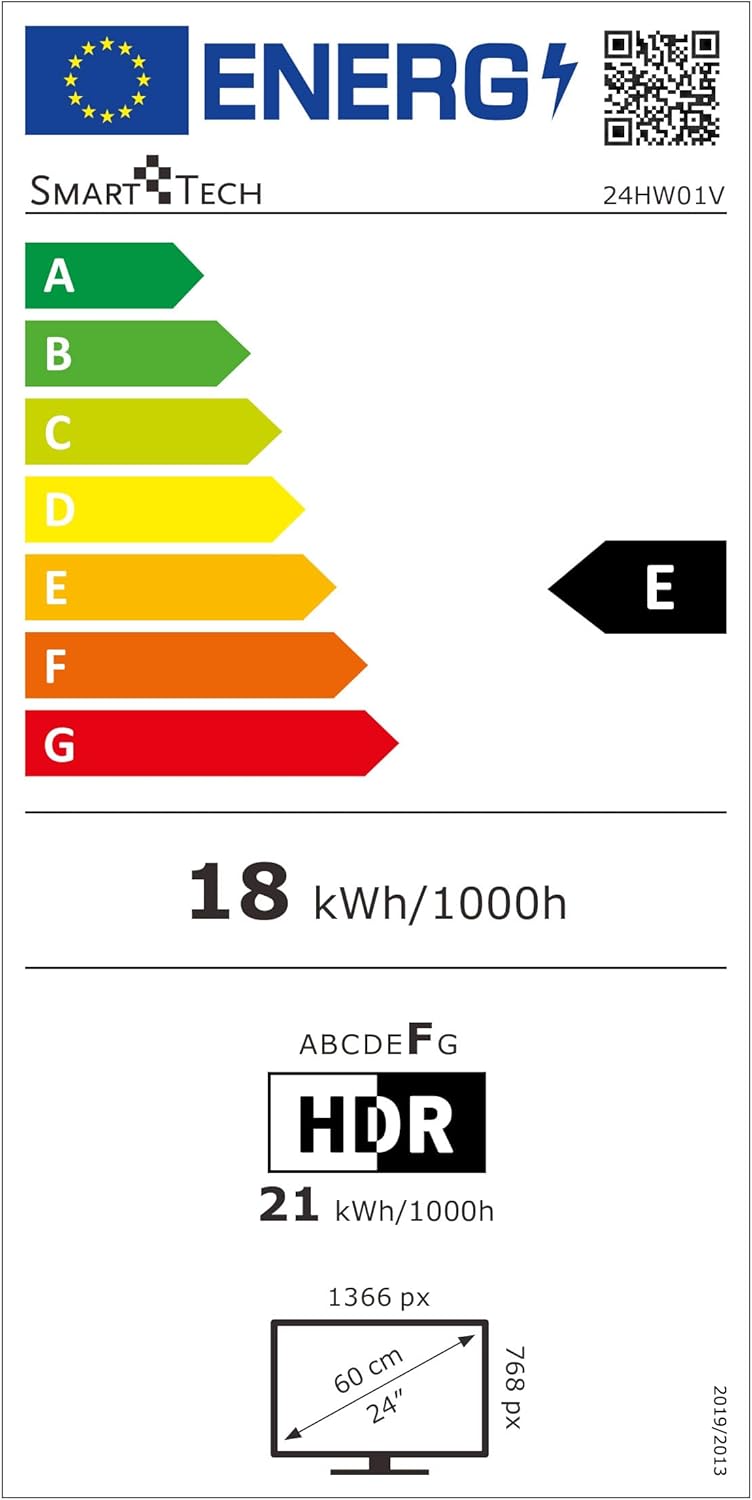
Image 9.1: EU Energy Label for Model 24HW01V. For more details, visit eprel.ec.europa.eu/qr/2124911.
10. Warranty and Support
Smart Tech products are designed for durability and performance. This product comes with a standard manufacturer's warranty. Please refer to the warranty card included in your package for specific terms and conditions.
Spare Parts Availability: Spare parts for this model are guaranteed to be available for up to 11 years from the date of purchase.
For technical support, troubleshooting assistance, or warranty claims, please contact Smart Tech customer service through their official website or the contact information provided in your product documentation.


