1. Product Overview
The TUSITA GPS Mount Holder is designed to securely hold your Garmin Montana 700, 700i, 710, 710i, 750i, or 760i handheld device. It features a B Size (1") ball for versatile attachment to compatible mounting systems, allowing for flexible adjustment of your device's viewing angle.
Constructed from high-quality, marine-grade aluminum and high-strength composite materials, this mount ensures durability and reliability in various environments. Its black finish complements a wide range of vehicle interiors and exteriors.

Figure 1: TUSITA GPS Mount Holder with B Size 1-inch Ball. This image displays the TUSITA GPS Mount Holder, featuring the main cradle for the Garmin Montana device and the integrated B Size 1-inch ball for attachment to a compatible mounting arm.
2. What's in the Box
Please verify that all components are present in your package:
- 1 x TUSITA Mount Holder with B Size 1" Ball
- 1 x Screwdriver
Note: Additional mounting accessories, such as a double socket arm or a handlebar base, are not included and must be purchased separately to complete your mounting system.

Figure 2: TUSITA Montana Mount components. This image displays the TUSITA Montana Mount, highlighting the main device cradle and the separate B Size 1-inch ball, which allows for connection to a compatible double socket arm.
3. Compatibility
This mount holder is specifically designed for the following Garmin Montana GPS devices:
- Garmin Montana 700
- Garmin Montana 700i
- Garmin Montana 710
- Garmin Montana 710i
- Garmin Montana 750i
- Garmin Montana 760i
The B Size (1") ball is compatible with a wide range of mounting systems, making it suitable for various vehicle types including:
- Automobiles
- Trucks
- Boats
- ATVs
- Motorcycles
4. Setup and Installation
Follow these steps to install your TUSITA GPS Mount Holder:
- Attach the Mount Holder to your GPS Device: Carefully align your Garmin Montana device with the mount holder. Slide the device into the cradle until it clicks securely into place. Ensure the device is firmly seated.
- Connect to a Compatible Mounting Arm: The mount holder features a B Size (1") ball. Connect this ball to a compatible double socket arm (sold separately). Tighten the knob on the socket arm to secure the connection.
- Secure the Mounting System to your Vehicle: Attach the other end of your double socket arm to a compatible base mount (e.g., handlebar mount, suction cup mount, or drill-down base, all sold separately) on your desired vehicle. Ensure all connections are tightened using the provided screwdriver or appropriate tools.
- Adjust Viewing Angle: Loosen the knob on the double socket arm slightly to adjust the position and angle of your GPS device. Once the optimal viewing angle is achieved, tighten the knob firmly to prevent movement during operation.
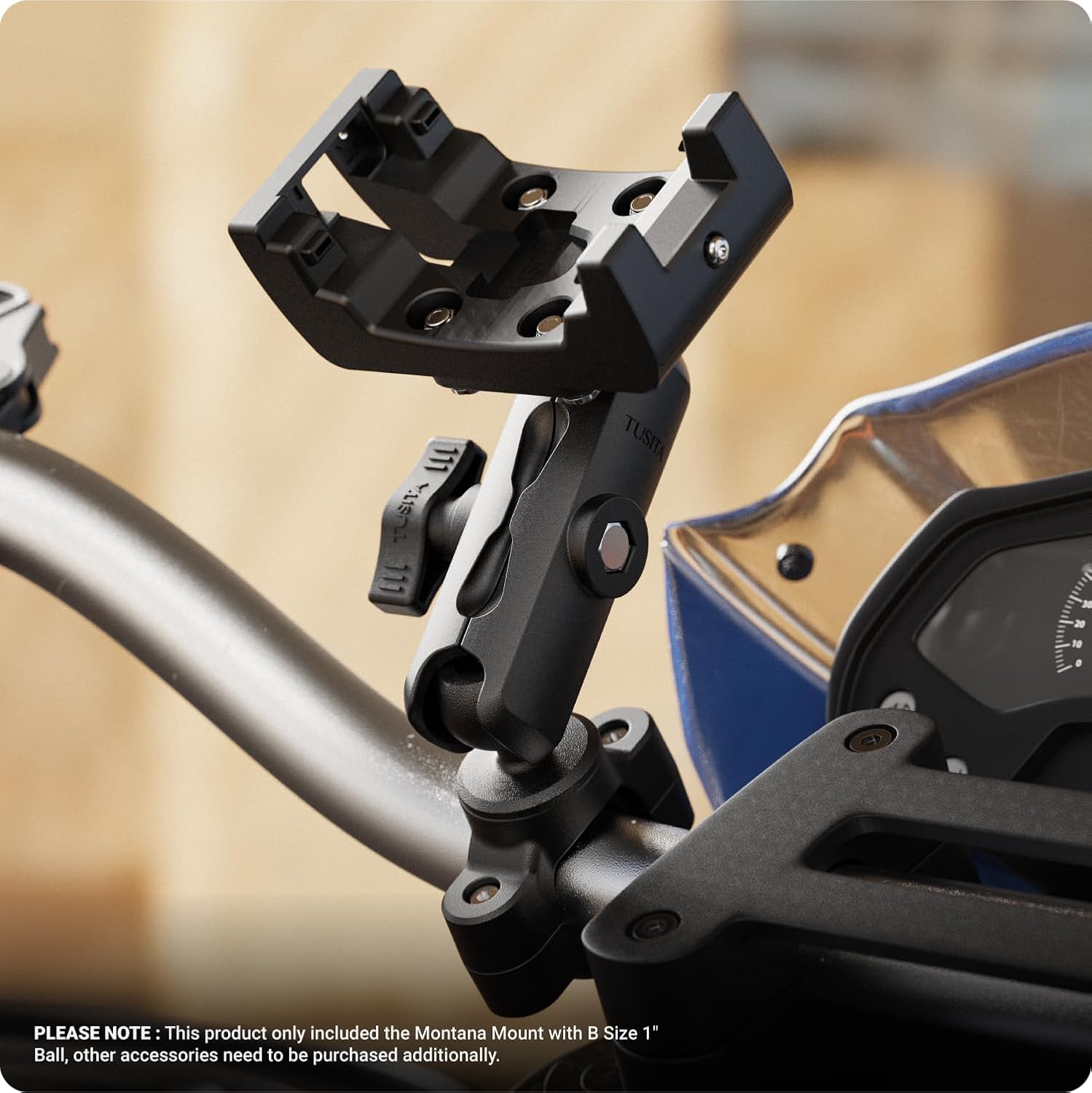
Figure 3: Mount holder attached to a motorcycle handlebar. The image shows the TUSITA GPS Mount Holder securely attached to a motorcycle handlebar, demonstrating its integration with a separate mounting arm (not included) and its readiness to receive a GPS device.

Figure 4: Garmin Montana GPS device mounted on a motorcycle handlebar. Here, a Garmin Montana GPS device is shown securely placed within the TUSITA mount holder, which is attached to a motorcycle handlebar. This illustrates the device in its operational position, providing navigation during a ride.
5. Operation
Once installed, the TUSITA GPS Mount Holder provides a stable platform for your Garmin Montana device. Ensure the device is securely clicked into the holder before beginning any journey. The flexible B Size (1") ball system allows for quick adjustments to the viewing angle as needed for optimal visibility and comfort.
To remove your GPS device from the holder, gently press the release mechanism (if present on your specific Garmin Montana model or the mount itself) and slide the device out. Always ensure the mount is empty before leaving your vehicle unattended to prevent theft or damage.
6. Maintenance
To ensure the longevity and optimal performance of your TUSITA GPS Mount Holder, follow these maintenance guidelines:
- Cleaning: Wipe the mount holder with a damp cloth to remove dust and dirt. Avoid using harsh chemicals or abrasive cleaners, which can damage the materials.
- Check Tightness: Periodically inspect all screws and connection points to ensure they remain tight. Vibrations from vehicle movement can sometimes loosen fasteners over time. Use the provided screwdriver or appropriate tools to re-tighten as necessary.
- Inspect for Wear: Regularly check the mount for any signs of wear, cracks, or damage. If any significant damage is observed, discontinue use and consider replacing the mount to prevent potential failure and damage to your GPS device.
7. Troubleshooting
If you encounter issues with your TUSITA GPS Mount Holder, consider the following:
- Device Not Secure: Ensure the Garmin Montana device is fully seated in the cradle and has clicked into place. Check for any obstructions preventing a secure fit. Verify that the small Phillips head screw (if applicable to your model) is tightened.
- Mount is Loose/Wobbles: Inspect all connection points, including the ball and socket arm, and the base mount. Tighten all knobs and screws firmly. Excessive vibration can cause loosening.
- Difficulty Adjusting Angle: Loosen the knob on the double socket arm slightly more to allow for easier adjustment. If the ball joint feels stiff, ensure it is clean and free of debris.
8. Specifications
| Feature | Detail |
|---|---|
| Brand | TUSITA |
| Model Name | 1" Ball Mount |
| Color | Black |
| Compatible Devices | Garmin Montana 700, 700i, 710, 710i, 750i, 760i |
| Mounting Type | Handlebar (requires additional base) |
| Weight Capacity Maximum | 2 Pounds (0.91 kg) |
| Compatible Vehicle Type | Automobile, Truck, Boat, ATV, Motorcycle |
| Item Weight | 0.18 Kilograms |
| Enclosure Material | High strength composite |
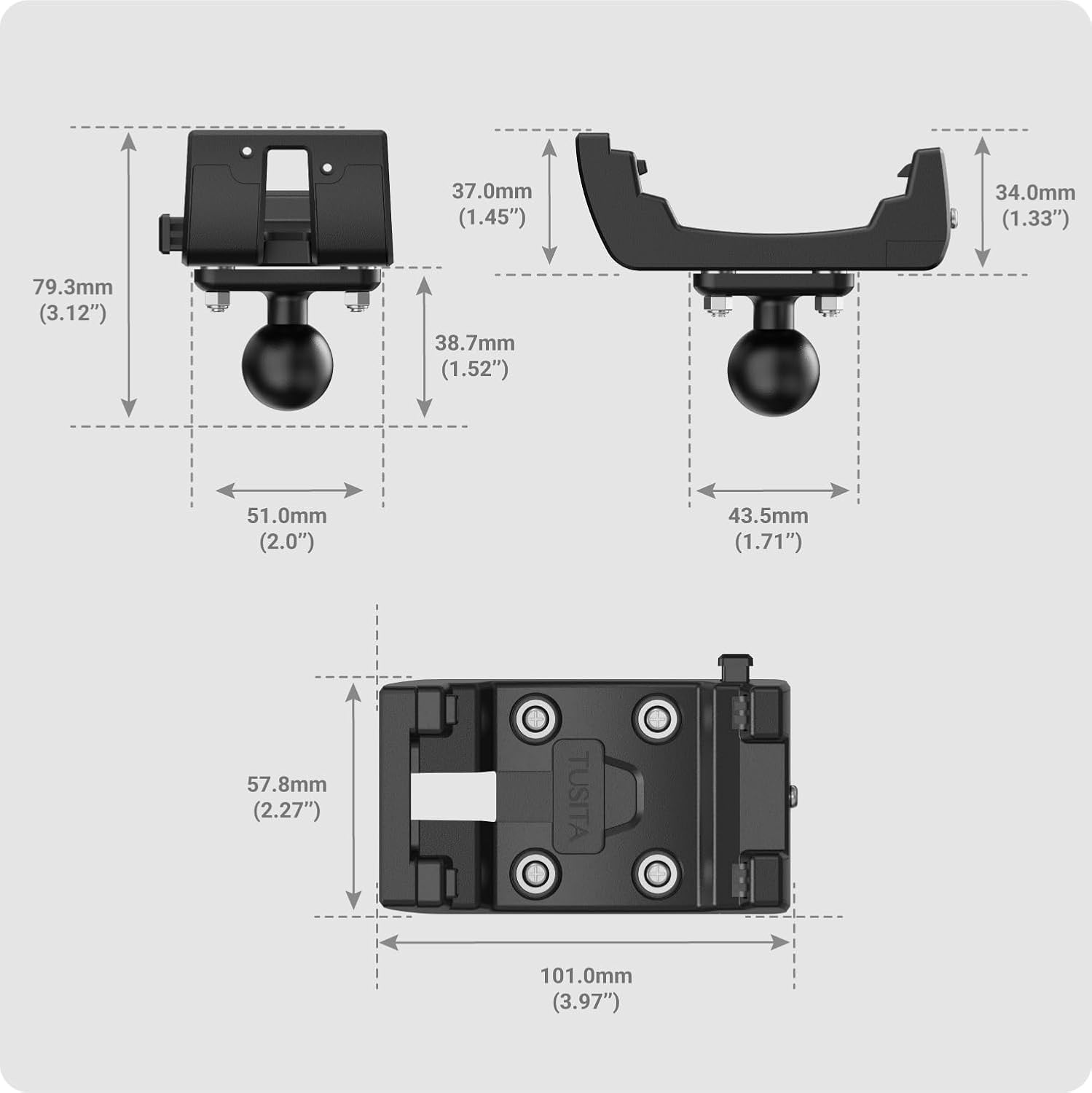
Figure 5: Dimensions of TUSITA GPS Mount Holder. This diagram illustrates the precise dimensions of the TUSITA GPS Mount Holder, including length, width, and height measurements in both millimeters and inches, crucial for installation planning.
9. Warranty and Support
The TUSITA GPS Mount Holder comes with an 18-month warranty from the date of purchase. This warranty covers manufacturing defects and material flaws under normal use.
For technical support, warranty claims, or any questions regarding your product, please contact TUSITA customer service through the retailer where the product was purchased or visit the official TUSITA website for contact information.