1. Important Safety Information
Before operating your Jasion YC1 ST electric bicycle, please read this manual thoroughly. Failure to follow instructions can result in serious injury or property damage. Always prioritize your safety and the safety of others.
- Wear a Helmet: Always wear an approved bicycle helmet that fits properly.
- Pre-Ride Inspection: Before each ride, check tire pressure, brake function, handlebar and seat tightness, and battery charge level.
- Obey Traffic Laws: Follow all local traffic laws, signs, and regulations. Ride defensively and be aware of your surroundings.
- Weather Conditions: Exercise caution when riding in wet conditions, low light, or adverse weather. Use the integrated lights for visibility.
- Weight Limit: Do not exceed the maximum load capacity of 330 lbs.
2. Package Contents
Your Jasion YC1 ST electric bicycle package includes the following components:
- Jasion YC1 ST Electric Bicycle (partially assembled)
- Removable Lithium-Ion Battery
- Battery Charger
- Front Wheel
- Handlebar Assembly
- Seat Post with Saddle
- Pedals (Left and Right)
- Front Fender
- Front Headlight
- Rear Cargo Rack
- Rear Taillight
- Tool Kit
- User Manual (this document)
3. Setup & Assembly
Follow these steps to assemble your Jasion YC1 ST electric bicycle. For a visual guide, please refer to the assembly video below.
3.1 Unboxing and Initial Preparation
- Carefully cut the shipping straps and open the box.
- Remove the accessory box containing the charger, tools, and other small parts.
- Gently lift the bicycle frame from the box and place it on a flat, stable surface.
- Remove all protective packaging materials and zip ties from the bicycle components. Ensure all parts listed in Section 2 are present.
3.2 Front Wheel Installation
- Remove the protective bolt from between the front forks.
- Remove the protection cap from the front wheel's axle.
- Lift the front fork and carefully slide the front wheel into place, ensuring the disc brake rotor aligns correctly within the caliper.
- Insert the quick-release skewer through the wheel axle and tighten the nut, then lock the bolt securely.
3.3 Handlebar Installation
- Remove the end cap from the handlebar stem.
- Slide the collar (found in the accessory box) onto the stem.
- Insert the handlebar assembly into the head tube.
- Use the supplied Allen key to tighten the bolts on the handlebar stem, securing it in place.
- Adjust the handlebars to a comfortable riding position and tighten the remaining bolts.
3.4 Front Fender and Headlight Installation
- Slide the front fender into place between the forks.
- Remove the included bolt from the fork crown; this bolt will be reused.
- Attach the front headlight and fender to the fork crown using the previously removed bolt and tighten it securely.
- Secure the fender arms to the lower bolts on the fork using the provided tools.
3.5 Seat Installation
- Open the quick-release lever on the seat tube.
- Insert the seat post with saddle into the seat tube.
- Adjust the seat height to your desired position. Ensure the minimum insertion mark is not visible.
- Close and tighten the quick-release lever firmly to secure the seat.
3.6 Pedal Installation
- Identify the Left (L) and Right (R) pedals. The pedals are side-specific.
- Thread the Left pedal (L) into the left crank arm (counter-clockwise).
- Thread the Right pedal (R) into the right crank arm (clockwise).
- Use the included wrench to tighten both pedals securely.
3.7 Rear Cargo Rack and Taillight Installation
- Remove the bolts from both sides of the rear frame, near the axle.
- Position the rear cargo rack and secure it using the previously removed bolts.
- Remove the nuts from the rear taillight.
- Slide the taillight into position on the rear cargo rack and re-secure it with the nuts using the correct sized wrench.
3.8 Initial Checks
- Ensure all bolts and quick-release levers are tightened.
- Check tire pressure and inflate to the recommended level.
- Verify brake functionality (front and rear).
- Test the horn and lights.
Assembly Video: Jasion YC1 ST Unboxing and Assembly
Detailed video guide for unboxing and assembling the Jasion YC1 ST electric bicycle.
4. Components Overview
Familiarize yourself with the main components of your Jasion YC1 ST electric bicycle.
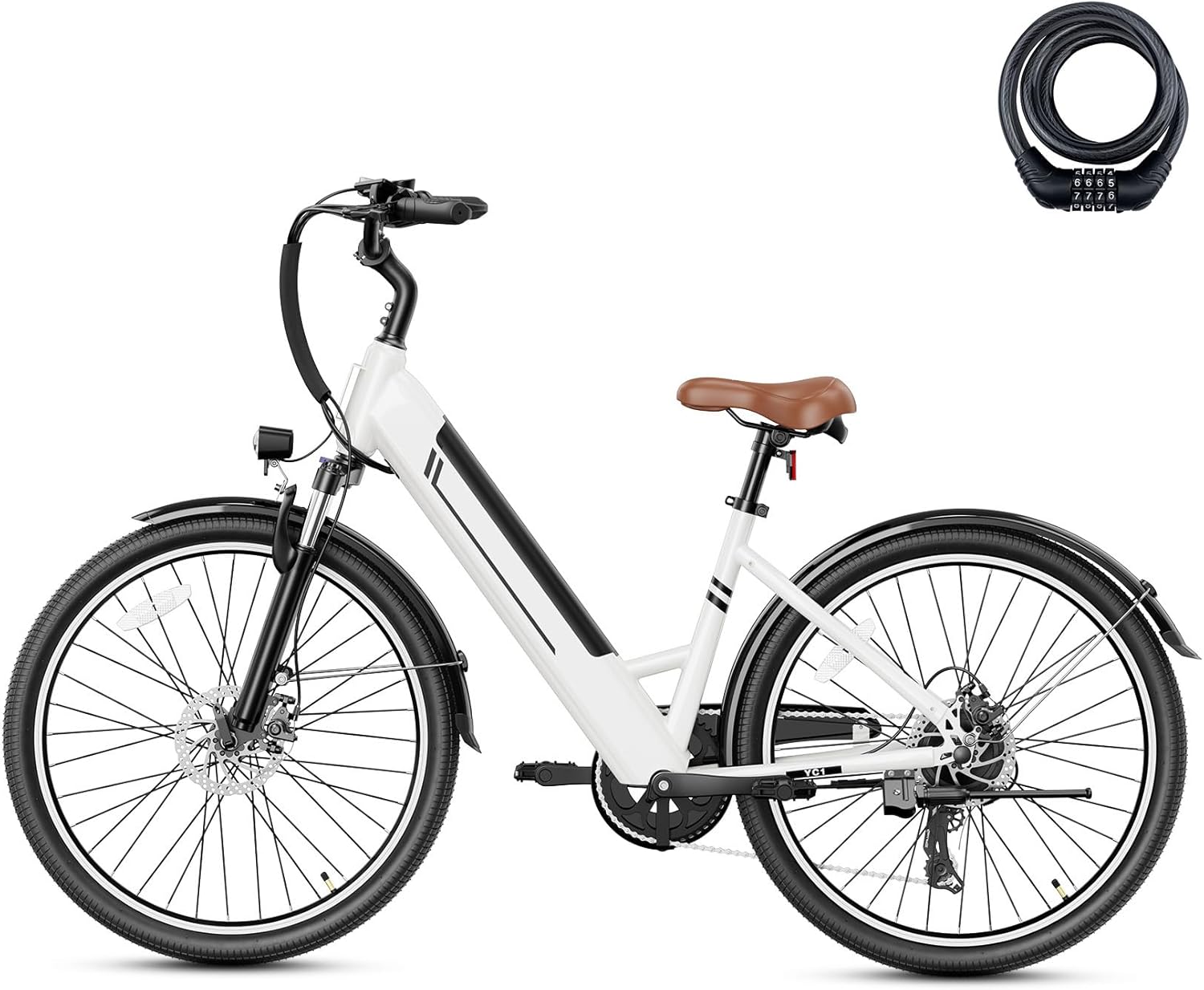
Figure 4.1: Jasion YC1 ST Electric Bike (Soft White). This image displays the complete electric bicycle from the side, highlighting its step-through frame design and integrated battery.

Figure 4.2: Key Features of the Jasion YC1 ST. This diagram labels various parts of the bike including the height-adjustable seat, rear warning light, full-cover mudguards, visible wheel, internal removable battery, lockable front suspension, bright front headlight, and step-through frame.
4.1 Internal Removable Battery
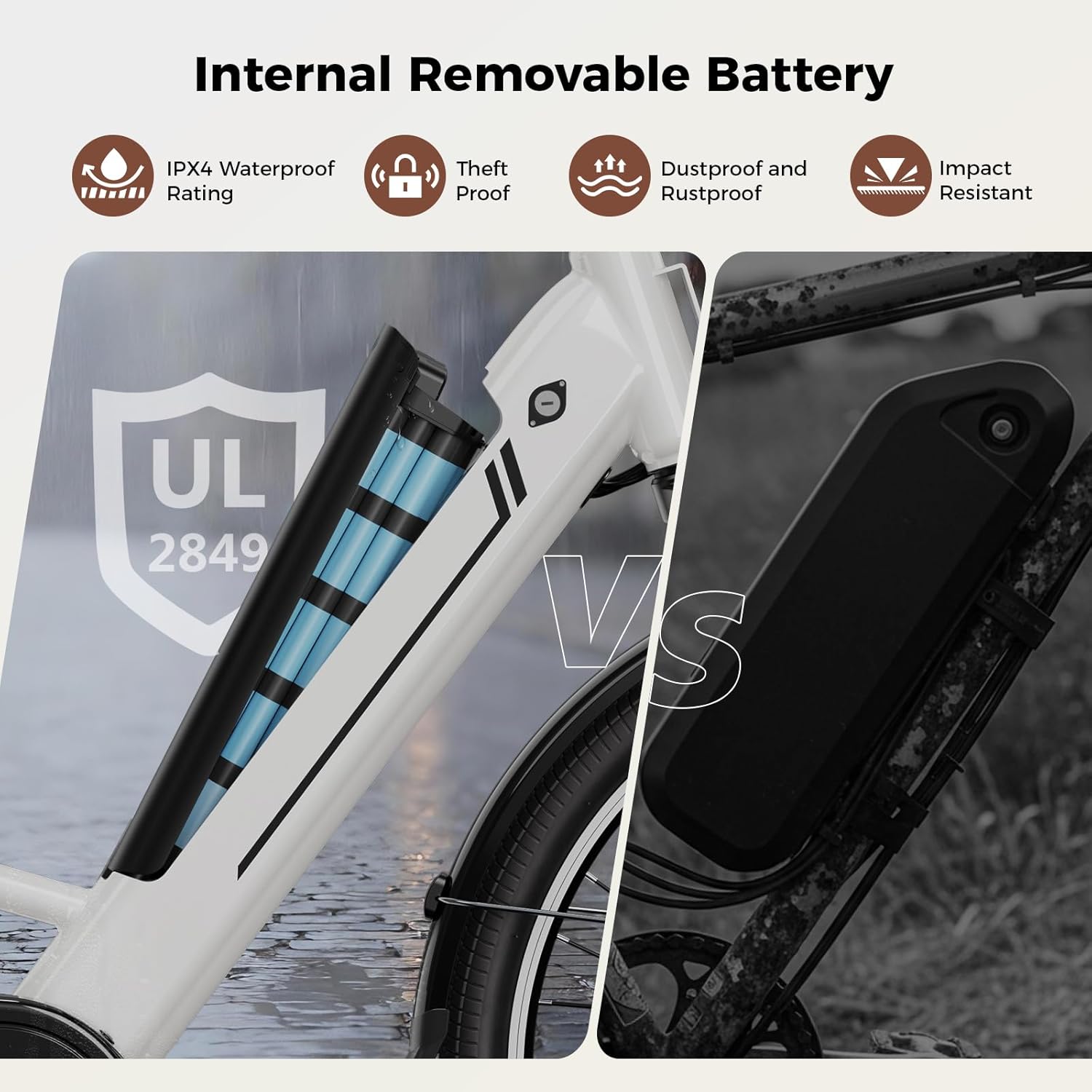
Figure 4.3: Internal Removable Battery. This image illustrates the internal battery design, highlighting its IPX4 waterproof rating, theft-proof mechanism, dustproof and rustproof casing, and impact resistance.
4.2 LCD Display

Figure 4.4: Multi-function LCD Display. The integrated LCD display provides real-time riding data such as current speed, total mileage, and battery power, ensuring you are always informed about your ride.
4.3 Suspension and Brakes

Figure 4.5: Lockable Front Fork Suspension. This feature absorbs road shock, reduces vibration, improves control on uneven surfaces, and enhances comfort during rides.

Figure 4.6: Dual Disc Brakes. The front and rear disc brakes provide reliable and responsive stopping power in various conditions, ensuring a safe ride.
5. Operating Instructions
Your Jasion YC1 ST electric bicycle offers multiple riding modes and intuitive controls for a versatile experience.
5.1 Powering On/Off
- To power on the bike, ensure the battery is installed and the red switch on the battery is in the 'ON' position.
- Press and hold the power button on the LCD display for approximately one second until the screen illuminates.
- To power off, press and hold the power button on the LCD display again until the screen turns off.
5.2 Riding Modes
The Jasion YC1 ST features 3+1 riding modes, allowing you to customize your ride:

Figure 5.1: Four Riding Modes. This graphic illustrates the four distinct riding modes available on the Jasion YC1 ST: Throttle Mode, Pedal Assist Mode, Pedal-Only Mode, and Walk Assist Mode.
- Pure Electric Mode (Throttle Mode): Engage the throttle for electric power without pedaling. Provides speeds up to 25 mph.
- Pedal Assist Mode (PAS): The motor provides assistance as you pedal, extending your range up to 50 miles. Adjust assist levels via the LCD display.
- Pedal-Only Mode: Ride the bicycle like a traditional bike with no electric assistance.
- Walk Assist Mode: Provides a low-speed motor assist to help you push the bike while walking, useful for inclines or tight spaces.
5.3 Gear Shifting
The Jasion YC1 ST is equipped with a 7-speed transmission system. Use the twist grip shifter on the handlebar to change gears, adapting to different terrains and riding conditions.

Figure 5.2: 7-Speed Drivetrain. The 7-speed gear system allows for easy gear changes to match various riding rhythms, from gentle inclines to relaxed city cruising.
6. Battery Information
The Jasion YC1 ST features a 360WH internal removable lithium-ion battery with a Battery Management System (BMS) for enhanced safety.
6.1 Charging the Battery
- The battery can be charged while installed on the bike or removed.
- To remove the battery, use the key to unlock it from the frame.
- Connect the supplied charger to the charging port on the battery.
- Plug the charger into a standard wall outlet. The charging indicator on the charger will show the charging status.
- A full charge typically takes 5-6 hours. Disconnect the charger once fully charged.
6.2 Battery Care and Safety
- Avoid fully discharging the battery regularly. Charge it after each ride or when the charge level is low.
- Store the battery in a cool, dry place away from direct sunlight and extreme temperatures.
- Do not expose the battery to water or moisture beyond its IPX4 rating.
- Only use the charger provided by Jasion.
7. Maintenance
Regular maintenance ensures the longevity and safe operation of your electric bicycle.
7.1 Regular Checks
- Tires: Check tire pressure before each ride. Inspect for wear and damage.
- Brakes: Regularly check brake pads for wear and ensure brake levers provide firm and responsive braking. Adjust as needed.
- Chain: Keep the chain clean and lubricated for smooth operation and to prevent rust.
- Bolts and Fasteners: Periodically check all bolts and fasteners for tightness.
- Electrical Connections: Ensure all electrical connections are secure and free from corrosion.
7.2 Cleaning and Storage
- Clean the bike with a damp cloth and mild soap. Avoid high-pressure washing directly on electrical components.
- Store the bicycle in a dry, sheltered area to protect it from the elements.
- If storing for an extended period, charge the battery to 50-70% and check it periodically.
8. Troubleshooting
This section addresses common issues you might encounter with your Jasion YC1 ST electric bicycle.
| Problem | Possible Cause | Solution |
|---|---|---|
| Bike does not power on | Battery not charged or not installed correctly; Battery switch is off; Loose electrical connection. | Charge battery; Ensure battery is fully inserted and locked; Turn battery switch to 'ON'; Check all cable connections. |
| Motor not assisting | Pedal Assist Level is 0; Brake levers engaged; Motor cable loose. | Increase PAS level on LCD; Release brake levers; Check motor cable connection. |
| Brakes feel weak | Worn brake pads; Loose brake cable; Air in hydraulic system (if applicable). | Inspect and replace brake pads; Adjust brake cable tension; Consult a professional bike mechanic. |
| Unusual noises during ride | Loose components; Dry chain; Rubbing fender. | Check all bolts and connections; Lubricate chain; Adjust fender position. |
If you encounter issues not listed here or require further assistance, please contact Jasion customer support.
9. Specifications

Figure 9.1: Jasion YC1 ST Dimensions. This image provides detailed measurements of the bike, including seat height, wheelbase, handlebar height, and total length, along with e-bike weight, load capacity, and recommended rider height.
| Feature | Detail |
|---|---|
| Model Name | YC1 ST |
| Bike Type | City Bike, Electric Bike |
| Age Range | Adult |
| Number of Speeds | 7 |
| Wheel Size | 26 Inches |
| Frame Material | High Carbon Steel |
| Suspension Type | Front (Lockable) |
| Brake Style | Disc (Dual Disc Brakes) |
| Power Source | Electric motor (rechargeable battery-powered) |
| Motor Peak Power | 750W |
| Max Speed | 25 Mph |
| Lithium Battery Energy Content | 360 Wh |
| Max Range | Up to 50 Miles (PAS mode) |
| Charging Time | 5-6 hours |
| Electric Assist Type | Throttle-on-demand, Pedal Assist |
| Certifications | UL2849 Certified (battery and entire e-bike) |
| E-bike Weight | 58 lbs |
| Load Capacity | 330 lbs |
| Recommended Height | 5'1"-6'6" |
10. Warranty & Support
10.1 Product Warranty
The Jasion YC1 ST electric bicycle comes with a 1-Year Limited Warranty. This warranty covers manufacturing defects in materials and workmanship. Please refer to your warranty card included in the accessory box for full terms and conditions.
10.2 Customer Support
For technical assistance, warranty claims, or any questions regarding your Jasion YC1 ST electric bicycle, please contact Jasion customer support through the retailer where you purchased the product or visit the official Jasion website for contact information.