Introduction
This manual provides instructions for the setup, operation, maintenance, and troubleshooting of your XINFUTE WH-TA11PE replacement remote control for Toshiba Air Conditioners. This remote is designed to function as an original replacement for controlling both cooling and heating functions.
Setup
1. Battery Installation
The XINFUTE WH-TA11PE remote control requires two (2) AAA batteries for operation. Follow these steps to install the batteries:
- Locate the battery compartment cover on the back of the remote control.
- Slide the cover downwards or press the latch and lift to open the compartment.
- Insert two AAA batteries, ensuring the positive (+) and negative (-) terminals align correctly with the markings inside the compartment.
- Replace the battery compartment cover by sliding it back into place until it clicks securely.
Note: No pairing or programming is required. The remote control is ready for use immediately after battery installation.
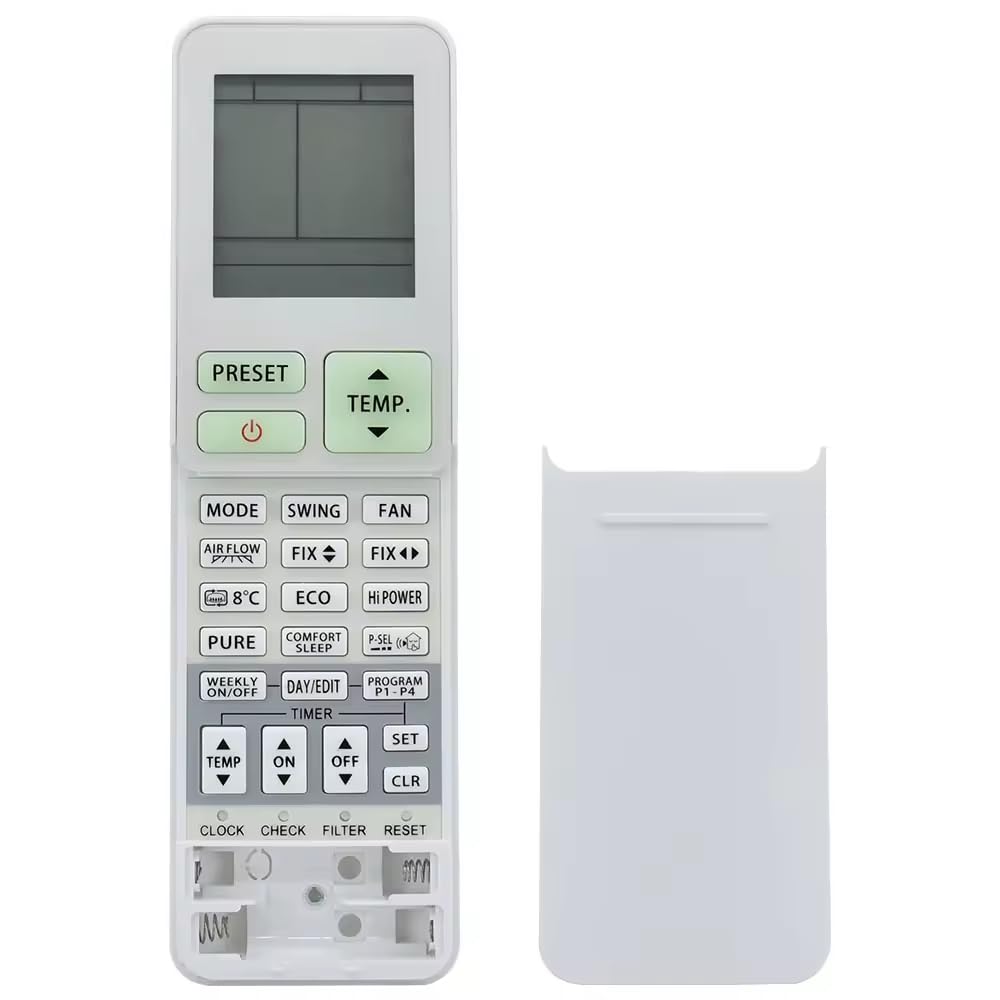
Image: Front and back view of the XINFUTE WH-TA11PE remote control. The back view highlights the battery compartment, indicating where two AAA batteries should be inserted.
Operating Instructions
This replacement remote control is designed to function identically to the original Toshiba Air Conditioner remote, supporting both cooling and heating modes. Point the remote control directly at your Toshiba Air Conditioner unit when pressing buttons.
Basic Functions:
- Power On/Off: Press the POWER button to turn the air conditioner on or off.
- Mode Selection: Use the MODE button to cycle through available modes (e.g., Cool, Heat, Fan, Dry, Auto).
- Temperature Adjustment: Use the TEMP UP (▲) and TEMP DOWN (▼) buttons to set your desired temperature.
- Fan Speed: Adjust the fan speed using the FAN button.
- Swing/Louvre: Control the air direction with the SWING or LOUVRE button (if applicable to your AC model).
Refer to your Toshiba Air Conditioner's original manual for specific functions and button layouts if you require advanced operation details.
Maintenance
Proper care will extend the life of your remote control.
- Cleaning: Wipe the remote control with a soft, dry cloth. Do not use liquid cleaners, abrasive pads, or chemical solvents.
- Battery Replacement: Replace batteries when the remote's range decreases or it stops responding. Always replace both batteries at the same time with new ones of the same type (AAA).
- Storage: If the remote control will not be used for an extended period, remove the batteries to prevent leakage and potential damage.
- Environment: Keep the remote control away from direct sunlight, high temperatures, and high humidity. Avoid dropping the remote or exposing it to strong impacts.
Troubleshooting
If you experience issues with your XINFUTE WH-TA11PE remote control, try the following solutions:
- Remote not responding:
- Check if the batteries are inserted correctly with the correct polarity (+/-).
- Replace old batteries with new AAA batteries.
- Ensure there are no obstructions between the remote control and the air conditioner unit.
- Make sure you are within the effective operating range of the air conditioner.
- Specific functions not working:
- Verify that your Toshiba Air Conditioner model supports the specific function you are trying to use. Some advanced features may vary between AC models.
If the problem persists after trying these steps, please refer to the Warranty and Support section for further assistance.
Specifications
| Model Number | WH-TA11PE |
| Brand | XINFUTE |
| Compatible Devices | Toshiba Air Conditioners |
| Power Source | 2 x AAA Batteries (not included) |
| Product Dimensions | 4 x 3 x 1 inches |
| Item Weight | 2.82 ounces |
| Material | ABS Material |
| Special Feature | Ergonomic |
Warranty and Support
Warranty Information
Your XINFUTE WH-TA11PE remote control comes with a one-year warranty from the date of purchase. This warranty covers manufacturing defects and ensures the product functions as intended under normal use.
Customer Support
If you encounter any issues or are not satisfied with your purchase, please contact XINFUTE customer support. It is recommended to reach out within 24 hours of receiving your product for prompt assistance. Contact details can typically be found on the product packaging or the retailer's website where the purchase was made.


