
Kiivakii bed 4d
Kiivakii Twin Size Bed Frame User Manual
Brand: Kiivakii | Model: bed 4d
Introduction
Thank you for choosing the Kiivakii Twin Size Bed Frame. This manual provides essential information for the safe and efficient assembly, operation, and maintenance of your new bed frame. Please read all instructions carefully before beginning assembly and retain this manual for future reference.
Safety Information
- Ensure all parts are present and undamaged before assembly. Do not use if any parts are missing or broken.
- Assemble the bed frame on a soft, clean surface to prevent scratches.
- It is recommended that two people assemble this product for ease and safety.
- Do not overtighten screws during assembly.
- Keep small parts away from children during assembly.
- The maximum load capacity for this bed frame is 800 lbs. Do not exceed this weight.
- Ensure all electrical connections for the LED lights and charging station are secure and follow local electrical codes.
Product Specifications
| Feature | Detail |
|---|---|
| Name | Twin Bed Frame with 4 Drawers |
| Color | Gray |
| Material | Metal, Wood |
| Product Size (L x W x H) | 81.96"L x 39.56"W x 39.17"H |
| Product Weight | 75 lbs (83 lbs as per description) |
| Max Load Capacity | 800 lbs |
| Features | 4 Drawers, RGB LED Light, 2 Standard Plug Outlets & 1 USB Ports, 1 Type-C Port, Storage Headboard, Solid and Stable |
| Assembly Required | Yes |
| UPC | 990484100603 |

Figure 1: Product Dimensions and Weight Capacity. This diagram provides detailed measurements for the bed frame and its components, along with the maximum supported weight of 800 lbs.
Setup Guide
The Kiivakii Twin Size Bed Frame is designed for straightforward assembly. All necessary tools and hardware are typically included, and parts are labeled for easy identification. Assembly usually takes approximately 45 minutes with two people.
Assembly Steps Overview:
- Unpack and Verify: Carefully unpack all components and compare them against the parts list provided in your assembly manual to ensure nothing is missing or damaged.
- Assemble Frame: Follow the step-by-step instructions to connect the main frame components, including the side rails and support beams.
- Install Slats: Secure the metal slats to the frame. The snap-in design ensures a secure and noise-free fit.
- Attach Headboard: Mount the headboard to the assembled frame, ensuring the charging station and LED light components are correctly positioned.
- Assemble Drawers: Put together the four storage drawers and insert them under the bed frame. Ensure the wheels are properly attached for smooth operation.
- Connect Power: Plug in the power cord for the LED lights and charging station to a suitable wall outlet.

Figure 2: Fully Assembled Bed Frame. This image displays the complete bed frame with the headboard, LED lighting, charging station, and four storage drawers in place.
Operating Instructions
1. RGB LED Lighting System
The integrated RGB LED lighting system in the headboard offers customizable ambiance for your room. It can be controlled via a remote control or a dedicated smartphone application.
- Color Options: Choose from over 60,000 color options to match your mood or decor.
- Control Modes: Utilize various modes such as Mic Mode (lights react to sound), Music Mode (lights sync with music), and Timer functions for automated on/off schedules.
- Brightness Adjustment: Adjust the brightness levels to your preference.

Figure 3: RGB LED Lighting Features. This image illustrates the various control options and modes available for the smart LED lighting system.
2. Built-in Charging Station
The headboard features a convenient charging hub to keep your electronic devices powered and within reach.
- Ports: Includes 2 standard AC outlets (125V/12A), 1 USB port (5V 2A), and 1 Type-C port (5V 2A).
- Power Cord: Equipped with a 7.9 ft power cord for flexible placement.
- Usage: Simply plug your devices into the appropriate ports for charging.

Figure 4: Charging Station Details. This close-up shows the various power outlets and USB ports available on the headboard for convenient device charging.
3. Storage Drawers
The bed frame includes four spacious storage drawers, providing ample space for clothes, linens, and other items.
- Smooth Operation: Each drawer is equipped with smooth rollers for easy access and quiet movement.
- Lockable Design: The drawers feature a lockable mechanism to keep them securely in place when not in use.
- Capacity: Utilize the drawers to maximize storage in your bedroom.

Figure 5: Storage Drawers. This image demonstrates the four under-bed storage drawers and their lockable feature.
Maintenance
Regular maintenance will help prolong the life and appearance of your bed frame.
- Cleaning: Wipe down metal and wood surfaces with a soft, damp cloth. Avoid harsh chemicals or abrasive cleaners that could damage the finish.
- Hardware Check: Periodically check all screws and bolts to ensure they remain tight. Retighten if necessary to maintain stability and prevent noise.
- Drawer Care: Keep the drawer rollers clean and free of debris to ensure smooth operation.
- Electrical Components: Ensure the charging station and LED light connections are secure. Do not attempt to repair electrical components yourself; contact qualified personnel if issues arise.
Troubleshooting
This section addresses common issues you might encounter with your bed frame.
| Problem | Possible Cause | Solution |
|---|---|---|
| Bed frame is noisy/squeaks. | Loose bolts or connections; friction between metal parts. | Ensure all bolts are securely tightened. The design includes "silent cotton" to minimize noise; verify it is properly installed. |
| LED lights are not working. | Power cord not plugged in; loose connection; remote control battery dead; app issue. | Check if the power cord is securely plugged into the wall outlet and the headboard. Ensure all connections are firm. Replace remote battery if applicable. Restart the control app. |
| Charging station is not providing power. | Power cord not plugged in; device not properly connected; power surge protection tripped. | Verify the bed frame's power cord is plugged into a live outlet. Ensure your device's charging cable is fully inserted. Try a different device or cable to rule out device issues. |
| Drawers do not slide smoothly or are difficult to close. | Debris in rollers; misaligned drawers; overloaded drawers. | Clean any debris from the drawer rollers. Ensure drawers are correctly aligned in their tracks. Do not overload drawers beyond their capacity. Verify the lockable mechanism is disengaged when attempting to slide. |
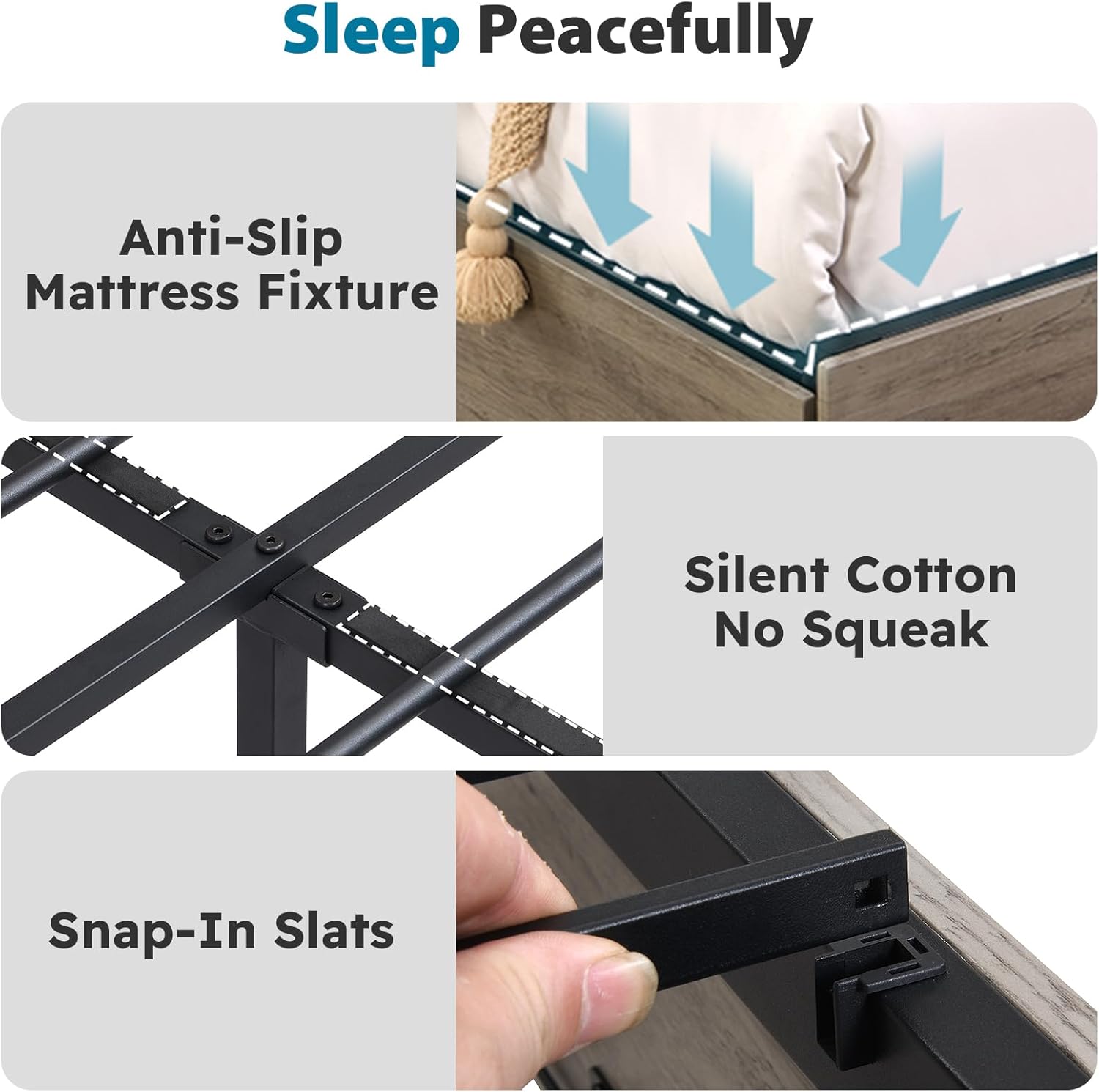
Figure 6: Noise Reduction and Stability Features. This image highlights the anti-slip mattress fixture, silent cotton for noise reduction, and snap-in slats for a stable bed base.
Warranty Information
For specific warranty terms and conditions related to your Kiivakii Twin Size Bed Frame, please refer to the warranty card included with your product packaging or contact Kiivakii customer support directly. Warranty coverage typically addresses manufacturing defects and material flaws under normal use.
Extended protection plans may be available for purchase separately. Please consult the retailer or manufacturer for details on these additional coverage options.
Customer Support
If you have any questions, require assistance with assembly, or need to report a missing or damaged part, please contact Kiivakii customer support. Have your model number ("bed 4d") and purchase information ready when contacting support.
You can often find contact information on the manufacturer's website or through the retailer where you purchased the product. For more information about Kiivakii products, you may visit the official Kiivakii Store: Kiivakii Store.
Ask a question about this manual
Ask about setup, troubleshooting, compatibility, parts, safety, or missing instructions. Manuals+ will review the question and use this page’s manual context to help answer it.