
Introduction
This manual provides detailed instructions for the assembly, operation, maintenance, and troubleshooting of your Kiivakii Full Size Bed Frame. Please read this manual thoroughly before beginning assembly or use to ensure proper function and safety. Keep this manual for future reference.
The Kiivakii Full Size Bed Frame is designed for comfort and convenience, featuring an upholstered storage headboard with integrated LED lighting and a charging station, along with four spacious storage drawers. Its robust metal construction ensures durability and stability.

Figure 1: The Kiivakii Full Size Bed Frame, featuring an upholstered headboard with integrated LED lighting and charging station, and four pull-out storage drawers. The bed is shown in a dark grey finish, complementing a modern bedroom aesthetic.
Important Safety Information
Always follow these safety guidelines to prevent injury or damage to the product:
- Ensure all parts are present and undamaged before assembly. Do not use if any parts are missing or broken.
- Assemble the bed frame on a soft, clean surface to prevent scratches.
- Tighten all screws and bolts securely, but do not overtighten. Periodically check and retighten fasteners.
- Do not exceed the maximum load capacity of 800 lbs.
- Keep children and pets away from the assembly area.
- Only use the charging station for compatible devices. Do not overload the outlets.
- Disconnect power to the charging station before cleaning or maintenance.
Setup and Assembly
Assembly typically requires two adults and can take approximately 2-3 hours. Please ensure you have adequate space and all tools provided or required (e.g., screwdriver, Allen wrench).
Package Contents
Verify that all components listed in your packaging insert are present. Common components include:
- Headboard sections (upholstered and frame)
- Side rails and footboard
- Metal bed slats and support legs
- 4 Storage drawers with rollers
- Charging station unit
- LED light strip and controller
- Assembly hardware (screws, bolts, washers, nuts)
- Assembly tools (Allen wrench)
Assembly Steps
- Unpack and Organize: Carefully unpack all components and lay them out on a soft, clean surface. Group similar parts and hardware.
- Assemble the Headboard: Attach the upholstered headboard panel to the metal frame of the headboard. Secure with the provided screws. Install the charging station unit into the designated slot on the headboard frame.
- Attach Side Rails: Connect the side rails to the assembled headboard and footboard using the appropriate bolts. Ensure connections are snug but do not fully tighten yet.
- Install Bed Slats: Place the metal bed slats onto the support beams. The snap-in design allows for easy installation. Ensure all slats are securely seated to provide a stable foundation for your mattress.
- Assemble Storage Drawers: Assemble the four storage drawers according to the instructions, attaching the rollers. Insert the assembled drawers into the designated compartments under the bed frame.
- Install LED Lighting: Adhere the LED light strip to the underside of the headboard shelf. Connect the LED controller and power supply.
- Final Tightening: Once all major components are in place, go back and fully tighten all screws and bolts. This ensures the bed frame's stability and prevents creaking.
- Anti-Slip Mattress Fixture: Position the anti-slip mattress fixture as indicated in your specific assembly guide to prevent mattress movement.

Figure 2: Exploded view of the bed frame components with key dimensions. This diagram illustrates the main parts including the headboard, frame, and drawer units, along with overall dimensions of 82.08"L x 55.75"W x 38.97"H and a weight capacity of 800 lbs.
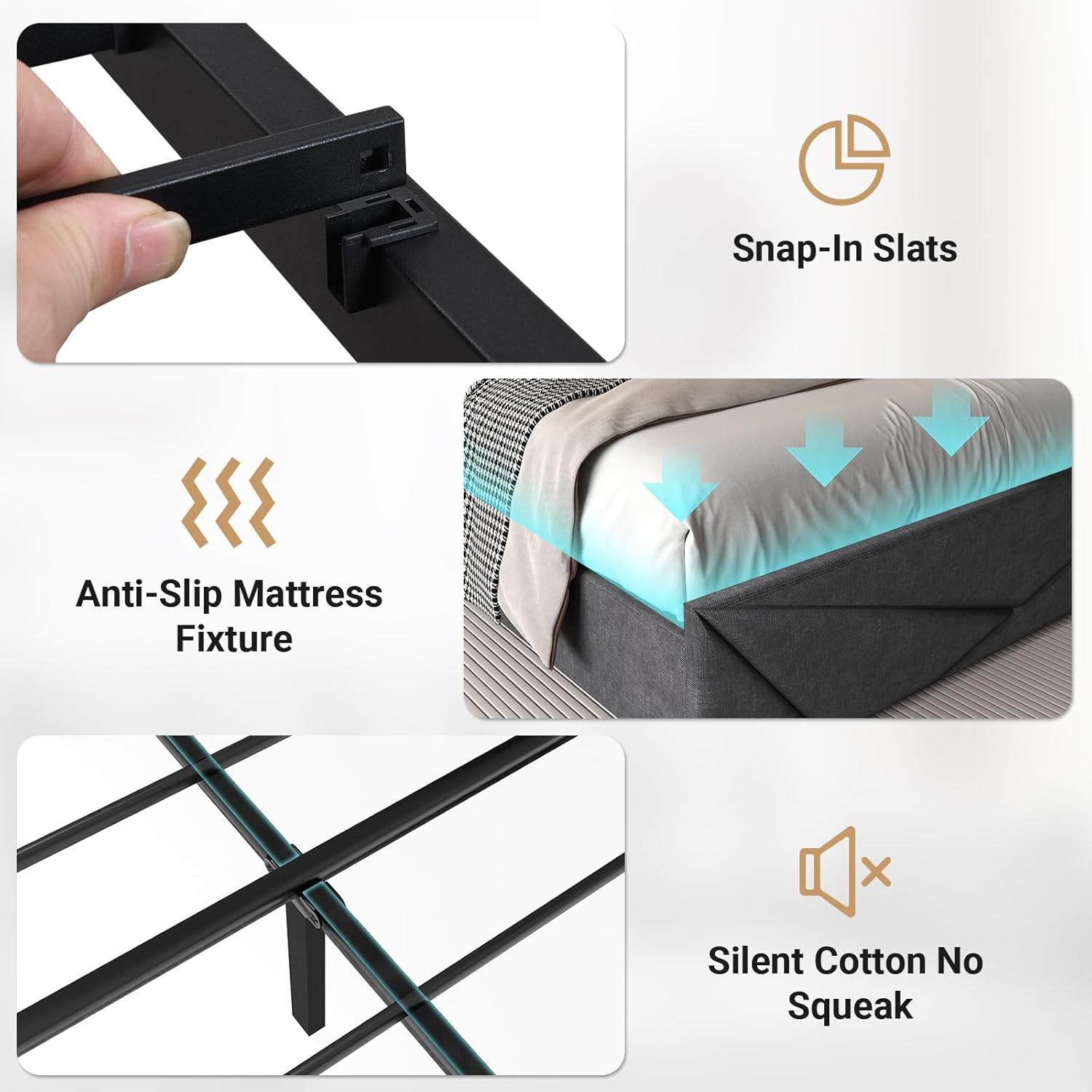
Figure 3: Details of the bed frame's construction features, including the snap-in slat system for easy assembly, the anti-slip mattress fixture to keep the mattress in place, and silent cotton padding designed to prevent noise and squeaking.
Operating Instructions
Charging Station
The integrated charging station on the headboard provides convenient power access for your electronic devices.
- Power Outlets: Two standard AC outlets (125V/12A) are available for plugging in lamps, laptops, or other electronics.
- USB Ports: One USB-A port and one USB-C port (5V 2A total) are provided for charging smartphones, tablets, and other USB-powered devices.
- Usage: Simply plug your device's charging cable into the appropriate port. Ensure the bed frame's power cord is connected to a wall outlet.

Figure 4: Detailed view of the headboard's built-in charging station, highlighting the two AC outlets, one USB-A port, and one USB-C port, designed for convenient device charging. The image also shows the 7.9-foot power cord for connection to a wall outlet.
LED Lighting System
The RGB LED lights on the headboard can be customized to create various ambiance settings.
- Control: The LED lights are controllable via a dedicated mobile application. Download the app by scanning the QR code provided in your LED light kit or searching for the app name in your device's app store.
- Features: The app allows access to over 60,000 color options, microphone mode (lights react to sound), music mode (lights sync with music), timer functions, and dynamic lighting modes.
- Power On/Off: Use the app or the inline controller (if present) to turn the lights on or off.

Figure 5: Illustration of the RGB LED lighting system integrated into the headboard. This image highlights the extensive customization options, including over 60,000 colors, microphone mode for sound-reactive lighting, music mode for synchronization with audio, timer functions, and smart control via a mobile application.
Storage Drawers
The four lockable storage drawers provide ample space for clothes, linens, or other items.
- Access: Gently pull the drawers out from under the bed frame. They are equipped with smooth rollers for easy movement.
- Locking Mechanism: The drawers feature a simple locking device to keep them securely in place when not in use. Engage the lock by pushing down on the mechanism located near the top edge of the drawer.
- Capacity: Each drawer is designed to hold a significant amount of items, helping to maximize your bedroom storage.

Figure 6: View of one of the four large storage drawers, demonstrating its capacity for storing items like clothing. The image also includes a detailed inset showing the lockable device, which helps secure the drawer in place under the bed frame.
Side Storage Box
A convenient side storage box is integrated into the headboard design for small, frequently accessed items.
- Usage: Ideal for storing items such as remote controls, glasses, or a small book, keeping them within easy reach.

Figure 7: Close-up image illustrating the side storage box integrated into the headboard, designed for convenient storage of small items such as a mobile phone or other personal effects, keeping them easily accessible from the bed.
Maintenance and Care
Regular maintenance will help prolong the life and appearance of your bed frame.
- Cleaning:
- For the metal frame, wipe with a soft, damp cloth. Avoid abrasive cleaners.
- For the upholstered headboard, use a soft brush or vacuum cleaner with an upholstery attachment to remove dust. Spot clean with a mild fabric cleaner if necessary, testing on an inconspicuous area first.
- Ensure the charging station is unplugged before cleaning. Wipe with a dry cloth.
- Fastener Check: Periodically (every 3-6 months) check all screws, bolts, and connections to ensure they remain tight. Retighten as needed to maintain stability and prevent noise.
- Drawer Maintenance: Keep the drawer rollers free of dust and debris to ensure smooth operation.
- LED Lights: The LED lights are designed for long life and typically require no maintenance. If issues arise, refer to the troubleshooting section.
Troubleshooting
This section addresses common issues you might encounter with your bed frame.
| Problem | Possible Cause | Solution |
|---|---|---|
| Bed frame is squeaking or wobbly. | Loose fasteners; uneven assembly. | Check and tighten all screws and bolts. Ensure the bed is on a level surface. Re-check slat installation. |
| Charging station not working. | Power cord unplugged; overloaded circuit; faulty device. | Ensure the bed frame's power cord is securely plugged into a working wall outlet. Try a different device. Do not exceed the rated capacity of the outlets/USB ports. |
| LED lights not turning on or functioning incorrectly. | Power connection issue; app connectivity problem; faulty LED strip. | Check if the LED power adapter is securely connected. Restart the mobile app and ensure Bluetooth/Wi-Fi is enabled for connection. Try resetting the LED controller (refer to LED kit instructions if separate). |
| Drawers are difficult to open/close or do not stay in place. | Rollers obstructed; drawer not assembled correctly; locking mechanism not engaged/disengaged. | Clear any debris from the rollers. Ensure drawers are assembled correctly and rollers are properly aligned. Verify the locking mechanism is fully engaged or disengaged as desired. |
If the problem persists after attempting these solutions, please contact customer support.
Specifications
| Feature | Detail |
|---|---|
| Product Name | Full Size Bed Frame with 4 Drawers, LED Metal Platform Bed with Upholstered Storage Headboard, Built in Charging Station |
| Model Number | bed1301 |
| Brand | Kiivakii |
| Size | Full |
| Color | Dark Grey |
| Material | Metal frame, Upholstered headboard |
| Product Dimensions (L x W x H) | 82.08" x 55.75" x 39" |
| Product Weight | Approximately 65 lbs |
| Maximum Load Capacity | 800 lbs |
| Charging Station | 2 AC Outlets (125V/12A), 1 USB-A Port (5V 2A), 1 USB-C Port (5V 2A) |
| LED Lighting | RGB, App Control, 60,000+ colors, Mic Mode, Music Mode, Timer, Dynamic Modes |
| Storage | 4 Lockable Storage Drawers, Side Storage Box |
| Box Spring Required | No |
Warranty and Support
Kiivakii provides a limited warranty for this product against defects in materials and workmanship under normal use. The specific terms and duration of your warranty may vary. Please refer to the warranty card included with your product or contact Kiivakii customer support for detailed information.
Customer Support
For assembly assistance, missing parts, troubleshooting, or warranty claims, please contact Kiivakii customer support. Have your model number (bed1301) and purchase information ready when contacting support.
Contact Information:
- Website: Visit the official Kiivakii store on Amazon for support resources: Kiivakii Amazon Store
- Email: Refer to your product packaging or warranty card for direct email support.
- Phone: Refer to your product packaging or warranty card for direct phone support.
Please retain your proof of purchase for warranty validation.