
1. Product Overview
This manual provides instructions for the METEESER 8Core 4G+64G Car Stereo, designed for Suzuki SX4 models manufactured between 2006 and 2013. This unit features a 9-inch IPS touchscreen, wireless CarPlay and Android Auto, Bluetooth 5.1, DSP Hi-Res audio, GPS navigation, Steering Wheel Control (SWC) compatibility, and support for a backup camera.
2. Vehicle Compatibility
This car stereo is specifically designed for Suzuki SX4 models from 2006 to 2013. Please verify your vehicle's dashboard configuration matches the compatible examples shown below before installation.

Image: METEESER Car Stereo installed in a Suzuki SX4 dashboard, showing a modern touchscreen replacing the original radio.
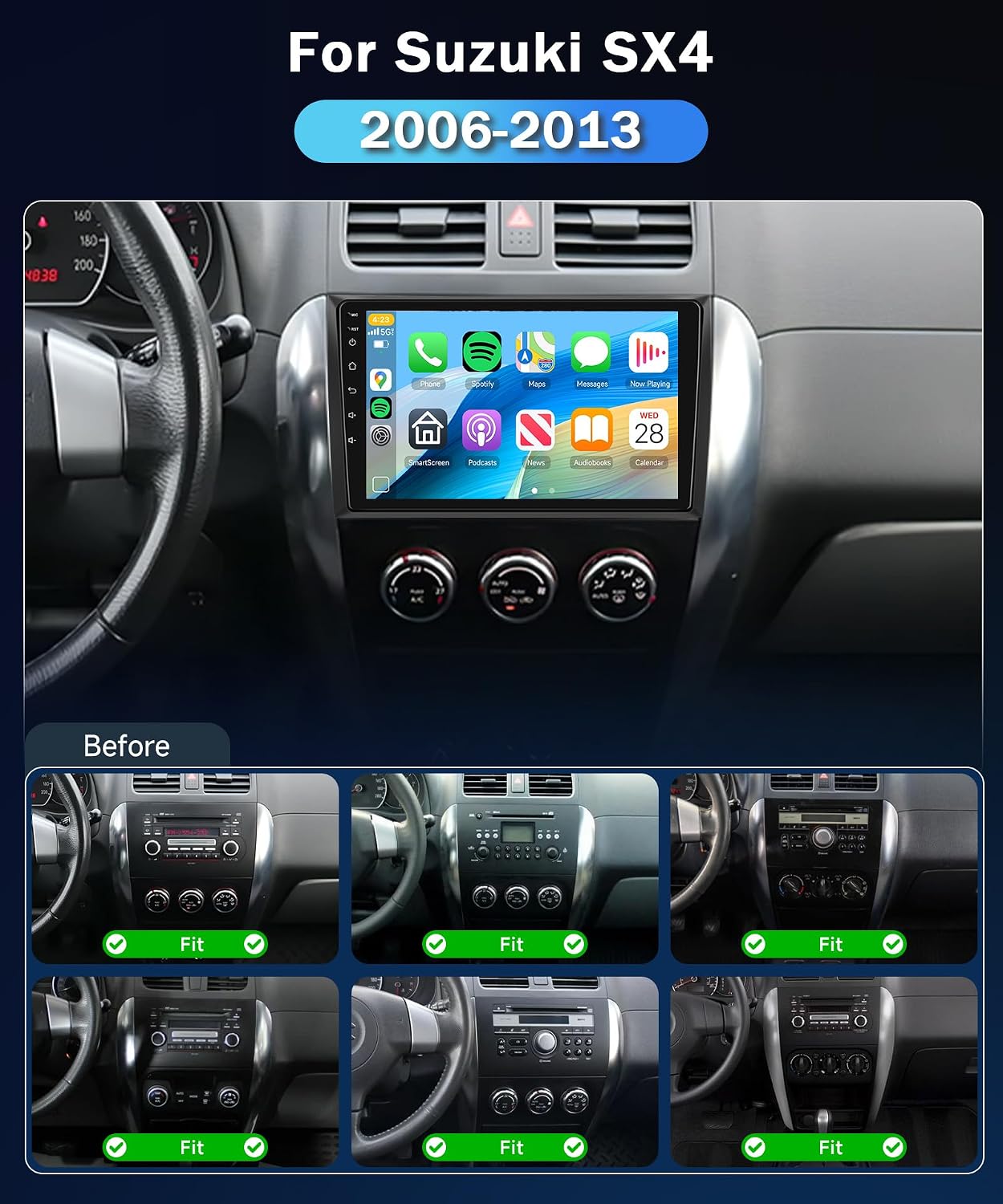
Image: Comparison of Suzuki SX4 dashboard before and after METEESER car stereo installation, with various original radio configurations marked as compatible.

Image: Diagram showing Canbus setup steps for the car stereo.
Note: This car stereo is not compatible with vehicles that have an original J-B-L/B-OSE audio system.
3. Key Features
- 9-Inch HD IPS Touchscreen: 1280*720 resolution, scratch-resistant, anti-knock, high-temperature protection, Display P3/SRGB wide color gamut.
- Powerful Processor: Snapdragon 8-Core processor with 4GB RAM + 64GB ROM for smooth performance.
- Wireless Connectivity: Supports Wireless CarPlay, Android Auto, and Mirror Link. Features WIFI and Bluetooth 5.1 for stable connections.
- Customizable Interface: Optional home page app displays and window designs for personalized user experience.
- Enhanced Audio: Built-in DSP (Digital Signal Processor) for improved audio quality.
- Multimedia Excellence: Picture-in-Picture Video feature, built-in offline maps, dual USB interfaces for charging.
- Advanced Compatibility: Supports reversing cameras (1080P IP69 Waterproof), driving recorders, and external microphones.
- Voice Control: Intuitive operation via Siri/Google controls.
- Global Weather Display: Keeps you informed of weather conditions.

Image: Collage illustrating key features such as the 2.5D 1024x600P display, Bluetooth, EQ Band, Android 15 operating system, 5G WiFi & 8 Core processor, FM/RDS Radio, and Steering Wheel Control.

Image: Features including FM/RDS Radio, Split Screen functionality, and 1280x720 IPS Touchscreen.
4. What's in the Box
The product package includes the following components:
- Backup Camera
- GPS Antenna
- External Mic
- USB Cable x 2
- Manual

Image: Diagram illustrating the car stereo unit with its dimensions and a comprehensive list of included accessories.
5. Installation
5.1 Wiring Diagram
Refer to the following diagram for proper wiring connections. Ensure all connections are secure before powering on the unit.

Image: Detailed wiring diagram for the car stereo, indicating connections for power, speakers, camera, USB, and other accessories.

Image: Wiring Note providing additional instructions or warnings for the car stereo installation.
5.2 Cooling Fan
The unit includes a cooling fan to manage heat dissipation, ensuring stable performance and longevity, especially during extended use or in warm environments.

Image: The cooling fan component of the car stereo, with a graph illustrating its heat dissipation performance compared to other systems.
6. Operating Instructions
6.1 Wireless CarPlay Connection
To connect your iPhone wirelessly to CarPlay:
- Open the CarPlay application on the car stereo.
- On your iPhone, go to Settings > Bluetooth and connect to the device named 'BLINK_6115' (or similar).
- Confirm the pairing request on both devices.
- Once connected, CarPlay will launch automatically on the car stereo display.
Video: Demonstrates the steps for connecting a smartphone to the car stereo via Wireless CarPlay, including opening the CarPlay app, connecting via Bluetooth, and confirming the connection.
6.2 Wireless Android Auto Connection
To connect your Android phone wirelessly to Android Auto:
- Open the Android Auto application on the car stereo.
- On your Android phone, go to Settings > Bluetooth and connect to the device named 'BLINK_6115' (or similar).
- Confirm the pairing request on both devices.
- Once connected, Android Auto will launch automatically on the car stereo display.
Video: Illustrates the process of connecting an Android smartphone to the car stereo using Wireless Android Auto, including opening the Android Auto app, establishing a Bluetooth connection, and confirming the pairing.
6.3 Wireless iPhone Mirroring
To mirror your iPhone screen wirelessly:
- Open the 'Mirroring' application on the car stereo and select 'iPhone'.
- On your iPhone, go to Settings > Personal Hotspot and enable it. Ensure 'Allow Others to Join' is active.
- On the car stereo, connect to your iPhone's personal hotspot via Wi-Fi.
- On your iPhone, open Control Center, select 'Screen Mirroring', and then choose 'zj-airplay'.
- Your iPhone screen will now be mirrored on the car stereo display.
Video: Shows how to set up wireless iPhone mirroring, including enabling personal hotspot, connecting the car stereo to the hotspot, and initiating screen mirroring from the iPhone's Control Center.
6.4 Wireless Android Mirroring
To mirror your Android phone screen wirelessly:
- Open the 'Mirroring' application on the car stereo and select 'Android'.
- For the first connection, scan the QR code displayed on the car stereo screen with your phone's browser to download the mirror software (zPlus app).
- Connect your Android phone to the car stereo via Bluetooth.
- On your Android phone, enable Personal Hotspot.
- Open the zPlus app on your phone and click the 'Start Mirroring' button to begin screen projection.
Video: Guides through the steps for wireless Android mirroring, including downloading the necessary app, connecting via Bluetooth, enabling personal hotspot, and starting screen projection from the zPlus app.
6.5 Basic Operations
- Volume Control: Adjust the volume using the on-screen controls or steering wheel controls (if configured).
- Radio: Access FM/RDS radio stations.
- GPS Navigation: Utilize built-in offline maps or online navigation via connected smartphone.
- Split Screen: Use two applications simultaneously on the screen.
- UI Customization: Personalize the home screen layout and window designs.
- 3D Car Model Display: Experience dynamic 3D car model effects.
- DSP Audio: Adjust sound settings for optimal audio output.

Image: METEESER car stereo display showcasing Wireless CarPlay and Android Auto interfaces with various applications like navigation, music, and phone.

Image: Various UI design options for the car stereo interface.

Image: Customizable home app display, 3D car model display, and built-in DSP and Hi-Res audio features.
7. Maintenance
- Cleaning: Use a soft, dry cloth to clean the touchscreen and exterior. Avoid abrasive cleaners or solvents.
- Software Updates: Periodically check for software updates to ensure optimal performance and access to new features. Follow the on-screen instructions for any available updates.
- Environmental Conditions: Avoid exposing the unit to extreme temperatures or direct sunlight for prolonged periods.
8. Troubleshooting
- No Power: Check all power connections and the vehicle's fuse box. Ensure the ignition is on.
- No Sound: Verify speaker connections, volume levels, and audio source selection. Check DSP settings.
- Touchscreen Unresponsive: Try restarting the unit. If the issue persists, perform a factory reset (refer to the Car Settings menu).
- Bluetooth/CarPlay/Android Auto Connection Issues: Ensure Bluetooth is enabled on both the stereo and your phone. Forget the device on both ends and attempt to re-pair. Check for any interference.
- GPS Signal Loss: Ensure the GPS antenna is properly installed and has a clear view of the sky.
- Backup Camera Not Displaying: Check the camera's power and video connections. Ensure the vehicle is in reverse gear.
9. Specifications
| Feature | Specification |
|---|---|
| Brand | METEESER |
| Vehicle Service Type | Car (Suzuki SX4 2006-2013) |
| Screen Size | 9 Inches |
| Operating System | Android |
| Processor | 8-Core Snapdragon |
| Memory Storage Capacity | 64 GB |
| RAM | 4 GB |
| Display Type | IPS |
| Touch Screen Type | Capacitive |
| Resolution | 1280*720 |
| Connectivity Technology | Bluetooth 5.1, USB, Wi-Fi (5G) |
| Supported Navigation System | GPS (Worldwide Map Type) |
| Audio Output Mode | APE/FLAC/WAV/MP4/WMA etc. |
| Human-Interface Input | Touchscreen |
| Included Components | Backup Camera, External Mic, GPS Antenna, Manual, USB Cable x 2 |

Image: Details of the 8Core 4+64GB with SM4250 Qualcomm Snapdragon 460 chip, emphasizing its advanced specifications.

Image: Comparison table of various car stereo models, detailing their CPU, screen, DSP, Bluetooth, CarPlay/Android Auto, Mirror Link, Video Output, Split Screen, and 3D car model features.
10. Warranty and Support
This product comes with a 2-year warranty. For any support inquiries, technical assistance, or warranty claims, please contact METEESER Tech directly through the retailer's platform where the product was purchased. You can typically find a 'Ask a question' link on the product page or seller profile.

Image: Instructions on how to contact METEESER Tech for support via the product page.