
1. Introduction
This manual provides detailed instructions for the EPLZON 0.96 inch OLED IIC Display Module. This compact, self-luminous display features a 128x64 pixel resolution and utilizes an I2C communication interface, making it ideal for integration into various microcontroller projects such as Arduino, Raspberry Pi, and other embedded systems. Its high contrast and clear display ensure readability even for small fonts.
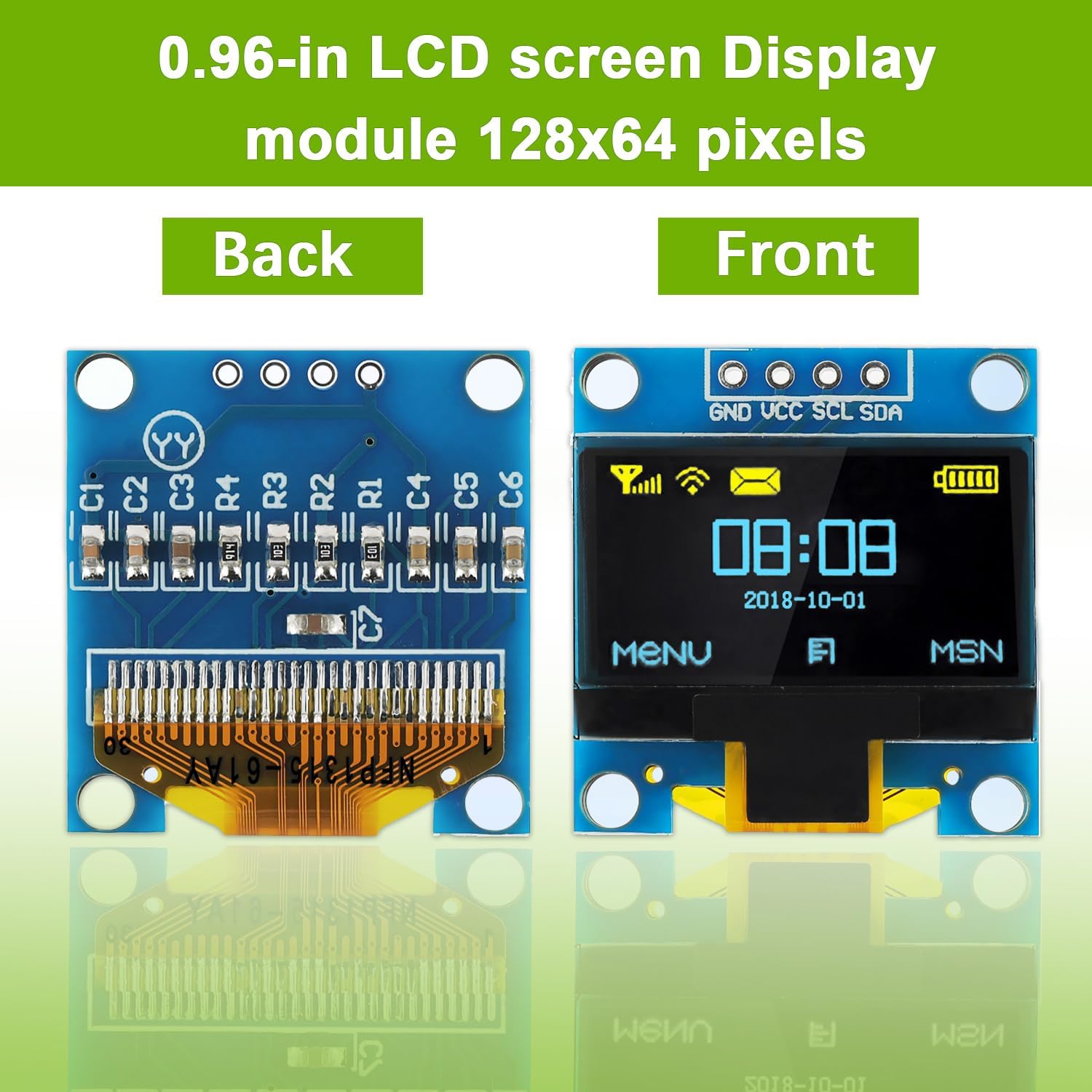
Image 1.1: Front and back view of the 0.96 inch OLED IIC Display Module. The front shows the active display area, while the back reveals the circuit board and components.
2. Setup and Wiring
The EPLZON 0.96 inch OLED module uses an I2C interface, requiring only four pins for connection: GND, VCC, SCL, and SDA. This simplifies wiring and reduces the number of I/O ports needed on your microcontroller.
2.1 Pin Definitions
- GND: Ground connection.
- VCC: Power supply input (3.3V to 5V DC).
- SCL: I2C Serial Clock line. Connect to your microcontroller's SCL pin (e.g., Arduino UNO A5, Arduino Mega 21).
- SDA: I2C Serial Data line. Connect to your microcontroller's SDA pin (e.g., Arduino UNO A4, Arduino Mega 20).

Image 2.1: Detailed wiring diagram showing the connection of the OLED module to an Arduino UNO R3 board. The table clarifies pin functions and typical microcontroller connections.
2.2 Compatibility
This module is compatible with a wide range of development boards and microcontrollers, including:
- Arduino R3 board
- Arduino Mega
- Raspberry Pi
- 51 MCU
- STM32
- MMDVM
- Pi Star

Image 2.2: The OLED module shown in a hand, illustrating its compact size and compatibility with common development platforms.
3. Operating Instructions
The 0.96 inch OLED display module is self-luminous, meaning each pixel generates its own light. This results in ultra-high contrast, vibrant colors, and excellent readability without the need for a backlight.
3.1 Display Characteristics
- High Contrast: Provides deep blacks and bright whites for clear visuals.
- High Resolution: 128x64 pixels ensure detailed graphics and text.
- Wide Viewing Angle: Greater than 160 degrees, allowing visibility from various perspectives.
- Energy Efficient: Low power consumption, especially when displaying fewer lit pixels.

Image 3.1: A close-up view of the OLED display demonstrating its high contrast and clear pixel output, making even small fonts easily readable.
3.2 Programming and Software
The module uses the SSD1306 driver IC. To display graphics and text, you will need to use a compatible library with your microcontroller. Popular libraries like the Adafruit SSD1306 library are known to work well with these displays. Since the OLED controller does not have embedded fonts, users typically generate fonts using font generation software and integrate them into their code.
3.3 Applications
The versatility and compact size of this OLED module make it suitable for a wide range of applications, including:
- Portable electronic devices (e.g., MP3/MP4 players, smartwatches)
- Head-mounted displays
- Meters and intelligent instruments
- DIY electronic projects requiring a small, clear display

Image 3.2: A collage of application examples, including integration into a breadboard project, a portable music player, a remote control, and a smartwatch.
4. Maintenance
To ensure the longevity and optimal performance of your OLED display module, follow these general maintenance guidelines:
- Handle with Care: Avoid applying excessive force or bending the module, especially the flexible connector.
- Keep Dry: Protect the module from moisture and liquids, which can cause short circuits and damage.
- Clean Gently: If cleaning is necessary, use a soft, dry, lint-free cloth. Avoid abrasive materials or chemical cleaners.
- Storage: Store the module in a cool, dry environment, away from direct sunlight and extreme temperatures.
5. Troubleshooting
If you encounter issues with your OLED display module, consider the following troubleshooting steps:
- Display Not Lighting Up:
- Verify that the VCC and GND connections are correct and providing the specified voltage (3.3V-5V DC).
- Check all wiring connections (SCL, SDA, VCC, GND) for proper contact and continuity.
- Ensure your microcontroller is powered on and running the display initialization code.
- Incorrect or Garbled Display:
- Confirm the I2C address in your code matches the module's address (commonly 0x3C or 0x3D).
- Ensure you are using the correct library for the SSD1306 driver.
- Check for any loose connections on the SCL and SDA lines.
- Partial Display or Missing Pixels:
- This specific model (Blue and Yellow variant) features a split-color display, typically with the bottom 10% in yellow and the rest in blue. This is a design feature, not a defect.
- If other parts of the display are missing, recheck connections and code initialization.
6. Specifications
Detailed technical specifications for the EPLZON 0.96 inch OLED IIC Display Module:
| Feature | Specification |
|---|---|
| Display Size | 0.96 inches |
| Resolution | 128 x 64 pixels |
| Display Color | Blue and Yellow (split display) |
| Driver IC | SSD1306 |
| Communication Interface | I2C (IIC) |
| Supported Voltage | 3.3V - 5V DC |
| Power Consumption (Normal) | 0.04W |
| Power Consumption (Full Screen) | 0.08W |
| Viewing Angle | >160° |
| Module Size | 27.3mm x 27.8mm |
| Effective Display Area | 21.74mm x 10.86mm |
| Working Temperature | -20°C to 60°C |
| Drive Duty | 1/64 Duty |
| Pin Definition | GND, VCC, SCL, SDA |
| Item Weight | 1.23 ounces |

Image 6.1: Diagram illustrating the precise dimensions of the OLED module in millimeters.
6.1 Included Components
The package typically includes:
- 5 x 0.96 Inch OLED IIC Display Modules
- 10 x Female to Female Dupont Wires
- 10 x Male to Female Dupont Wires
7. Warranty and Support
For specific warranty information and technical support, please refer to the product's purchase documentation or contact EPLZON customer service directly. General support for programming and integration can often be found within the open-source community forums dedicated to Arduino, Raspberry Pi, and SSD1306 OLED displays.