
1. Introduction
This manual provides instructions for the setup, operation, and maintenance of your new TUZIGUAIGUAI Replacement Remote Control. This remote is designed to be compatible with various GREE KINGHOME Air Conditioner models, including YAY1FF, KW09HQ17SDI, KW12HQ17SAI, KW12HQ17SDI, KW18HQ17SDI, KW24HQ17SDI, KW09HQ19SAI, KW12HQ19SAI, KW09HQ19SDI, KW12HQ19SDI, KW18HQ19SDI, and KW24HQ19SDI. Please read this manual thoroughly before use to ensure proper functionality.
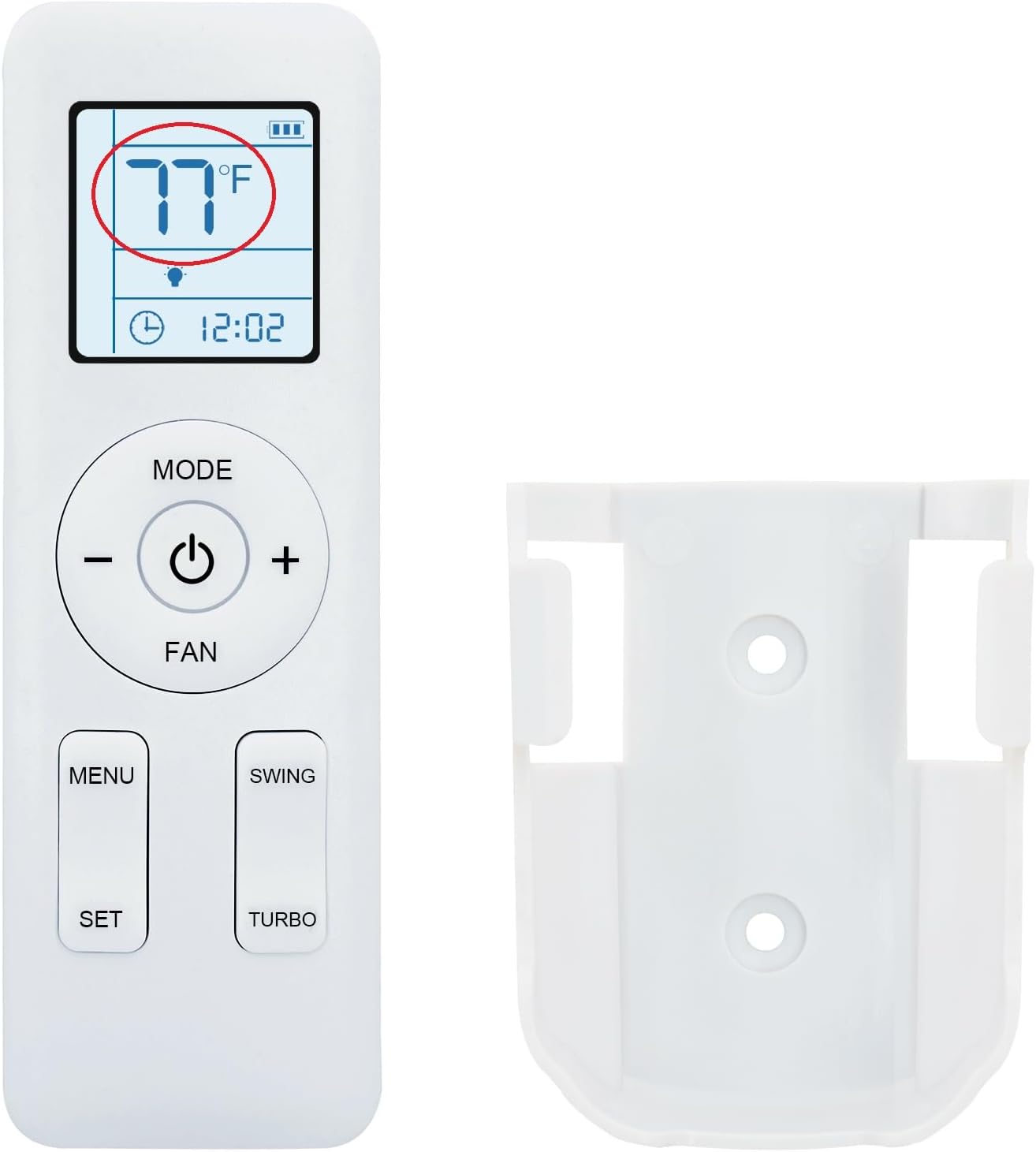
Image 1.1: The replacement remote control and its accompanying wall mounting bracket.
2. Setup
2.1. Battery Installation
The remote control requires two (2) AAA 1.5V batteries (not included). Follow these steps to install them:
- Locate the battery compartment cover on the back of the remote control.
- Slide the cover downwards or press the latch and lift to open.
- Insert two AAA batteries, ensuring the positive (+) and negative (-) terminals align correctly with the markings inside the compartment.
- Replace the battery compartment cover until it clicks securely into place.
Note: Always use new batteries and replace both batteries at the same time. Do not mix old and new batteries or different types of batteries.
2.2. Wall Mounting Bracket Installation
The included wall mounting bracket allows for convenient storage of your remote control. To install:
- Choose a suitable location on a wall, preferably near your air conditioner, where the remote will be easily accessible.
- Use the bracket as a template to mark the positions for drilling holes.
- Drill two small holes at the marked positions.
- Insert wall anchors (if necessary, depending on wall material) into the drilled holes.
- Align the bracket with the holes and secure it to the wall using screws.
- Place the remote control into the mounted bracket.
3. Operating Instructions
This remote control is designed for immediate use with compatible GREE KINGHOME Air Conditioners without requiring programming. Ensure a clear line of sight between the remote and the air conditioner's receiver.

Image 3.1: The remote control in use, pointing towards an air conditioner unit.
3.1. Basic Functions
- Power Button (⏻): Press to turn the air conditioner ON or OFF.
- Temperature Adjustment (- / +): Use these buttons to increase or decrease the desired temperature setting.
- MODE Button: Cycles through available operating modes (e.g., Cool, Heat, Fan, Dry, Auto).
- FAN Button: Adjusts the fan speed (e.g., Low, Medium, High, Auto).

Image 3.2: A close-up view of the remote control's display, showing temperature and time.
3.2. Advanced Functions
- MENU Button: Accesses additional settings or options. Refer to your air conditioner's original manual for specific menu functions.
- SET Button: Confirms selections made within the menu or sets specific parameters.
- SWING Button: Controls the louver swing function, directing airflow.
- TURBO Button: Activates a rapid cooling or heating function for quick temperature changes.
3.3. Display Features
- Fahrenheit and Celsius Display: The remote control supports displaying temperature in both Fahrenheit (°F) and Celsius (°C). The method to switch between these units may vary; typically, it involves pressing a combination of buttons (e.g., MODE and + simultaneously) or accessing a setting via the MENU button.
- Backlit Display: The remote features a white backlit display for improved visibility in low-light conditions. This feature activates automatically when buttons are pressed.

Image 3.3: The remote control display showing temperature in both Celsius and Fahrenheit.
4. Maintenance
4.1. Cleaning
To maintain the remote control's appearance and functionality:
- Wipe the surface with a soft, dry cloth.
- For stubborn dirt, lightly dampen the cloth with water and a mild detergent, then wipe dry immediately.
- Do not use abrasive cleaners, solvents, or chemical sprays, as these can damage the remote's finish or internal components.
4.2. Battery Replacement
Replace batteries when the display becomes dim or the remote's response becomes inconsistent. Refer to Section 2.1 for battery installation instructions.
5. Troubleshooting
If you experience issues with your remote control, consider the following:
- Remote not responding:
- Check if the batteries are correctly installed with the correct polarity.
- Replace old batteries with new ones.
- Ensure there is a clear line of sight between the remote control and the air conditioner's receiver. Obstructions can block the signal.
- Confirm the remote is pointed directly at the air conditioner.
- Air conditioner not responding to specific functions:
- Verify that the air conditioner supports the specific function (e.g., some older models may not have a "Turbo" mode).
- Refer to your air conditioner's original manual for supported features.
6. Specifications
| Feature | Detail |
|---|---|
| Model Number | D225012202F22 |
| Compatible Devices | GREE KINGHOME Air Conditioners (YAY1FF, YAY1F2, YAY1F2F, YAY1F1, YAY1F1F, 305001060119_x73461, KW09HQ17SDI, KW12HQ17SAI, KW12HQ17SDI, KW18HQ17SDI, KW24HQ17SDI, KW09HQ19SAI, KW12HQ19SAI, KW09HQ19SDI, KW12HQ19SDI, KW18HQ19SDI, KW24HQ19SDI) |
| Power Source | 2 x AAA 1.5V Batteries (not included) |
| Special Features | Backlit Display, Fahrenheit/Celsius Display, No Programming Required, Includes Wall Mounting Bracket |
| Item Weight | 1.23 ounces |
| Package Dimensions | 4 x 1 x 0.5 inches |
7. Warranty and Support
For any questions, concerns, or support regarding your TUZIGUAIGUAI Replacement Remote Control, please contact the seller directly through the platform where the purchase was made. Please retain your proof of purchase for any warranty claims.
This product is designed to be a direct replacement and typically does not require complex troubleshooting beyond battery replacement and ensuring a clear signal path.