
CCTVPRO LPR413-IRASPV4-0832
CCTVPRO 4MP License Plate Recognition Network Camera ITC413-PW4D-Z3 User Manual
Brand: CCTVPRO
Model: LPR413-IRASPV4-0832
1. Introduction
This manual provides detailed instructions for the installation, operation, and maintenance of the CCTVPRO 4MP License Plate Recognition Network Camera, model ITC413-PW4D-Z3. This advanced security camera is designed for precise license plate recognition and vehicle monitoring in various environments.
2. Safety Information
Please read these safety instructions carefully before operating the device to prevent damage and ensure proper functionality. Keep this manual for future reference.
- Power Supply: Use only the power supply provided or specified by the manufacturer. Ensure the power source matches the camera's requirements.
- Installation Environment: Install the camera in a stable location, away from direct sunlight, heat sources, and excessive moisture. Ensure proper ventilation.
- Handling: Avoid dropping or subjecting the camera to strong impacts. Do not disassemble the camera; refer servicing to qualified personnel.
- Cleaning: Use a soft, dry cloth for cleaning. Do not use strong detergents or abrasive materials.
- Outdoor Use: The camera is rated IP67 and IK10 for outdoor use, providing protection against dust, water, and vandalism. However, ensure all connections are properly sealed during installation.
3. Product Overview
The ITC413-PW4D-Z3 is a high-performance 4MP License Plate Recognition (LPR) network camera featuring a motorized vari-focal lens and dual illuminators. It is designed for accurate vehicle and license plate detection in various lighting conditions.
Key Features:
- 4MP High-Resolution Video: Captures clear 2688×1520 resolution for precise license plate recognition.
- Motorized Vari-Focal Lens: Adjustable 8-32mm lens offers flexible focus and enhanced coverage.
- Advanced Analytics: Supports vehicle type, color, and plate recognition with a detection range of 26-65ft.
- Efficient Installation: Includes mounting bracket and power supply for quick and seamless setup.
- Durability: IP67 and IK10 rated for protection against dust, water, and impact.
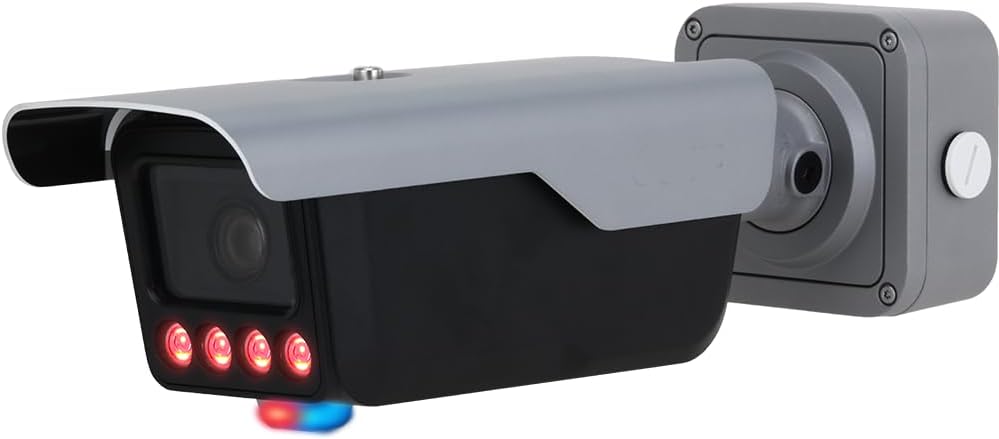
Figure 3.1: Front view of the ITC413-PW4D-Z3 License Plate Recognition Network Camera. The camera features a robust housing, a motorized lens, and integrated illuminators visible at the front.
4. Package Contents
Verify that all items are present and in good condition upon opening the package:
- ITC413-PW4D-Z3 LPR Network Camera
- Mounting Bracket
- Power Supply
- Installation Screws and Anchors
- Quick Start Guide (this manual)
5. Installation
5.1 Mounting Options
The camera supports various mounting configurations to suit different installation environments:
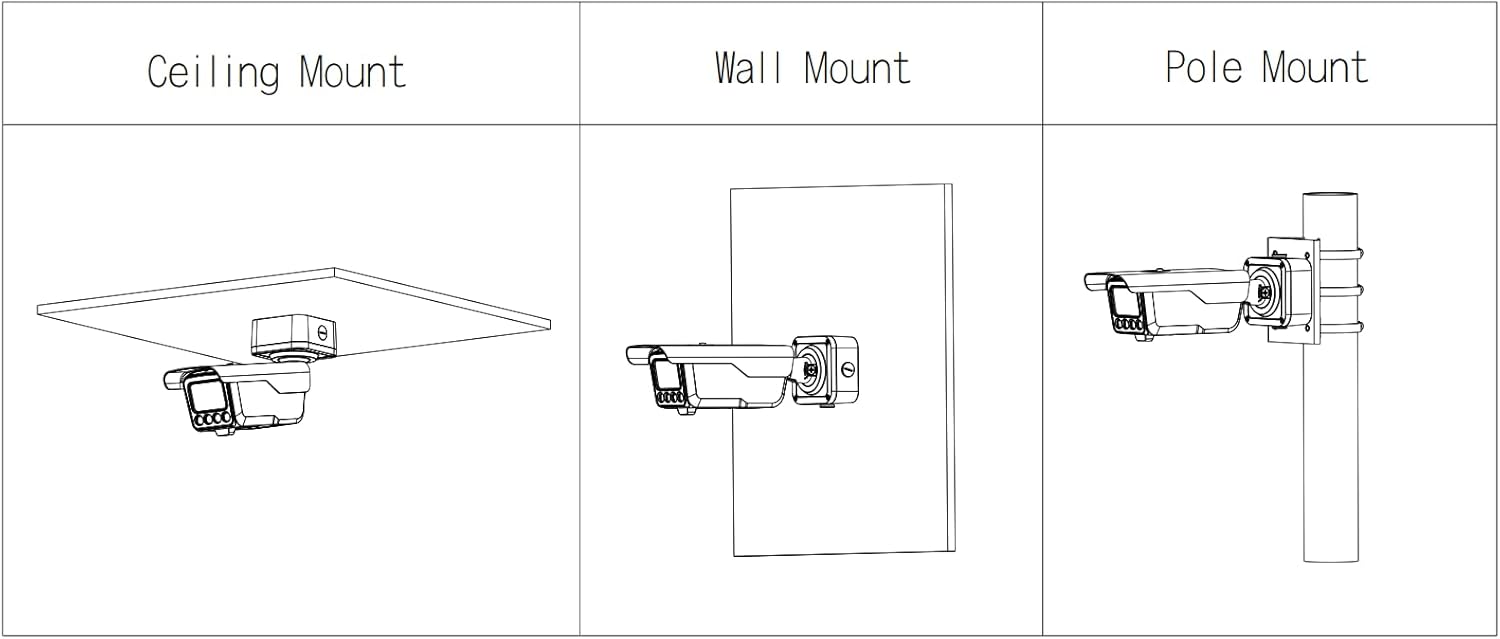
Figure 5.1: Diagram illustrating the three primary mounting options for the camera: Ceiling Mount (camera suspended from an overhead surface), Wall Mount (camera attached to a vertical wall), and Pole Mount (camera secured to a cylindrical pole).
5.2 Installation Steps
- Choose Location: Select an optimal location for LPR, considering the detection range (26-65ft) and lighting conditions. Ensure a clear line of sight to the license plates.
- Mounting:
- Attach the mounting bracket to the chosen surface (ceiling, wall, or pole) using appropriate screws and anchors.
- Securely attach the camera to the mounting bracket.
- Wiring:
- Connect the Ethernet cable for network connectivity.
- Connect the power supply to the camera. Ensure all connections are secure and weatherproofed if installed outdoors.
- Initial Configuration: Access the camera's web interface via its IP address to perform initial network settings, date/time, and administrator password setup.
5.3 Dimensions

Figure 5.2: Technical drawing displaying the precise dimensions of the camera in millimeters and inches, including length, width, height, and mounting hole spacing. This diagram is crucial for pre-installation planning and bracket compatibility.
6. Operation
6.1 Accessing the Camera
The camera can be accessed via a web browser using its IP address. Refer to your network configuration for the assigned IP address or use a discovery tool provided by the manufacturer.
6.2 Motorized Lens Adjustment
The 8-32mm motorized vari-focal lens can be adjusted remotely through the camera's web interface. This allows for precise focusing and zooming to optimize the field of view for LPR.
6.3 License Plate Recognition (LPR) Features
The camera's advanced analytics enable:
- Plate Recognition: Automatically detects and reads license plates.
- Vehicle Type and Color Recognition: Identifies vehicle characteristics for enhanced data collection.
- Whitelist/Blacklist Management: Configure lists for authorized or unauthorized vehicles.
- Event Triggers: Set up actions based on LPR events, such as recording or alerts.
7. Maintenance
7.1 Cleaning
Regularly clean the camera lens and housing to ensure optimal performance. Use a soft, lint-free cloth. For stubborn dirt, a mild cleaning solution designed for optical lenses can be used sparingly.
7.2 Firmware Updates
Periodically check the manufacturer's website for firmware updates. Keeping the firmware updated ensures the camera has the latest features, security patches, and performance improvements. Follow the provided instructions carefully during the update process.
8. Troubleshooting
| Problem | Possible Cause | Solution |
|---|---|---|
| No image/video output | Power issue, network cable disconnected, incorrect IP address. | Check power connection. Verify Ethernet cable is securely connected. Confirm camera's IP address and network settings. |
| Poor image quality | Dirty lens, incorrect focus, insufficient lighting, network bandwidth issues. | Clean the lens. Adjust motorized focus via web interface. Ensure adequate lighting or check illuminator settings. Verify network bandwidth. |
| LPR not accurate | Camera angle/distance, lighting conditions, software configuration. | Adjust camera angle and distance to be within optimal LPR range (26-65ft). Ensure proper lighting. Review LPR settings in the camera's web interface. |
| Cannot access web interface | Incorrect IP address, network connectivity issue, firewall blocking. | Verify IP address and subnet mask. Ping the camera's IP address. Temporarily disable firewall on your PC to test. |
9. Specifications
| Feature | Detail |
|---|---|
| Model Number | LPR413-IRASPV4-0832 |
| Resolution | 4MP (2688×1520) |
| Lens | 8-32mm Motorized Vari-Focal |
| LPR Detection Range | 26-65ft |
| Ingress Protection | IP67 |
| Vandal Resistance | IK10 |
| Connectivity | Ethernet |
| Item Weight | 7 pounds |
| Package Dimensions | 17.5 x 9.5 x 9 inches |
| Manufacturer | Dahua |
10. Warranty and Support
For technical assistance, troubleshooting, or warranty inquiries, please contact CCTVPRO customer support. Local technical support is available to assist with installation and troubleshooting needs.
Refer to your purchase documentation or the CCTVPRO official website for specific warranty terms and contact information.
Online Resources: Visit the CCTVPRO Store on Amazon
Ask a question about this manual
Ask about setup, troubleshooting, compatibility, parts, safety, or missing instructions. Manuals+ will review the question and use this page’s manual context to help answer it.