
Vsdampj CS-FV50
User Manual for Vsdampj 600mAh/7.4V NP-FV50 Compatible Battery
Model: CS-FV50
Introduction
This manual provides essential information for the safe and effective use of your Vsdampj 600mAh/7.4V NP-FV50 compatible battery. Please read this manual thoroughly before using the product to ensure optimal performance and longevity.
Product Overview
The Vsdampj NP-FV50 compatible battery is a high-capacity Lithium-Ion replacement battery designed for various Sony camcorders. It offers reliable power and is built to meet high quality and safety standards.
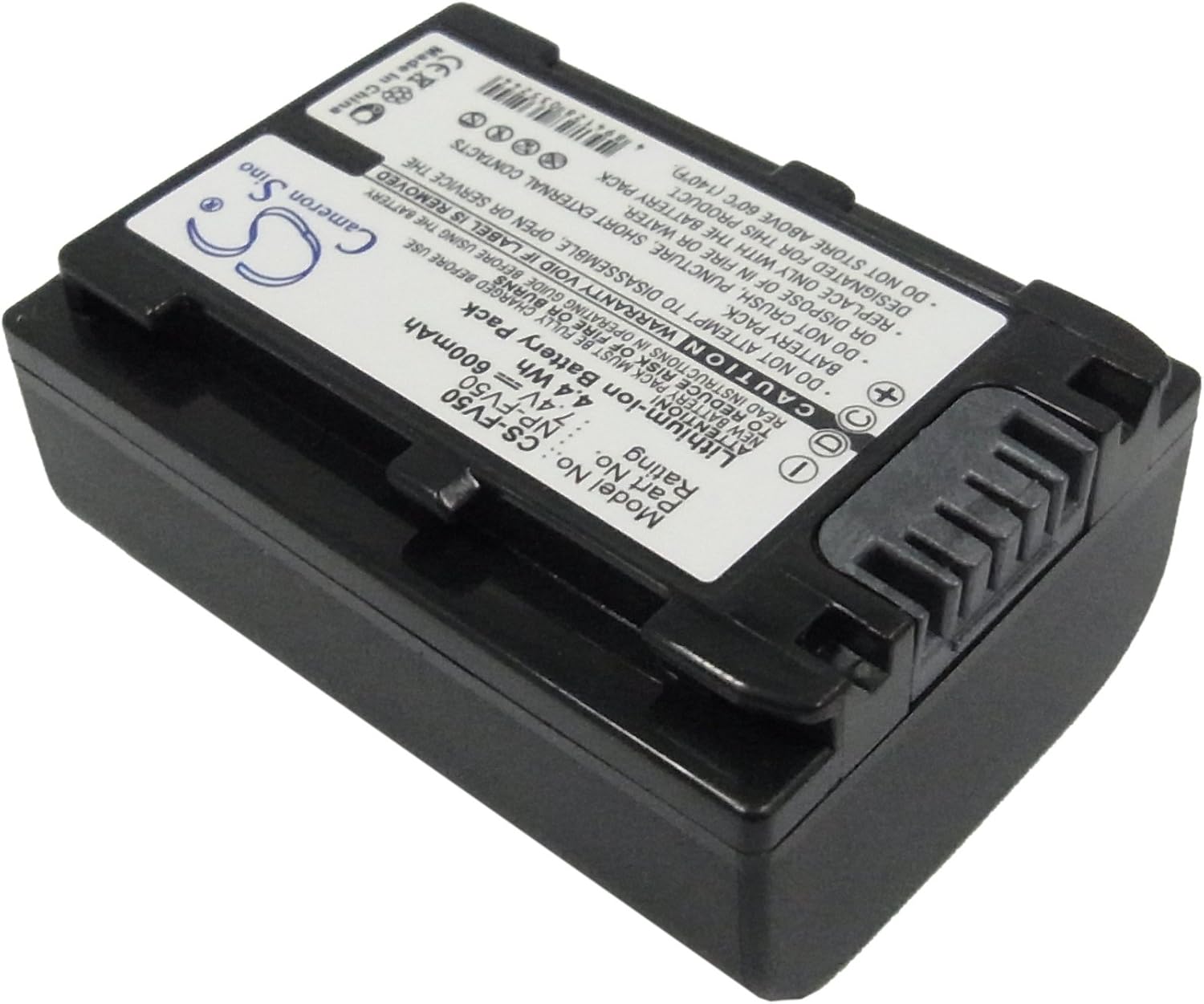
Figure 1: Top view of the Vsdampj NP-FV50 compatible battery, showing the label with model number, voltage, and capacity.
Safety Information
Please observe the following safety precautions to prevent damage to the battery or injury to yourself:
- Do not attempt to disassemble, open, or service the battery pack.
- Do not crush, puncture, short external contacts, or dispose of in fire or water.
- Replace only with the battery pack designated for this product.
- Do not store above 60°C (140°F).
- Use only compatible chargers designed for Lithium-Ion batteries. Avoid low-quality third-party chargers.
- Keep out of reach of children.

Figure 2: Close-up of the battery's warning label, highlighting important safety instructions and certifications.
Setup
Initial Charge
Before first use, the new battery pack must be fully charged. For optimal performance, a new battery will achieve its best capacity after 2 or 3 full charge and discharge cycles.
- Connect the battery to a compatible Sony charger or camcorder.
- Ensure the charger is connected to a power source.
- Allow the battery to charge until the charging indicator shows it is full.
Compatibility Check
Before installing, carefully check your device model number and the original battery part number (NP-FV50) to ensure compatibility.
Operating Instructions
Installing the Battery
- Turn off your camcorder or device before installing the battery.
- Locate the battery compartment on your device.
- Align the battery with the compartment, ensuring the contacts match.
- Gently slide the battery into place until it clicks securely. Make sure the connector is properly connected to your device.
- Close the battery compartment cover.

Figure 3: Side view of the battery, showing its compact design and connection points.
Removing the Battery
- Turn off your camcorder or device.
- Open the battery compartment cover.
- Press the battery release latch (if present) and gently slide the battery out.
Maintenance and Storage
Charging
Always use the original charger or a high-quality, compatible charger. Using low-quality third-party chargers can reduce battery life and performance.
Cleaning
Wipe the battery and its contacts with a clean, dry cloth if necessary. Do not use liquid cleaners.
Storage
For long-term storage, store the battery in a cool, dry place, away from direct sunlight and extreme temperatures. Do not store above 60°C (140°F).

Figure 4: Angled view of the battery, showing its overall shape and design.
Troubleshooting
| Problem | Possible Cause | Solution |
|---|---|---|
| Battery not charging | Incorrectly seated battery; faulty charger; dirty contacts. | Ensure battery is properly inserted. Try a different compatible charger. Clean battery contacts. |
| Short battery life | New battery not cycled; using non-optimal charger; battery degradation. | Perform 2-3 full charge/discharge cycles. Use a high-quality, compatible charger. If battery is old, consider replacement. |
| Battery not recognized by device | Incompatibility; dirty contacts; incorrect installation. | Verify battery part number (NP-FV50) and device model. Clean contacts. Reinstall battery, ensuring proper connection. |
Specifications
| Feature | Detail |
|---|---|
| Model Number | CS-FV50 |
| Part Number (P/N) | NP-FV50 |
| Battery Type | Lithium-Ion |
| Capacity | 600mAh |
| Voltage | 7.4V |
| Watt-Hour (Wh) | 4.44Wh |
| Dimensions | 45.24 × 31.75 × 20.22 mm |
| Weight | 113 grams |
| Certifications | ISO9001, RoHS, CE, UN38.3, MSDS |

Figure 5: Bottom view of the battery, showing the contacts and additional product information.
Warranty and Support
Warranty Information
This product comes with a 30-day free refund or replacement policy without reason. Please refer to your purchase documentation for specific warranty terms and conditions.
Customer Support
If you have any questions or encounter any issues while using our products, please do not hesitate to contact us. We will respond to you as soon as possible.
For support, please visit the seller's page on Amazon or use the contact information provided with your purchase.
Ask a question about this manual
Ask about setup, troubleshooting, compatibility, parts, safety, or missing instructions. Manuals+ will review the question and use this page’s manual context to help answer it.