
1. Introduction
This manual provides essential instructions for the safe and effective use of your Vsdampj 5400mAh/11.4V Li-Polymer Replacement Battery. Please read this manual thoroughly before installation and use to ensure optimal performance and longevity of your battery.

Image 1.1: General view of the Vsdampj 5400mAh/11.4V Li-Polymer Battery. This image shows the overall shape and design of the replacement battery.
2. Product Specifications
- Battery Type: Li-Polymer
- Capacity: 5400mAh
- Voltage: 11.4V
- Energy Rate: 61.56Wh
- Applicable Part Number (P/N): BTY-L76
- Model Number: CS-MRS700NB
- Dimensions: Approximately 253.73mm x 120.50mm x 7.90mm (9.99 inches x 4.74 inches x 0.31 inches)
- Weight: Approximately 531.8g (1.17 pounds)
- Certifications: ISO9001, RoHS, CE, UN38.3, MSDS
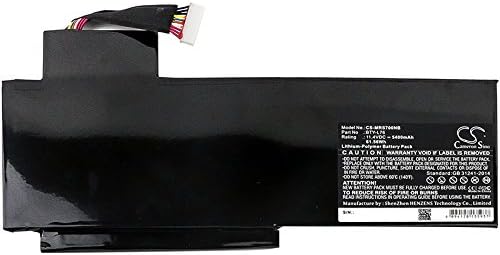
Image 2.1: Top-down view of the battery, highlighting the product label with detailed specifications and safety warnings.
3. Compatibility Check
Before installing the battery, it is crucial to verify compatibility with your device. Please carefully check the model number of your device and the part number of your original battery to ensure it matches BTY-L76 and your device's requirements.
Incompatible batteries can lead to improper function or damage to your device.
4. Setup and Installation
General Installation Guidelines:
- Ensure your device is powered off and disconnected from any power source.
- Refer to your device's specific service manual for detailed instructions on how to safely open the device and remove the old battery.
- Carefully remove the old battery.
- Align the new Vsdampj battery with the battery compartment.
- Connect the battery cable to the device's motherboard connector. Ensure the connector is properly seated and secured.
- Close your device according to its service manual.

Image 4.1: Close-up view of the battery connector, showing the multi-pin interface for connecting to the device. Ensure this connector is properly seated during installation.
5. Operating Guidelines
Initial Use:
A new battery will achieve its best performance after 2 or 3 complete cycles of charge and discharge. For the first few uses, allow the battery to fully charge, then use the device until the battery is nearly depleted, and repeat this process.
Charging:
- Always use the original or a certified compatible charger provided with your device.
- Do not use low-quality third-party adapter chargers, as this can shorten the battery's life and potentially damage the device.
6. Maintenance and Storage
Proper maintenance ensures the longevity and safety of your battery:
- Temperature: Avoid exposing the battery to extreme temperatures. Do not store above 60°C (140°F).
- Storage: If storing the battery for an extended period, ensure it is charged to approximately 50-70% and stored in a cool, dry place.
- Cleaning: Keep battery contacts clean and free from dust or debris.
- Disposal: Dispose of old or damaged batteries responsibly according to local regulations. Do not dispose of in household waste.
7. Troubleshooting
If you encounter issues with your battery, consider the following:
- Battery Not Charging:
- Ensure the charger is properly connected and functional.
- Verify the battery connector is securely seated in the device.
- Check if the charger is the original or a certified compatible one.
- Short Battery Life:
- Ensure the initial 2-3 charge/discharge cycles have been completed.
- Check background applications or device settings that might be consuming excessive power.
- Avoid extreme temperatures during use.
- Device Not Powering On:
- Confirm the battery is fully charged.
- Re-check the battery installation and connector seating.
8. Safety Information
Your Vsdampj battery has passed ISO9001, RoHS, CE, UN38.3, and MSDS certifications, ensuring high safety standards. However, please observe the following precautions:
- Do Not Disassemble: Do not attempt to disassemble, open, or service the battery pack.
- Avoid Damage: Do not crush, puncture, short external contacts, or dispose of in fire or water.
- Temperature Limits: Do not store above 60°C (140°F).
- Fire/Burn Risk: To reduce the risk of fire or burns, do not modify or attempt to open the battery.
- Children: Keep batteries out of reach of children.
9. Warranty and Support
Warranty:
We offer a refund or a free replacement without reason for 30 days from the date of purchase. Please retain your proof of purchase for warranty claims.
Customer Support:
If you have any questions or encounter any issues when using our product, please send us a message. Our customer support team will reply to you as soon as possible to assist you.