
Vsdampj CS-MKT105PW
Vsdampj 12V Ni-MH Replacement Battery User Manual
Model: CS-MKT105PW
1. Introduction
This manual provides essential instructions for the safe and effective use, installation, and maintenance of your Vsdampj 12V Ni-MH replacement battery. Please read this manual thoroughly before using the product to ensure optimal performance and longevity.
2. Product Overview
The Vsdampj 12V Ni-MH battery is designed as a high-capacity replacement for various Makita power tools. It features a robust construction and is engineered for reliable performance.
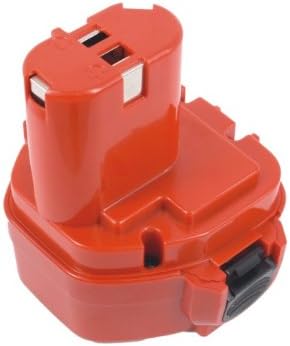
Figure 2.1: Front view of the Vsdampj 12V Ni-MH replacement battery. This image shows the battery's primary casing and connection terminals.

Figure 2.2: Angled view of the Vsdampj 12V Ni-MH replacement battery, highlighting its compact design and connection points.

Figure 2.3: Side view of the Vsdampj 12V Ni-MH replacement battery, showing the release mechanism and overall profile.

Figure 2.4: Top view of the Vsdampj 12V Ni-MH replacement battery, illustrating the battery's shape and interface for tool attachment.

Figure 2.5: View of the Vsdampj 12V Ni-MH replacement battery showing the product label with model number and specifications.
3. Specifications
| Feature | Detail |
|---|---|
| Battery Type | Ni-MH |
| Voltage | 12.0V |
| Capacity | 1500mAh (18.00Wh) |
| Model Number | CS-MKT105PW |
| Product Dimensions | 3.7 x 3.31 x 4.08 inches |
| Item Weight | 1.63 pounds (738g) |
| Manufacturer | Vsdampj |
| Recommended Use | Replacement Battery |
4. Compatibility
This Vsdampj replacement battery is compatible with various Makita power tools and original battery part numbers. Please verify your device's model number and original battery part number before purchase.
Compatible Makita Tool Models:
- Makita 6313D
- Makita 6313DA
- Makita 6313DWAE
- Makita 6313DWBE
- Makita 6314DWAE
- Makita 6314DWBE
- Makita 6316D
- Makita 6316DWA
Compatible Original Battery Part Numbers (P/N):
- 1220
- 1222
- 192598-2
- 192681-5
- 192698-8
- 192698-A
5. Setup and Initial Use
5.1 Initial Charging
For optimal performance, a new battery should undergo 2 to 3 complete charge and discharge cycles. This process helps to condition the battery cells and maximize their capacity.
- Insert the new battery into a compatible Makita charger.
- Allow the battery to charge fully until the charger indicates completion.
- Use the battery in your tool until it is fully discharged.
- Repeat steps 1-3 for two more cycles.
Important: Use only a compatible and high-quality charger. Using low-quality or incompatible third-party chargers can shorten the battery's lifespan and may pose safety risks.
5.2 Battery Installation
To install the battery into your power tool:
- Ensure the power tool is turned off.
- Align the battery with the battery slot on your tool.
- Slide the battery firmly into place until it clicks, indicating a secure connection.
- Verify that the connector is properly connected to your device.
6. Operating Instructions
6.1 Charging the Battery
Always charge the battery in a well-ventilated area, away from flammable materials. Refer to your charger's manual for specific charging indicators and times.
- Connect the charger to a power outlet.
- Insert the battery into the charger.
- Monitor the charging indicator lights.
- Remove the battery once fully charged.
6.2 Using the Battery
Once installed and charged, the battery powers your compatible Makita tool. Operate your tool according to its specific user manual. When the tool's performance diminishes, it indicates the battery requires recharging.
7. Maintenance and Storage
7.1 General Maintenance
- Keep the battery terminals clean and free from dirt or debris.
- Avoid exposing the battery to extreme temperatures, direct sunlight, or moisture.
- Do not attempt to disassemble or modify the battery.
7.2 Storage
If storing the battery for an extended period:
- Charge the battery to approximately 50-70% capacity before storage.
- Store the battery in a cool, dry place, away from direct heat sources and metal objects.
- Periodically check the battery during long-term storage and recharge it to 50-70% if its charge drops significantly.
8. Troubleshooting
| Problem | Possible Cause | Solution |
|---|---|---|
| Battery not charging | Charger not plugged in; faulty charger; battery not properly seated; battery too hot/cold. | Check power connection; try a different charger; re-seat battery; allow battery to reach room temperature. |
| Tool not powering on with battery | Battery not charged; battery not properly installed; faulty tool. | Charge battery fully; ensure battery is clicked into place; test with another known-good battery if available. |
| Short operating time after full charge | Battery not conditioned; battery nearing end of life; excessive tool load. | Perform 2-3 full charge/discharge cycles; consider replacing battery if old; reduce continuous heavy load on tool. |
If troubleshooting steps do not resolve the issue, please contact customer support.
9. Safety Information
WARNING: Failure to follow these safety instructions may result in fire, electric shock, or other injury or damage.
- Do not short-circuit the battery terminals.
- Do not expose the battery to water or moisture.
- Do not store or use the battery in temperatures exceeding 122°F (50°C) or below 14°F (-10°C).
- Do not incinerate the battery or dispose of it in fire.
- Do not puncture, drop, or otherwise damage the battery.
- Keep the battery away from children and pets.
- If battery fluid comes into contact with skin or eyes, flush immediately with plenty of water and seek medical attention.
- Recycle used batteries according to local regulations.
10. Warranty and Customer Support
10.1 Warranty Information
This product comes with a 30-day refund or free replacement policy without reason. The battery has passed ISO9001, RoHS, CE, UN38.3, and MSDS certifications, ensuring quality and safety standards.
10.2 Customer Support
If you have any questions or encounter any issues while using our product, please send us a message. We are committed to replying as soon as possible to assist you.
For support, please refer to the contact information provided by your retailer or on the product packaging.
Ask a question about this manual
Ask about setup, troubleshooting, compatibility, parts, safety, or missing instructions. Manuals+ will review the question and use this page’s manual context to help answer it.