
YOKAMU P021013640
YOKAMU P021013640 Replacement Fuel Tank Instruction Manual for Echo PE-265, SRM-2655, SRM-265T Trimmers
Model: P021013640
1. Product Overview
This document provides instructions for the YOKAMU P021013640 Replacement Fuel Tank, designed for specific Echo string trimmer models. This fuel tank serves as a direct replacement for the original equipment manufacturer (OEM) part, ensuring proper fit and function for your outdoor power tool.
Key Features:
- Direct replacement for OEM part number P021013640.
- Constructed for durability and compatibility with specified Echo trimmer models.
2. Compatibility
This replacement fuel tank is compatible with the following Echo string trimmer models:
- Echo PE-265
- Echo SRM-2655
- Echo SRM-265T
Replaces OEM Part Number: P021013640
Note: Always verify your trimmer's model number and the required part number before installation to ensure correct fitment.
3. Installation Instructions
Safety Precautions:
- Ensure the trimmer engine is cool and turned off.
- Disconnect the spark plug wire to prevent accidental starting.
- Work in a well-ventilated area, away from open flames or sparks.
- Wear appropriate personal protective equipment, such as gloves and eye protection.
- Drain any remaining fuel from the old tank into an approved container before removal.
3.1. Tools Required
- Screwdriver set (Phillips and/or flathead, depending on your trimmer model)
- Pliers (for fuel lines and clamps)
- Empty fuel-safe container
- Clean rags
3.2. Removal of Old Fuel Tank
- Locate the fuel tank on your Echo trimmer.
- Carefully disconnect the fuel lines from the carburetor and the fuel tank. Use pliers if necessary to loosen clamps.
- Remove any screws, bolts, or clips securing the fuel tank to the trimmer frame.
- Gently detach the old fuel tank, ensuring all fuel lines are clear.
- Inspect the fuel lines and fuel filter for wear or damage. Replace if necessary.
3.3. Installation of New Fuel Tank
- Position the new YOKAMU P021013640 fuel tank onto the trimmer frame.
- Secure the tank using the original screws, bolts, or clips. Ensure it is firmly seated.
- Reconnect the fuel lines to the carburetor and the new fuel tank. Ensure connections are tight and secure to prevent leaks.
- Verify that the fuel filter is properly installed within the tank or on the fuel line.
- Double-check all connections and fasteners.
3.4. Post-Installation Check
- Fill the new fuel tank with the appropriate fuel mixture for your Echo trimmer (refer to your trimmer's original manual for fuel specifications).
- Inspect for any fuel leaks around the tank and fuel line connections.
- Reconnect the spark plug wire.
- Start the trimmer and allow it to run for a few minutes, checking for proper operation and any signs of leaks.

Figure 1: Front view of the YOKAMU P021013640 Replacement Fuel Tank.

Figure 2: Side view of the YOKAMU P021013640 Replacement Fuel Tank, showing connection points.
4. Operating Considerations
Once the new fuel tank is installed, proper fueling procedures are essential for safe and efficient operation.
- Fuel Type: Always use the fuel type and oil mixture ratio specified in your Echo trimmer's original owner's manual. Using incorrect fuel can damage the engine.
- Fueling Procedure:
- Turn off the trimmer and allow it to cool.
- Move to a well-ventilated outdoor area, away from ignition sources.
- Carefully open the fuel cap.
- Fill the tank slowly to prevent spills, leaving a small air gap at the top to allow for fuel expansion.
- Securely close the fuel cap.
- Wipe up any spilled fuel immediately.
- Storage: When storing the trimmer for extended periods, it is recommended to drain the fuel tank or use a fuel stabilizer to prevent fuel degradation.
5. Maintenance
Regular inspection and maintenance of the fuel tank and associated components can extend the life of your trimmer.
- Visual Inspection: Periodically check the fuel tank for cracks, leaks, or signs of deterioration.
- Fuel Lines: Inspect fuel lines for hardening, cracking, or loose connections. Replace damaged lines promptly.
- Fuel Filter: The fuel filter, typically located inside the fuel tank or on a fuel line, should be inspected and replaced annually or more frequently if fuel delivery issues occur.
- Cleaning: Keep the exterior of the fuel tank clean to prevent dirt and debris from entering when refueling.
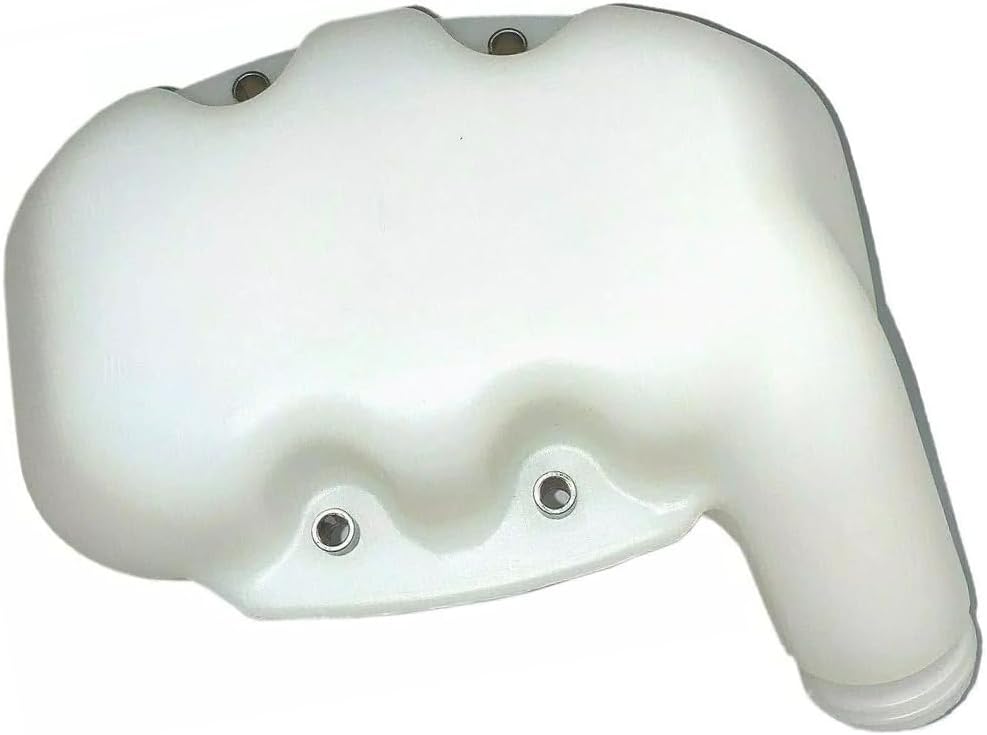
Figure 3: Top view of the YOKAMU P021013640 Replacement Fuel Tank, highlighting the fuel cap area.

Figure 4: Bottom view of the YOKAMU P021013640 Replacement Fuel Tank, showing mounting points.
6. Troubleshooting
If you encounter issues after installing the new fuel tank, consider the following common problems and solutions:
| Problem | Possible Cause | Solution |
|---|---|---|
| Fuel Leakage | Loose fuel line connections, damaged fuel lines, improperly seated fuel cap, cracked tank. | Tighten fuel line clamps, replace damaged fuel lines, ensure fuel cap is secure, inspect tank for damage. |
| Engine Not Getting Fuel | Clogged fuel filter, kinked fuel line, empty fuel tank. | Check fuel level, replace fuel filter, inspect fuel lines for kinks or blockages. |
| Difficulty Starting Engine | Related to fuel delivery issues (see above), incorrect fuel mixture. | Verify fuel level and mixture, check fuel filter and lines. |
If problems persist, consult a qualified service technician or refer to your trimmer's original service manual.
7. Specifications
| Attribute | Detail |
|---|---|
| Brand | YOKAMU |
| Manufacturer Part Number | 44530-1 |
| Replaces OEM Part Number | P021013640 |
| Compatible Trimmer Models | Echo PE-265, SRM-2655, SRM-265T |
| Product Dimensions (L x W x H) | Approximately 1 x 1 x 1 inches (Note: These dimensions appear to be placeholder values from the source data and may not reflect actual product size.) |
8. Warranty and Support
Every product from YOKAMU includes a 30-day money-back guarantee and an 18-month worry-free warranty.
For questions regarding compatibility or any other inquiries, please contact YOKAMU customer support. When contacting support, it is helpful to provide your trimmer's model and serial number.
This is an aftermarket replacement part. Any brand names mentioned are used solely for demonstrating compatibility.