
1. Introduction
This manual provides detailed instructions for the safe and effective use of your iToncs LED Camping Lantern, Model XY008. Please read this manual thoroughly before operating the device and retain it for future reference.
2. Safety Information
- Do not look directly into the LED light when it is on, as it can cause temporary vision impairment.
- Keep the device away from extreme temperatures and direct sunlight to prevent battery damage.
- Ensure all ports are dry before charging to prevent electrical hazards.
- Do not attempt to disassemble or modify the lantern. This will void the warranty and may cause damage or injury.
- Dispose of the battery according to local regulations.
- The lantern is water-resistant, not waterproof. Avoid submerging it in water.
3. Package Contents
Verify that all items are present in your package:
- 1 x iToncs LED Camping Lantern (10000 mAh)
- 1 x Hook
- 1 x Storage Bag
- 1 x Type-C Charging Cable
- 1 x Carabiner
- 1 x User's Guide (this manual)

Image: The iToncs LED Camping Lantern shown with its storage bag, hook, and carabiner, highlighting its portability and included accessories.
4. Product Overview
The iToncs LED Camping Lantern Model XY008 is a versatile lighting solution designed for outdoor activities, emergencies, and general use. It features a 10000mAh rechargeable battery, multiple lighting modes, and a durable, water-resistant construction.

Image: The iToncs LED Camping Lantern, its protective storage case, and a smartphone connected for charging, illustrating its dual function as a light source and power bank.

Image: A visual representation of the lantern's compact dimensions (6.7 x 3.6 x 1.3 inches) and how it fits easily into a backpack, emphasizing its portability.
5. Setup
The iToncs LED Camping Lantern comes pre-charged. Before first use, it is recommended to fully charge the device using the provided Type-C cable.
- Unpack all components from the packaging.
- Connect the Type-C charging cable to the lantern's charging port.
- Connect the other end of the cable to a compatible USB power adapter (not included) or power source.
- The digital display will show the charging progress. Once 100% is displayed, the lantern is fully charged.
6. Operating Instructions
The lantern features 12 distinct lighting modes and stepless dimming functionality.
6.1 Power On/Off and Mode Selection
The lantern has four independent buttons for mode switching. A short press cycles through modes, while a long press activates stepless dimming.

Image: A visual guide demonstrating how a short press on the control buttons cycles through the 12 available lighting modes, including various panel lights, flashlight options, and emergency red/blue flashing lights.
- White Light Modes: Short press the corresponding button to cycle through Left Light, Right Light, Left & Right Light, and Front Light.
- Color Temperature Modes: Short press the button to switch between White Light, Warm Light, and White Warm Light.
- Flashlight Modes: Short press for Flashlight Light. Double-click for Flashlight Strobe.
- Emergency Modes: Short press for Red Light, Red Light Flashing, and Red & Blue Flashing.

Image: Examples of the lantern's diverse lighting capabilities, showcasing its use as natural ambient light, bright white light, warm light, a focused flashlight, and a red emergency signal.
6.2 Brightness Adjustment (Stepless Dimming)
To adjust the brightness of any active light mode:
- Press and hold the active mode button. The brightness will gradually increase or decrease.
- Release the button when the desired brightness level is reached.

Image: A visual representation of the stepless dimming feature, showing how pressing and holding a button allows for continuous adjustment of light intensity.
6.3 Flashlight Mode
The dedicated flashlight mode provides a focused beam for specific tasks or navigation in dark environments.

Image: A user demonstrating the flashlight mode, highlighting its ability to project a focused beam for navigating dark outdoor areas.
7. Charging the Lantern and External Devices
The iToncs LED Camping Lantern functions as both a light source and a 10000mAh power bank.
7.1 Charging the Lantern
The lantern can be charged via the Type-C port or through its integrated solar panel.
- Type-C Charging: Connect the provided Type-C cable to the lantern's input port and a USB power source. The LCD digital display will show the charging status. A full charge typically takes approximately 7 hours.
- Solar Charging: Place the lantern with its solar panel facing direct sunlight. The solar charging indicator will activate. Solar charging is slower and best used for maintaining charge or in emergency situations.
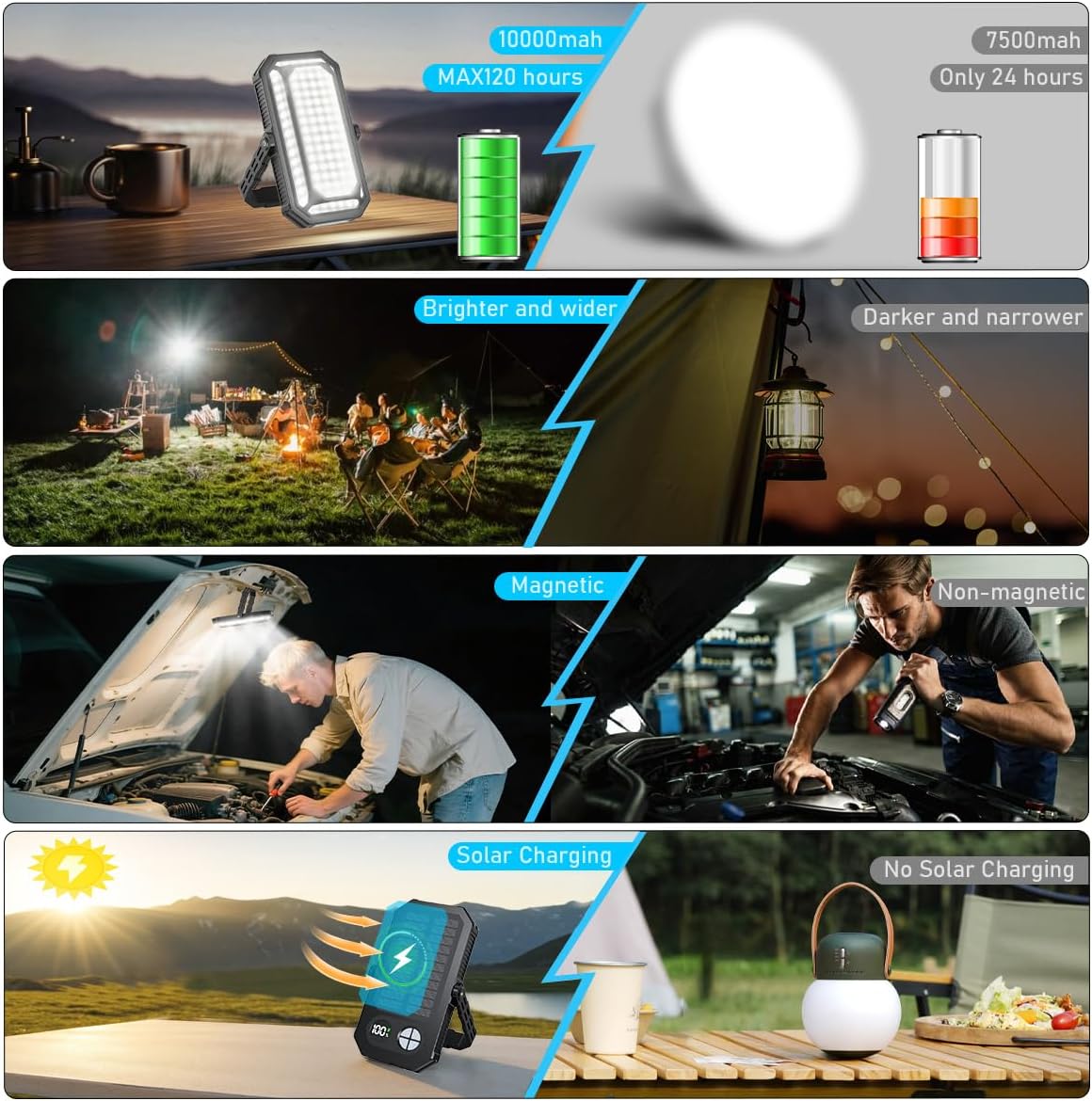
Image: A multi-panel image illustrating the benefits of the 10000mAh battery, wider illumination, magnetic base, and solar charging capability of the lantern.
7.2 Charging External Devices (Power Bank Function)
Use the lantern's USB output port to charge smartphones, tablets, or other USB-powered devices.
- Connect your device's charging cable to the lantern's USB output port.
- The lantern's 10000mAh battery can provide significant power for your devices.
- The built-in charge protection function ensures safety for both the lantern and your connected devices.

Image: The lantern actively charging a smartphone, demonstrating its function as a portable power bank with a visible digital battery indicator.
8. Mounting Options
The iToncs LED Camping Lantern offers multiple ways to position it for optimal lighting.
8.1 360° Rotatable Hook
The integrated hook allows for hanging the lantern in various locations.
- Extend the hook from the top of the lantern.
- Hang it inside a tent, on a tree branch, or any suitable fixture.
- The 360° rotation allows you to direct light precisely where needed.

Image: The lantern suspended inside a tent, demonstrating its ability to provide wide-area illumination from above.
8.2 Strong Magnetic Base
The built-in magnets provide secure attachment to metal surfaces.
- Attach the magnetic base to any ferrous metal surface, such as a car hood, metal shelf, or workbench.
- This feature is ideal for hands-free operation during vehicle maintenance or in workshops.

Image: A mechanic using the magnetically mounted lantern to light up a car engine, showcasing its utility for hands-free work.
9. Maintenance
- Clean the lantern with a soft, dry cloth. Do not use abrasive cleaners or solvents.
- Ensure the Type-C port cover is securely closed when not in use to maintain water resistance.
- Store the lantern in a cool, dry place when not in use for extended periods.
- Periodically charge the battery (every 3-6 months) to prolong its lifespan if stored for a long time.

Image: Visuals demonstrating the lantern's durability, including its resistance to impacts from drops and its ability to withstand water splashes.
10. Troubleshooting
| Problem | Possible Cause | Solution |
|---|---|---|
| Lantern does not turn on. | Battery is depleted. | Charge the lantern using the Type-C cable. |
| Lantern not charging. | Charging cable or adapter is faulty. | Try a different Type-C cable or USB power adapter. Ensure connections are secure. |
| External device not charging from lantern. | Lantern battery is low or cable is faulty. | Ensure the lantern is sufficiently charged. Try a different charging cable for the external device. |
| Light output is dim. | Brightness setting is low or battery is low. | Adjust brightness using the long-press function. Recharge the lantern if the battery is low. |
11. Specifications
| Feature | Detail |
|---|---|
| Model Number | XY008 |
| Battery Capacity | 10000mAh (Rechargeable Lithium-ion Polymer) |
| Battery Life | Up to 120+ hours (under normal brightness) |
| Light Modes | 12 (White, Warm, White Warm, Left, Right, Left&Right, Front, Flashlight, Flashlight Strobe, Red, Red Flashing, Red&Blue Flashing) |
| Brightness | Dimmable (Stepless adjustment) |
| Light Source Type | LED (Light Emitting Diode) |
| Color Temperature | 7000 Kelvin |
| Charging Input | Type-C, Solar Panel |
| Power Bank Output | USB (for charging external devices) |
| Water Resistance Level | Water Resistant |
| Material | Acrylonitrile Butadiene Styrene (ABS) |
| Product Dimensions | 6.7"L x 3.6"W x 1.3"H |
| Item Weight | 1.12 pounds |
| Voltage | 5 Volts |
| Wattage | 12 watts |
12. Warranty and Support
iToncs provides 2-year customer support for this product. If you encounter any quality issues or require assistance, please contact our customer service team. Refer to the contact information provided with your purchase or visit the official iToncs website for support.