
Flodream FD-Jan-WC500-MY
Flodream Macerating Toilet System User Manual
Model: FD-Jan-WC500-MY
Brand: Flodream
Introduction
This manual provides comprehensive instructions for the installation, operation, maintenance, and troubleshooting of your Flodream Macerating Toilet with Pump. Designed for efficient waste disposal in various settings, including basements, this two-piece compact toilet system offers a powerful 500W macerator pump with multiple inlets for versatile use.
Please read this manual thoroughly before installation and use to ensure proper function and longevity of your product.
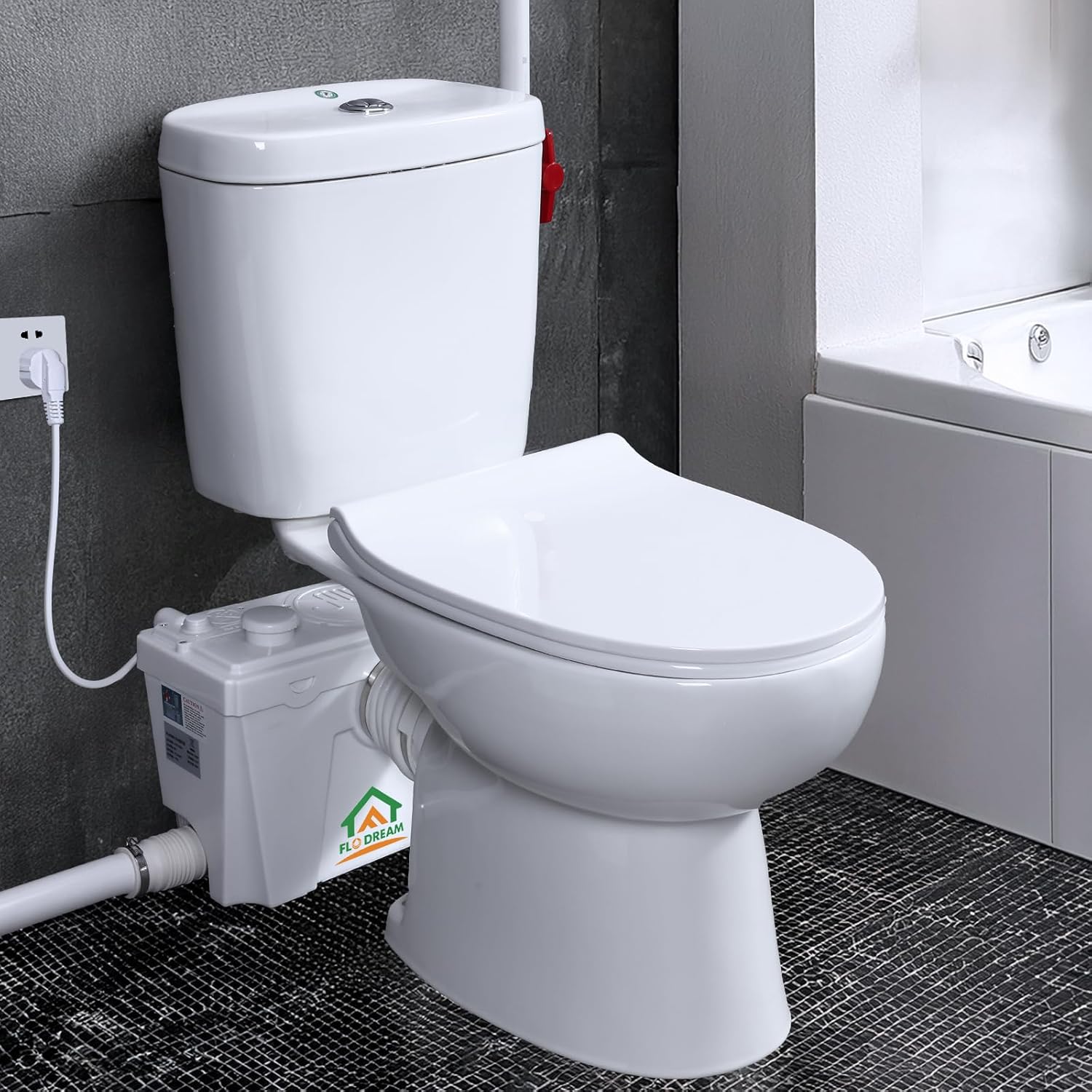
Figure 1: Flodream Macerating Toilet System. This image shows the complete two-piece macerating toilet system, including the toilet bowl, tank, and the external macerator pump unit, installed in a bathroom environment.
Official Flodream brand introduction video. This short video provides an overview of the Flodream brand and its commitment to quality bathroom solutions.
Setup and Installation
The Flodream Macerating Toilet system is designed for straightforward installation, eliminating the need for complex venting or connection to a traditional vent stack. The package includes the toilet bowl, tank, pump, soft-close toilet seat, and all necessary mounting accessories.
Components Overview

Figure 2: Macerator Pump Components. This diagram illustrates the various inlets and outlets on the macerator pump, including the toilet inlet, sink inlet, shower inlet, multi-size sewage outlet, non-return elbow, spare water inlet, emergency switch, and a place for activated carbon.
- Macerator Pump: The central unit for waste grinding and pumping.
- Toilet Bowl and Tank: Standard two-piece toilet components.
- Soft-Close Toilet Seat: Included for safety and convenience.
- Inlet Ports: Four inlet ports on the pump allow connection to a toilet, sink, bathtub, or shower.
- Discharge Pipe: Capable of pushing waste up to 229 feet horizontally and 23 feet vertically.
Installation Process
Follow these general steps for installation. Refer to the detailed diagram for plumbing connections.
- Positioning: Place the toilet and macerator pump in the desired location. Ensure adequate space for connections and maintenance.
- Plumbing Connections:
- Connect the toilet outlet to the designated inlet on the macerator pump.
- Connect additional fixtures (sink, shower, basin) to the available inlet ports using appropriate plumbing.
- Install the discharge pipe from the macerator pump to the main sewage line. Ensure proper slope for horizontal runs and secure vertical runs.
- Electrical Connection: Connect the 500W macerator pump to a suitable power outlet.
- Water Supply: Connect the toilet tank to your water supply line.
- Testing: After all connections are secure, slowly turn on the water supply and check for leaks. Perform a test flush to ensure the macerator pump operates correctly and waste is discharged efficiently.

Figure 3: Typical Installation Diagram. This diagram shows the plumbing connections for the macerating toilet system, including connections to a sink, shower, and the main sewage line, illustrating the use of PVC pipes, elbows, and adapters.
Operating Instructions
The Flodream Macerating Toilet is designed for efficient and quiet operation, providing a reliable solution for waste disposal.
Flushing Mechanism
This toilet features a water-saving dual flush system:
- Light Liquid Flush: Uses 1 gallon of water.
- Heavy Solid Flush: Uses 1.28 gallons of water.
This design ensures effective cleaning while conserving water, using 20% less water than standard toilets.
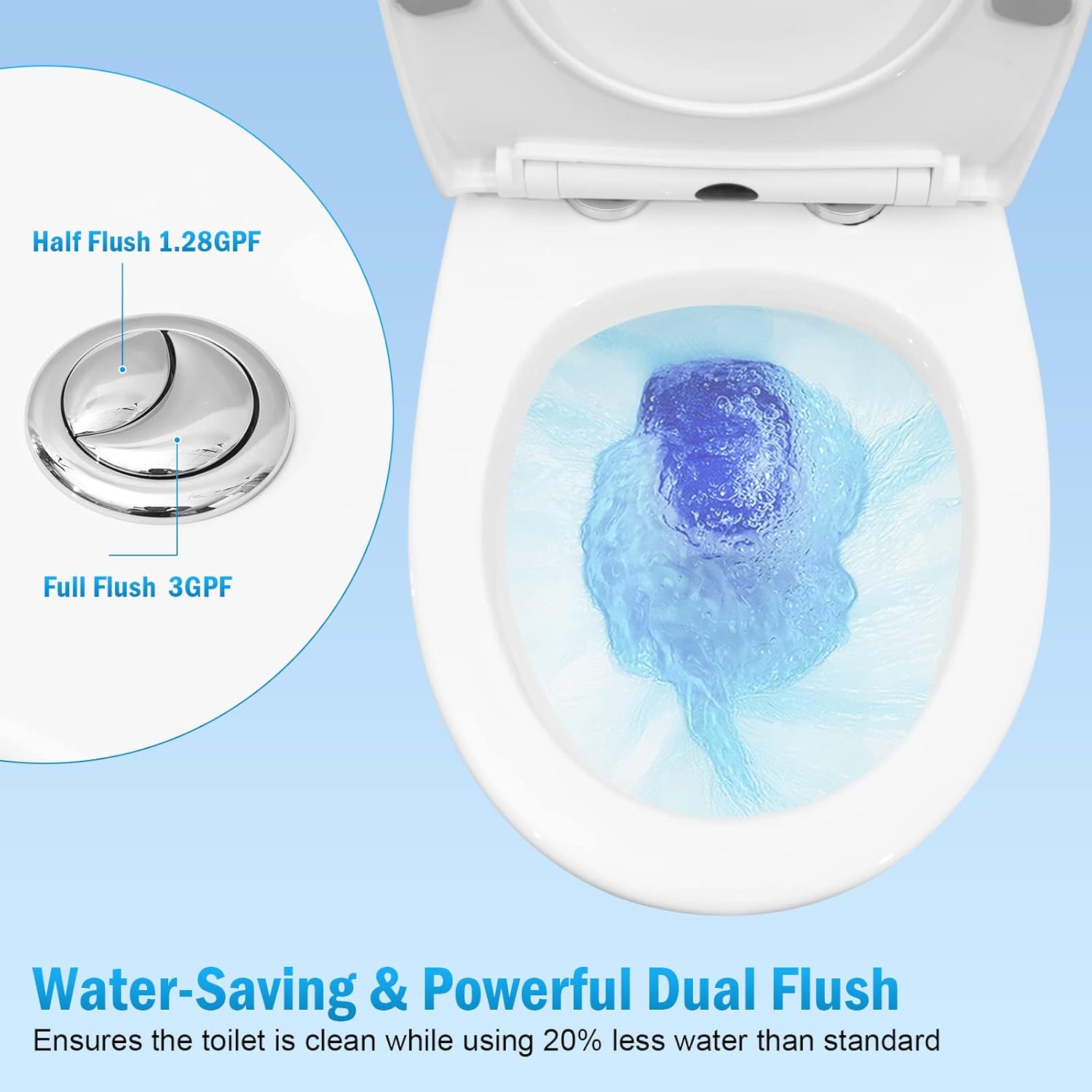
Figure 4: Dual Flush Buttons. The toilet features two flush buttons: a smaller button for a half flush (1.28 GPF) and a larger button for a full flush (3 GPF, though the product description states 1.28 gallons for heavy solid flush, which is more accurate for water conservation).

Figure 5: Powerful Flushing Action. The system utilizes a powerful direct flush and a nano-glazed bowl for easy cleaning, ensuring efficient waste removal and preventing clogging.
Macerator Pump Operation
The 500W macerator pump, equipped with a 1 HP unit and stainless steel non-clog blades, automatically activates upon flushing to grind and pump waste. Its design ensures low noise operation.
The soft-closing lid provides an added safety measure and reduces noise from slamming.

Figure 6: Versatile Application. The Flodream macerating toilet system can be used in various locations, connecting to a toilet, sink, bathtub, and kitchen basin for waste water disposal.
Maintenance
Regular maintenance ensures the optimal performance and longevity of your Flodream Macerating Toilet system.
Cleaning the Toilet Bowl
The toilet bowl features a nano-glazed surface for easy cleaning. Use standard non-abrasive toilet bowl cleaners and a soft brush or cloth. Avoid harsh chemicals that could damage the glaze or internal components.

Figure 7: Easy Clean Bowl. The nano-glazed surface helps prevent stains and makes cleaning effortless with every flush.
Odor Control
To effectively address odor concerns, ensure proper ventilation. Incorporating a 1 1/4" venting pipe or utilizing activated carbon filters (place activated carbon as indicated in Figure 2) can provide reliable odor control.
Pump Maintenance
- Avoid flushing non-biodegradable items such as wipes, sanitary products, or excessive paper, as these can clog the macerator blades.
- Periodically inspect visible connections for any signs of leaks or wear.
- If the system will be unused for an extended period, consider flushing with clean water to clear any remaining waste.
Troubleshooting
This section provides solutions for common issues you might encounter with your Flodream Macerating Toilet system.
| Problem | Possible Cause | Solution |
|---|---|---|
| Pump not activating or weak flush. | No power, clogged blades, low water level, or faulty sensor. | Check power supply. Ensure nothing is obstructing the blades. Verify water supply is adequate. If issues persist, contact customer support. |
| Unusual noise from pump. | Foreign object in pump, worn motor bearings, or pump cavitation. | Turn off power immediately. Do not attempt to remove foreign objects yourself if unsure. Contact customer support. |
| Odors present. | Improper ventilation, activated carbon needs replacement, or waste buildup. | Ensure proper venting. Replace activated carbon if used. Clean the toilet and ensure regular flushing. |
| Water leakage. | Loose connections, cracked pipes, or faulty seals. | Inspect all plumbing connections for tightness. Check for visible cracks. If unable to locate or fix, contact a qualified plumber or customer support. |
For issues not listed here or if the suggested solutions do not resolve the problem, please contact Flodream customer support.
Specifications
Detailed technical specifications for the Flodream Macerating Toilet with Pump.
| Feature | Detail |
|---|---|
| Model Number | FD-Jan-WC500-MY |
| Power | 500W (1 HP unit) |
| Voltage | 110V - 120V |
| Input Ports | 4 (for toilet, sink, basin, shower) |
| Vertical Discharge | Up to 23 ft |
| Horizontal Discharge | Up to 229 ft |
| Material | Ceramic (toilet) |
| Color | White |
| Product Dimensions (D x W x H) | 25.4"D x 14.8"W x 15.4"H |
| Flush Type | Dual Flush (1 gallon light, 1.28 gallons heavy) |
| Installation Type | Floor Mounted |

Figure 8: Product Dimensions. Detailed measurements of the toilet and bowl for installation planning.
Warranty Information
Flodream provides the following warranty for this product:
- 1-Year Manufacturer Warranty: For replacement of parts.
- 2-Year Manufacturer Warranty: For repair services.
Please retain your proof of purchase for warranty claims.
Customer Support
For any questions regarding your Flodream Macerating Toilet system, assistance with installation, or warranty claims, please contact our customer support team.
Contact Method: Please email us for support.
Our team is committed to helping you resolve any issues within 24 hours.
Ask a question about this manual
Ask about setup, troubleshooting, compatibility, parts, safety, or missing instructions. Manuals+ will review the question and use this page’s manual context to help answer it.