
JECOD DMP-30
Jebao/Jecod DMP-30 Smart Aquarium Wave Maker User Manual
Model: DMP-30 | Brand: JECOD
1. Introduction
Product Overview
The Jebao/Jecod DMP-30 Smart Aquarium Wave Maker is an advanced pump designed to create natural wave-like currents in marine and freshwater aquariums. Its innovative wet and dry side design ensures the motor remains outside the water, promoting silent operation and preventing corrosion. This device offers adjustable flow modes, Wi-Fi and Bluetooth control, and is engineered for energy efficiency and durability.
Key Features
- Advanced Wet & Dry Side Design: Motor is completely out of the water for silent operation and corrosion prevention.
- Energy-Efficient Performance: Low power consumption with powerful flow.
- Whisper-Quiet Operation: Motor isolated from water reduces vibrations and noise.
- Adjustable Flow Settings: Multiple wave modes and customizable water flow.
- Promotes Coral & Fish Health: Enhances oxygenation and water filtration.
- Versatile & Compatible: Suitable for aquariums ranging from 10 to 300+ gallons.
- Easy Installation & Maintenance: Magnetic and suction cup mounting, tool-free disassembly.
- Smart Control: Bluetooth fast connection with app, Wi-Fi and Bluetooth control function, manual control.
2. What's Included
Please verify that all components are present in the package:
- 1 x Wave Maker Wet Side
- 1 x Wave Maker Dry Side
- 1 x Controller
- 1 x Power Adaptor
3. Setup and Installation
3.1 Component Identification
Familiarize yourself with the main components of your wave maker system:
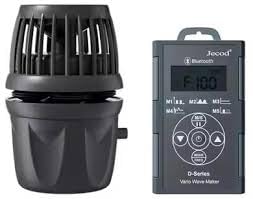
Image: The complete Jebao/Jecod DMP-30 Smart Aquarium Wave Maker system, showing the wave maker pump unit and its external controller.
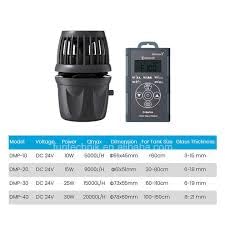
Image: Illustration of the wave maker's wet side (submerged part) and dry side (motor housing outside the water), highlighting the unique design.
3.2 Placement
Select an appropriate location within your aquarium for the wave maker. It should be placed to optimize water flow and circulation without directly blasting sensitive corals or fish. Consider the size and shape of your tank to achieve the desired current patterns.
3.3 Mounting
The DMP-30 wave maker utilizes a magnetic mounting system for secure attachment to your aquarium glass. Ensure the glass thickness is within the recommended range (6-21mm for DMP-30). Position the wet side of the wave maker inside the tank and align the dry side (with the magnet) on the outside of the glass. The strong magnets will hold the unit firmly in place.
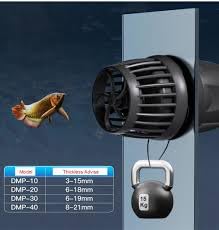
Image: The wave maker securely mounted on the aquarium glass, demonstrating its placement and the magnetic attachment mechanism.
3.4 Power Connection
- Connect the wave maker unit to the controller.
- Connect the power adaptor to the controller.
- Plug the power adaptor into a suitable electrical outlet. Ensure all connections are secure before powering on.
3.5 App Connection (Wi-Fi & Bluetooth)
The DMP-30 wave maker can be controlled via a smartphone app using Wi-Fi and Bluetooth. Download the official Jecod/Jebao app from your device's app store (Google Play or Apple App Store). Follow the in-app instructions to pair your device via Bluetooth and then connect it to your home Wi-Fi network for remote control and advanced settings.
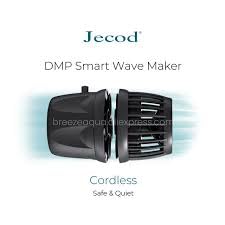
Image: Visual representation of the wave maker and controller, indicating connectivity options via Wi-Fi and Bluetooth for smartphone app control.
4. Operation
4.1 Control Panel Overview
The external controller features an LCD display and several buttons for manual operation. Refer to the controller's labels for specific functions such as mode selection, flow intensity adjustment, and feed mode activation.
4.2 Flow Modes and Adjustment
The DMP-30 offers multiple adjustable flow modes to simulate various natural water movements. Use the controller or the smartphone app to cycle through modes (e.g., constant flow, wave mode, random flow) and adjust the flow intensity (Qmax) to suit your aquarium's needs and inhabitants. The maximum flow rate for the DMP-30 is 20000 L/H.
4.3 Smart Control (App)
The smartphone app provides comprehensive control over your wave maker. You can:
- Set custom schedules for different flow modes throughout the day.
- Fine-tune flow intensity with greater precision.
- Access advanced settings and diagnostics.
- Receive firmware updates for improved performance.
5. Maintenance
Regular maintenance is crucial for the longevity and optimal performance of your wave maker.
5.1 Regular Cleaning
Over time, algae and detritus can accumulate on the wet side of the wave maker, reducing its efficiency. It is recommended to clean the wet side components every 2-4 weeks, depending on your aquarium's conditions.
5.2 Disassembly
The DMP-30 features a tool-free disassembly design for easy cleaning. Simply twist and pull apart the wet side components to access the impeller and housing.
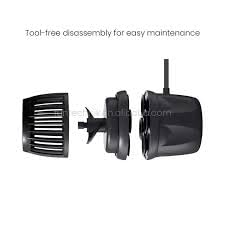
Image: Exploded view of the wave maker showing its components separated for tool-free disassembly, facilitating easy cleaning and maintenance.
5.3 Cleaning Procedure
- Unplug the power adaptor from the electrical outlet.
- Remove the wave maker from the aquarium.
- Disassemble the wet side components.
- Rinse all parts thoroughly under clean water. Use a soft brush to remove any stubborn algae or debris from the impeller and housing. For calcification, a mild vinegar solution can be used, followed by thorough rinsing.
- Inspect the impeller for any damage or wear.
5.4 Reassembly
After cleaning, reassemble the components in reverse order, ensuring all parts fit snugly. Reinstall the wave maker in your aquarium and reconnect the power.
6. Troubleshooting
If you encounter issues with your wave maker, refer to the table below for common problems and solutions.
| Problem | Possible Cause | Solution |
|---|---|---|
| Wave maker not turning on. | No power, loose connection, faulty adaptor/controller. | Check power outlet. Ensure all cables are securely connected. Test with another outlet. |
| Weak or inconsistent flow. | Impeller clogged with debris/algae, worn impeller, incorrect mode/setting. | Clean the impeller and pump housing. Check for obstructions. Adjust flow settings on controller/app. |
| Unusual noise or vibration. | Debris in impeller, impeller not seated correctly, dry side not fully sealed. | Clean impeller. Ensure impeller is correctly seated. Check that the wet and dry sides are properly aligned and sealed. |
| App connection issues. | Bluetooth/Wi-Fi interference, incorrect pairing, app outdated. | Ensure Bluetooth is enabled on your device. Restart the app and controller. Check Wi-Fi signal strength. Update the app to the latest version. |
| Controller display not working. | Power issue, controller malfunction. | Check power connection. If problem persists, contact customer support. |
7. Technical Specifications
Specifications for the Jebao/Jecod DMP-30 Smart Aquarium Wave Maker:
| Feature | Specification |
|---|---|
| Brand | JECOD (Manufacturer: JEBAO) |
| Model | DMP-30 |
| Voltage | DC 24V |
| Power | 30W |
| Maximum Flow Rate (Qmax) | 20000 L/H |
| Product Dimensions | ⌀73x55mm (approx. 7L x 7W x 8H Centimeters) |
| Recommended Tank Size | 60-110cm (approx. 10-300+ gallons) |
| Compatible Glass Thickness | 6-21mm |
| Material | Polypropylene (PP) |
| Control | Wi-Fi, Bluetooth, Manual Controller |
| Item Weight | 1 kg (1000 Grams) |
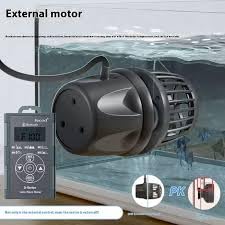
Image: A table detailing specifications for various models in the Jebao/Jecod DMP series, including flow rates, dimensions, and compatible glass thickness.
8. Warranty and Support
8.1 Warranty Information
This product comes with a manufacturer's warranty. Please refer to the warranty card included in your product packaging for specific terms, conditions, and duration. Keep your purchase receipt as proof of purchase for any warranty claims.
8.2 Customer Support
For technical assistance, troubleshooting beyond this manual, or warranty inquiries, please contact the retailer or the manufacturer's customer support. Contact details are typically provided on the product packaging or the manufacturer's official website.
Related documentsDMP-30


Ask a question about this manual
Ask about setup, troubleshooting, compatibility, parts, safety, or missing instructions. Manuals+ will review the question and use this page’s manual context to help answer it.