
decqle JY313-30W
decqle Universal Travel Adapter JY313-30W User Manual
Model: JY313-30W
1. Introduction
Thank you for choosing the decqle Universal Travel Adapter JY313-30W. This adapter is designed to provide a convenient and safe power solution for your electronic devices while traveling worldwide. Please read this manual carefully before use to ensure proper operation and to maximize the lifespan of your product.
2. Product Overview
2.1 Key Features
- Worldwide Compatibility: Designed with 4 interchangeable plugs (Type C, Type G, Type A, Type I) covering over 224 countries.
- AC Power Socket: Supports a maximum power of 2500W and an input voltage of 100-250V for high-power devices.
- Multiple Charging Ports: Features 3 USB-C ports and 2 USB-A ports with a maximum total output of 30W for charging multiple devices simultaneously.
- Compact Design: Foldable pins and a compact cube shape (7.6*5.3*5.9 cm, 158g) make it highly portable for travel.
- Multiple Protection: Equipped with comprehensive safety features including over-temperature, over-voltage, over-current, overload, short-circuit, and undervoltage protection.
2.2 Package Contents
- 1 x decqle Universal Travel Adapter JY313-30W
- 1 x User Manual
2.3 Product Diagram
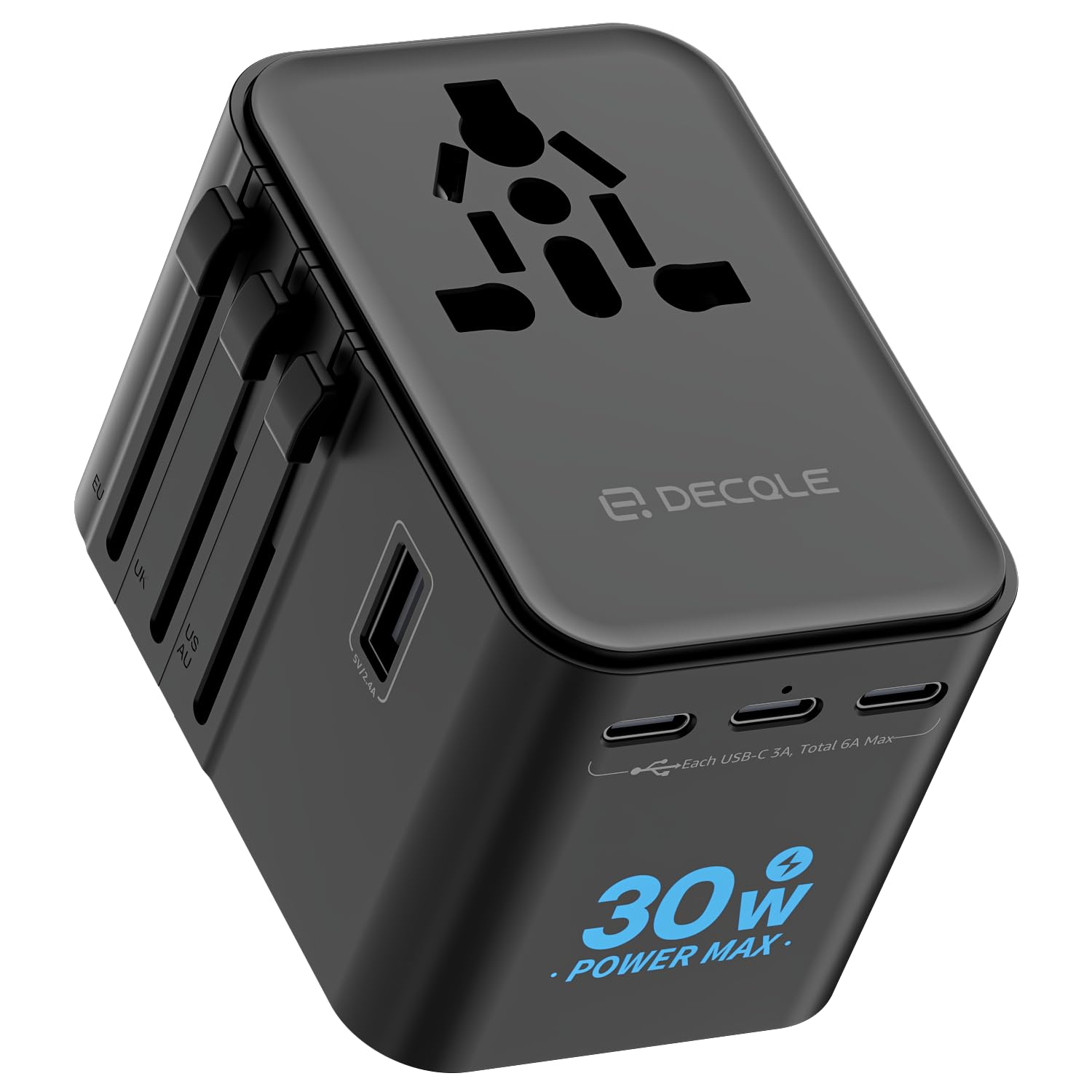
Figure 1: Front view of the decqle Universal Travel Adapter JY313-30W, showing the universal AC socket and USB ports.
3. Setup
3.1 Initial Inspection
Before first use, inspect the adapter for any signs of damage. Do not use if the adapter appears damaged.
3.2 Selecting and Extending the Correct Plug Type
The adapter features sliders on its sides to extend the appropriate plug for your destination. Identify the required plug type (Type C, G, A, or I) for the country you are in.

Figure 2: Illustration of worldwide plug compatibility, showing Type C (EU), Type G (UK), Type A (US), and Type I (AU) plugs.

Figure 3: Visual guide to various plug types supported by the adapter across 224+ countries.
- Locate the slider corresponding to the desired plug type.
- Slide the button forward until the pins are fully extended and locked into place.
- Insert the adapter into the wall socket.
Important Note:
- This adapter is NOT a voltage converter. Ensure your electronic devices support dual voltage (100-240V, 50/60Hz) before plugging them into the AC socket. Failure to do so may damage your device.
- The adapter is not compatible with Type D (India), Type M (South Africa), and Korea (for certain plug types).
4. Operating Instructions
4.1 Using the AC Outlet
The universal AC outlet supports devices up to 2500W. It is suitable for various high-power appliances such as hair dryers, shavers, and cameras, provided they are dual-voltage compatible.

Figure 4: The AC socket supports up to 2500W and is compatible with various appliances, provided they support 100-250V input.
- Ensure the adapter is securely plugged into a wall socket.
- Plug your appliance's power cord into the universal AC outlet on the adapter.
4.2 Using the USB Ports
The adapter features 3 USB-C ports and 2 USB-A ports, offering a total maximum output of 30W. The intelligent chip automatically distributes power to protect your devices during simultaneous charging.

Figure 5: The adapter provides 1 AC outlet, 2 USB-A ports, and 3 USB-C ports for charging multiple devices.
- Connect your USB-powered devices (e.g., smartphones, tablets, smartwatches) to the USB-C or USB-A ports using appropriate charging cables.
- The adapter will automatically begin charging your devices.
4.3 Retracting the Plugs
To retract the extended pins for compact storage:

Figure 6: Step-by-step guide on how to retract the plug pins by holding the button and sliding the slider.
- Press and hold the button located on the side of the adapter.
- While holding the button, slide the corresponding plug slider back until the pins are fully retracted into the adapter body.
5. Safety Features
The decqle Universal Travel Adapter is built with multiple protections to ensure safe operation:
- Over-temperature Protection
- Over-voltage Protection
- Over-current Protection
- Overload Protection
- Short-circuit Protection
- Undervoltage Protection
- Overcharge Protection
- Smart Chip Protection
The external casing is made from flame-retardant PC material, capable of withstanding temperatures up to 750 °C.
5.1 Fuse Replacement
The adapter includes two 10A fuses: one in service and one spare. If the adapter stops working, the fuse may have blown. To replace the fuse:
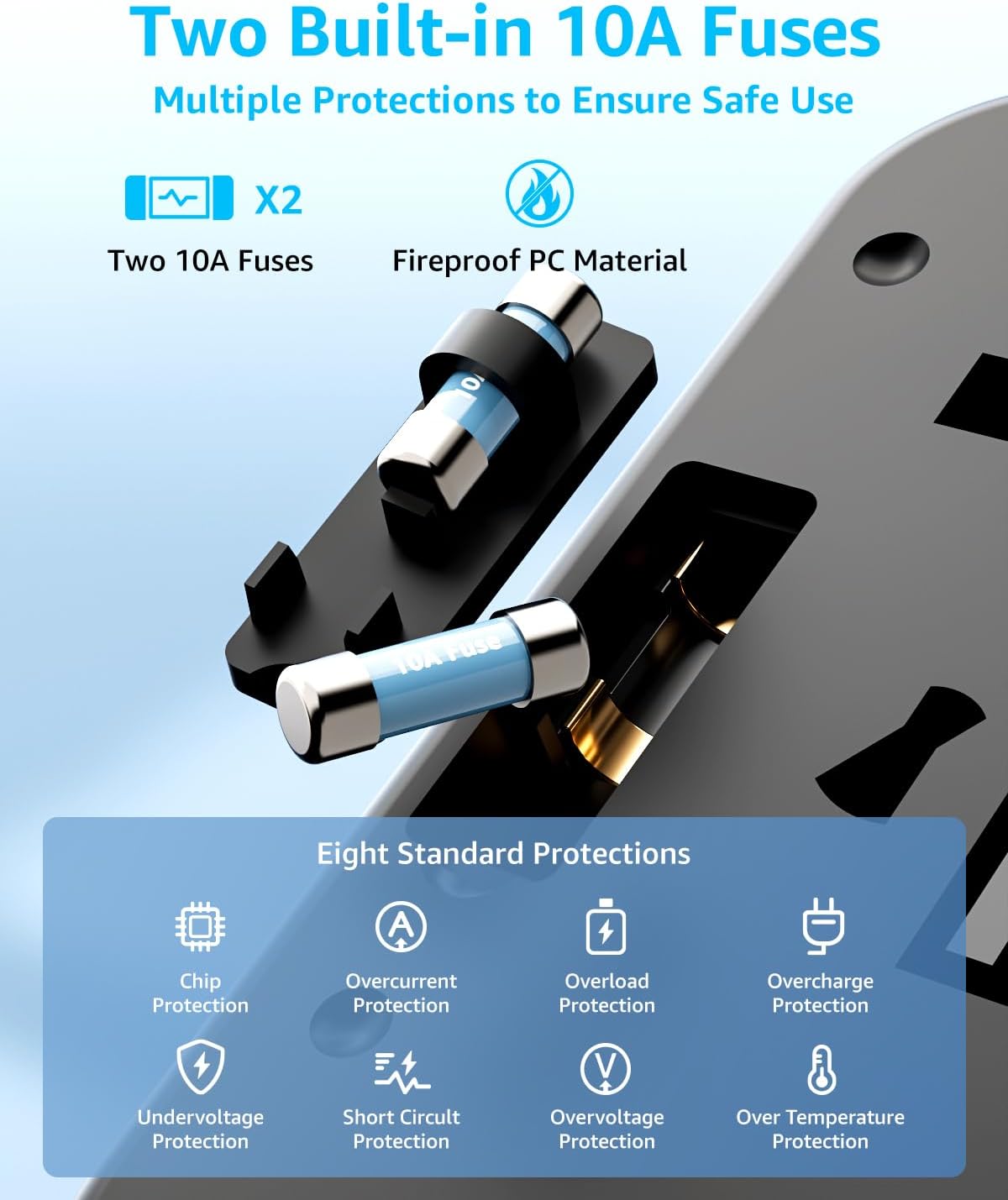
Figure 7: Diagram showing the location of the two 10A fuses and icons representing various safety protections.
- Unplug the adapter from the wall socket and disconnect all devices.
- Locate the fuse compartment (usually a small tray that slides out) on the side of the adapter.
- Carefully slide out the fuse tray.
- Remove the blown fuse and replace it with the spare 10A fuse.
- Slide the fuse tray back into place until it clicks securely.
6. Maintenance
- Keep the adapter clean and dry. Wipe with a soft, dry cloth. Do not use liquid cleaners.
- Store the adapter in a cool, dry place when not in use.
- Avoid dropping the adapter or subjecting it to strong impacts.
7. Troubleshooting
7.1 Adapter Not Providing Power
- Check the wall socket: Ensure the wall socket is functional by testing it with another device.
- Check the fuse: The internal fuse may have blown. Refer to section 5.1 for fuse replacement instructions.
- Check plug connection: Ensure the correct plug type is fully extended and securely inserted into the wall socket.
7.2 Devices Not Charging via USB Ports
- Check cables: Ensure your USB charging cables are not damaged and are properly connected.
- Device compatibility: Verify that your device is compatible with the USB charging specifications (e.g., 5V output).
- Overload: If too many devices are connected, the smart chip may limit power to protect devices. Try charging fewer devices.
7.3 AC Appliance Not Working
- Voltage compatibility: Confirm that your appliance supports dual voltage (100-240V, 50/60Hz). This adapter does not convert voltage.
- Appliance power: Ensure the appliance's power consumption does not exceed the adapter's maximum of 2500W.
8. Specifications
| Brand | decqle |
| Model | JY313-30W |
| Input Voltage | 100-250V AC |
| AC Power Rating | 2500W Max |
| AC Amperage | 10A Max |
| USB-C Ports | 3 |
| USB-A Ports | 2 |
| Total USB Output | 30W Max |
| Output Voltage (USB) | 5V DC |
| Plug Types | Type C (EU), Type G (UK), Type A (US), Type I (AU) |
| Dimensions | 7.6 x 5.3 x 5.9 cm |
| Weight | 158 g |
| Fuses | 2 x 10A (one spare) |
9. Warranty and Support
decqle products are designed and manufactured to the highest quality standards. For warranty information or technical support, please refer to the contact details provided on the product packaging or visit the official decqle website. Please retain your proof of purchase for warranty claims.
Ask a question about this manual
Ask about setup, troubleshooting, compatibility, parts, safety, or missing instructions. Manuals+ will review the question and use this page’s manual context to help answer it.