
1. Introduction
This manual provides essential information and instructions for the installation, operation, and maintenance of the JYFORNWC TV Motherboard, specifically model TP.MS638.PC822. This product is designed as a replacement component for compatible television sets to restore or improve functionality.
2. Safety Information
Please read and understand all safety instructions before attempting installation or repair. Failure to follow these instructions may result in electric shock, fire, or damage to the product or other components.
- Disconnect Power: Always unplug the television from the power outlet before opening the TV casing or performing any installation.
- Static Electricity: Electronic components are sensitive to static discharge. Use an anti-static wrist strap or discharge static electricity by touching a grounded metal object before handling the motherboard.
- Professional Installation Recommended: Installation of TV motherboards requires technical knowledge and experience. If you are not confident in your ability to perform the installation safely, seek assistance from a qualified technician.
- Handle with Care: Avoid touching the integrated circuits and connectors directly. Hold the board by its edges.
- Ventilation: Ensure proper ventilation around the TV after installation to prevent overheating.
3. Product Overview
The JYFORNWC TV Motherboard is a critical component responsible for controlling various functions of your television, including image processing, audio output, and input/output management. This specific model, TP.MS638.PC822, is compatible with several TV models, including TP.HV530.PC821 and TP.HV510.PC822.
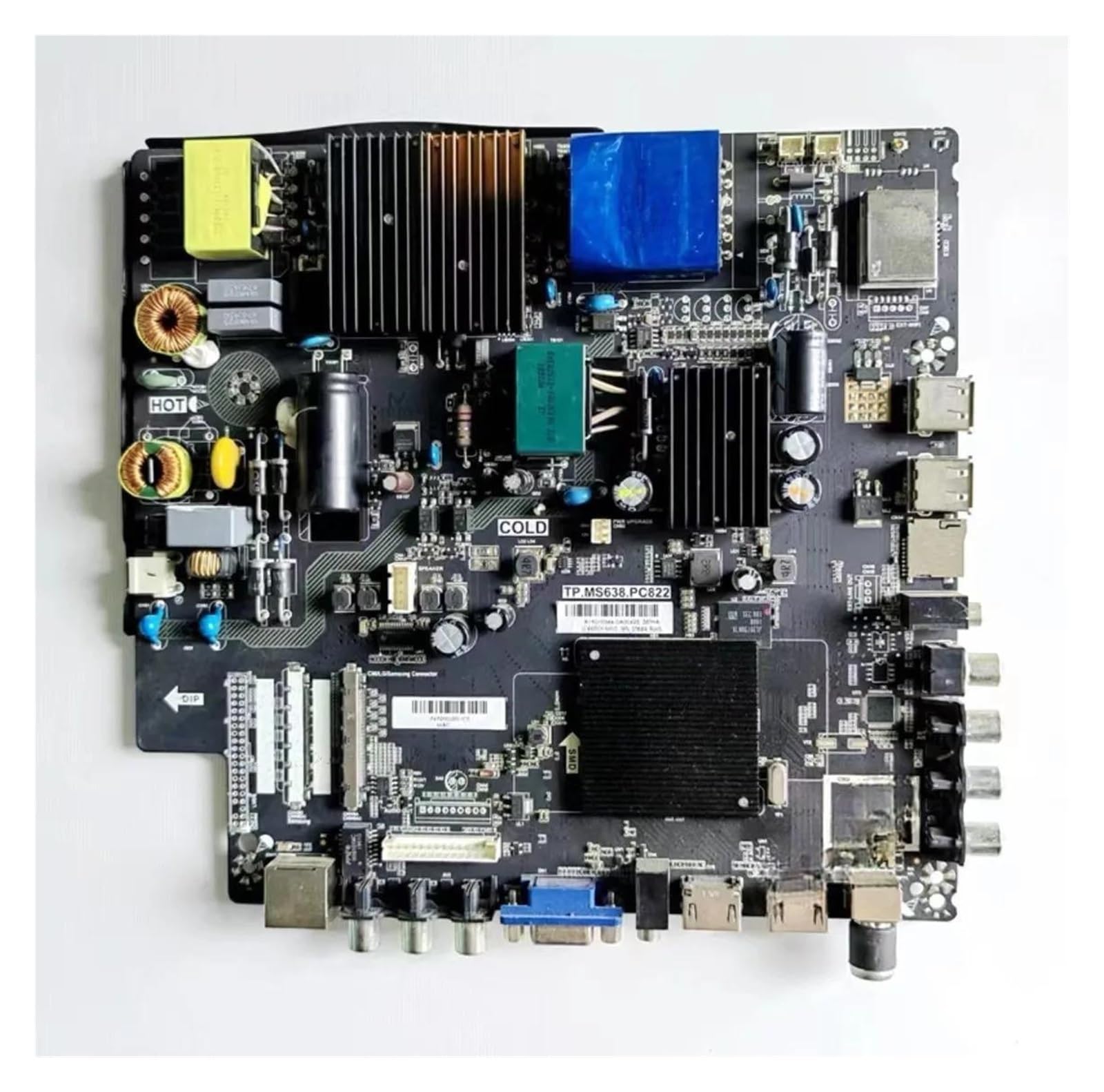
Figure 1: JYFORNWC TV Motherboard (Model TP.MS638.PC822). This image shows the main circuit board with various components and connectors.
4. Setup and Installation
This section outlines the general steps for replacing a TV motherboard. Specific procedures may vary depending on your TV model. Always refer to your TV's service manual for detailed instructions.
4.1. Preparation
- Gather necessary tools: screwdrivers (Phillips, flathead), anti-static wrist strap, plastic prying tools, clean workspace.
- Ensure the TV is unplugged from all power sources and external devices.
- Place the TV face down on a soft, clean surface to protect the screen.
4.2. Installation Steps
- Carefully remove the back cover of the television. Document screw locations if necessary.
- Locate the existing motherboard. Take photos of all cable connections before disconnecting them.
- Disconnect all cables and ribbon connectors from the old motherboard. Handle connectors gently to avoid damage.
- Unscrew and remove the old motherboard from the TV chassis.
- Carefully place the new JYFORNWC TP.MS638.PC822 motherboard into position, ensuring it aligns with the mounting holes.
- Secure the new motherboard with the appropriate screws. Do not overtighten.
- Reconnect all cables and ribbon connectors to their correct ports on the new motherboard, referring to your photos. Ensure all connections are firm and secure.
- Before replacing the back cover, perform a preliminary test by plugging in the TV and checking for basic functionality (power on, display).
- If the test is successful, unplug the TV again and reattach the back cover.
5. Operation
The motherboard functions as the central processing unit for your television. Once correctly installed, it enables all standard TV operations, including power management, signal processing from various inputs (HDMI, USB, etc.), and output to the display panel and speakers. No direct user operation is performed on the motherboard itself; its function is integrated into the TV's overall system.
6. Maintenance
Proper maintenance can extend the lifespan of your TV and its components, including the motherboard.
- Dust Removal: Periodically clean the interior of your TV to prevent dust buildup on the motherboard and other components. Use compressed air or a soft brush. Ensure the TV is unplugged before cleaning.
- Ventilation: Ensure the TV's ventilation openings are not blocked to allow for proper airflow and heat dissipation.
- Avoid Liquids: Keep liquids away from the television to prevent spills that could damage internal electronics.
7. Troubleshooting
Replacing the TV motherboard can resolve several common television malfunctions. If you experience issues after installation, consider the following:
- No Power/Black Screen:
- Verify all power cables are securely connected.
- Check if the power outlet is functional.
- Ensure all internal connectors to the motherboard are firmly seated.
- Flickering Display:
- Inspect ribbon cables connecting the motherboard to the display panel for proper connection and damage.
- Confirm the motherboard model is compatible with your TV's display panel.
- No Audio/Video from Inputs:
- Ensure external devices are correctly connected to the TV's input ports.
- Verify the TV's input source selection is correct.
If issues persist, re-check all installation steps or consult a professional technician.
8. Specifications
| Feature | Detail |
|---|---|
| Brand | JYFORNWC |
| Model Number | TP.MS638.PC822 |
| Compatible Models | TP.HV530.PC821, TP.HV510.PC822 |
| Item Weight | 1.76 ounces (approximately 50 grams) |
| Package Dimensions | 1.18 x 0.79 x 0.39 inches |
| Manufacturer | songxdian |
| ASIN | B0DTHQ42NH |
9. Warranty and Support
This product is typically covered by a return policy. For this specific purchase, a 30-day return policy is generally applicable from the date of receipt. Please refer to your purchase documentation for exact terms and conditions.
For technical support or inquiries regarding compatibility, please contact the seller, songxdian, or the brand, JYFORNWC, through the platform where the purchase was made. Additional protection plans (e.g., 3-Year or 4-Year Protection Plans) may be available for separate purchase to extend coverage beyond the standard return period.