
Introduction
Thank you for choosing the HEYZONE Black TV Stand. This manual provides comprehensive instructions for the safe assembly, proper operation, and effective maintenance of your new entertainment center. Please read all instructions carefully before beginning assembly and retain this manual for future reference.
This TV stand is designed to accommodate televisions up to 80 inches, offering a stylish and functional storage solution for your living room or bedroom. Its mid-century modern design with wave-shaped fluted panels and sturdy construction ensures durability and aesthetic appeal.
Important Safety Information
WARNING: Failure to follow these safety instructions could result in injury or property damage.
- Always assemble this furniture with at least two people to ensure stability and prevent injury.
- Keep children and pets away from the assembly area to avoid accidents with small parts or tools.
- Once assembled, secure the furniture to the wall using appropriate anti-tip hardware (not specified if included, but good general advice for TV stands) to prevent tip-overs, especially in households with children.
- Be cautious of sharp edges and small parts during assembly and disassembly.
- Do not exceed the maximum weight capacity of 150 pounds for the top surface.
- Ensure the TV stand is placed on a level and stable surface.
Package Contents
Before beginning assembly, please verify that all parts listed below are present and undamaged. If any parts are missing or damaged, please contact HEYZONE customer service immediately.
- All necessary engineered wood panels (top, bottom, side, back, shelves, doors)
- Metal legs and mounting hardware
- Door hinges and handles
- Assembly hardware (screws, dowels, cam locks, etc.)
- Instruction Manual

Image: Example of various components and hardware included in the package.
Assembly Instructions
Assembly of the HEYZONE TV Stand is designed to be straightforward with clearly numbered parts and easy-to-follow instructions. We recommend having a Phillips head screwdriver and a hammer (for dowels) on hand. Please ensure you have ample space for assembly.
Step 1: Prepare the Base
Attach the metal legs to the bottom panel of the TV stand using the provided screws. Ensure all legs are securely fastened and aligned.

Image: Diagram illustrating the overall dimensions of the TV stand and the placement of its support legs.
Step 2: Assemble the Frame
Connect the side panels to the bottom panel, followed by the top panel. Use the provided dowels and cam locks to secure these connections. Ensure all connections are tight and the frame is square.

Image: Exploded view diagram detailing the assembly process, showing how various panels and hardware connect.
Step 3: Install Shelves and Back Panel
Insert the adjustable shelves into the designated compartments. The shelves offer 3 height options for customized storage. Attach the back panel to the rear of the stand, ensuring the pre-punched cable management holes are correctly oriented.

Image: Detailed view of the TV stand's interior, highlighting adjustable shelves and cable management holes for organizing wires.
Step 4: Attach Doors and Handles
Mount the door hinges to the doors and then attach the doors to the main frame. Finally, install the handles onto the doors. Adjust hinges as needed for proper door alignment.
Video: Official HEYZONE-US video demonstrating the assembly process and features of the TV stand. This video provides a visual guide to help with installation.
Video: A short preview video from HEYZONE-US showcasing the black TV stand. This video offers a quick look at the assembled product.
Operating Instructions
Once assembled, your HEYZONE TV Stand is ready for use.
- Placement: Position the TV stand on a flat, stable surface. Ensure there is adequate space around the stand for ventilation and access.
- Television Placement: Carefully place your television on the top surface. Ensure the TV's base is fully supported and centered on the stand. Do not exceed the maximum weight capacity of 150 pounds.
- Storage: Utilize the interior compartments for storing media devices, game consoles, DVDs, books, or other items. The adjustable shelves allow you to customize the storage space to fit your needs.
- Cable Management: Route all cables and wires through the pre-punched holes in the back panel to maintain a tidy appearance and ensure proper ventilation for your electronic devices.
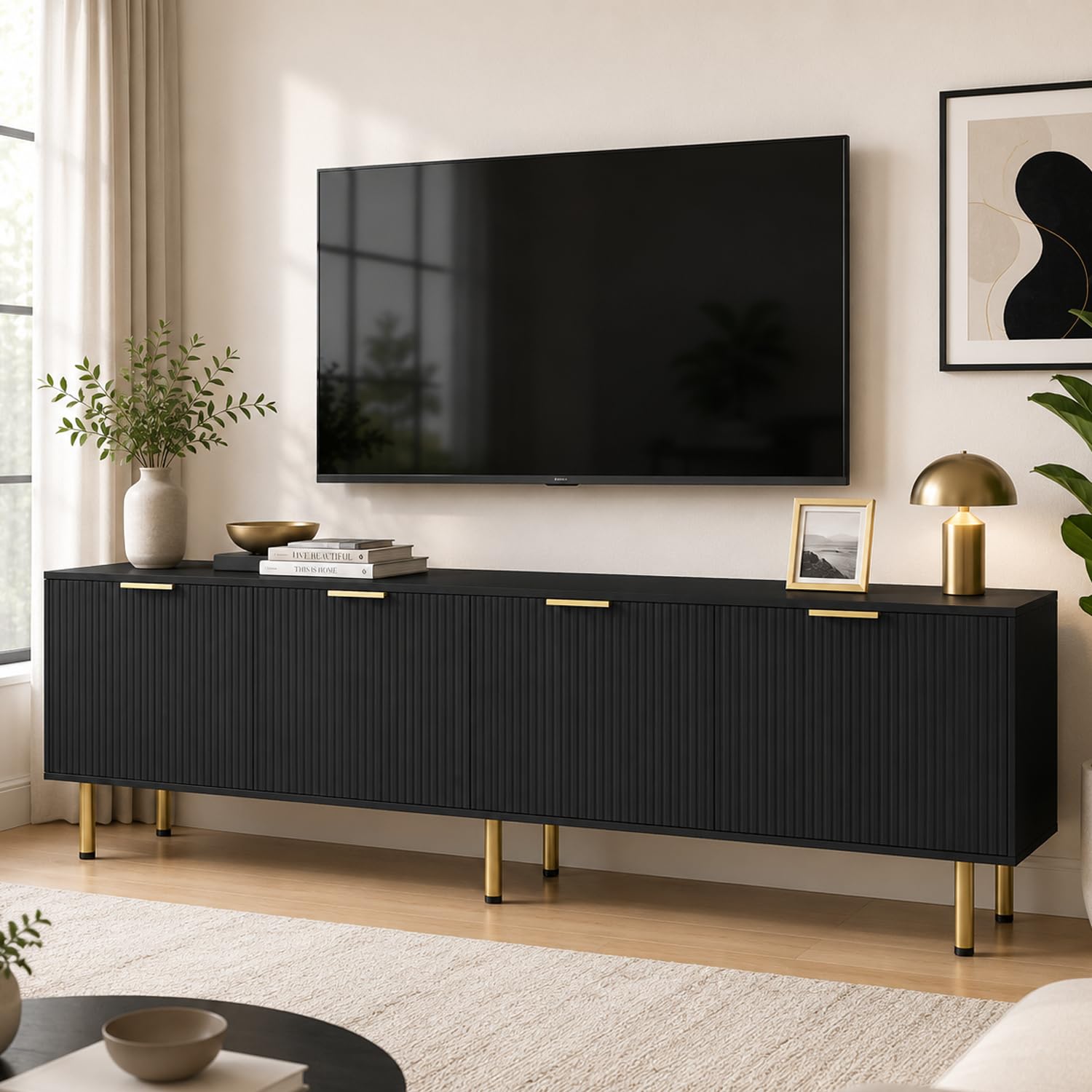
Image: The HEYZONE Black TV Stand in a living room, showcasing its use with a television and decorative items.
Maintenance
To ensure the longevity and appearance of your HEYZONE TV Stand, follow these maintenance guidelines:
- Cleaning: Wipe surfaces with a soft, damp cloth. Avoid using harsh chemicals, abrasive cleaners, or polishes that may damage the finish.
- Spills: Immediately wipe up any spills to prevent staining or damage to the engineered wood.
- Sunlight: Avoid prolonged exposure to direct sunlight, which can cause fading or discoloration.
- Hardware: Periodically check all screws and connections to ensure they remain tight. Re-tighten if necessary.
Troubleshooting
| Problem | Possible Cause | Solution |
|---|---|---|
| Stand is wobbly or unstable. | Uneven floor; loose connections; legs not fully tightened. | Ensure the stand is on a level surface. Check and tighten all screws and leg connections. The stand features adjustable feet for minor leveling. |
| Doors do not align properly. | Hinges are not adjusted correctly. | Adjust the screws on the door hinges to align the doors. Refer to the assembly video for visual guidance on hinge adjustment. |
| Missing parts or damaged components. | Shipping damage; packaging error. | Do not proceed with assembly. Contact HEYZONE customer service immediately for replacement parts. |
| Difficulty inserting screws or dowels. | Holes not fully cleared; misalignment. | Ensure holes are clear of debris. Gently tap dowels with a hammer. For screws, ensure proper alignment before applying force. Do not overtighten. |
Specifications
- Brand: HEYZONE
- Model Number: TV1 BLACK
- Color: Black
- Material: Engineered Wood
- Dimensions (L x W x H): 70.86 x 15.75 x 23.62 inches (approx. 71 x 16 x 24 inches)
- Item Weight: 91 pounds
- Weight Capacity: Up to 150 pounds (top surface)
- TV Size Compatibility: 50 to 80 inches
- Number of Drawers/Doors: 4 doors (storage compartments)
- Additional Features: Adjustable Feet, Cable Management Holes
Warranty and Customer Support
HEYZONE is committed to providing high-quality products and excellent customer service. While specific warranty details are not provided in this manual, most HEYZONE products come with a limited manufacturer's warranty against defects in materials and workmanship.
If you encounter any issues with your HEYZONE Black TV Stand, including missing parts, damaged components, or difficulties during assembly or use, please do not hesitate to contact our dedicated customer support team. We are here to provide prompt and satisfying solutions.
For assistance, please refer to the contact information provided with your purchase or visit the official HEYZONE website.