
1. Introduction
Welcome to the user manual for your new Gourmia 7-Quart Digital Air Fryer with Panoramic View. This appliance is designed for efficient and convenient cooking, utilizing Fry Force 360° technology to circulate heated air for crispy results. It features a large 7-quart capacity, a panoramic viewing window, a 3D holographic display, and 12 one-touch cooking presets. Please read this manual thoroughly before first use to ensure safe operation and optimal performance.
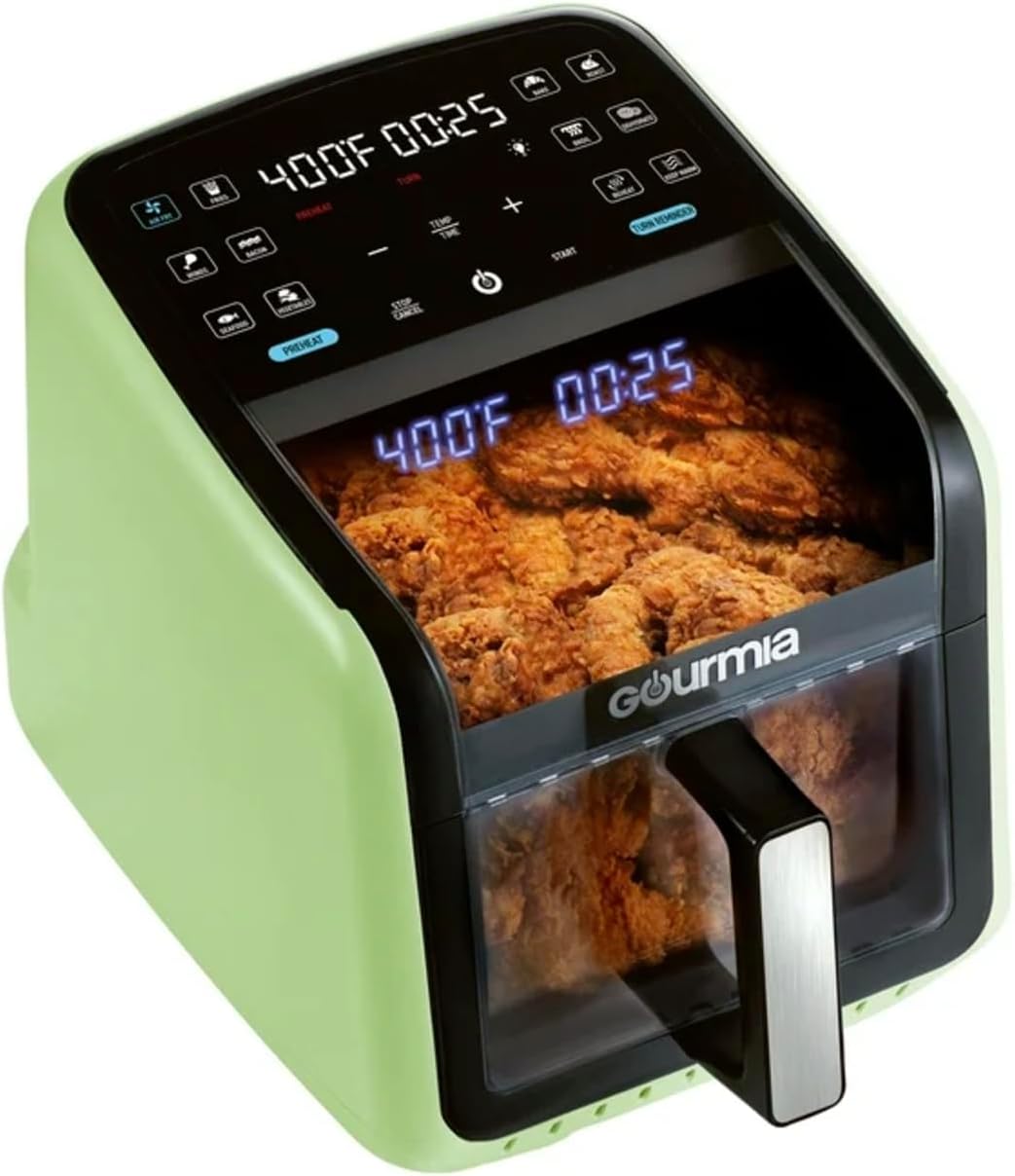
Image 1.1: The Gourmia 7-QT Digital Air Fryer in green, showcasing its panoramic viewing window with food cooking inside.
2. Important Safety Instructions
When using electrical appliances, basic safety precautions should always be followed to reduce the risk of fire, electric shock, and injury.
- Read all instructions before using the appliance.
- Do not touch hot surfaces. Use handles or knobs.
- To protect against electric shock, do not immerse cord, plugs, or the appliance in water or other liquid.
- Close supervision is necessary when any appliance is used by or near children.
- Unplug from outlet when not in use and before cleaning. Allow to cool before putting on or taking off parts.
- Do not operate any appliance with a damaged cord or plug, or after the appliance malfunctions or has been damaged in any manner.
- The use of accessory attachments not recommended by the appliance manufacturer may cause injuries.
- Do not use outdoors.
- Do not let cord hang over edge of table or counter, or touch hot surfaces.
- Do not place on or near a hot gas or electric burner, or in a heated oven.
- Extreme caution must be used when moving an appliance containing hot oil or other hot liquids.
- Always attach plug to appliance first, then plug cord into the wall outlet. To disconnect, turn any control to "off", then remove plug from wall outlet.
- Do not use appliance for other than intended use.
- Ensure the basket and crisper tray are properly inserted before operation.
- A short power-supply cord is provided to reduce the risk resulting from entanglement or tripping over a longer cord.
3. Product Overview
3.1 Components
Familiarize yourself with the parts of your Gourmia Digital Air Fryer.
- Main Unit with Heating Element and Fan
- Control Panel with 3D Holographic Display
- Panoramic Viewing Window
- 7-Quart Nonstick Basket
- Dishwasher-Safe Crisper Tray
- Handle

Image 3.1: Main unit, removable basket, and crisper tray components.
3.2 Control Panel
The digital control panel features a holographic display for temperature, time, and messages, along with 12 one-touch cooking presets.

Image 3.2: Detailed view of the digital control panel and holographic display.
4. Setup and First Use
4.1 Unpacking
- Remove all packaging materials, stickers, and labels from the appliance.
- Carefully remove the air fryer and its accessories from the box.
4.2 Cleaning Before First Use
- Wash the basket and crisper tray in hot, soapy water, then rinse and dry thoroughly. Alternatively, these parts are dishwasher safe.
- Wipe the interior and exterior of the air fryer with a damp cloth.
- Ensure all parts are completely dry before use.
4.3 Placement
- Place the air fryer on a stable, heat-resistant surface.
- Ensure there is at least 6 inches (15 cm) of space on all sides of the appliance for proper air circulation.
- Do not place the appliance near flammable materials or heat sources.
5. Operating Instructions
5.1 Basic Operation
- Place the crisper tray inside the basket.
- Place food on the crisper tray. Do not overfill.
- Slide the basket into the air fryer.
- Plug the air fryer into a wall outlet. The display will illuminate.
- Select a preset or manually set temperature and time.
- Press the Start button to begin cooking.
5.2 Using Presets
The air fryer comes with 12 one-touch cooking presets for common foods. Simply select the desired preset icon on the control panel. The appliance will automatically set the optimal temperature and time.
5.3 Manual Temperature and Time Adjustment
- Press the "TEMP" button to adjust temperature using the +/- buttons.
- Press the "TIME" button to adjust cooking time using the +/- buttons.
- Temperature range: 180°F - 400°F (80°C - 200°C).
- Time range: 1 - 60 minutes.
5.4 Special Features
- Preheat: An optional preheat function ensures optimal cooking results. Press the "PREHEAT" button before starting a cooking cycle.
- Turn Food Reminder: For even cooking, the air fryer may prompt you to turn or shake food halfway through the cooking cycle. The "TURN FOOD" message will appear on the display.
- Panoramic View: Monitor your food's progress without opening the basket through the large, curved viewing window.
- Holographic Display: The 3D holographic display projects temperature, time, and guided cooking prompts for clear visibility.

Image 5.1: The air fryer displaying the "Turn Food" reminder during cooking.
6. Cleaning and Maintenance
Regular cleaning ensures the longevity and optimal performance of your air fryer.
6.1 Before Cleaning
- Unplug the air fryer from the power outlet.
- Allow the appliance to cool down completely before handling any parts.
6.2 Cleaning the Basket and Crisper Tray
- The nonstick basket and crisper tray are dishwasher safe.
- For hand washing, use warm, soapy water and a non-abrasive sponge. Rinse thoroughly and dry completely.
- Do not use metal utensils or abrasive cleaning materials on the nonstick coating.
6.3 Cleaning the Main Unit
- Wipe the exterior of the air fryer with a damp cloth.
- Clean the interior with a damp cloth and mild detergent if necessary.
- Never immerse the main unit in water or any other liquid.
- For stubborn residue on the heating element, use a soft brush.
6.4 Storage
- Ensure the appliance is clean and dry before storing.
- Store the air fryer in a cool, dry place.
7. Troubleshooting
If you encounter issues with your air fryer, refer to the table below for common problems and solutions.
| Problem | Possible Cause | Solution |
|---|---|---|
| Air fryer does not turn on. | Appliance not plugged in. | Ensure the power cord is securely plugged into a grounded wall outlet. |
| Food is not cooked evenly. | Basket is overfilled; food not turned/shaken. | Do not overfill the basket. Turn or shake food halfway through cooking when prompted by the "TURN FOOD" reminder. |
| White smoke coming from the appliance. | Grease residue from previous use; fatty food cooking. | Clean the basket and crisper tray thoroughly after each use. For fatty foods, this is normal and will dissipate. |
| Food is not crispy. | Too much moisture; insufficient cooking time/temperature. | Pat food dry before air frying. Increase cooking time or temperature slightly. Ensure preheat is used. |
8. Specifications
| Brand | Gourmia |
| Model Name | 7-QT Digital Air Fryer |
| ASIN | B0DTGSKFFF |
| Capacity | 7 Quarts |
| Power Output | 1500 Watts |
| Voltage | 120 Volts |
| Control Method | Touch |
| Max Temperature | 400°F |
| Special Features | Built-In Timer, Automatic Shut-Off, Digital Display, Non-Stick, Removable Basket, Panoramic View, Holographic Display, 12 Presets, Preheat, Turn Food Reminder |
| Dimensions (D x W x H) | 17.4"D x 13.4"W x 13.9"H |
| Material | Plastic |
| Dishwasher Safe Parts | Basket, Crisper Tray |
9. Warranty and Support
For warranty information or customer support, please refer to the documentation included with your purchase or visit the manufacturer's official website. Keep your proof of purchase for warranty claims.
For further assistance, you may contact Gourmia customer service.


