
AX WABER AX01WG02
AX WABER Keyboard Tray Under Desk Pull Out with C Clamp Mount System
Model: AX01WG02
Brand: AX WABER
1. Introduction
This manual provides instructions for the assembly, installation, and operation of your AX WABER Under-Desk Keyboard Tray. This product is designed to enhance your workspace by providing an ergonomic platform for your keyboard and mouse, helping to reduce clutter on your desktop and promote comfortable typing angles.

Image: A person maintaining an ergonomic typing posture while using the keyboard tray, highlighting its benefit for wrist and shoulder comfort.
2. Safety Information and Important Considerations
- Weight Capacity: The keyboard tray is designed to hold weights up to 11 lbs (5 kg). Do not exceed this limit.
- Desk Thickness: The C-clamp mounting system is compatible with desk thicknesses between 0.3 inches (0.76 cm) and 1.9 inches (4.8 cm). Ensure your desk falls within this range.
- Desk Edge Compatibility: This tray is not compatible with desktops that have beveled or lipped edges. It requires a flat, regular table edge for secure attachment.
- Under-Desk Clearance: A minimum of 12 inches (30.5 cm) of clear space is required under your desk for the tray to slide in and out without obstruction.
- Keyboard and Mouse Compatibility: The tray is not compatible with vertical mice or excessively raised keyboards. Ensure your peripherals fit within the tray's dimensions and clearance.
- Typing Position: The tray is not designed for typing when it is fully stowed under the desk. Always pull the tray out to a comfortable position before use.

Image: A diagram illustrating the acceptable desk thickness range (0.3"-1.75") and a table detailing 3-position height clearance based on desktop thickness.
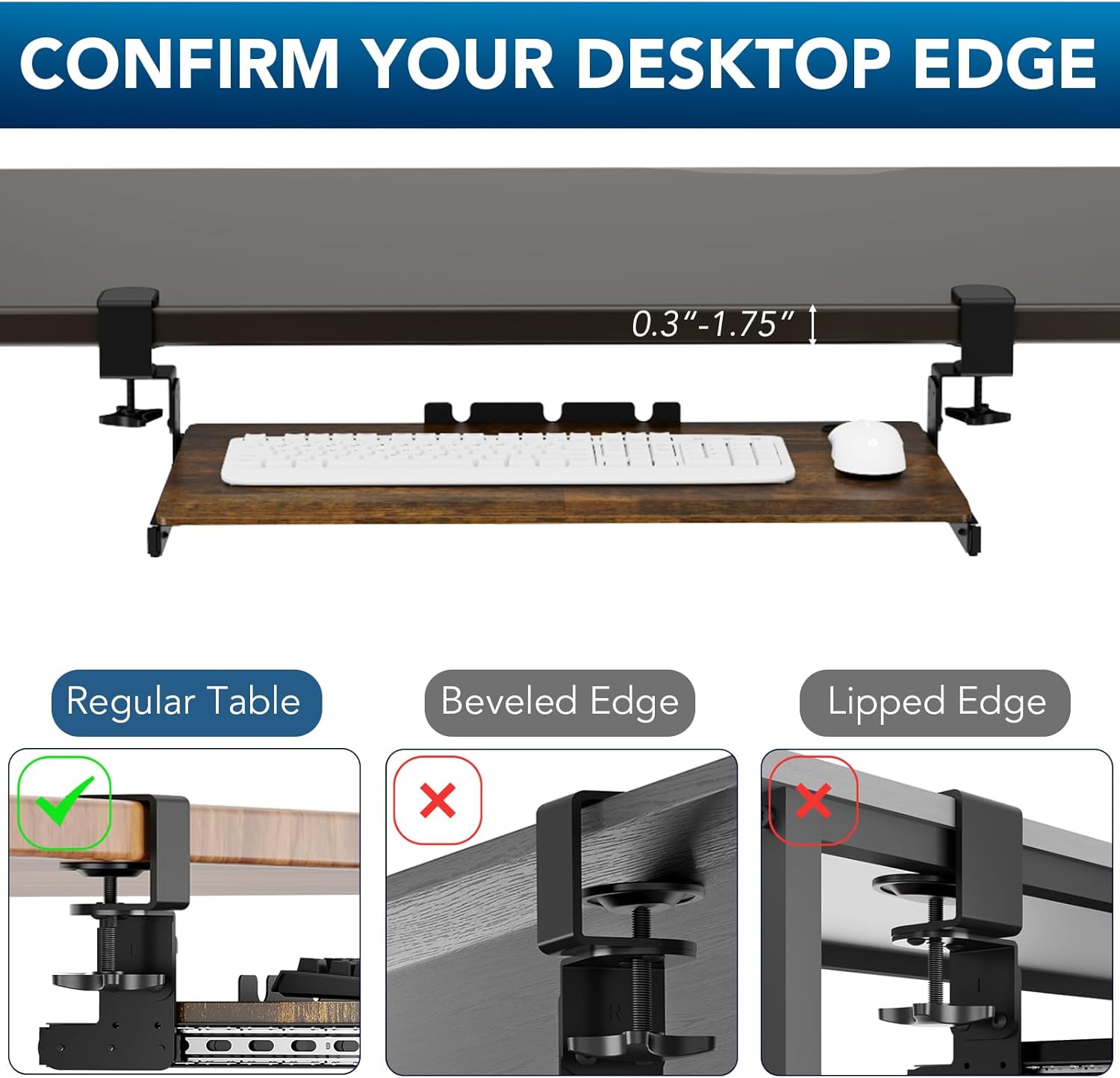
Image: Visual examples of a regular table edge (compatible) versus beveled and lipped edges (incompatible) for the C-clamp system.
Video: This video demonstrates desk compatibility, including required clearance, desk thickness, and highlights incompatibility with certain keyboard and mouse types, as well as typing while the tray is stowed.
3. Package Contents
Your AX WABER Keyboard Tray package includes all necessary components for assembly and installation. Please verify that all parts are present before beginning assembly.
- Keyboard Tray Platform
- C-Clamp Brackets (2x)
- Slider Brackets (2x)
- Mounting Screws
- Rubber Pads for Clamps
- Cable Management Clips (if included)
- Instruction Manual

Image: An exploded view of the keyboard tray components, illustrating the C-clamps, sliding rails, and the main platform.
4. Assembly Instructions
Follow these steps to assemble and install your keyboard tray. A screwdriver is required for some steps.
- Attach Slider Brackets: Secure the slider brackets to the underside of the keyboard tray platform using the provided screws. Ensure they are aligned correctly for smooth operation.
- Assemble C-Clamps: Attach the C-clamps to the support brackets. These clamps will secure the entire assembly to your desk.
- Adjust Height: The support brackets offer multiple height adjustment positions. Select your desired height and secure the clamps to the support brackets accordingly.
- Install on Desk: Place the assembled keyboard tray onto the edge of your desk. Slide the rubber pads onto the top of the clamps to protect your desktop. Tighten the C-clamp screws until the tray is firmly secured to the desk. Do not overtighten.
- Check Clearance: Ensure there are no obstacles under your desk that would prevent the tray from sliding freely. A 12-inch clearance is recommended.
Video: This video provides a step-by-step guide for assembling a clamp-on height-adjustable keyboard tray, demonstrating how to attach brackets and secure the unit to a desk.

Image: A visual representation emphasizing the necessity of a 12-inch clearance under the desk to allow the keyboard tray to slide in and out freely.
5. Operating Instructions
- Sliding the Tray: The keyboard tray features smooth-gliding ball bearings, allowing it to easily slide in and out from under your desk. Gently pull the tray towards you to extend it, and push it away to stow it. The tray extends a maximum of 5.7 inches (14.5 cm) from the edge of your desk.
- Height Adjustment: The tray offers 3 height adjustment positions. To change the height, loosen the screws on the support brackets, adjust to the desired level, and re-tighten securely. The maximum height is 5.7 inches (14.5 cm) and the minimum height is 3.7 inches (9.4 cm) from the underside of the desk.
- Corner Adjustment: For L-shaped or curved tables, the double C-clamps and pads can rotate simultaneously at a 45-degree angle, allowing for flexible orientation.

Image: A visual demonstrating the smooth sliding action of the keyboard tray, retracting under the desk and extending outwards.

Image: An illustration detailing the 45-degree rotation capability of the C-clamps, allowing the tray to be adjusted for corner or curved desks.
Video: This video showcases the smooth sliding mechanism and the three-level height adjustment feature of the keyboard tray, demonstrating its adaptability for various user preferences.
6. Maintenance
To ensure the longevity and smooth operation of your keyboard tray, follow these simple maintenance guidelines:
- Cleaning: Wipe the tray surface and metal components with a soft, damp cloth. Avoid using harsh chemicals or abrasive cleaners.
- Lubrication: Periodically check the sliding rails. If movement becomes stiff, apply a small amount of silicone-based lubricant to the ball bearings.
- Tightness Check: Regularly inspect the C-clamps and all screws to ensure they remain tight. Re-tighten if necessary to maintain stability.
7. Troubleshooting
- Tray is wobbly: Ensure all C-clamp screws are tightened securely. Verify that your desk thickness is within the compatible range and that the rubber pads are correctly positioned.
- Tray does not slide smoothly: Check for any obstructions in the sliding mechanism or under the desk. Clean the rails and apply a silicone lubricant if needed. Ensure the tray is installed level.
- Difficulty adjusting height: Loosen the height adjustment screws sufficiently before attempting to reposition the tray. Ensure the screws are re-tightened firmly after adjustment.
8. Specifications
| Model Number | AX01WG02 |
| Brand | AX WABER |
| Tray Dimensions | 27.3 inches (69.3 cm) x 11 inches (27.9 cm) |
| Total Length (including clamps) | 32.5 inches (82.5 cm) |
| Weight Capacity | 11 lbs (5 kg) |
| Compatible Desk Thickness | 0.3 inches (0.76 cm) to 1.9 inches (4.8 cm) |
| Under-Desk Clearance Required | 12 inches (30.5 cm) |
| Height Adjustment | 3 positions (Max 5.7 inches / 14.5 cm extension from desk underside) |
| Assembly Required | Yes |
| Manufacturer | kuochi |
9. Warranty and Support
AX WABER is committed to providing quality products and excellent customer service. If you encounter any issues with your keyboard tray or have questions regarding its use, please contact our friendly technical support team for assistance.
Contact information can typically be found on the product packaging or the retailer's website where the product was purchased.