
Introduction
Thank you for choosing the Lioncho Commercial Slushie Machine, Model MJ-7031748. This machine is designed for preparing a variety of frozen beverages, including slushies, margaritas, and other cold drinks. Its dual-tank design allows for two different flavors simultaneously, making it suitable for both home and commercial use. Please read this manual thoroughly before operation to ensure safe and efficient use of your appliance.
Safety Instructions
- Always ensure the machine is placed on a stable, level surface to prevent tipping.
- Do not operate the machine with wet hands or near water to avoid electrical shock.
- Ensure the power cord is not damaged and is properly grounded.
- Keep children and unauthorized personnel away from the machine during operation.
- Do not insert any objects into the machine's vents or moving parts.
- Unplug the machine before cleaning or performing any maintenance.
- Ensure the sugar content of ingredients is at least 13% to prevent damage to the machine during freezing.
Product Components
Familiarize yourself with the main components of your slushie machine:
- Dual Tanks: Transparent food-grade PC tanks for holding beverages.
- Lids: Cover for each tank.
- Agitators: Rotating blades inside the tanks for even freezing.
- Faucets: Dispensing levers for each tank.
- Drip Trays: Removable trays below the faucets to catch spills.
- Control Panel: Buttons and switches for power, mode selection, and agitator control.
- Compressor: Internal cooling unit.
- Heat Dissipation Vents: Located on the sides and back of the machine.
- LED Lights: Integrated lighting for tank illumination.

Overall view of the Lioncho Commercial Slushie Machine, showcasing its dual tanks and stainless steel body.
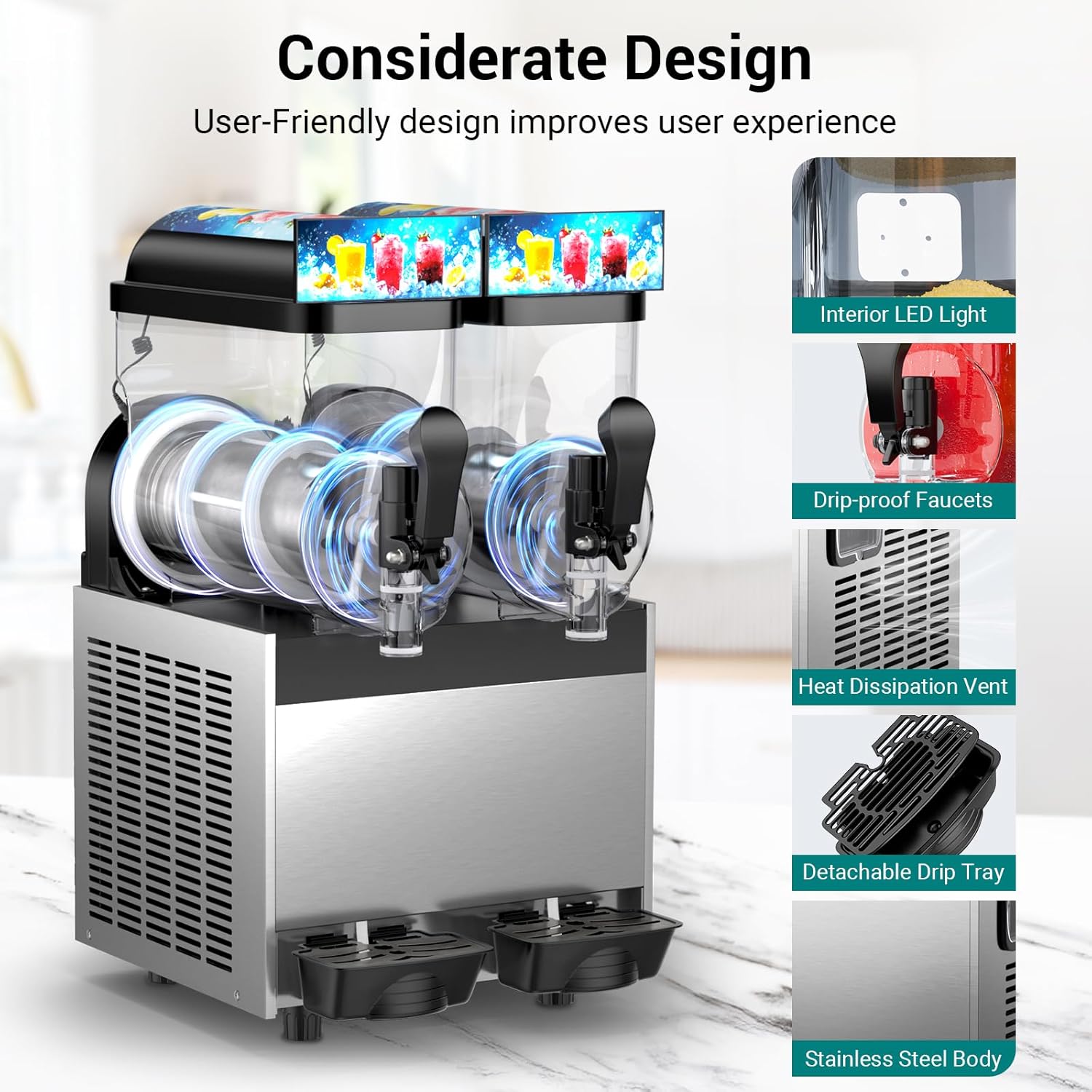
Key design features including interior LED lighting, drip-proof faucets, heat dissipation vents, detachable drip trays, and the durable stainless steel body.
Setup
1. Unpacking and Placement
- Carefully remove the machine from its packaging.
- Place the machine on a sturdy, level, and dry surface.
- Ensure there is adequate ventilation around the machine, leaving at least 6 inches of space from walls or other appliances, especially around the heat dissipation vents.
- Avoid placing the machine in direct sunlight or near heat sources.
2. Initial Cleaning
- Before first use, wash all removable parts (tanks, lids, agitators, faucets, drip trays) with warm, soapy water. Rinse thoroughly and dry completely.
- Wipe down the exterior of the machine with a damp cloth.
3. Assembly
- Ensure the agitators are correctly seated in each tank.
- Place the tanks securely onto the machine base.
- Attach the lids to the tanks.
- Slide the drip trays into their designated slots below the faucets.
Operating Instructions
1. Filling the Tanks
- Prepare your desired beverage mixture. For slushies and frozen drinks, ensure the sugar content is at least 13%. This is crucial for proper freezing and to prevent damage to the machine.
- Pour the mixture into the tanks, ensuring not to exceed the maximum fill line.
2. Control Panel Overview

The control panel features switches for power, freezing, mixing, and mode selection.
- Power (Main Power Switch): Turns the entire machine ON/OFF.
- FREEZE: Activates the cooling function for freezing beverages.
- MIXING 1 & 2: Controls the agitators for each respective tank. When in Slush mode, the agitators must be ON.
- SLUSH Mode: Select this mode to make slushies or margaritas.
- JUICE Mode: Select this mode to keep drinks cold without freezing them.
3. Making Frozen Beverages (Slush/Margarita)
- Ensure tanks are filled with a mixture containing at least 13% sugar.
- Turn on the Power switch.
- Select SLUSH mode for the desired tank(s).
- Turn on the MIXING switch (1 or 2) for the corresponding tank(s). The agitators must be running during freezing.
- Turn on the FREEZE switch.
- The machine will begin the freezing process, typically taking 30-45 minutes depending on ambient temperature and mixture.
- Once the desired consistency is reached, dispense by pulling the faucet lever.

Simple operation: Pour in drink, select mode, and enjoy your slushy.
4. Making Cold Drinks (Juice Mode)
- Fill tanks with your preferred cold beverage.
- Turn on the Power switch.
- Select JUICE mode for the desired tank(s).
- The machine will cool the beverage without freezing it.
- Dispense by pulling the faucet lever.
Maintenance and Cleaning
Regular cleaning ensures hygiene and extends the lifespan of your machine.
1. Daily Cleaning (Self-Cleaning Mode)
- After each use, empty any remaining beverage from the tanks.
- Fill the tanks with clean water (approximately 2-3 liters per tank).
- Turn on the Power switch.
- Select JUICE mode for both tanks.
- Turn on the MIXING switches for both tanks.
- Allow the machine to run for 5-10 minutes to circulate the water and clean the internal components.
- Drain the water through the faucets. Repeat if necessary.

The one-button automatic cleaning feature uses 360-degree rotation for thorough cleaning.
2. Deep Cleaning
- Always unplug the machine before deep cleaning.
- Remove the lids, tanks, agitators, faucets, and drip trays.
- Disassemble the faucets for thorough cleaning of all small parts and rubber rings.
- Wash all removable parts with warm, soapy water. A soft brush can be used for hard-to-reach areas.
- Rinse all parts thoroughly with clean water to remove any soap residue.
- Allow all parts to air dry completely before reassembling.
- Wipe down the exterior of the machine with a damp cloth, then dry. Do not immerse the main unit in water.

Detachable parts allow for hassle-free and thorough cleanup.
Troubleshooting
| Problem | Possible Cause | Solution |
|---|---|---|
| Machine does not turn on. | No power supply; Power switch off. | Check power cord connection; Ensure main power switch is ON. |
| Beverage not freezing. | FREEZE mode not selected; Sugar content too low; Ambient temperature too high. | Ensure FREEZE switch is ON; Adjust sugar content to at least 13%; Move machine to a cooler environment. |
| Agitator not rotating. | MIXING switch off; Obstruction in tank. | Turn on the corresponding MIXING switch; Check for and remove any obstructions. |
| Leaking from faucet. | Faucet not properly assembled; Worn rubber seal. | Disassemble and reassemble faucet correctly; Replace rubber seal if worn. |
| Machine is noisy. | Normal compressor operation; Machine not level. | Ensure machine is on a level surface. If noise is excessive or unusual, contact support. |
Specifications
- Model Number: MJ-7031748
- Product Dimensions: 16.5 x 20.5 x 30 inches
- Capacity: 30L (2 x 15L tanks) / 8 Gallons (2 x 4 Gallons)
- Power: 700 W
- Voltage: AC120V/60Hz
- Cooling System: Air Cooling
- Body Material: Stainless Steel
- Tank Material: Food-grade PC
- Product Weight: 95.9 lbs

Detailed product dimensions and key specifications.
Warranty and Support
For warranty information or technical support, please refer to the documentation provided with your purchase or contact Lioncho customer service. Keep your purchase receipt as proof of purchase for any warranty claims.