
1. Product Overview
The PYKFVTGL HC-Y810 is a digital pressure switch controller designed for various applications, including well water pumps, submersible pumps, and air compressors. It functions by converting the elastic energy of compressed air into kinetic energy through pressure or expansion, offering a simple, lightweight, and easy-to-maintain solution for pressure regulation.
This device features an ABS housing for dust and water resistance and incorporates an imported shock-resistant, wide-voltage pressure chip for stable operation, minimizing downtime caused by voltage fluctuations.
Key Features:
- Digital display for precise pressure monitoring.
- Integrated pressure switch functionality.
- Durable ABS housing for environmental protection.
- Shock-resistant internal components for enhanced reliability.
- Suitable for various pump types and air compressors.
2. Safety Information
Please read all safety instructions carefully before installation and operation. Failure to follow these instructions may result in injury or damage to the product.
- Electrical Safety: Ensure power is disconnected before performing any wiring or maintenance. All electrical connections should be made by a qualified professional in accordance with local electrical codes.
- Pressure Safety: Always depressurize the system before installing or removing the pressure switch. Do not exceed the maximum rated pressure of the device.
- Environmental Conditions: Install the device in an environment free from excessive moisture, dust, or corrosive substances, despite its protective housing.
- Proper Use: Use the device only for its intended purpose as a pressure switch controller.
3. Product Components and Display
The HC-Y810 features a clear digital display and intuitive controls for easy operation.

Image 3.1: Front view of the PYKFVTGL HC-Y810 Digital Pressure Switch Controller, showing the digital display, 'SET', 'Upper limit', 'Lower limit', and 'ON/OFF' buttons, and pressure units (MPa, Kg/cm², PSI).
Display and Buttons:
- Digital Display: Shows the current pressure reading and settings.
- SET Button: Used to enter and confirm settings.
- Up Arrow Button (Upper Limit): Adjusts values upwards or sets the upper pressure limit.
- Down Arrow Button (Lower Limit): Adjusts values downwards or sets the lower pressure limit.
- ON/OFF Button: Powers the device on or off.
- Unit Indicators: LEDs for MPa, Kg/cm², and PSI to indicate the selected pressure unit.
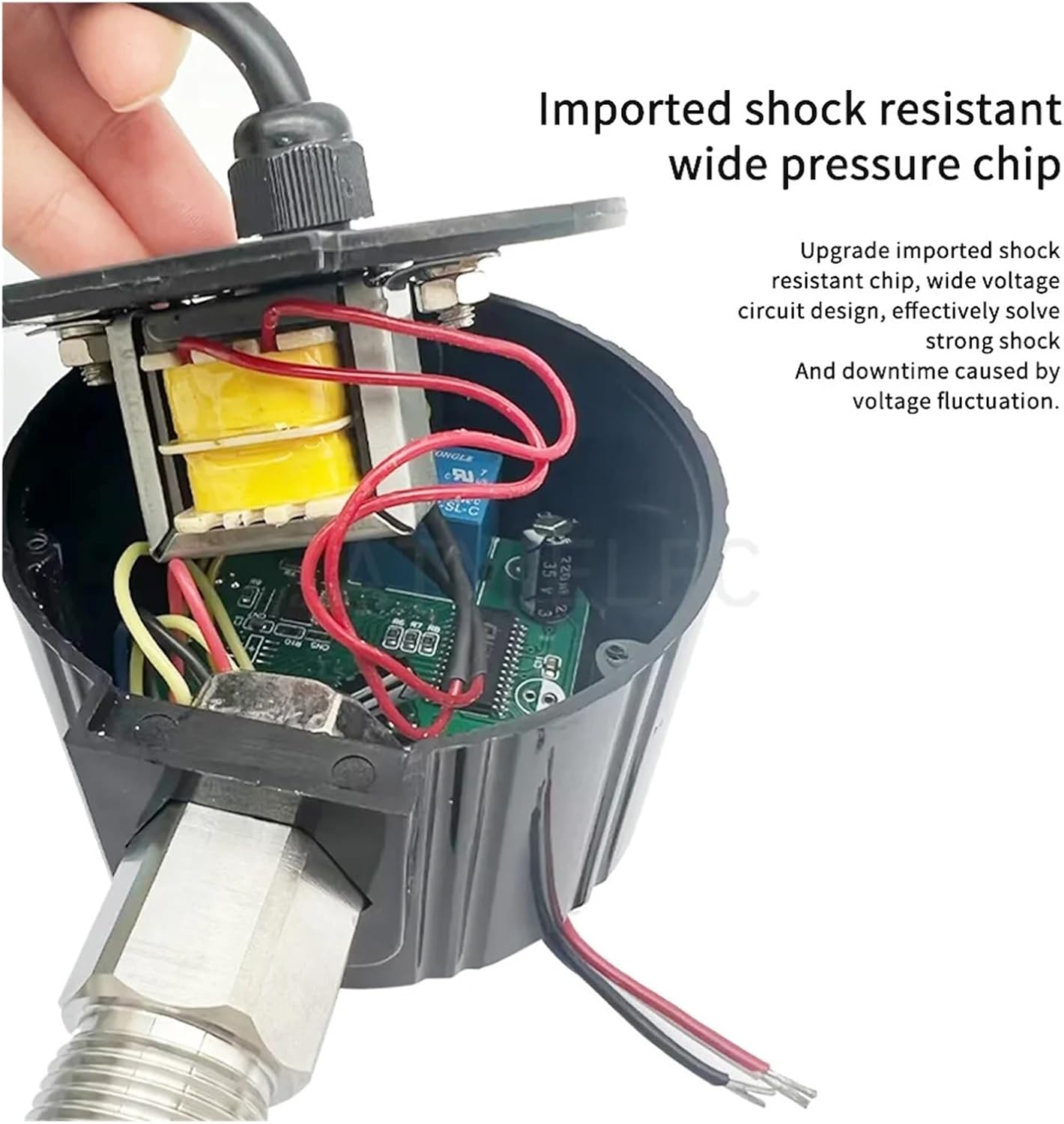
Image 3.2: Internal view of the pressure switch, highlighting the imported shock-resistant wide pressure chip and circuit design, which enhances stability and reduces downtime from voltage fluctuations.
4. Setup and Installation
Proper installation is crucial for the accurate and safe operation of the pressure switch controller.
4.1 Mechanical Installation:
- Ensure the system is depressurized before installation.
- The default thread size for connection is M20 * 1.5. Ensure compatibility with your system's port.
- Thread the pressure switch securely into the designated pressure port. Do not overtighten.
4.2 Electrical Wiring:
The device operates on 24V DC. Refer to the wiring diagram below for correct connections.

Image 4.1: Power cord with multiple colored wires, indicating connections for power supply and load. Consult a qualified electrician for wiring.

Image 4.2: Wiring diagram illustrating the connection for power supply and load. When low pressure is exceeded, the output switch is closed.
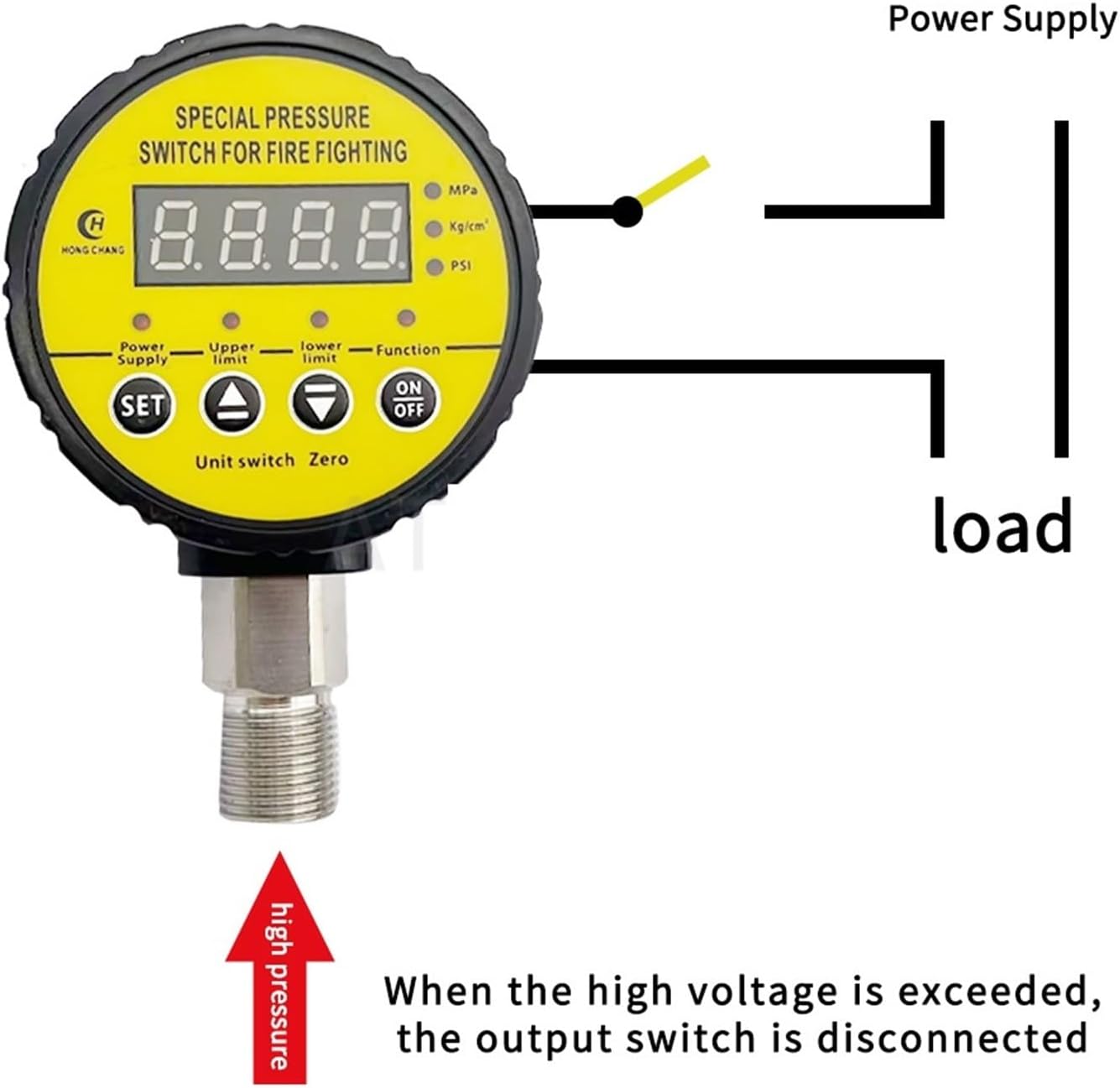
Image 4.3: Wiring diagram illustrating the connection for power supply and load. When high pressure is exceeded, the output switch is disconnected.
Important: Ensure the power supply matches the device's voltage rating (24V). Incorrect voltage can damage the unit.
5. Operating Instructions
The HC-Y810 is designed for simple pressure setting and monitoring.
5.1 Powering On/Off:
- Press the ON/OFF button to power the device on or off.
5.2 Setting Pressure Limits:
The device allows independent setting of upper and lower pressure limits.
- Press the SET button to enter the setting mode.
- Use the Up Arrow (Upper Limit) and Down Arrow (Lower Limit) buttons to adjust the desired pressure values.
- Press SET again to confirm and save the settings.
5.3 Unit Switching:
The device supports multiple pressure units (MPa, Kg/cm², PSI). Refer to the display for the current unit indicator.
- To switch units, press and hold the SET button for a few seconds until the unit indicator changes. Release and press again to cycle through available units.
6. Maintenance
The HC-Y810 is designed for low maintenance. Follow these guidelines to ensure longevity:
- Cleaning: Periodically wipe the exterior of the device with a soft, dry cloth. Do not use abrasive cleaners or solvents.
- Inspection: Regularly check electrical connections for tightness and signs of wear. Inspect the pressure port for any leaks.
- Environmental Protection: Ensure the ABS housing remains intact to protect internal components from dust and water.
7. Troubleshooting
This section addresses common issues you might encounter with the pressure switch controller.
7.1 Inaccurate Measurement / Resetting:

Image 7.1: Back view of the pressure switch, with text indicating that inaccurate measurements can be recovered by pressing 'Clear'. When the pipeline is under 0 pressure, the running light will turn off, and pressing the key for 5 seconds will reset the device.
- Symptom: Displayed pressure seems inaccurate or stuck.
- Solution: If the pipeline is under 0 pressure (no pressure), the running light will turn off. Press and hold the SET button for 5 seconds to reset the device. This can help recover from inaccurate measurements.
7.2 Device Not Powering On:
- Check Power Supply: Ensure the 24V power supply is connected correctly and is active.
- Wiring: Verify all electrical connections are secure and correctly wired according to the diagram in Section 4.2.
7.3 Output Switch Not Activating:
- Pressure Limits: Confirm that the set upper and lower pressure limits are appropriate for your application and that the current pressure is within the activation range.
- Load Connection: Ensure the load (e.g., pump) is correctly wired to the output terminals of the pressure switch.
8. Specifications
| Feature | Specification |
|---|---|
| Model Number | HC-Y810 |
| Brand | PYKFVTGL |
| Pressure Range | 0-0.16 MPa |
| Operating Voltage | 24V |
| Item Weight | 100 Grams (3.53 ounces) |
| Package Dimensions | 0.39 x 0.39 x 0.39 inches |
| Thread Size | M20 * 1.5 (Default) |
| Housing Material | ABS |
9. Warranty and Support
Specific warranty details and customer support contact information are not provided in this manual. Please refer to your purchase documentation or contact your retailer for warranty claims and technical assistance.