Introduction
This user manual provides comprehensive instructions for the setup, operation, maintenance, and troubleshooting of your LG 27-Inch Black Monitor, model 27MS570B-B. This monitor features a Full HD 1080p IPS display, 100Hz refresh rate, 5ms response time, USB Type-C with 65W Power Delivery, and built-in speakers. Please read this manual thoroughly before using the product to ensure proper and safe operation.
Safety Information
Always observe the following safety precautions to prevent electric shock, fire, or damage to the product.
- Do not expose the monitor to rain or moisture.
- Do not block ventilation openings.
- Use only the power cord supplied with the monitor.
- Do not place heavy objects on the power cord.
- Unplug the monitor from the wall outlet if it will be unused for a long period.
- Refer all servicing to qualified service personnel.
Package Contents
Before setting up your monitor, ensure all items are present in the box. If any items are missing or damaged, contact your retailer.
- LG 27-Inch Monitor (27MS570B-B)
- Monitor Stand (Base and Neck)
- Power Cord
- HDMI Cable
- USB Type-C Cable
- User Manual (this document)
Setup
1. Assembling the Stand
- Carefully place the monitor face down on a soft, clean surface to prevent scratches.
- Attach the stand neck to the monitor's mounting point. Secure it with the provided screws.
- Connect the stand base to the stand neck and tighten the thumb screw at the bottom of the base.
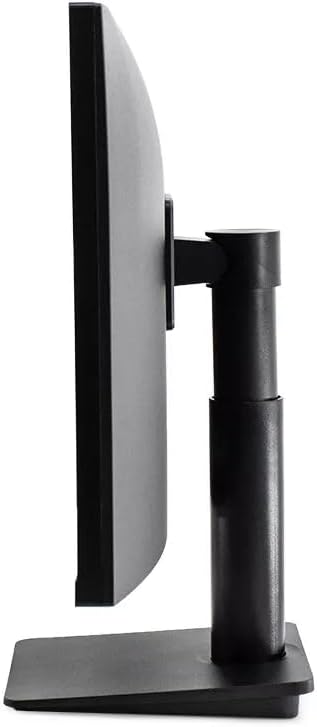
Figure 1: Side view of the monitor illustrating the assembled stand and its adjustable features.
2. Connecting Cables
Ensure the monitor and your computer are powered off before making any connections.
- Power Connection: Connect the power cord to the monitor's power input and then to a wall outlet.
- Video Connection:
- HDMI: Connect one end of the HDMI cable to the HDMI port on your computer and the other end to an HDMI port on the monitor.
- USB Type-C: Connect one end of the USB Type-C cable to a compatible port on your computer and the other end to the USB Type-C port on the monitor. This connection supports video, data, and 65W power delivery.

Figure 2: Rear view of the monitor displaying available input ports for connectivity.
3. Initial Power On
After all connections are made, press the power button located on the bottom center of the monitor to turn it on. The monitor should automatically detect the input signal.

Figure 3: Front view of the LG 27-inch monitor powered on and displaying an image.
Operating the Monitor
On-Screen Display (OSD) Menu
The OSD menu allows you to adjust various settings of the monitor. Use the joystick button located at the bottom center of the monitor to navigate the menu.
- Press the joystick button to open the OSD menu.
- Move the joystick left/right to navigate through menu options.
- Move the joystick up/down to adjust values or select sub-menus.
- Press the joystick button again to confirm a selection.
- Move the joystick left to exit the menu.
Key OSD Settings
- Input: Select the active input source (HDMI, USB Type-C).
- Picture: Adjust brightness, contrast, sharpness, gamma, and color temperature.
- Color: Fine-tune color settings, including RGB levels.
- Audio: Control volume for the built-in speakers.
- General: Access settings like OSD language, power saving, and factory reset.
Maintenance
Cleaning the Monitor
- Always unplug the monitor before cleaning.
- Use a soft, lint-free cloth slightly dampened with water or a specialized screen cleaner.
- Do not spray cleaner directly onto the screen.
- Avoid using abrasive cleaners, waxes, or solvents.
Storage
If storing the monitor for an extended period, disconnect all cables and pack it in its original packaging or a suitable protective box to prevent damage.
Troubleshooting
| Problem | Possible Cause | Solution |
|---|---|---|
| No Power | Power cord not connected; Power outlet not working. | Ensure power cord is securely connected. Test the outlet with another device. |
| No Signal | Video cable not connected; Incorrect input source selected. | Check video cable connections (HDMI, USB Type-C). Select the correct input source via the OSD menu. |
| Distorted Image | Incorrect resolution; Loose cable connection. | Set the display resolution to 1920 x 1080. Reconnect the video cable. |
| No Sound from Speakers | Volume too low; Incorrect audio output selected on computer. | Increase monitor volume via OSD. Ensure LG monitor is selected as audio output on your computer. |
Specifications
| Feature | Detail |
|---|---|
| Brand | LG |
| Model | 27MS570B-B |
| Screen Size | 27-Inch |
| Resolution | Full HD (1920 x 1080) |
| Panel Type | IPS Display |
| Refresh Rate | 100Hz |
| Response Time | 5ms |
| Connectivity | HDMI, USB Type-C (with 65W PD) |
| Speakers | Built-in |
| Stand Features | Tilt, Height Adjustment |
| UPC | 742761307362 |
Warranty and Support
This product is sold as a "Renewed" item. While LG is the original manufacturer, warranty terms for renewed products may differ from new products. Please refer to the specific warranty information provided by your retailer or the Amazon Renewed program for details.
For issues not covered in the troubleshooting section, or for warranty claims, please contact the seller "QuickshipElectronics" or Amazon Renewed support directly. The product is eligible for a 90-day refund/replacement return policy from the date of purchase.
For general product information or technical support from LG, you may visit the official LG support website, though specific support for renewed products might be handled by the reseller.