1. Introduction
Thank you for choosing the SIHOO Doro C300 Ergonomic Office Chair. This manual provides essential information for the safe assembly, operation, and maintenance of your new chair. Please read these instructions carefully before use and retain them for future reference.
2. Important Safety Information
- Always follow the assembly instructions carefully.
- Keep fingers and body parts away from moving parts when adjusting the backrest, armrests, or reclining position.
- Do not exceed the maximum weight capacity of 136 kg (300 lbs).
- Ensure all screws and bolts are securely tightened before use. Periodically check and re-tighten as necessary.
- Use the chair on a level surface to prevent tipping.
3. Product Overview
The SIHOO Doro C300 is designed for optimal ergonomic support and comfort. Key features include a dynamic backrest system, adjustable headrest, 3D armrests, and a retractable footrest.
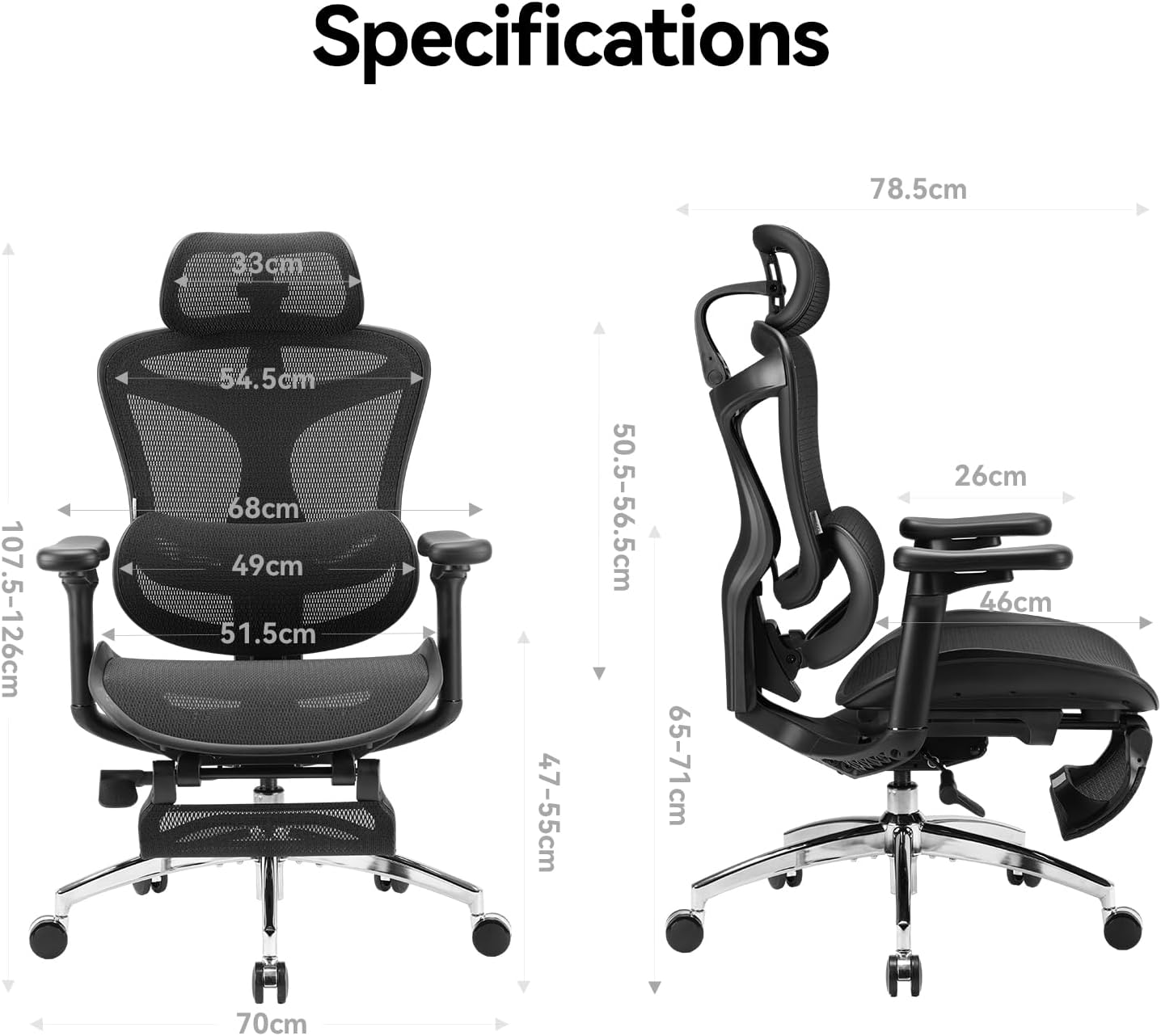
Figure 1: Front view of the SIHOO Doro C300 Ergonomic Office Chair, highlighting its overall design and mesh construction.
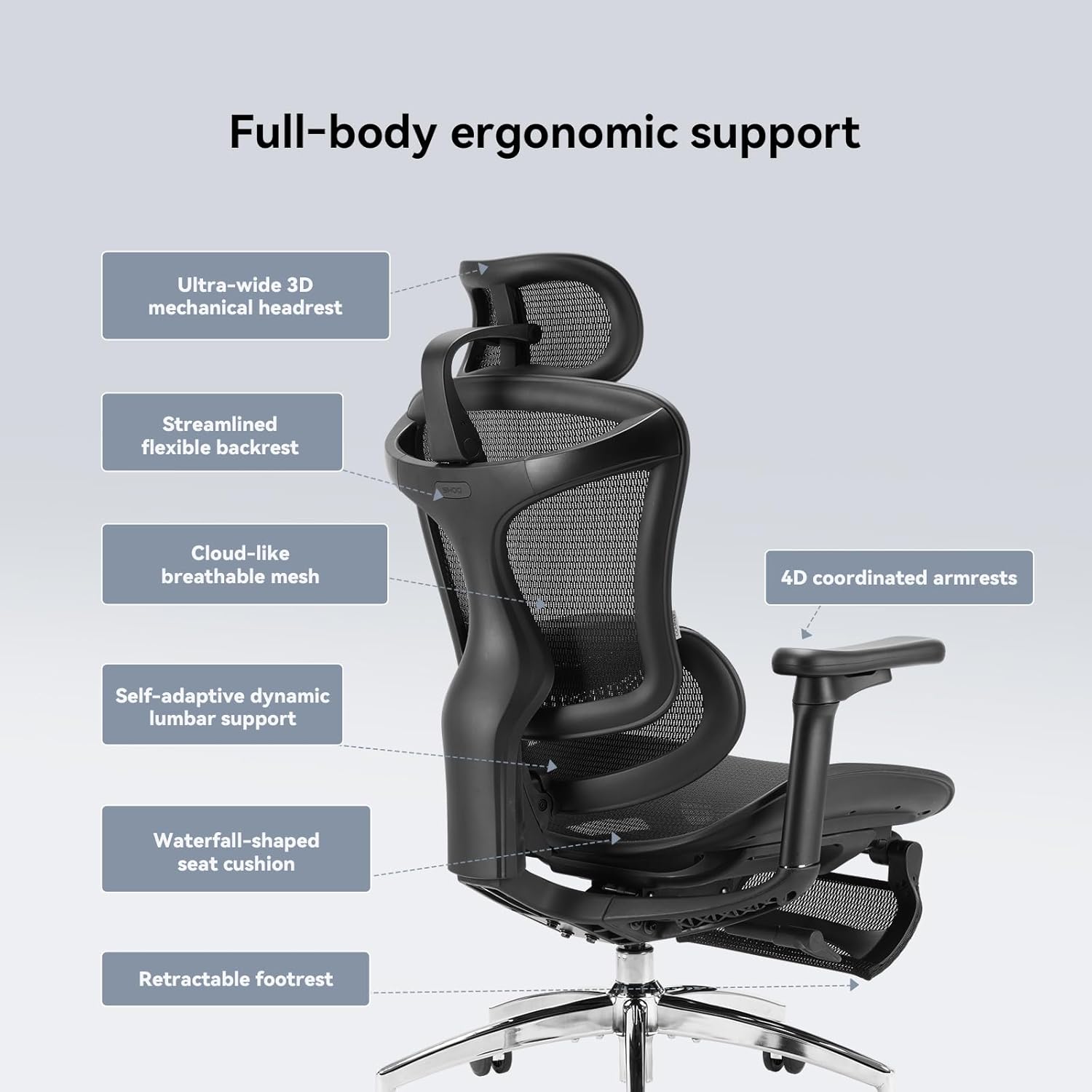
Figure 2: Side view of the SIHOO Doro C300, illustrating the chair's ergonomic curves and various adjustable components.
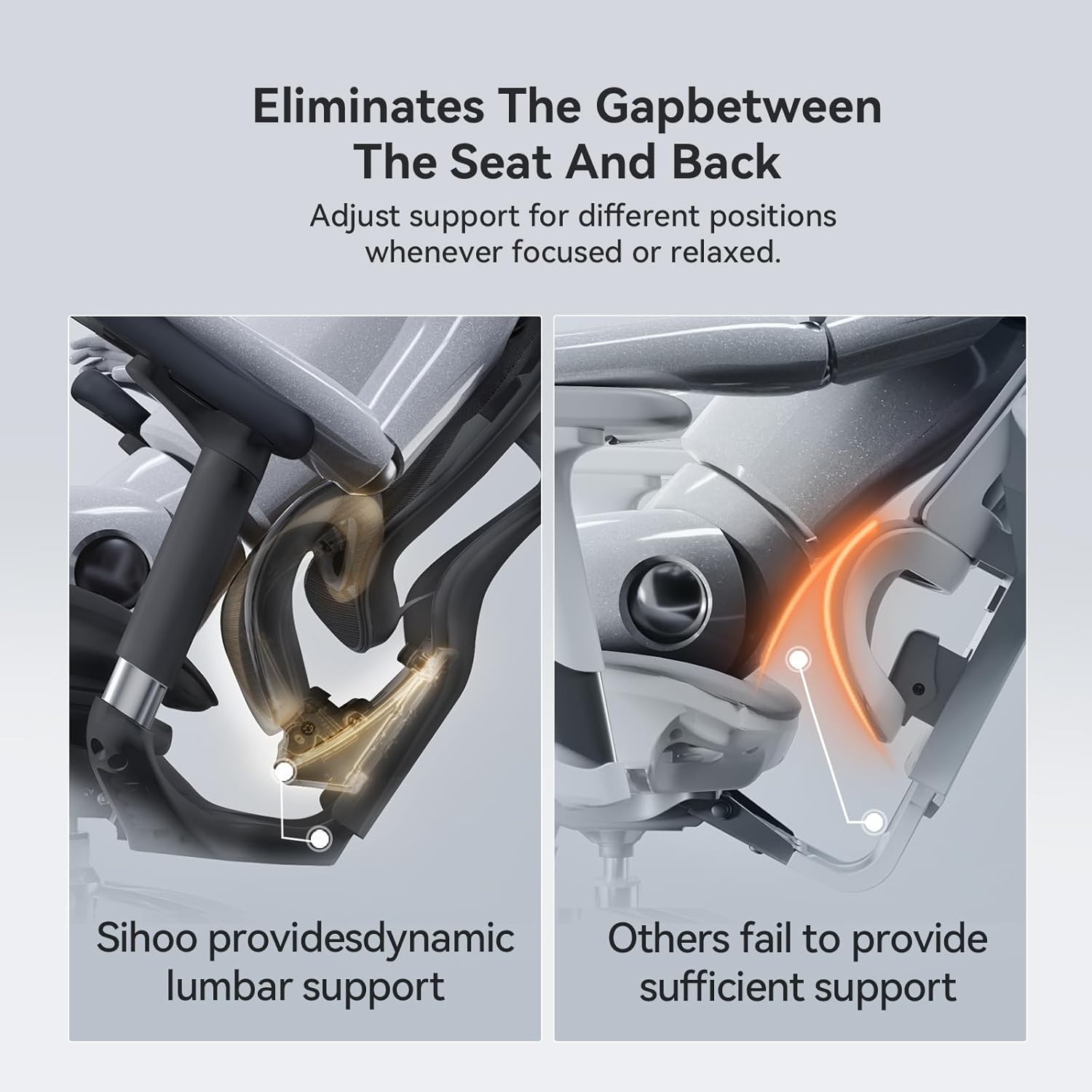
Figure 3: Detail of the dynamic lumbar support, which automatically adjusts to your back's curve.

Figure 4: The 3D mechanical headrest provides precise neck support through various adjustments.

Figure 5: Reclining adjustment options, allowing for various work and rest positions.

Figure 6: The 4D armrests offer extensive customization for personalized comfort and support.

Figure 7: The portable telescopic foot pedal provides additional support for relaxation.
4. Assembly Instructions
Assembly is required for the SIHOO Doro C300 chair. Instructions are included with the product packaging. Please follow the step-by-step guide provided to ensure correct and safe assembly. Typically, assembly involves:
- Attaching the casters to the chair base.
- Inserting the gas lift into the chair base.
- Attaching the mechanism to the seat cushion.
- Connecting the backrest to the seat cushion.
- Mounting the armrests.
- Attaching the headrest.
- Placing the assembled seat onto the gas lift.
Ensure all connections are secure before using the chair.
5. Operating Instructions
Your SIHOO Doro C300 chair offers multiple adjustment points to customize your seating experience:
5.1. Chair Height Adjustment
- Locate the lever on the right side, beneath the seat.
- To raise the chair: Lift the lever upwards while taking your weight off the seat.
- To lower the chair: Lift the lever upwards while remaining seated.
5.2. Seat Depth Adjustment
- Rotate the same lever (on the right side) forward.
- Slide the seat forward or backward to your desired depth.
- Release the lever to lock the seat in position.
5.3. Backrest Height Adjustment
- The backrest features a dynamic tracking system. To adjust its height, lift the entire backrest upwards from its lowest position.
- It has four height settings. Once it reaches the highest position, lifting it again will reset it to the lowest position.
5.4. Headrest Adjustment
- The 3D mechanical headrest can be adjusted in multiple ways:
- Forward/Backward Tilt: Push or pull the headrest to adjust its angle. It offers numerous micro-positions for precise support.
- Up/Down Height: Slide the headrest up or down to align with your neck's contour.
5.5. Armrest Adjustments
The 3D armrests are highly adjustable:
- Height Adjustment: Lift the entire armrest column to adjust its height. It has multiple positions.
- Forward/Backward: Slide the armrest pads forward or backward.
- Inward/Outward Rotation: Rotate the armrest pads inward or outward.
- Tilt Coordination: The armrests are designed to follow the chair's reclining angle, providing continuous support for your arms.
5.6. Reclining and Tilt Lock
- Rotate the lever (on the right side) backward to unlock the recline function.
- Lean back to your desired angle (110°, 120°, or 130°).
- Return the lever to the center position to lock the recline angle.
- The chair features intelligent weight-sensing technology for smooth and balanced reclining.
5.7. Footrest Operation
- To extend the footrest: Pull the footrest out from underneath the seat.
- To retract the footrest: Push the footrest back underneath the seat until it is fully stored.
6. Maintenance
Regular maintenance will prolong the life and appearance of your SIHOO Doro C300 chair:
- Cleaning: Wipe mesh and plastic surfaces with a soft, damp cloth. For stubborn stains, use a mild soap solution and dry thoroughly. Avoid harsh chemicals or abrasive cleaners.
- Casters: Periodically clean hair and debris from the casters to ensure smooth movement.
- Connections: Check all screws and bolts every few months and re-tighten if they have loosened.
- Mesh: The breathable mesh is designed for durability and ventilation. Avoid sharp objects that could damage the mesh.
7. Troubleshooting
If you encounter any issues with your chair, please refer to the following common solutions:
- Chair Sinks or Won't Stay Up: The gas lift may be faulty. Contact customer support for a replacement.
- Chair Squeaks: Check and tighten all screws and bolts. Applying a small amount of silicone lubricant to moving parts may also help.
- Casters Don't Roll Smoothly: Clean any debris from the casters. Ensure they are properly inserted into the base.
- Adjustments Not Working: Ensure levers are fully engaged or disengaged as required for each function. Check for any obstructions.
If the problem persists, please contact SIHOO customer support.
8. Specifications

Figure 8: SIHOO Doro C300 Ergonomic Chair Specifications.
| Feature | Detail |
|---|---|
| Brand | SIHOO |
| Model Name | Doro C300 |
| Item Model Number | C300 M101 JT |
| Color | Black |
| Product Dimensions | 17.1"D x 20"W x 40"H |
| Item Weight | 54.8 pounds |
| Material | Mesh |
| Maximum Load | 136 kg (300 lb) |
| Arm Style | Pillow-Top, 4D Coordinated Armrests |
| Back Style | Solid Back, Dynamic Tracking System |
| Reclining Position Count | 4 (110°, 120°, 130° tilt) |
| Certifications | TÜV certified, European REACH and EN1335 standards, SGS-certified 4-stage pneumatic lift |
9. Warranty and Support
The SIHOO Doro C300 is built to last and comes with comprehensive warranty coverage:
- Warranty: Enjoy a three-year warranty on the entire chair.
- Customer Support: For any questions, issues, or warranty claims, please contact SIHOO customer support. Response is typically within 24 hours.
- Returns: The product is eligible for 30-day easy returns.


