
ODK SPCB01010801022USDF-1
ODK 48-Inch Computer Desk Instruction Manual
Model: SPCB01010801022USDF-1
Introduction
Thank you for choosing the ODK 48-Inch Computer Desk. This manual provides detailed instructions for assembly, operation, maintenance, and troubleshooting to ensure you get the most out of your new desk. Please read this manual thoroughly before beginning assembly and keep it for future reference.

Image: The ODK 48-inch computer desk, showcasing its spacious black desktop, integrated power outlets, side storage bag, and headphone hook. Two monitors are displayed on the desk, along with a keyboard, mouse, and a wireless charging pad, illustrating its functionality as a modern workstation.
Safety Information
- Keep all small parts and packaging materials away from children and pets to prevent choking hazards.
- Ensure all screws and fasteners are securely tightened before use. Periodically check and re-tighten as needed.
- Do not overload the desk. Refer to specifications for weight capacity.
- Use the desk on a flat, stable surface to prevent tipping.
- For indoor use only. Avoid exposure to direct sunlight, extreme temperatures, or high humidity.
- When using the built-in power outlets, ensure devices are compatible with the specified voltage and current (120V/12A for AC outlets, 5V/2A for USB-A and Type-C ports). Do not exceed the maximum load.
Package Contents
Please verify that all components are present before beginning assembly. If any parts are missing or damaged, please contact customer support.
- Desktop Panel
- Desk Legs (Metal Frame)
- Cross Bars / Support Rods
- Built-in Power Outlet Strip (Pre-installed in desktop)
- Removable Storage Bag
- Headphone Hook
- Adjustable Leg Pads
- Assembly Hardware (Screws, Allen Wrench, etc.)
- Instruction Manual
Setup and Assembly
Assembly is designed to be quick and straightforward. It is recommended to have a clear, open space for assembly. All necessary tools are included.
- Unpack Components: Carefully remove all parts from the packaging and lay them out on a soft, clean surface to prevent scratches. Identify each component using the parts list.
- Attach Leg Frames: Secure the desk leg frames to the underside of the desktop panel using the provided screws. Ensure the pre-drilled holes align correctly.
- Install Cross Bars: Attach the cross bars (support rods) between the leg frames. These provide additional stability. Tighten all screws firmly.
- Attach Storage Bag and Headphone Hook: The storage bag attaches to the side of the desk frame, and the headphone hook can be mounted to a convenient location on the frame.
- Adjust Leg Pads: Once the desk is upright, adjust the leg pads at the bottom of each leg to ensure the desk is level and stable on uneven floors.
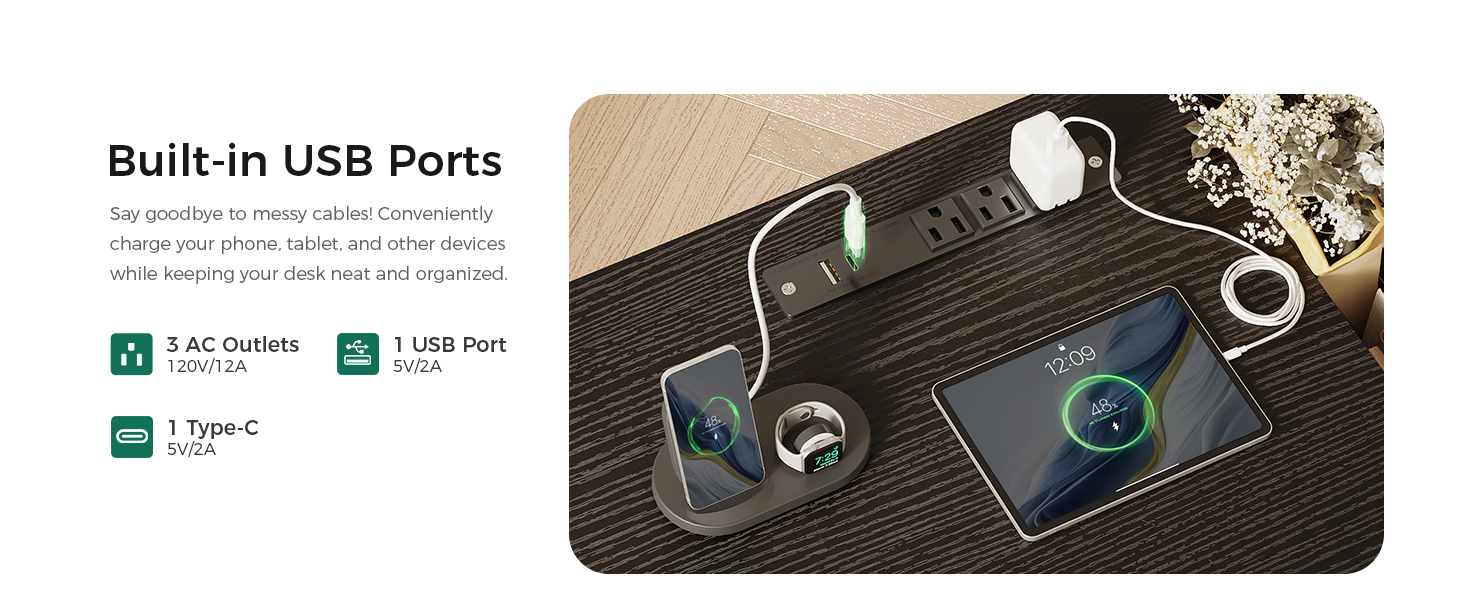
Image: A visual guide illustrating the four main steps for assembling the ODK computer desk, from attaching legs to installing the storage bag, highlighting the ease of setup.
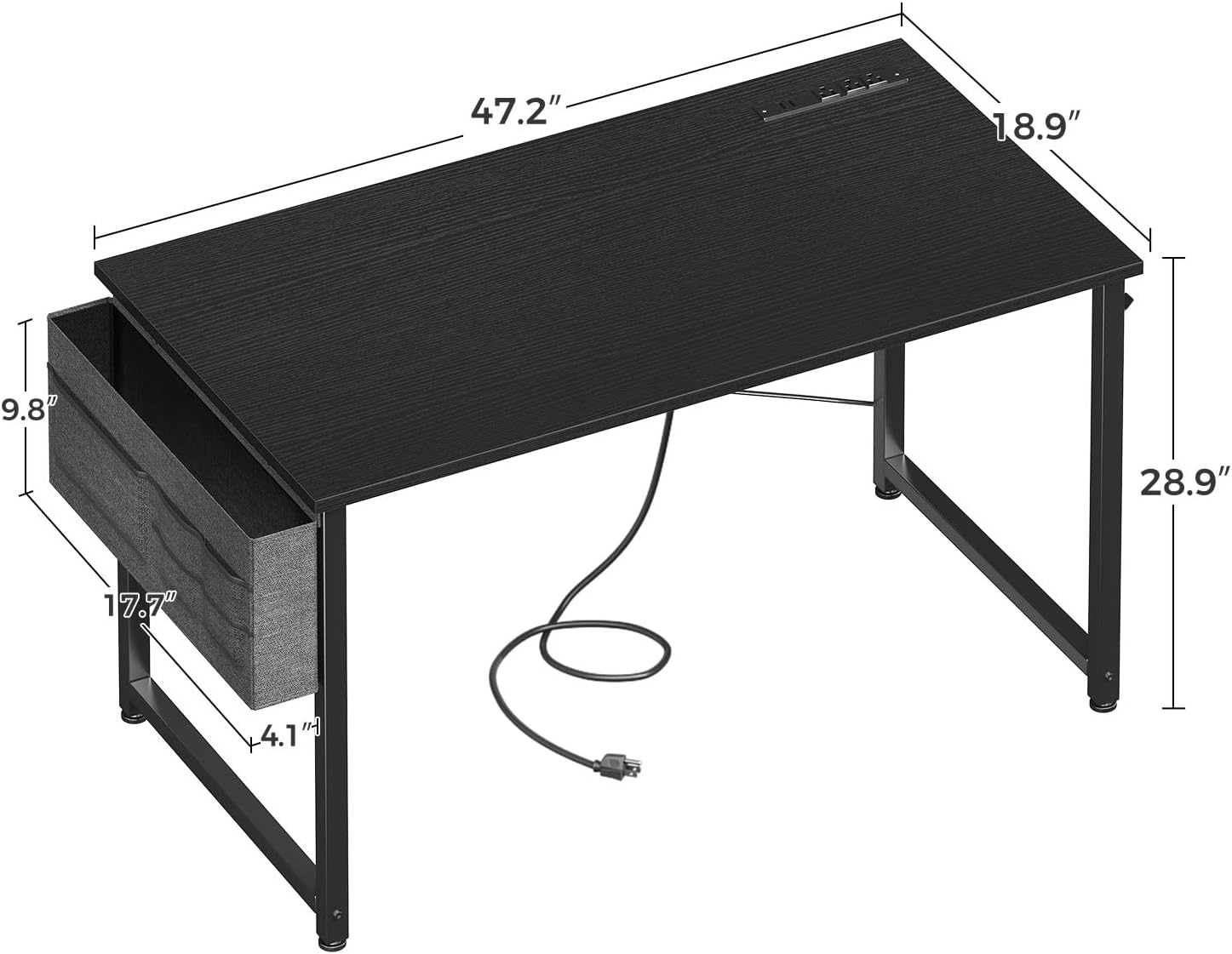
Image: A detailed diagram displaying the overall dimensions of the ODK 48-inch computer desk, including length, width, height, and the dimensions of the side storage bag, providing clear measurements for planning your space.
Operating Instructions
Built-in Power Outlets and USB Charging Ports
The ODK Computer Desk is equipped with a convenient power strip integrated into the desktop, providing easy access to power for your devices.
- AC Outlets: The desk features 3 standard AC outlets (120V/12A) for powering monitors, laptops, lamps, and other electronic devices.
- USB-A Port: One USB-A charging port (5V/2A) is available for charging smartphones, tablets, and other USB-powered accessories.
- Type-C Port: One Type-C charging port (5V/2A) is available for newer devices that utilize USB-C for charging.
- Usage: Simply plug the desk's main power cord into a wall outlet. Then, connect your devices to the integrated outlets and ports.

Image: A close-up view of the recessed power outlet on the ODK desk, showing three AC outlets, one USB-A port, and one Type-C port, with a smartphone, smartwatch, and tablet actively charging, demonstrating its integrated charging capabilities.
Removable Storage Bag
The fabric storage bag provides convenient extra space for books, notebooks, documents, or office supplies, helping to keep your desktop clutter-free.
- Attachment: The bag attaches securely to the side of the desk frame.
- Use: Place items in the main compartment or the smaller front pockets for easy access.
- Removal: The bag can be easily removed for cleaning or if not needed.

Image: A close-up shot of the fabric storage bag attached to the side of the ODK desk, filled with books and office supplies, highlighting its practical design for organizing workspace essentials.
Headphone Hook
The sturdy headphone hook offers a convenient place to hang your headphones, backpack, or charging cables, freeing up valuable desktop space.
- Placement: The hook can be installed on either side of the desk frame.
- Use: Hang your items securely to keep them off the desk surface.

Image: A close-up view of the headphone hook installed on the ODK desk, with a pair of headphones hanging from it, demonstrating its utility for convenient storage and organization.
Maintenance
- Cleaning: Wipe the desktop and metal frame with a soft, damp cloth. Avoid harsh chemicals or abrasive cleaners, which can damage the finish.
- Spills: Immediately wipe up any spills to prevent staining or damage to the desktop.
- Tighten Fasteners: Periodically check all screws and fasteners to ensure they remain tight. Re-tighten if necessary to maintain stability.
- Storage Bag Care: The fabric storage bag can be spot cleaned with a mild detergent and water. Allow it to air dry completely before reattaching.
Troubleshooting
| Problem | Possible Cause | Solution |
|---|---|---|
| Desk is wobbly/unstable. | Screws are loose; uneven floor. | Ensure all assembly screws are fully tightened. Adjust the adjustable leg pads to level the desk on uneven surfaces. |
| Power outlets/USB ports not working. | Desk power cord not plugged in; power strip overloaded; faulty device. | Check if the desk's main power cord is securely plugged into a working wall outlet. Ensure the total power draw of connected devices does not exceed the power strip's capacity. Test with a different device. |
| Scratches on desktop. | Sharp objects; abrasive cleaning. | Use coasters or desk mats for protection. Avoid dragging sharp objects across the surface. Clean with soft cloths only. |
Specifications
| Feature | Detail |
|---|---|
| Brand | ODK |
| Model Number | SPCB01010801022USDF-1 |
| Product Dimensions | 18.9"D x 47.24"W x 28.94"H |
| Color | Black |
| Style | Modern |
| Base Material | Metal |
| Top Material Type | Engineered Wood |
| Item Weight | 20.72 Pounds |
| Power Outlets | 3 AC Outlets (120V/12A) |
| USB Ports | 1 USB-A Port (5V/2A), 1 Type-C Port (5V/2A) |
| Special Features | Removable Storage Bag, Headphone Hook, Adjustable Leg Pads |
| Assembly Required | Yes (All tools included) |
Warranty and Support
ODK products are manufactured with quality and durability in mind. For information regarding warranty coverage, technical support, or to order replacement parts, please refer to the contact information provided on the product packaging or visit the official ODK website.
Please retain your purchase receipt as proof of purchase for any warranty claims.
Ask a question about this manual
Ask about setup, troubleshooting, compatibility, parts, safety, or missing instructions. Manuals+ will review the question and use this page’s manual context to help answer it.