
1. Product Overview
The TYGHBN Electric Razor is designed for an efficient and comfortable shaving experience. It features a 4D floating head system that adapts to facial contours, an IPX7 waterproof rating for wet and dry use, and a powerful yet quiet motor. This rechargeable shaver is equipped with a USB fast charging capability and an LCD display for battery status.
Key Features:
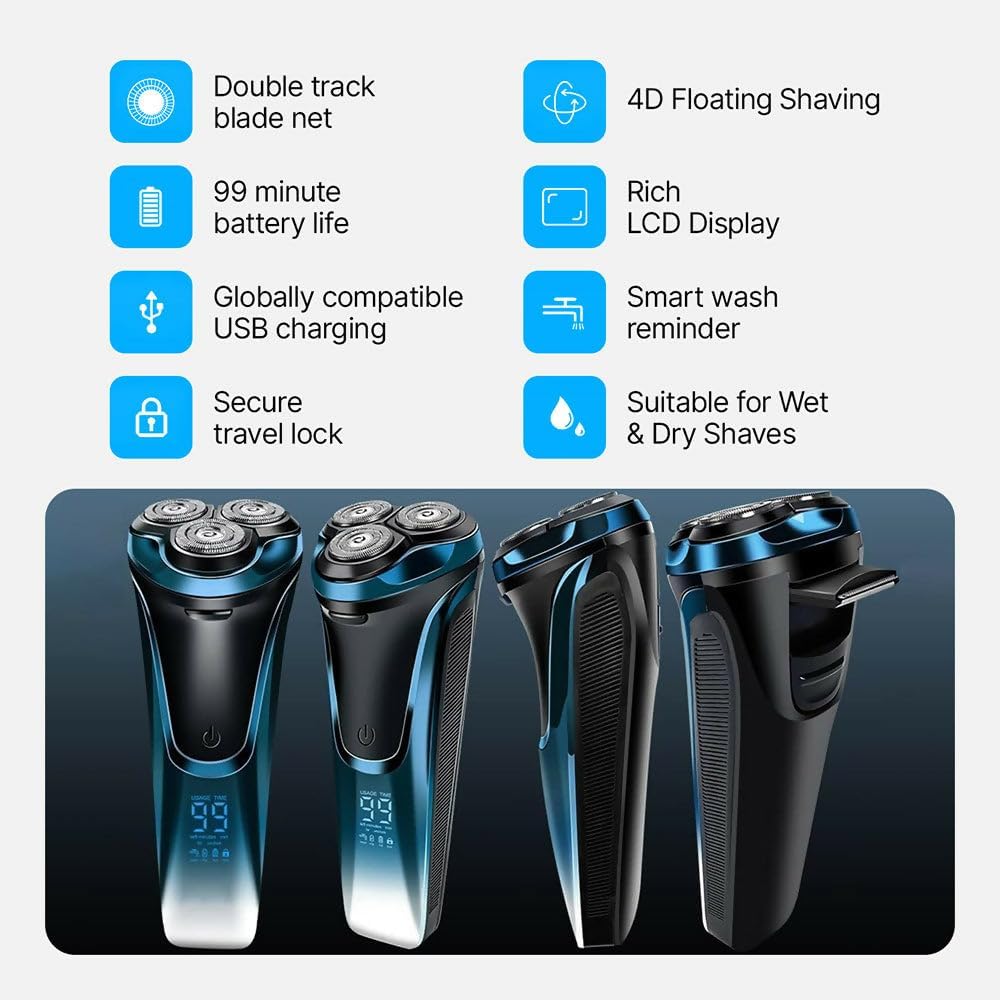
- 4D Floating Head System: Adapts to the curves of your face, neck, and jawline for a close shave.
- IPX7 Waterproof: Suitable for both wet and dry shaving, including use in the shower.
- USB Fast Charging: Provides up to 99 minutes of shaving time after a 1.5-hour charge.
- Quiet Motor: Delivers powerful performance with minimal noise.
- LCD Display: Shows battery level and charging status.
- Pop-up Trimmer: Integrated for sideburn and beard shaping.

This image displays the main unit of the TYGHBN Electric Razor. It features a dark, ergonomic body with a power button and a prominent LCD screen that indicates the remaining shaving time in minutes. The three rotary shaving heads are visible at the top, designed for efficient hair removal.

This close-up image highlights the three independent 4D floating rotary shaving heads of the TYGHBN Electric Razor. These heads are designed to flex and pivot, ensuring maximum contact with the skin for a close and comfortable shave across various facial contours.
2. Safety Information
Please read all safety instructions before using the TYGHBN Electric Razor to ensure safe operation and prevent injury.
- Always keep the razor clean and dry to prevent bacterial growth.
- Avoid using the razor while charging or near water to prevent electrical hazards.
- Exercise caution when using the razor on sensitive areas to avoid skin irritation.
- Do not disassemble or attempt to repair the device yourself. Contact customer support for assistance.
- Keep out of reach of children.
3. Setup and Charging
Initial Charge:
- Before first use, fully charge the electric razor.
- Connect the USB charging cable to the razor's charging port.
- Plug the other end of the USB cable into a compatible USB power source (e.g., power adapter, computer, power bank).
- The LCD display will indicate charging status. A full charge typically takes approximately 1.5 hours.
- Once fully charged, the razor provides up to 99 minutes of shaving time.
Note: A charger is not included with the product. Use a standard USB power adapter (5V) for charging.
This image demonstrates the USB charging process for the electric razor. The razor is shown plugged into a USB wall charger, highlighting its compatibility with various USB power sources for convenient charging at home or while traveling.
4. Operating Instructions
Powering On/Off:
Press the power button located on the front of the razor to turn it on or off.
Wet and Dry Shaving:
The TYGHBN Electric Razor is designed for versatile use, allowing for both wet and dry shaving.
- Dry Shaving: For a quick shave, use the razor on dry skin.
- Wet Shaving: For a more comfortable shave, especially for sensitive skin, use with shaving foam or gel. The IPX7 waterproof rating allows for safe use in the shower.

This image visually explains the wet and dry shaving functionality of the TYGHBN Electric Razor. It shows the razor's head under running water for wet shaving and a man applying shaving cream for a comfortable wet shave, emphasizing its IPX7 waterproof design.
Using the Pop-up Trimmer:
The integrated pop-up trimmer is ideal for shaping sideburns and maintaining beard lines.
- Locate the trimmer release button on the side of the razor.
- Slide the button upwards to activate the pop-up trimmer.
- Use the trimmer to precisely shape desired areas.
- Push the trimmer back down to retract it when finished.

This image illustrates the pop-up trimmer feature of the electric razor. It shows the trimmer extended at a 90-degree angle, indicating its flexibility for precise shaping of sideburns and beard lines.
5. Maintenance and Cleaning
Cleaning the Shaver:
Regular cleaning ensures optimal performance and hygiene.
- Turn off the razor before cleaning.
- Detach the shaving head unit.
- Rinse the shaving head thoroughly under running water. The IPX7 waterproof design allows for easy cleaning.
- Shake off excess water and allow the head to air dry completely before reattaching or storing.
- Periodically, use the included cleaning brush (if applicable) to remove stubborn hair particles from the blades.
Storage:
Store the razor in a cool, dry place away from direct sunlight. For travel, consider using a protective case.

This image shows the electric razor neatly stored within a portable EVA box. This type of storage protects the razor from dust and water damage, making it ideal for travel and ensuring its longevity.
6. Troubleshooting
If you encounter any issues with your TYGHBN Electric Razor, please refer to the following common solutions:
| Problem | Possible Cause | Solution |
|---|---|---|
| Razor does not turn on. | Low battery or no charge. | Charge the razor for at least 1.5 hours. Ensure the charging cable is securely connected. |
| Poor shaving performance / Not a close shave. | Blades are dull or clogged with hair. | Clean the shaving head thoroughly. Consider replacing the shaving head if performance does not improve after cleaning. |
| Skin irritation after shaving. | Incorrect shaving technique or sensitive skin. | Try wet shaving with foam or gel. Shave in the direction of hair growth. Ensure blades are clean. |
| Protective cover does not stay on. | Manufacturing defect or improper fit. | Contact customer support for assistance. |
7. Specifications
| Feature | Detail |
|---|---|
| Product Name | Electric Shaver |
| Model Number | Electric Razor |
| Rated Power | 5W |
| Rated Voltage | 5V |
| Charging Time | Approximately 1.5 hours (60-90 minutes) |
| Battery Life | Up to 99 minutes |
| Waterproof Rating | IPX7 |
| Blade Material | Stainless Steel |
| Dimensions | 7.09 x 3.43 x 3.03 inches |
| Weight | 8.99 ounces |
| Manufacturer | TYGHBN |
8. Warranty and Support
For warranty information, product support, or to inquire about replacement parts, please contact TYGHBN customer service. Refer to your purchase documentation for specific warranty terms.
Optional protection plans may be available for extended coverage. Please check with your retailer for details.
For further assistance, visit the official TYGHBN store: TYGHBN Store