
1. Introduction
This manual provides essential information for the safe and efficient operation of your Tanoxo 16,000 BTU Inverter Portable Air Conditioner. Please read all instructions carefully before using the appliance and retain this manual for future reference.
The Tanoxo Portable Air Conditioner is a versatile 3-in-1 unit designed to provide cooling, dehumidification, and fan functions. It features advanced inverter technology for energy efficiency and a dual-hose design for effective air circulation.

Figure 1: Tanoxo 16,000 BTU Inverter Portable Air Conditioner with remote control and exhaust hose.
2. Safety Information
Always follow basic safety precautions when using electrical appliances to reduce the risk of fire, electric shock, or injury.
- Read all instructions before use.
- Do not operate the unit with a damaged cord or plug.
- Ensure the unit is placed on a flat, stable surface.
- Maintain a minimum distance of 20 inches (50 cm) from walls or other objects to ensure proper airflow.
- Do not block air inlets or outlets.
- Unplug the unit before cleaning or servicing.
- Do not use the unit in wet areas such as bathrooms or laundries.
- This appliance is not intended for use by persons (including children) with reduced physical, sensory or mental capabilities, or lack of experience and knowledge, unless they have been given supervision or instruction concerning use of the appliance by a person responsible for their safety.
3. What's in the Box
The following items are included in your package:
- 1 x Portable Air Conditioner
- 1 x Remote Control
- 1 x User Guide
- 1 x Quick Guide
- 1 x Window kit with 2 hoses
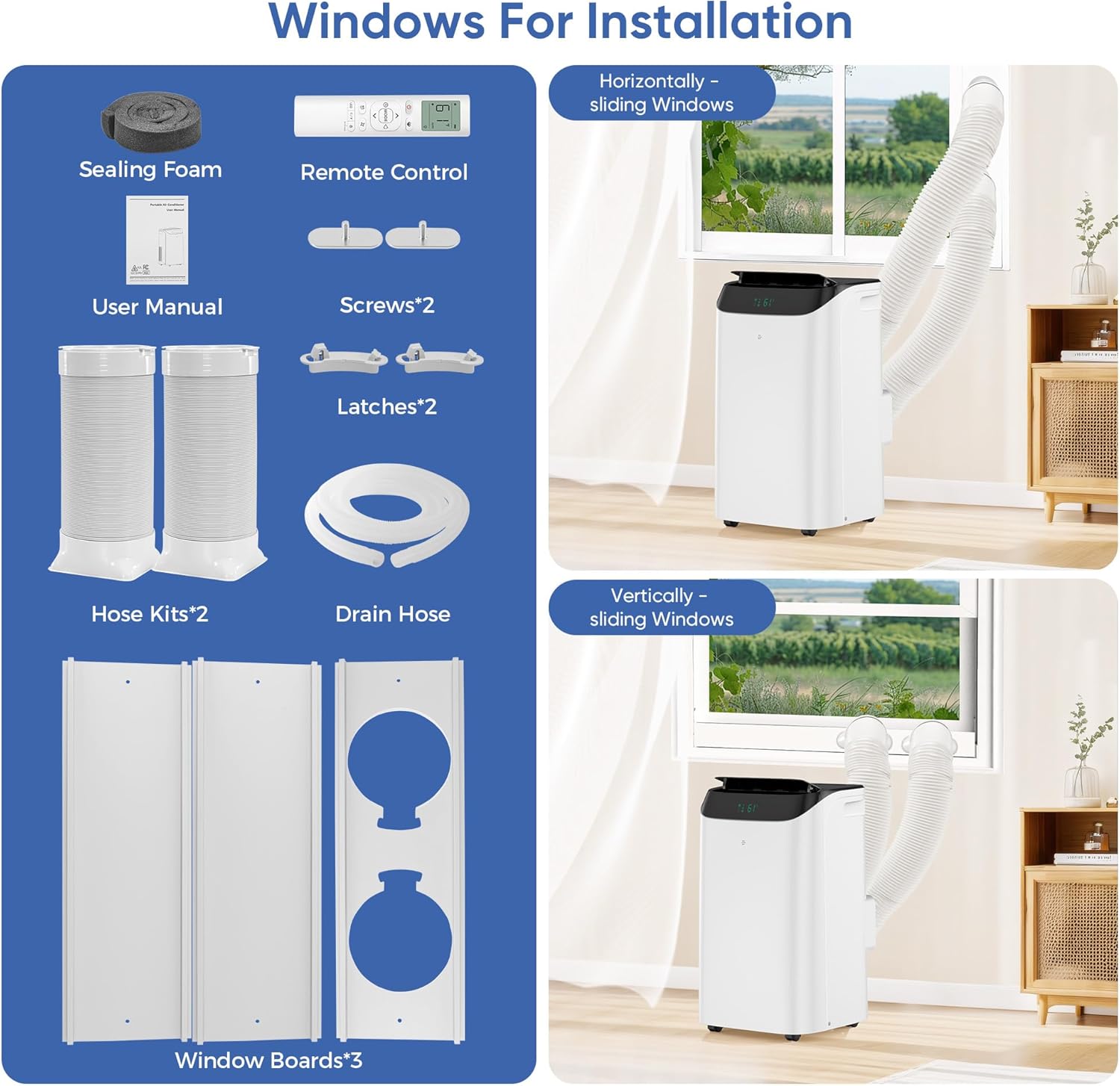
Figure 2: Included components: Portable AC unit, remote control, user manuals, hose kits, drain hose, window boards, sealing foam, screws, and latches.
4. Setup and Installation
The unit is designed for easy installation in most vertical and horizontal sliding windows. No special tools are required for basic setup.
4.1. Window Kit Installation
- Attach sealing foam to the window frame to prevent air leakage.
- Adjust the length of the window panels to fit your window opening. Secure them with the provided butterfly screws.
- Insert the adapters of the exhaust hoses into the window board.
4.2. Hose Attachment
- Attach the two exhaust hoses to the corresponding adapters on the back of the AC unit.
- Connect the other end of the exhaust hoses to the window board.

Figure 3: Visual guide for installing the window kit and connecting the dual hoses to the portable AC unit.
Video 1: Official seller video demonstrating how to install the inverter portable AC unit.
5. Operating Instructions
Your Tanoxo Portable Air Conditioner offers multiple modes and settings for optimal comfort.
5.1. Control Panel
The unit features an easy-to-read front LED display and touch panel for direct control.

Figure 4: Close-up of the LED touch control panel with buttons for Timer, Fan Speed, Temperature Up/Down, Mode, and Power.
5.2. Remote Control
A full-function remote control with a backlit LED display is included, offering control from up to 23 feet away.
5.3. Operating Modes
- Cooling Mode: Adjust temperature between 61°F and 86°F.
- Dehumidification Mode: Removes up to 95 pints of moisture per day.
- Fan Mode: Circulates air with 3 wind speeds (Low, Medium, High).
- Auto Smart Mode: Automatically switches between Cool and Fan modes to maintain a comfortable room temperature (73°F - 77°F).
- Quiet Sleep Mode: Maintains optimal temperature at low wind speed, operating below 45dB.

Figure 5: Illustration of the 3-in-1 modes: Cool Mode (16,000 BTU), Dry Mode (96 Pint/Day), and Fan Mode (High/Mid/Low/Auto).
5.4. Additional Functions
- Timer: Preset the unit to shut down after 0.5 to 24 hours.
- Auto Swing: 15-75° wide-angle automatic swing function for even air distribution.
- Smart Controls: The unit can be controlled via a smartphone app (details in user manual).
6. Maintenance
Regular maintenance ensures optimal performance and longevity of your air conditioner.
6.1. Filter Cleaning
The filter is easy to remove without tools and can be directly rinsed with water. Clean the filter regularly to maintain air quality and unit efficiency.
6.2. Drainage
- Self-Evaporation System: For daily use, the built-in water self-evaporation system automatically evaporates water through the air hose, eliminating the need for manual drainage.
- Manual Drainage: If the unit is placed in a humid environment (e.g., basement, laundry room), it may need to be drained every 8 hours. The unit will stop running if the internal water tank is full. To drain, unplug the drain plug at the back and connect the provided drain pipe. Restart the machine after drainage.
7. Specifications
- Brand: Tanoxo
- Model Number: TAC-12CPD-BP1 (Part Number: YAC-12CPD/PD2BpSG)
- Cooling Capacity: 16,000 BTU (ASHRAE) / 12,000 BTU (SACC)
- Coverage Area: Up to 800 sq.ft
- Dehumidification Capacity: 95 pints per day
- Noise Level: 45 Decibels (Quiet Sleep Mode)
- Item Weight: 66 pounds
- Product Dimensions: 14 x 16.5 x 27 inches
- Voltage: 115 Volts
- Wattage: 1280 watts
- Annual Energy Consumption: 240 Kilowatt Hours
- Efficiency: Highly Efficient (Inverter Technology)
- Refrigerant: R32
- Special Features: Child Lock, Dehumidifier, Fast Cooling, Inverter Compressor, Remote Controlled
8. Warranty and Support
For customer support, product guidance, or to extend your warranty, please refer to the contact information provided in the Quick Guide or User Manual included in your product packaging.
- Customer Support: Refer to included User Guide for contact details.
- Protection Plans: 3-Year and 4-Year protection plans are available for purchase.