
1. Introduction
This manual provides essential information for the safe assembly, operation, and maintenance of your HUAHUU Fluted Vanity with Glass Top. Please read these instructions thoroughly before beginning assembly or use to ensure proper function and longevity of your product. Keep this manual for future reference.

Image 1.1: The HUAHUU Fluted Vanity with Glass Top, featuring its large mirror, integrated lighting, and multiple drawers.
2. Important Safety Information
Adherence to these safety guidelines is crucial for preventing injury and damage to the product.
- Always unplug the vanity before assembly or disassembly.
- Be cautious of sharp edges and pinch points during assembly and usage.
- Do not place heavy objects on the glass top to prevent damage.
- Keep the vanity away from water to prevent electrical hazards.
- Ensure all electrical connections are secure and conform to local electrical codes.
- Do not attempt to modify the electrical components or wiring.
3. Package Contents
Before beginning assembly, verify that all components listed in the packing list are present and undamaged. A detailed list of parts and hardware is typically included within the product packaging. If any parts are missing or damaged, please contact customer support.
4. Setup and Assembly
Assembly of the HUAHUU Fluted Vanity requires careful attention to the provided step-by-step instructions and numbered accessories. It is recommended to assemble the vanity in the room where it will be used due to its size and weight.
- Preparation: Clear a spacious area for assembly. Lay out all components on a soft, clean surface to prevent scratches. Identify all parts using the included hardware and parts list.
- Base Assembly: Begin by assembling the main base structure according to the diagrams. Ensure all connections are tightened securely but do not overtighten.
- Drawer Installation: Install the drawer slides onto the vanity frame and then assemble and insert the nine drawers. Ensure they slide smoothly.
- Mirror and Lighting Installation: Carefully attach the mirror unit to the vanity base. Connect the lighting system as per the electrical diagrams.
- Glass Top Placement: Gently place the glass top into its designated position. Ensure it is seated securely and evenly.
- Power Outlet Integration: Connect the built-in power outlet to a wall socket.
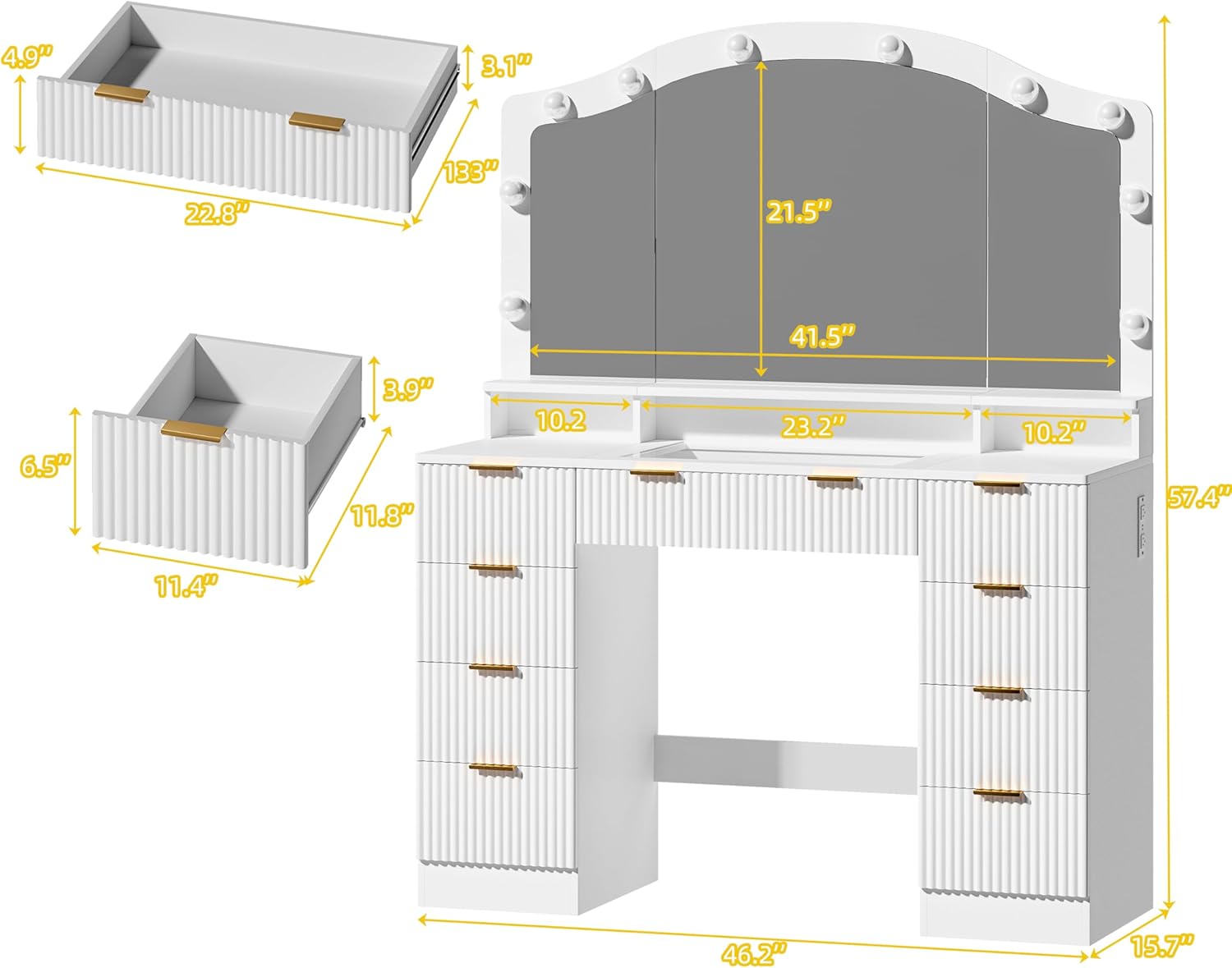
Image 4.1: Dimensional overview of the vanity, useful for assembly planning.

Image 4.2: The vanity with drawers open, illustrating the internal structure and storage.
5. Operating Instructions
5.1. Mirror Lighting System
The vanity mirror is equipped with Hollywood-style bulbs offering adjustable lighting. Locate the control button, typically on the side of the mirror frame or on the vanity surface.
- Power On/Off: Press the button once to turn the lights on or off.
- Color Temperature Adjustment: With the lights on, press the button repeatedly to cycle through the three available color temperatures: Cool White, Natural White, and Warm White.
- Brightness Adjustment: Hold the button down to smoothly adjust the brightness level. Release the button when the desired brightness is achieved.
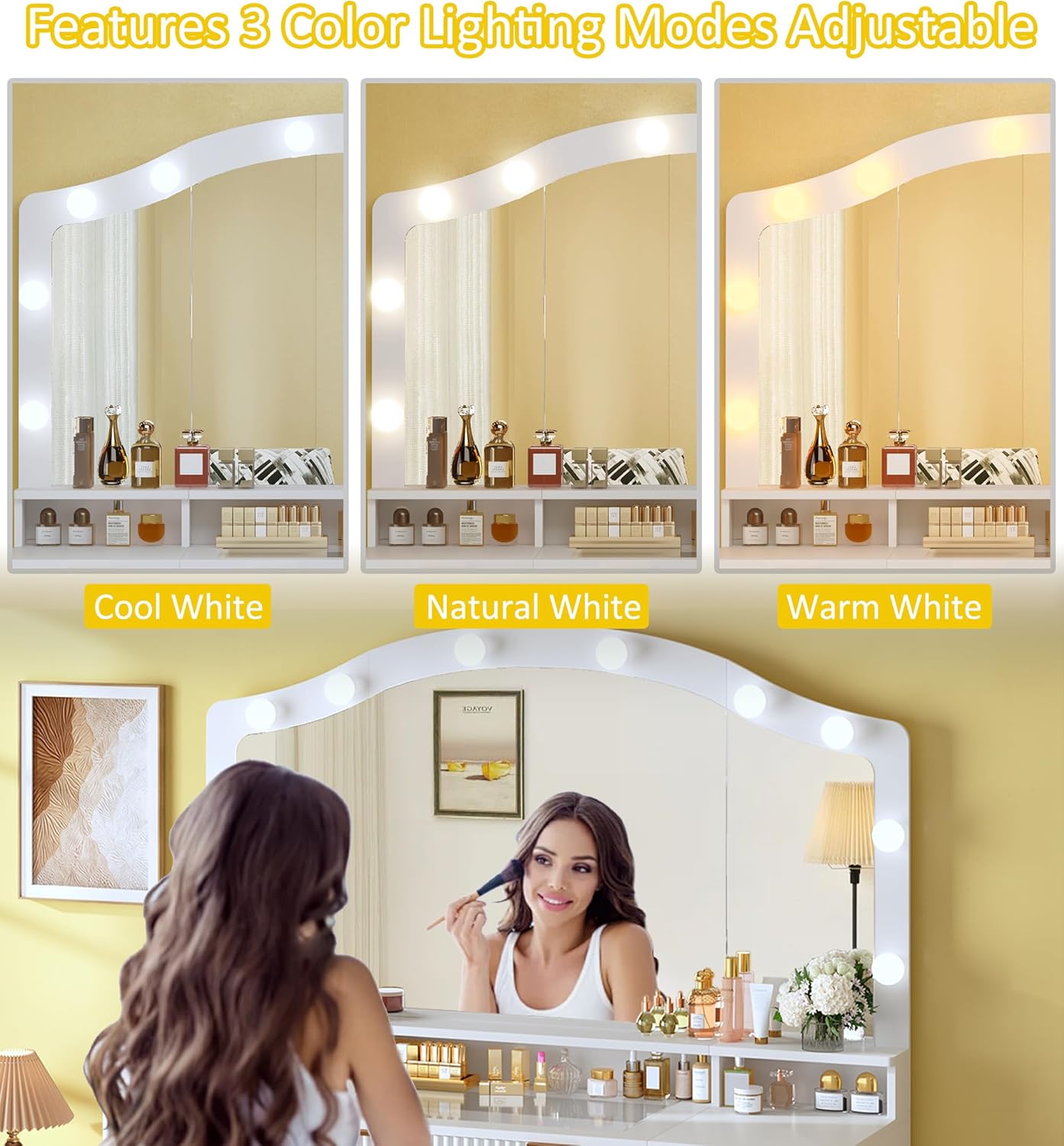
Image 5.1: Demonstration of the three adjustable lighting modes.
5.2. Integrated Power Outlet
The vanity includes a built-in power outlet for convenient access to electrical power.
- AC Outlets: Two 125V/12A AC outlets are provided for devices such as hair dryers, curling irons, or other small appliances.
- USB Ports: Two 5V/2A USB ports are available for charging mobile phones, tablets, and other USB-powered devices.
- Ensure the vanity is properly plugged into a wall outlet for the power features to function.

Image 5.2: Detail of the integrated power outlet with AC and USB ports.
5.3. Storage and Organization
The vanity features nine spacious drawers and a unique glass top for organized storage.
- Drawers: Utilize the multiple drawers for storing various cosmetics, accessories, and personal items.
- Glass Top Display: The transparent glass top allows for a clear view of items stored beneath, such as jewelry or frequently used cosmetics, enhancing accessibility and display.

Image 5.3: The glass top section, showcasing internal storage.
6. Maintenance
Regular cleaning and proper care will help maintain the appearance and functionality of your vanity.
- Surface Cleaning: Wipe all surfaces, including the fluted panels and glass top, with a soft, damp cloth. Avoid abrasive cleaners or harsh chemicals that could damage the finish.
- Glass Care: For the glass top, use a glass cleaner and a lint-free cloth to prevent streaks.
- Drawer Maintenance: Periodically check drawer slides for smooth operation. If a drawer sticks, ensure it is not overloaded and that the slides are clean.
- Electrical Components: Ensure the power outlet and lighting components are kept dry. Do not spray liquids directly onto electrical parts.
- Bulb Replacement: If a mirror bulb needs replacement, refer to the specific bulb type and wattage indicated in the product specifications or on the bulb itself. Always unplug the vanity before replacing bulbs.
7. Troubleshooting
| Problem | Possible Cause | Solution |
|---|---|---|
| Lights do not turn on. | Vanity not plugged in; loose connection; faulty bulb; power outage. | Ensure power cord is securely plugged into a working outlet. Check all internal connections. Replace faulty bulbs. Verify power supply to the outlet. |
| Power outlets (AC/USB) are not working. | Vanity not plugged in; circuit overload; internal wiring issue. | Confirm the vanity is plugged in. Unplug some devices to reduce load. If problem persists, contact customer support. |
| Drawers are difficult to open or close. | Overloaded drawer; debris in slides; misaligned slides. | Reduce contents of the drawer. Clean drawer slides. Re-align drawer slides if necessary (refer to assembly instructions). |
| Glass top appears unstable. | Improper placement; uneven surface. | Ensure the glass top is correctly seated in its designated area. Verify the vanity is on a level surface. |
8. Specifications
| Feature | Detail |
|---|---|
| Product Name | Fluted Vanity with Glass Top |
| Brand | HUAHUU |
| Model Number | HUAHUU Fluted Vanity 0026 |
| Product Dimensions (D x W x H) | 15.7"D x 46.0"W x 58.3"H (15.7 x 46 x 58.3 inches) |
| Item Weight | 115.7 pounds |
| Color | Brilliant White |
| Furniture Finish | MDF |
| Frame Material | Engineered Wood |
| Assembly Required | Yes |
| Mirror Size | 41.5"L x 21.5"W (HD Mirror) |
| Lighting | Hollywood-style bulbs, 3 adjustable colors (Cool, Natural, Warm White), adjustable brightness |
| Power Outlet | 2 x 125V/12A AC Outlets, 2 x 5V/2A USB Ports |
| Number of Drawers | 9 |

Image 8.1: Key design elements and mirror dimensions.
9. Warranty and Customer Support
For warranty information, product support, or to report missing/damaged parts, please contact HUAHUU customer service. Keep your purchase receipt and model number readily available when contacting support.
Manufacturer: HUAHUU
For the most up-to-date contact information, please refer to the official HUAHUU website or the documentation included with your product.